Tag: Content Creation

  • Automate & Elevate Your Content: 6 Best AI Writing Tools for Businesses

    Automate & Elevate Your Content: 6 Best AI Writing Tools for Businesses

    Artificial intelligence (AI) text generators initially received a bad reputation for lack of unique content. However, machine learning and training in properly using these apps have advanced AI content writing to help businesses streamline their marketing efforts ethically. 

    So, how can you automate and elevate your content with AI? Learn our six recommendations on the best AI writing tools and how to leverage them correctly to create personalized content. 

    What is the Best AI for Writing? 

    A graphic of two people working with an AI robot on a cloud system


    AI has disrupted the digital marketplace in all facets, from SEO to advertising, and it’s here to stay. Current AI marketing trends show it’ll continue to advance, so your business should understand how to find the best text generators. That way, you use them correctly to prevent accidental plagiarism and promote a greater ROI on your content marketing

    How to Find the Best AI Writing Tools

    When searching for the best AI tools for writing, there are key attributes to look for, including:

    • Plagiarism Detection: They should offer a feature to run their generated content through a plagiarism scanner to ensure it’s original.
    • User-Friendliness: They should be easy to use for all skill levels, such as text prompt templates and recommendations to enhance your AI content. 
    • Content Personalization: They should have specific industry categories or target audience prompts for you to create personalized short and long-form content.
    • Fact-Checks: They should have a feature that scans their generated content through a fact checker to verify its accuracy. 
    • Content-Specific Platforms: AI tools differ in content focuses, like novel writing and SEO blogs, so the platform you pick should be specific to what your business requires.

    While it may seem daunting to try AI if it’s new to your business, leveraging it offers several advantages for your content marketing. They help reduce writer’s block by generating topics and text as inspiration to kickstart the creation process. AI writing tools also provide simplified summaries of long-form content to analyze them faster. 

    These are just a few of the benefits of using AI content. 

    However, they all share a primary purpose—boosting productivity by reducing manual writing tasks so your company can become more efficient. 

    How to Use AI Content Generators Correctly

    As with any marketing software, there are pros and cons of AI content writing if you don’t know how to use it. While some applications offer plagiarism detection, you should never use their generated text word for word. AI content tools should act as a foundation and inspiration, not a replacement for your writing. 

    Additionally, if you’re using AI text generators for SEO blogs, this doesn’t replace your keyword research. They don’t gather keywords when you enter prompts, so you must still use SEO software to optimize your AI-generated content.

    Best-use practices for AI writing tools include:

    • Detailed Prompts: Enter as many instruction details as possible into your prompts to generate a higher quality content output, including tone, target audience, and the company it’s for. 
    • Referential Research: In addition to detailed prompts, include your own research and add necessary citations for the AI tool to reference and enhance its content accuracy. 
    • Personal Fact-Checks: While AI writing tools offer fact-checking, also check this yourself to verify its accuracy by reviewing it or using third-party tools, like Google Fact Check Explorer
    • Content Editing: Always edit AI-generated content to tailor it to your client’s branding and prevent harming your credibility with plagiarism.

    Remember, AI is still relatively new. But it offers countless opportunities to save you time by using it properly. 

    Streamline Your Content Workflows: The 6 Best AI Writing Tools Businesses Should Leverage


    Now that you know the benefits of using AI-generated content, how to use it, and what to look for in different applications, below are the six best AI writing tools to consider and why they make the list. 

    1. ContentShake AI

    A screenshot of SEMRush's ContentShake AI interface
    Credit: SEMRush

    If your business creates SEO content, such as blogs and web page copy, look for AI generators focusing on producing optimized content. As one of the leading SEO platforms, SEMRush has its own AI text generator, ContentShake AI. What separates it from other AI writing apps is that it combines SEMRush’s SEO data to create high-ranking AI-generated content 12 times faster

    ContentShake AI uses real-life competitor insights to create SEO-optimized content for organic traffic and engagement. It even scores how well it’s optimized per Google’s algorithms and SEO content guidelines. 

    While SEMRush claims you don’t need to do extra keyword research, we always recommend doing so to verify its accuracy and maximize your content’s SEO performance. 

    2. ChatGPT

    A screenshot of OpenAI's ChatGPT interface
    Credit: OpenAI

    You’ve likely heard of ChatGPT, as one of the original AI text generators. Developed by OpenAI, it’s an AI chatbot that generates content via conversational prompts and machine learning models. 

    While ChatGPT doesn’t have a specific content focus, you can use it for diverse writing tasks, including:

    • Emails, articles, web pages, outlines, essays, resumes, cover letters, poems, etc. 
    • Application and website coding in multiple programming languages
    • Summaries of long-form content, including research journals, books, etc. 
    • Complex problem-solving, like debugging your existing website code, content edit suggestions, etc.

    What makes ChatGPT one of the best AI writing tools is it remembers your conversations. As you continuously use it for clients, it stores information from your previous prompts and references it to better produce ongoing personalized content.

    3. Jasper AI

    A screenshot of the Jasper AI interface
    Credit: Jasper AI

    If you’re looking for business-focused AI content generators, consider JasperAI. Like ChatGPT, it’s also a large language model that uses AI to create content. However, JasperAI is the better option for marketing-oriented AI content. It’s specifically programmed for marketing content writing, like emails, blogs, and social media posts.

    4. Google Gemini

    A screenshot of Google's Gemini AI interface
    Credit: Google Gemini

    Google has its own AI content generator, Gemini. It has two focuses: web developers and businesses. If your company wants to streamline web builds and designs, it uses state-of-the-art generative AI models for coding in various programming languages. From flexible frameworks to customizable code and problem-solving, it provides countless solutions for your developers.

    Regarding business use, Gemini acts as your AI writing assistant across your Google Workspace. It integrates with Gmail, Docs, Sheets, and more to centralize and automate your writing tasks. 

    Gemini crafts content drafts, including blog posts, proposals, advertising copy, and more. It can even generate customized images with a single prompt to enhance your visual branding

    5. Claude AI

    A screenshot of the Claude AI interface
    Credit: Claude AI

    Similar to ChatGPT, ClaudeAI is an AI-powered chatbot designed to generate various types of text based on conversational prompts and large language models. From coding to long-form content summaries and proofreading, you can leverage ClaudeAI for almost any writing project. 

    However, ClaudeAI produces more human-like writing that sounds less generic than ChatGPT. While ChatGPT excels at complex problem-solving, ClaudeAI is best suited for more personalized content. 


    6. CoPilot

    A screenshot of Microsoft 365's CoPilot AI interface
    Credit: Microsoft 365

    Like Google, Microsoft has its own AI content writing assistant, CoPilot. It similarly integrates across Microsoft 365 apps, including Word, Excel, Teams, and PowerPoint. CoPilot combines large language models and your company’s organizational data to streamline production workflows. 

    Some notable content writing features include:

    • Creating and refining existing content by referencing up to three Word documents
    • Transforming and condensing PowerPoint presentations from existing documents with speaker notes
    • Summarizing complex data in Excel to help you analyze it faster with filters
    • Recapping Teams conversations and key discussion points based on chat history

    CoPilot is one of the best AI content writing tools because you don’t need to enter prompts to generate text. It directly pulls information from your Microsoft apps, including files, emails, chats, and meeting notes—making it user-friendly for everyone. It also has different CoPilot versions for small to medium-sized businesses and specific industries, like public sectors and education.

    Words Matter–Get Quality Content Writing That Works with Reach Marketing Pro

    While AI text generators streamline your content marketing workflows with automation and advanced learning models, you can maximize their performance with professionals. AI writing tools still require a learning curve to leverage their fullest potential and precise editing to ensure it’s accurate and original. 

    Let us help you generate a greater ROI for your content marketing. At Reach Marketing Pro, we’re a full-service digital agency with extensive experience creating content across diverse industries. From SEO-optimized blogs to compelling website messaging and effective ad copy, we create high-quality content that supports your bottom line.

    Learn more about our content writing services, or contact us to boost your business’s marketing productivity today! 

  • SMS and Email Marketing: How to Combine Strategies to Reach More Customers 

    SMS and Email Marketing: How to Combine Strategies to Reach More Customers 

    Combining SMS and email marketing into an omnichannel strategy can significantly improve your campaign’s results. Emails are best for longer, scrollable content, while SMS focuses on short-form transactional content. Coordinating both allows you to leverage the strengths of each channel to maximize your campaign’s impact.

    From increasing deliverability to boosting content ROI and improving personalization per customer journey, learn how this orchestration can better support your bottom line. 

    SMS and Email Marketing: Benefits of Integrating Multi-Channel Strategies for Your Bottom Line

    A graphic of two people shaking hands and making a transactional deal over a laptop

    There are several advantages to integrating your SMS and email marketing strategies. Here’s how a multi-channel approach can reach more of your customers.

    Expanded Market Reach

    Most consumers nowadays own a smartphone and check their texts at least 11 times daily within a minute of receiving them. They’re not only using it to browse on social media but also to make informed purchase decisions when shopping online. 

    The conversational nature of text message marketing even encourages 63% of consumers to engage with a brand’s SMS programs twice a week! This same study shows only 31% of consumers respond to a brand’s emails at the same rate weekly. 

    If they’re not subscribed to your emails or SMS, this consolidated marketing approach can meet them where they are and expand your market reach. Reaching mobile audiences on their preferred platform helps you connect with them. It centralizes their attention, which is typically divided across multiple channels.

    Stronger Multi-Channel Campaign Performance

    Did you know that SMS marketing messages have a 98% open rate compared to email’s 20%? These statistics show your SMS campaigns are more likely to have a higher engagement rate and stronger performance overall among your recipients. And you can leverage this to cross-promote your emails—without creating all new content! 

    You can re-purpose your email marketing content and convert it into micro SMS campaigns, such as:

    • Coupons, promotional codes, and loyalty program discounts
    • Back-in-stock notifications and low inventory alerts
    • Holiday sales or upcoming event announcements
    • Order, shipment, and delivery confirmations 
    • Abandon cart reminders

    It’s important to note that you shouldn’t send duplicate content via SMS and email. If your customers see the same text message as your email blasts, they’re 37% more likely to unsubscribe because it’s redundant, spammy, and lacks value. 

    Centralized Customer Data

    A graphic of two people reviewing three customer data profiles and their reviews

    Combining email and SMS marketing allows you to consolidate customer data into one platform. A centralized CRM with SMS and email customer data makes it easier for you to analyze and create more effective campaigns. 

    You can update customer data profiles to show them more relevant content, such as product promotions related to their most recent purchase and order history.

    It also makes segmentation more efficient because you can organize your contacts by stage in their customer journey and channel. You wouldn’t send a loyalty discount email to new customers or SMS promotional sign-ups to people already subscribed. 

    Centralized SMS and email customer data promote personalization and greater efficiency, leading to more successful outreach.

    Increased Customer Engagement and Lifetime Value

    As mentioned above, SMS recipients typically engage more since they have a significantly higher open rate over email. But what about those who sign up for both your channels? Studies show that SMS email subscribers are 2.4 times more likely to buy than solely SMS ones. 

    This history of increased customer lifetime value of recipients who engage with SMS and email is more cost-effective. Retaining existing customers is cheaper than acquiring new ones and provides long-term benefits.

    Keeping your current customers happy also makes them more likely to refer your business to people they know. In return, you gain a more loyal customer base and sustainable revenue sources since they’re more likely to repeat purchases because they trust your brand. 

    Greater Content Marketing ROI

    Utilizing email and SMS marketing can improve your campaign’s efficiency for a greater content marketing ROI. Your business is investing time and resources into these content marketing campaigns. You shouldn’t be creating content for the sake of doing it. It should support your bottom line and content marketing goals. 

    This centralized approach increases your content marketing ROI with the following:

    • Prevents you from sending irrelevant content, like duplicate messages, based on your customer’s interactions
    • Leads to stronger campaign performance metrics, like opens, clicks, and conversions, because of your expanded market reach
    • Provides more effective A/B testing to create better-performing campaigns because you know what resonates with your audience best

    How to Combine SMS and Email Marketing Strategies to Boost Customer Engagement and Revenue

    A graphic of a person reviewing strategies on mobile, desktop, and tablet

    Now that you know the benefits of utilizing email and SMS for your marketing efforts, here’s how to combine them for optimal results. 

    Send Cross-Promotional Content to Increase Subscribers

    You can’t reach more customers if they aren’t subscribed to your email or SMS marketing lists. However, you can encourage more people to sign up with channel-exclusive incentives. You can increase SMS subscribers by cross-promoting it to your email contacts with rewards and offers. 

    For example, you can send email blasts with special discounts for opting into your SMS marketing. This cross-promotional approach can be done vice versa if you want to build a bigger audience on your email marketing list.

    Segment Your Subscribers by Channel and Engagement

    The next step to developing an email SMS marketing strategy is segmenting your subscribers. Organize them by single and multi-channel subscribers so you know who to focus on for email, SMS, and both. That way, when you create email SMS campaigns, you can promote relevant content per platform. 

    Create Personalized Drip Campaigns

    Drip campaigns are blasts sequenced and triggered by customer interactions. They’re typically used in email marketing to contact customers with various touchpoints based on what they do, from open to purchase and unsubscribe. However, you can also utilize SMS email marketing in personalized drip campaigns.

    An example of an SMS email drip campaign is:

    • Welcome emails for new sign-ups 
    • Initial abandon cart email
    • Follow-up abandon cart SMS 
    • Purchase confirmation email 
    • SMS order review request

    We recommend using email and SMS marketing automation to streamline this process with data-driven metrics for you. Platforms like MailChimp and Constant Contact have built-in SMS email features that automate the sequencing of these touchpoints per customer interaction. 

    That way, you tailor your content for each unique subscriber based on where they are on their customer’s journey. Some customers may be ready to buy and waiting for a promotional sale, while others are considering their options between you and your competitor. Personalization is key not to only SMS emails but also to effective marketing. 

    Analyze SMS Email Campaigns for Improvement

    As with any of your marketing efforts, you should always analyze your performance metrics to uncover areas of improvement. 

    Key metrics to focus on in your SMS email campaigns include:

    • Open, click, and engagement rate per channel 
    • Conversion rates for SMS 
    • Unsubscriber rates per channel

    We recommend using automated email SMS platforms to streamline the data analytical process because they generate custom reports with recommendations per campaign. They analyze the performances of each channel and customer interactions with greater efficiency to maximize your next campaign’s performance with data-driven strategies. 

    SMS and Email Marketing FAQs:

    A graphic of two people reviewing their marketing strategies on mobile and laptop

    What’s the Difference Between SMS Marketing vs. Email Marketing? 

    The difference between SMS vs. email marketing is the channel they’re used on and content length. SMS (Short Message Service) marketing uses short-form texts and sends them to all cell phone types, including Android and Apple. 

    Email marketing is obviously for emails and can be sent to any platform, like Gmail and Outlook. These are typically longer forms with scrollable content. 

    What is an SMS Email?

    An SMS email is a marketing text message converted from an email blast. It reformats email content into short-form texts and is sent to the subscriber’s cell phone. 

    Can I Send an SMS to Email?

    Yes. Sending SMS from email blasts can be done and vice-versa. 

    How Do You Convert an Email to a Text Message? 

    Email marketing platforms convert emails to text messages via SMS gateways. An email is reformatted shorter and sent to an SMS email address linked to the subscriber’s phone number. You can find SMS emails with phone validating tools, like NumVerify, which also integrate with email marketing platforms.

    Boost Your Inbox Impact with Professional Email and SMS Marketing Services

    It can be challenging to strengthen your SMS email marketing efforts, with various platforms to manage, analyze, and create content for—especially on a monthly or weekly basis. 

    Let us maximize your campaign’s potential. 

    At Reach Marketing Pro, we’re a full-service digital agency with extensive experience in email SMS marketing. We can create and optimize your existing campaigns with custom visuals, effective messaging, and multi-channel personalization for greater ROI. 

    We’ll also include monthly reports to continuously track and measure the success of your email SMS strategies and improve them for better performance. 

    Ready to reach more of your customers? 

    Learn more about our email marketing services, or contact us today! 

  • Website Project Management: A Complete Guide for Design & Development 

    Website Project Management: A Complete Guide for Design & Development 

    Your website is a multi-faceted platform with various moving parts and siloed teams to track continuously. Do you have an organized system to manage ongoing projects and daily tasks simultaneously? 

    From regular maintenance to complete site redesigns, having streamlined workflows for website project management is essential. It ensures the design and development of your site remains efficient with the time and resources your business invests in. 

    While certain aspects require collaboration, your web developers, designers, SEO copywriters, and clients should all be on the same page to better deliver quality work. 

    If they’re constantly disrupted to redo site designs that stray far from the original concept or complete multiple rounds of copy edits that could’ve been consolidated, it can cost you more than necessary. It also increases the chance of mistakes happening due to this lack of focus. 

    Below is a complete guide to project management for websites to maximize your work efficiency and budget—without overwhelming everyone involved. 

    Website Project Management for Design & Development: A Complete Guide for Seamless Collaboration & Execution

    A graphic of three people meeting and reviewing statistics

    Website project management should be a separate department or assigned to a specific role outside your dev ops and designers. They’re responsible for their own technical tasks and need proper guidance from a website project manager to execute them efficiently. 

    Here’s how to ensure you set your web teams up for success in design, development, and everything in between. 

    Create a Website Project Plan 

    The first step for completing anything related to your site is creating a clear plan for everyone involved. This includes project management for routine site maintenance, new web builds, and redesigns for internal and external teams. 

    A website project plan should include the following:

    Understanding Your Web Project’s Goals

    What are the goals behind your website’s tasks or projects? Whether you’re redesigning, building a new one, or optimizing it for SEO, understanding the reason behind your site’s projects is the foundation of its success.

    For example, if you’re creating web content for the sake of doing it, it’s not researched-backed. Your website’s projects should be data-driven to ensure you remain on strategy for your bottom line.

    Ask your team the following questions if you need help figuring out your site’s project goals:

    • Why are we redesigning this site, and what is this aiming to accomplish? 
    • Why are we building a new site, and what is this aiming to accomplish? 
    • What are our top and lowest-performing web pages? 
    • Which website performance metrics do we want to improve or sustain?
    • How do we want our website to support our business goals?  

    That way, everyone is aligned on the overall mission of the website’s project goals. 

    Defining Key Web Project Details

    Before you begin assigning tasks to your web teams, you must define the key details of how these will be executed and the project scope. 

    Buffer Budget with All Website Deliverables

    First, create a client-approved buffer budget for additional tasks that may pop up or take longer than expected. This budget should include exact deliverables, like the number of redesigned pages or written blogs. Don’t forget to include potential subtasks required, like A/B testing page design concepts and publishing blogs after approval to prevent going out of scope. 

    Deadline Schedules with Your Preferred Project Management Method 
    A graphic of three people creating a calendar schedule for tasks

    Next, set the deadlines for your website’s tasks and how you want to complete them. 

    You can create milestones, like building a few web pages at a time and submitting them for client review. Known as agile web development, this project management methodology allows your team to work in short sprints with a few weekly or monthly deliverables at a time. 

    If you prefer to complete your web projects all at once, choose the waterfall web development approach. However, you must understand the pros and cons of each that best suits your web project’s goals. 

    Agile web project management is best if you’re on a tight deadline because you gain continuous feedback throughout the design and development process that can be turned around faster with fewer deliverables. Waterfall methodology is best for long-term web projects because it allows your team to work uninterrupted and the extra time to finalize the process. 

    Website Project Management Template or Software 

    We can’t stress enough the importance of using website project management platforms like Jira and Trello. Taking advantage of automation saves you time and headaches from manually creating workflows for your site’s projects.

    Depending on the application, these may include:

    • Pre-built website requests for new page graphics, copy edits, add-on features, etc. 
    • Interconnected action items that prevent future web tasks from being assigned until the previous one is completed
    • Sequenced site design/development steps, like preliminary design, code review, and testing
    • Organized web tasks by priority and status of completion  

    Web project management tools streamline your tasks and teams visually and easily in an automated, centralized platform. 

    Organize Web Tasks by Phase 

    Now that your website project plan is finalized, next is organizing the tasks by phase. While project management tools automate this for you, this helps guide your teams throughout the process. 

    Your site’s tasks should be categorized in the following order: 

    Website Project Discovery

    This discovery phase occurs when you first create your website project plan. This initial step is the ideation of your site’s project. However, it requires careful guidance to prevent your discovery meeting from expanding into unrealistic or disorganized expectations. 

    Ensure you only include people directly involved with the project, like a lead web developer, site designer, website project manager, and client representative. It prevents you from having too many cooks in the kitchen and promoting over-communication. 

    You should also prepare questions from your website project plan, like client goals, buffered budget, deliverables, timeline, and project management methodology. That way, there aren’t any surprises that may delay everyone before you start design and development.  

    Web Design

    A graphic of three people designing a website with HTML and CSS

    The site design phase involves multiple people, including web designers, SEO copywriters, and potential clients for approvals. They’re responsible for how the front end of your site will look. It’s especially crucial to organize the design stage of a web project because of the multiple roles you’ll manage. 

    Set your web design team up for success with the following:

    • Submit website examples to your designers for visual layout inspiration, must-have features, etc. 
    • Provide your web designers with everything they need, including branding guidelines, images, logos, optimized web copy, etc.
    • Give platform access to everyone involved to complete design tasks simultaneously across siloed teams
    • Schedule design tasks from highest to lowest priority, like your Home page first and Testimonials page later
    • Centralize all communications within your project management software for internal teams and update their tasks timely if you have edits from clients after review

    You should also standardize core web design processes, including:

    • Creating wireframes for web developers to reference when building sitemaps for the site’s structure
    • Designing the visual layout of all web pages, including colors, font, visuals, and staging links for client review
    • Setting up a content management system (CMS) to host, manage, and upload visuals and text assets for all web pages
    • Registering a web domain so your site owns the rights to its name

    Keep in mind that your web designers and developers work together to complete site projects. The main difference is that site designers create the visual elements, while web developers build and make them usable. 

    Web Development

    The web development phase primarily involves your dev ops team. They’re responsible for building the back end of your site’s functionality, requiring complex processes that must be executed successfully. While each web build is unique per platform and project, you can streamline their workflows more efficiently.

    Standardizing core web development processes should include:

    • XML Sitemap Creation: Creating a blueprint of the site’s structure, navigation, information hierarchy, etc. 
    • Platform Plug-in Installation: Installing popular plug-ins separate from your site platform, like Yoast SEO and WooCommerce
    • SSL (Secure Sockets Layer) Certification: Acquiring the code on your site’s server to create an encrypted connection and secure its data.
    • Website Analytics Software Integration: Connecting the software to your site to track its performance. 
    • Site Code & Tests: Building and testing the site’s various codes and markup languages to ensure proper functionality. 

    While you can use a website project management tool to automate these processes, it still needs to be properly assigned and scheduled.  

    Site-Wide Testing

    Testing your website is comprehensive, but you don’t need to complicate it more with a set process in place. That way, your dev ops and web design teams ensure they don’t miss any crucial steps.

    Create a site-wide testing plan for the following: 

    • Website accessibility for disabled users per ADA compliance 
    • User experience (UX) to provide visitors with seamless interaction in all aspects of your site, including minimal pop-ups, balanced white space, easy navigation, etc. 
    • HTTPS (Hypertext Transfer Protocol Secure) to ensure the HTTP version is redirected for site security 
    • Page load speed on PageSpeed Insights for mobile and desktop 
    • Site audits to check for potential issues, like broken links, invalid CSS/HTML, duplicate headings, and missing metadata 

    Website Launch

    A graphic of three people launching a new website with a rocketship

    Now that your website is ready to go live, your team is in the final phase of design and development.

    Include the following in your workflows for a successful site launch:

    • Submit sitemaps to Google Search Console for crawling and indexing 
    • Train internal staff training for website management, like content uploads and performance tracking
    • Proofread all web copy to ensure everything is accurate and error-free

    Remember, you can always fix minor issues and make design changes once the website is live—so don’t delay the launch for aesthetics and quick fixes! 

    Post-Launch

    Even newly launched websites must be continuously monitored and maintained to ensure they perform as they should. From troubleshooting bugs to optimizing the site for new search engine algorithm updates, your website isn’t a set-it-and-forget-it situation. It’s an ongoing responsibility for your business. 

    Create a post-launch checklist for your web team, including:

    • Scheduling weekly website backups to save your site from accidental data loss
    • Checking conversion paths for proper functionality on forms, page displays, etc.  
    • Cross-promoting the website on social media 
    • Fixing bugs when necessary

    Make Your Site’s Projects Smooth Sailing with a Website Project Manager

    As you can see, project management for website design and development is time-consuming and can get complex, even with automated platforms. Let a website project manager do the heavy lifting for you. 

    At Reach Marketing Pro, we have extensive experience in all aspects of web project management, including site design, development, and maintenance. We’re a full-service digital agency equipped to handle all aspects of your site with our in-house web developers, web designers, graphic designers, SEO copywriters—and, of course, project managers. 

    That way, you can focus on what you do best—managing your business and being an expert in your trade.

    Ready to optimize your website’s workflows and better support your bottom line? 

    Learn more about our website management services or contact us to make your site’s projects smoother sailing today! 

  • Keep Your Visitors Happy: Top 10 Attributes of User-Friendly Websites

    Keep Your Visitors Happy: Top 10 Attributes of User-Friendly Websites

    A user-friendly website is vital for your bottom line. It determines the ease of usability your site has for lead generation, conversions, SEO, and more. In contrast, poor site usability can make it harder for people to navigate, leading to higher bounce rates, lost sales, and dropped keyword rankings. 

    Learn more about the significance of website user-friendliness and how to achieve successful usability to support your business goals. 

    What Does User-Friendly Mean for Websites? 

    The meaning of user-friendly for websites is making them easier for people to use. They should be able to browse, search for information, and complete actions on your site quickly and easily. 

    Not to be confused with user experience (UX), which focuses on your site’s overall experience for people, whereas usability is for specific tasks. However, user-friendliness falls under the UX umbrella. Anyone should be able to use your site’s features easily and have a positive perception throughout the process.

    For example, if your website has an easy-to-use custom product builder, but your page takes too long to load, it can compromise its usability. User-friendly sites and UX design go hand-in-hand.

    Designing for Users: 10 Key Attributes of User-Friendly Websites

    A graphic of a person logging into a website on a laptop sitting down


    Learn the top 10 attributes of user-friendly websites with mistakes to avoid, tips on implementing them, and why each one matters.

    1. Responsive Moblie & Desktop Design

    Your website’s security is arguably the most important reason to take care of it. If your site’s platform hasn’t been updated to the People browse, research, and shop on mobile devices more than ever. In August 2024, studies show that nearly 62% of website traffic is from mobile users. At the same time, this doesn’t mean to neglect your desktop users. 

    Compared to mobile, people using desktop devices visited 100% more pages and spent almost 38% more time on websites—an average of four to seven pages than mobile’s three!  

    That’s why having a responsive website design on desktop and mobile is crucial. 

    A responsive website means its layout can easily adapt to any screen size. If your site has the same design for all devices, it can make it harder for people to navigate, a.k.a. not user-friendly. Examples of non-responsive web design include shrunken pages on mobile that make your text too small to read or grainy images that stretch too far on desktop. 

    You can optimize your site with user-friendly responsive design by:

    • Testing your website on different devices after major updates to ensure everything remains responsive 
    • Using flexible website grids and layouts via CSS (Cascading Style Sheets) code for optimal screen resolutions and orientations (portrait, landscape, iPads, Android phones, etc.)
    • Implementing max-width image source codes so they resize proportionally to all devices
    • Minimizing UI (user interactive) elements to prevent cluttering your site’s layout and complicating navigation

    2. Fast Page Load Speed

    Did you know if your website takes more than three seconds to load 40% of users will leave? In a rapid digital age, you can’t afford to lose visitors for slow page load speed. 

    Common reasons for slow websites include:

    • Large media files like long background videos and non-optimized images
    • Insufficient web host plans that share servers with other websites, slowing your site’s queue and lowering server performance
    • Limited CDN (Content Delivery Network) capabilities with smaller networks and no caching features
    • Dated CMS (content management system) that hasn’t been updated regularly or has many unused plug-ins
    • Unoptimized CSS and Javascript code with unnecessary rules or dense code, leading to increased HTTP requests your server can’t handle 

    You can improve your website’s page load speed with the following:

    • Compressing large media files and resizing them to a lower resolution
    • Upgrading your web hosting plan or switching providers with larger networks
    • Using CDNs with caching features for browsers and servers 
    • Downloading CMS updates regularly and removing unnecessary plug-ins
    • Minifying CSS and Javascript code to reduce the number of files loaded on your web pages

    Not to mention, slow page load also impacts your website’s technical SEO performance, like lower SERP rankings and reduced crawl rates. Google prioritizes fast-loading sites because it strengthens UX with quick content access. 

    Additionally, poor technical SEO makes it harder for search bots to crawl your website, delaying the indexing process. If Google takes a while to discover (crawl) and index (store) your site in their database, it’s essentially invisible online to users. 

    3. Seamless Navigation

    A graphic of a person navigating a website on a mobile device

    Your website’s navigation can be the main reason users browse or bounce. A beautifully designed site is nothing without successful functionality. If your website has no breadcrumbs for users to return to a page easily or has cluttered menu bars with too many web pages, it makes it harder for people to navigate. 

    User-friendly websites provide a seamless navigation experience, including:

    • Organized menu hierarchy by page priority with the top ones in the beginning, the lowest in the middle, and the contact page at the last 
    • Simplified menu bar design with a short list of options at the top header or side (seven maximum is recommended for most sites) 
    • Implemented breadcrumbs for users to backtrack easier or for sites with complex structures 
    • User-focused navigation experience with a recognizable search bar and accurate content label categories 

    4. Clear CTAs & Proper Placement

    As a business, your website must encourage users to take action. Whether it’s generating user engagement, leads, or conversions, your site should have various calls to action (CTAs) for your bottom line. CTAs prompt user interactions by guiding them to take the next step, like submitting a contact form, scheduling a demo, or downloading a free guide. 

    However, your CTAs require a careful balance to prevent them from making your site less user-friendly. Using too many pop-ups can overwhelm people, adding buttons that aren’t recognizable can easily be missed, and writing non-persuasive copy can make them ineffective. 

    User-friendly websites have clear and impactful CTAs, including:

    • Adding CTA buttons with bold colors, responsive sizing, and easy-to-find placement
    • Minimizing pop-ups that are distracting or spammy and make users bounce
    • Using persuasive CTA copy with action-oriented verbs that support the page’s content appropriately, like “Start Your Free Trial Today” instead of “Sign Up”
    • A/B testing your CTA buttons to see which designs resonate with users more

    5. Compliant User Accessibility

    Your website must be accessible to all users by law. The Americans with Disabilities Act (ADA) now requires business websites to have accessibility-designed features and functionalities for disabled users. 

    The ADA’s website accessibility guidelines include: 

    • Writing descriptive image alt text for blind users to understand the purpose of your visuals, including pictures, logos, and charts
    • Using screen readers that speak the text of your web pages and online forms for blind users 
    • Implementing keyboard navigation for users who cannot physically access a website via mouse 
    • Adding captions to your videos for people with hearing disabilities 

    You should also check with your state and local governments if they have specific regulations for website accessibility requirements. Remember, user-friendly sites are meant for all users. 

    6. Balanced Layout Design

    A graphic of a person designing the layout of a web page

    Adding more website designs and features doesn’t always mean better when it comes to user-friendliness. In fact, it can do the opposite for your site’s usability. Text-heavy pages and too many visuals can make your site look cluttered and harder to read for users.

    User-friendly site designs include:

    • Contrasting page colors to create a balanced layout design
    • Ample white space to break up heavy text 
    • Easy-to-read fonts with sufficient sizing on all devices
    • Appropriate number of visuals that support your page’s content without distraction 

    7. Organized Content Structure

    Site maintenance costs depend on several factors, including:

    Your website’s content must pass the scanability test for users and search engines alike. They should be able to quickly scroll and know instantly what it’s about to ensure your site’s content has strong usability and SEO performance. 

    User-friendly content formatting for websites includes:

    • Headings, subheadings, bullet point lists, and small paragraphs with four sentences minimum for easier readability 
    • Proper heading hierarchy for search engines to crawl and index faster (Ex: One H1 per page)
    • Keyword-optimized heading titles that briefly and clearly describe the content sections below it for search engine relevancy and user understanding

    Organized website architecture can boost your conversion rate six times and be your highest ROI driver over time.  

    8. Simple Online Forms

    Your website’s online forms are how you capture contacts and generate leads. If you make this harder than it should be, users can easily leave in the middle of filling them out due to the inconvenience—potentially losing customers from poor usability. 

    User-friendly forms should be straightforward. Include the minimum number of form fields you require, like name, phone number, email, and a button to submit their information. Adding too many required or optional fields can reduce your form’s lead generation as a result. 

    You can also strengthen form usability by having an option to save their contact information for future use. Returning customers like the convenience of minimal clicks to check out their purchases. 

    9. Clean Code & Valid Markup

    A graphic of a person coding the back-end of their website on a laptop

    Having clean site code and valid markup is not only beneficial for users but also for your web developers to enhance its usability more easily. Cluttered or error-filled code and invalid markup, like missing tags, make it harder for developers to read for regular website maintenance, scale it for site redesigns, and troubleshoot it for technical issues when necessary. 

    On the user end, sites with organized code and proper markup language have stronger browser compatibility and SEO performance. 

    In addition to different devices, users visit websites with various browsers, like Chrome, Firefox, and Safari, which all interpret web pages differently. Since quality code is more stable with fewer loading errors, it allows your site to have a consistent browser experience so its usability performs and looks as it should across all of them. 

    Regarding SEO, clean code makes it easier for search bots to crawl and index your site’s content because they’ll understand it better. In return, it can improve your site’s visibility and keyword rankings for search engines because it’s optimized for them. 

    You can check if your website has user-friendly code and markup language with the following:

    • Code comments for future web developers to reference without overdoing them
    • SEO crawlers, like ScreamingFrog, flag and help you fix HTML errors on your site
    • Code cleaner tools, like DirtyMarkup, reformat your disorganized HTML, CSS, and JavaScript code

    10. Valuable User Feedback

    Who better to learn how to make your site more user-friendly than the people you’re designing it for? Your users know what they like and don’t like from your website the best. You can gain valuable insights from the people you’re trying to attract directly. 

    Online surveys are a simple way to get feedback on the user-friendliness of your site. You can add them to the home page or in email blasts and even offer incentives for users to fill them out, like one-time discounts or gift cards. 

    Include questions in your site’s surveys like:

    • On a scale of 1 to 10, how easy was it to find what you were looking for? 
    • How likely are you to recommend our website to people you know?
    • What features would you like to see added or changes to be made to our website? 
    • Did you experience any technical issues while using our website? 

    Don’t Push People Away: Make Your Site User-Friendly Today

    Don’t push potential customers away from your website with poor user-friendliness. Your site is a significant investment and the foundation for your business. It should attract your target audience and keep them by making it as easy as possible for them to use. 

    However, it’s understandable to not know where to begin and have the time commitment to maintain since it’s multi-faceted. User-friendly websites require regular updates on the front and back end, which can be challenging for businesses to do themselves—especially if it hasn’t been maintained for a while. 

    At Reach Marketing Pro, we’re a full-service digital marketing agency with extensive experience designing, developing, and managing user-friendly sites. From website redesigns to UX optimization and custom code, we can improve your site’s usability in all aspects. 

    Ready to keep your users happy for your bottom line?

    Learn more about our website design & development services, or contact us to make your site more user-friendly today! 

  • Website Maintenance & Management: How it Keeps Your Site Up & Running Efficiently

    Website Maintenance & Management: How it Keeps Your Site Up & Running Efficiently

    Like other aspects of your business’s digital marketing, your website needs regular upkeep to ensure everything runs smoothly. Website maintenance is an ongoing process, even if you recently launched a new one. 

    From site security risks to optimal SEO performance, learn more about web maintenance and management and why keeping up is imperative.

    What is Website Maintenance? 

    Website maintenance means, as the name suggests, taking care of your site as needed. 

    Your security software will eventually need to be updated to new versions to maximize your site’s protection from new cyber threats. Sometimes, there’s a significant shift in Google’s algorithms, and different aspects of website SEO need different optimization, like its new AI search engine, Search Generative Experience

    There are even website accessibility laws, where your site must be ADA-compliant for users with disabilities.

    The digital landscape is ever-evolving, and your business website must adapt quickly. That’s where web maintenance comes in. It prevents your site from experiencing several online risks and performance issues. 

    What is Website Management? 

    Website management and maintenance are interconnected. Maintaining your site falls under the management umbrella. However, site management is more than updating it as necessary. It involves monitoring your website’s overall performance and uploading new content as part of your digital marketing efforts. 

    Web management and maintenance are both key focuses for keeping your site’s functionality and health in top shape.

    Why Web Maintenance & Management is Necessary for Businesses

    A graphic of two people inspecting their website for checkup

    Website management and maintenance are essential for businesses. Learn why investing in these services is necessary for your bottom line below.

    Prevents Site Security Risks

    Your website’s security is arguably the most important reason to take care of it. If your site’s platform hasn’t been updated to the most recent version or has expired SSL certificates, your business is at serious risk because your data isn’t protected.

    During site maintenance, web developers scan it for these potential security issues to prevent you from cyber attacks, malware, and leaked sensitive information. 

    Strengthening your site’s security typically includes:

    • Updating security codes
    • Re-certifying SSL
    • Installing web application firewalls (WAFs)
    • Implementing multi-factor authorization (MFA)
    • Limiting user access settings

    With a 72% increase in data breaches last year alone and at a record high, now, more than ever, it’s critical to safeguard your company’s website from cyber crimes. 

    Strengthens SEO Performance

    Google’s algorithms are constantly changing, and your website needs to keep up for optimal SEO performance, including on-page, off-page, and technical SEO

    SEO website management and maintenance tasks may require:

    • Technical SEO: Compressing large media files to increase site speed, fixing broken links, redesigning pages for mobile responsiveness, etc.
    • On-Page SEO: Optimizing metadata with new target keywords, including page titles, meta descriptions, image alt text, and fixing related issues like duplicate content or word count limits, etc.
    • Off-Page SEO: Creating sitemaps for crawling or indexing issues on Google Search Console, removing toxic backlinks, etc. 

    It ensures your site maximizes its online visibility for search engines and target audiences.


    Saves Your Website From Data Loss

    Another major impact of website maintenance is saving it from data loss with routine backups. Whether you accidentally deleted files, have a hardware failure, transferred information incorrectly, or experienced malware, these are the most common reasons your entire website’s data can become lost. 

    If you don’t regularly back up your site, you’ll have nowhere to recover it. You may lose customer contacts, saved passwords, complex codes your developers created to customize your site, and more. 

    Website backups make a copy of your existing site by safely storing it offline or in a secure cloud so you can always recover the most recent version. How often you should back up your website depends on how frequently you update it. 

    If you only post monthly blogs, backing up your site at that rate should be sufficient. If you’re redesigning your site, backing it up daily or weekly is recommended.

    Supports Your Bottom Line

    A graphic of two people repairing their website on a computer

    Web maintenance strengthens its user experience (UX), which, in return, supports your bottom line. Even if you regularly take care of your site, any updates may negatively impact its UX. 

    For example, large media files like background videos may significantly slow your site’s page load speed. In today’s digital age, 40% of users will leave a website if it takes more than three seconds to load. During maintenance, web developers may recommend compressing these files or replacing them with new media that doesn’t slow your site down. 

    Additional UX site maintenance tasks may include:

    • Adding breadcrumbs for users to navigate your site pages more easily
    • Installing one-click checkout to increase cart conversions
    • Uploading clearer visuals for a sleeker site design and a stronger brand impression

    Website Maintenance FAQs

    Below are some common FAQs about web maintenance asked by businesses. 

    How Often Should I Maintain My Website?

    As mentioned above, how often you should maintain your website depends on how frequently you update it. If you change it daily, weekly, or monthly, your site maintenance should meet this same rate. That way, you can recover the most recent version of it should you lose any data and ensure it always performs as it should.

    How Much Does Maintaining a Website Cost?

    Site maintenance costs depend on several factors, including:

    • Website size
    • Website platform
    • Web developer rates
    • What you’re updating: (Ex: domain names, SSL certificates, web hosting providers, content updates, SEO optimization, etc.) 

    In 2024, the average pricing for web maintenance plans ranges between $15 and $300 per month. 

    Should I Hire a Website Maintenance Company or DIY?

    While some web maintenance tasks may be doable yourself, like on-page SEO, there are risks your business poses without prior experience. Complex tasks, like site security updates, should be done by web developers to prevent related risks. You’ll also spend more time and resources doing it yourself instead of professionals who can do it quickly and more efficiently.

    What’s Included in Professional Web Maintenance Plans?

    Professional web maintenance services offer various plans, depending on the company. Most web developers will include plug-in updates, site theme changes, security scanning, and website backups in their plans.


    Keep Your Site Updated & Safe with Professional Web Maintenance Services

    Because web maintenance is ongoing, you may not have the time to commit to these necessary tasks. You have to manage your business while being an expert in your trade. At Reach Marketing Pro, we can lift this workload off your shoulders and ensure your website performs as it should. 

    We’re a full-service digital agency with extensive experience in web design, maintenance, development, and management. Our site maintenance services include technical support, UX design changes, WordPress updates, and more. 

    Learn more about our website services or contact us for questions about how we can upgrade your site today! 
  • How to Create a Website in Webflow: A Beginner’s Guide

    How to Create a Website in Webflow: A Beginner’s Guide

    Are you considering building a website or migrating an existing one to Webflow? Whether it’s a new business launch or a site redesign, Webflow is a user-friendly website builder that makes it easy to do so. 

    From drag-and-drop features to pre-designed site templates and a flexible content management system (CMS), you can customize your new Webflow website no matter your experience. 

    Learn how to create a website in Webflow with tips and mistakes to avoid in this beginner’s guide. 

    How to Create a Website in Webflow in Six Steps

    Here’s how to create a website in Webflow in six simple steps.

    1. Sign Up For a Webflow Account


    The first step to building a Webflow site is to sign up for an account. Webflow offers free starter accounts with fully customizable templates. It also has paid site plans with access to premium features like custom domains and additional monthly contact form submissions. 

    2. Select a Site Template

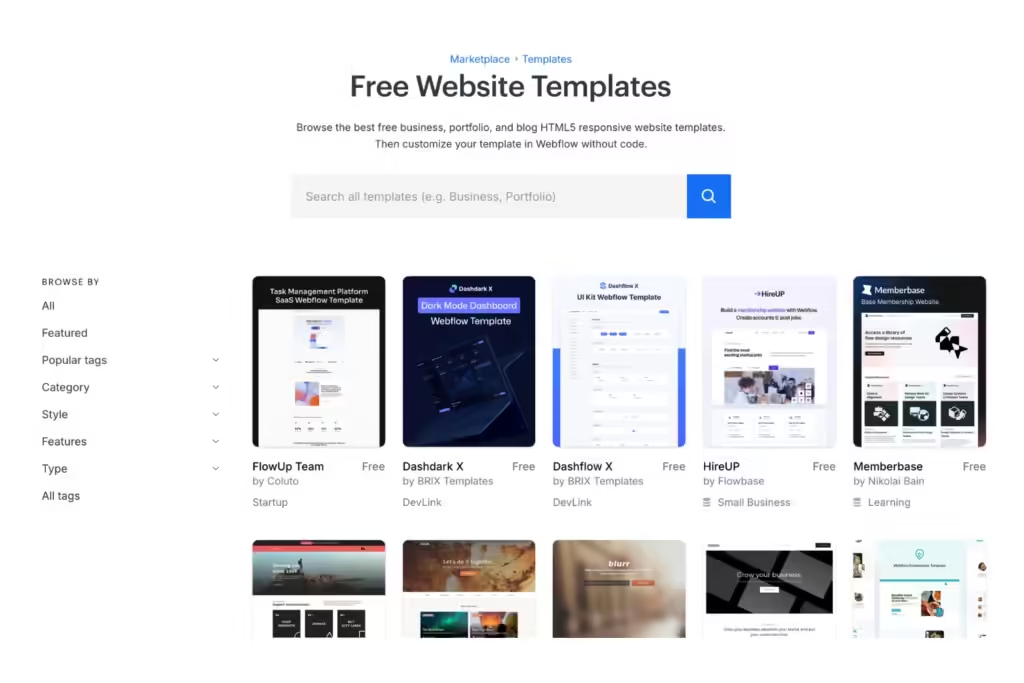
    A screenshot of Webflow's free website templates

    Next is choosing a website template. Webflow has over 1,500 free pre-designed templates with diverse themes from non-profits to fashion, medical, and more. Regardless of which you pick, they’re all easily customizable without code. Webflow also offers blank templates if you prefer to build a site from scratch. 

    If you have limited to no experience creating websites from site builders, we suggest using a pre-designed template. It gives you a foundation to customize, so you don’t have to build certain page elements or features on your own. Pre-designed templates also allow you to have a quicker turnaround for launch. 

    However, selecting the right Webflow template is one of your most important decisions. It must fully support your business needs, showcase your unique brand, and keep your customers happy when visiting your site. 

    Consider the must-have designs before building your website, such as: 

    • Industry-specific features like payment gateways and one-click checkout for e-commerce 
    • Total pages required (these are limited per template)
    • Type of pages required: collection, service, product, blog, etc. 
    • Brand-centric themes like 3D elements or demo contact forms for SaaS 

    While the details may seem overwhelming, you can start by choosing a category that closely aligns with your industry. Webflow also allows you to preview their templates by testing them to ensure their functionalities and designs meet your business needs. 

    3. Customize Your Site Template

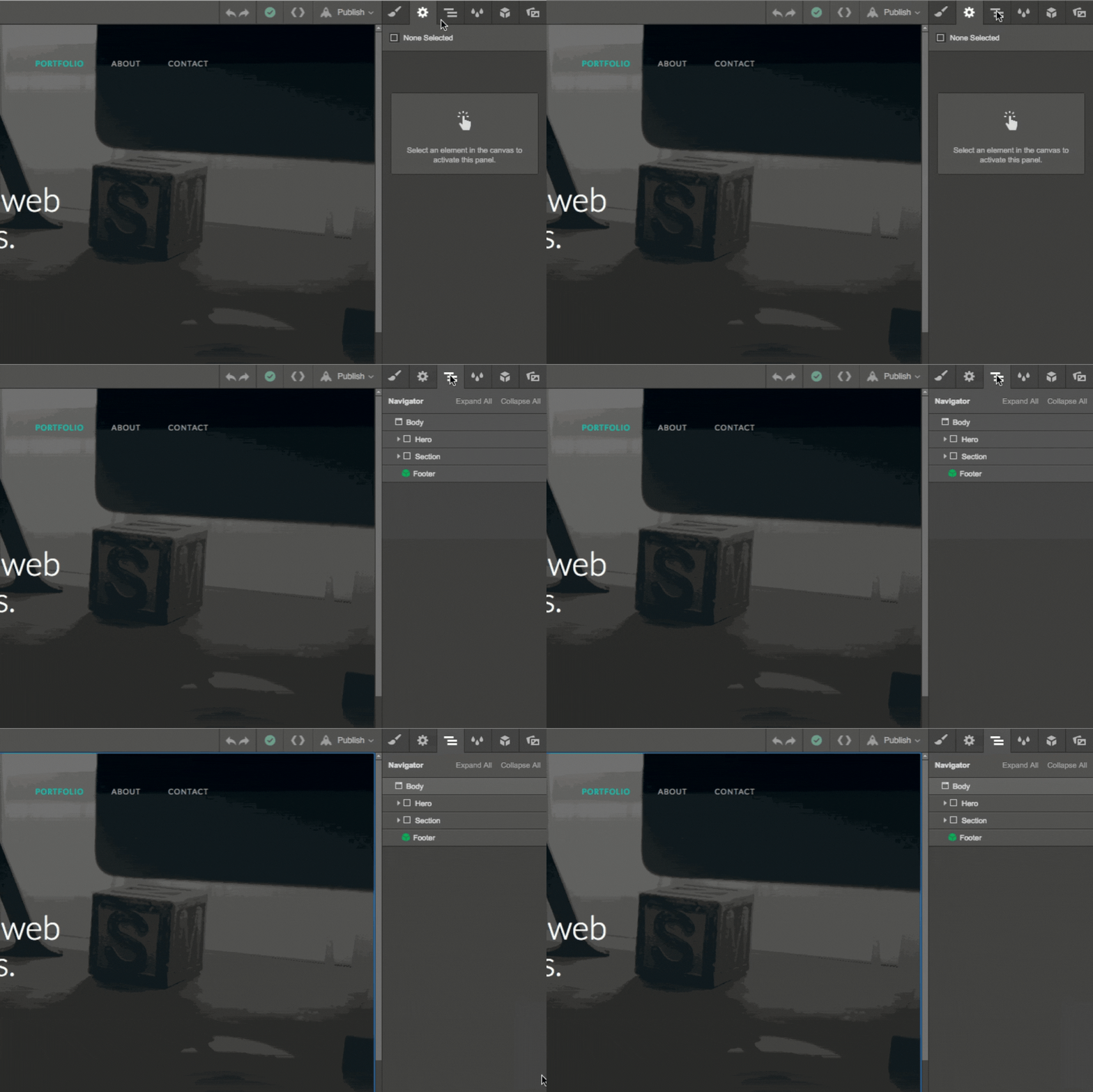
    A GIF of a user designing a web page in Webflow's interface
    Source: Webflow

    After selecting a template, you must customize the design to match your branding guidelines. Change the theme colors, text fonts, and logos to showcase your unique brand. Otherwise, it’ll have stock imagery and look like a pre-designed template that wasn’t customized—which your audience will notice.  

    You’ll need to become familiar with Webflow’s interface, but luckily, it’s easy to navigate. In the upper right-hand corner, open the Navigator tab, which organizes your site structure in one list. Depending on your template, it’ll display your site’s Body, Header, Section, and Footer, where you can simply drag and drop elements to customize the design.

    In addition to aesthetics, ensure your updated template has optimal UX (user experience) design. UX is crucial in web design because it’s built with your users in mind. If potential customers experience text-heavy pages, slow page speeds, and blurry mobile images when navigating your site, they’ll quickly bounce.

    In fact, 40% of users will leave a website if it takes more than three seconds to load and are five times more likely to abandon a task if it isn’t optimized for mobile. Your website should be generating traffic and converting leads. Don’t be the reason they leave from poor UX. 

    Some UX-centric site design tips include: 

    • Balanced white space
    • Clear visuals
    • Responsiveness on mobile and desktop
    • Easy-to-use navigation with site breadcrumbs
    • Compressing large media files for faster page load speed

    Keep in mind that you don’t have to customize your template in one sitting. It takes time to create a website, even with Webflow. Start with your core site pages, like Home, Service/Product, About, and Contact Us. Then, you can branch out to design the rest one page at a time. 

    4. Create or Migrate Your Website Content to Webflow

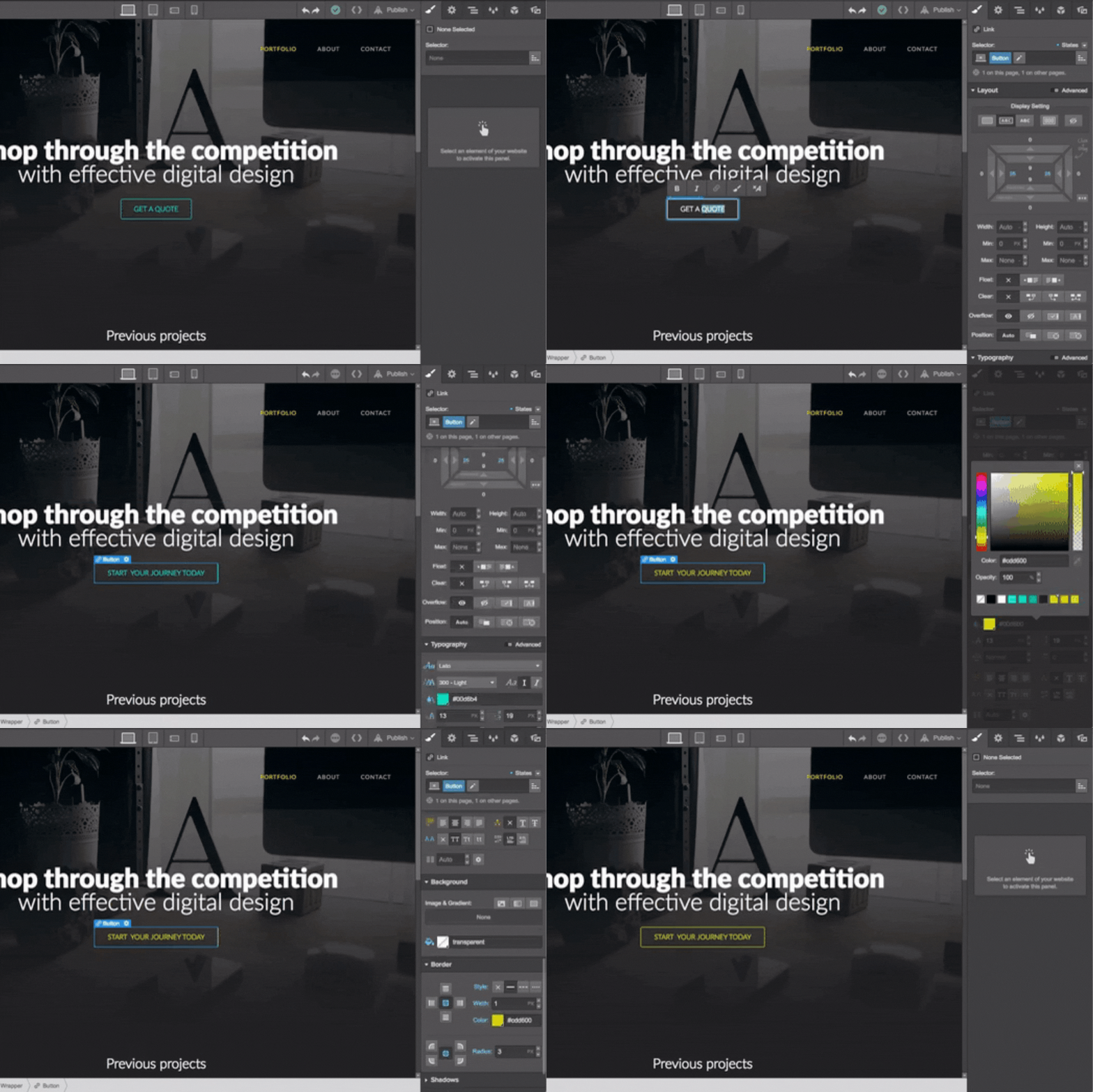
    A GIF of a user designing a web page in Webflow's interface
    Source: Webflow Blog

    If you’re migrating content from an existing site to Webflow, you can use migration tools or CSV plug-in files to transfer text and media to their platform. 

    If you’re creating content within Webflow, you’ll need to insert your text and media via Webflow Editor. It’s like the Navigator tab for your site structure mentioned above but for content. 

    The most common Webflow Editor elements to create content within your template are Sections, Headings, and Paragraphs. All you have to do is fill in your text and upload visuals in their CMS fields that are shown visually right on the page. Webflow also offers dynamic content features, like 3D visual transformations and pop-up variations for different pages.

    While websites built with Webflow have built-in SEO tools with no plug-ins necessary, you’ll still need to optimize your content. You can write your metadata, add schema markup, create sitemaps, migrate 301 directs from an existing site, and more. You can even set editor settings for collaborators to access your content to help you create and optimize it. 

    5. Preview Your Webflow Website

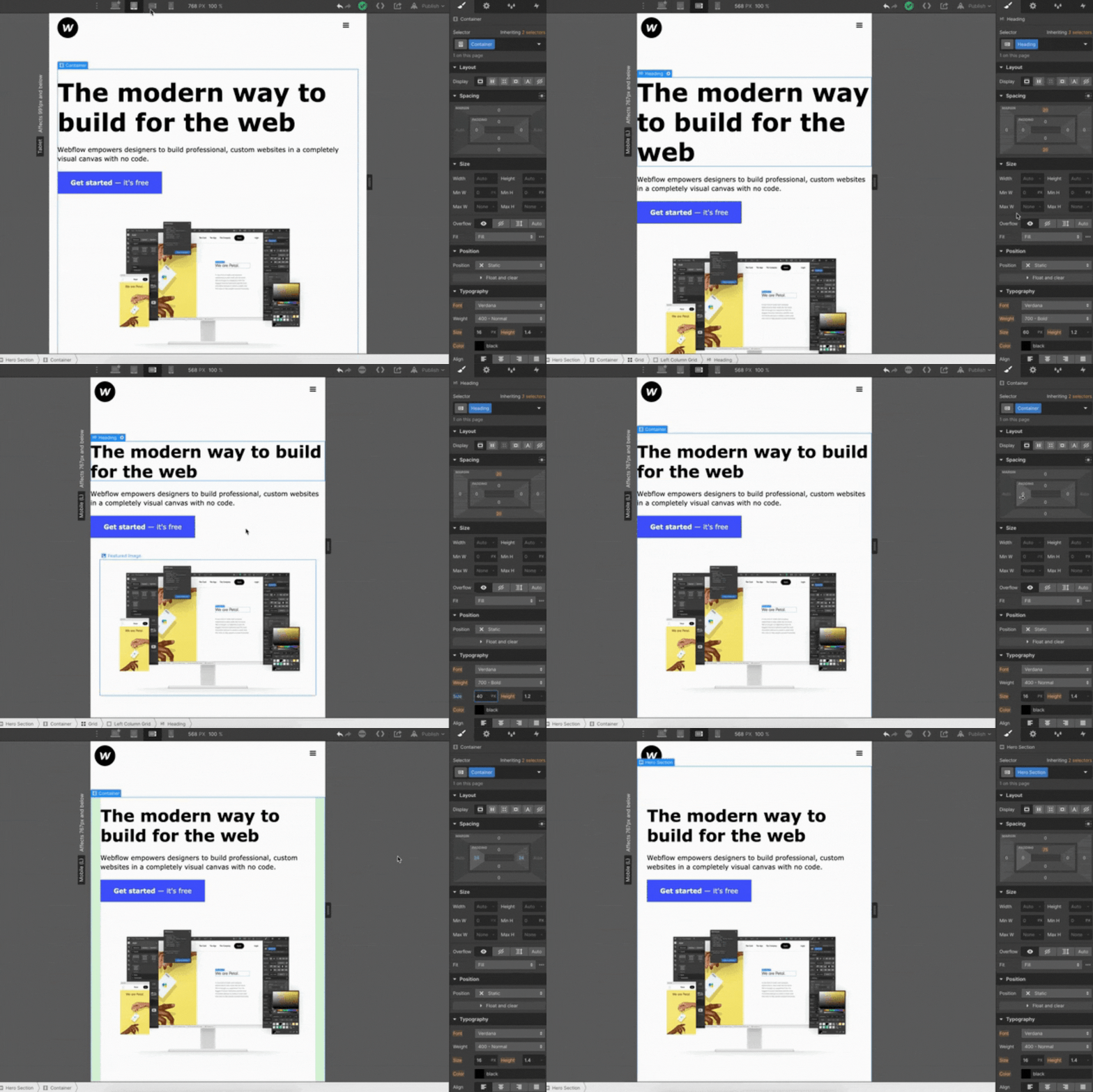
    GIF of a user designing a website page in Webflow
    Source: Webflow Tutorial

    Once your site template is customized and your content is added, the final step before launch is reviewing it for design and functionality. Webflow has a preview mode where you can check if all the site designs look and perform as they should as a saved draft.

    Test your web design on mobile and desktop for the following:

    • Click all buttons and links to ensure they work 
    • Look at your content on different devices to see if they have easy readability
    • Measure how long your site takes to load on Google PageSpeed Insights
    • Share your preview link with others for further review on details you may miss

    Don’t get too hung up on the details during this part. You can always update your site once it’s live with ongoing website maintenance. 


    6. Launch Your Webflow Website

    When you’re ready to publish your website, you can use a subdomain of webflow.com or create a custom domain with a paid Webflow account. Just make sure to index your web pages on Google Search Console so it can index and crawl your site. Remember, if Google can’t discover your website, it’s essentially invisible online.

    In addition to indexing, monitoring your new site’s performance is critical. It ensures everything is running smoothly for your visitors. 

    Track the following in a post-site launch:

    • Indexing status on Google Search Console
    • Overall website performance with Google Analytics 4 (GA4)
    • Potential SEO issues like duplicate headings and broken links with website crawlers like ScreamingFrog 

    Finally, start spreading the word! Cross-promote your new Webflow website on social media or advertising to generate audience discovery of all the hard work you put in.


    Unlock Your Webflow Site’s Potential with Full-Service Web Design & Development

    Although Webflow makes it easier to build a website, it’s still a comprehensive process that must be done correctly. Your site must be accessible to users with disabilities, properly optimized for Google’s changing algorithms, and regularly maintained for optimal performance.

    As a business owner or leader in your trade, it can be time-consuming and challenging to navigate the complexities of web design. At Reach Marketing Pro, we are your one-stop shop for everything you need to launch or migrate a new Webflow site. 

    We’re a full-service digital marketing agency with extensive experience in Webflow, including design, maintenance, development, and management. Our team includes graphic designers to make custom visuals for a powerful site and brand design. We also have SEO content writers with the expertise to create and optimize your site text for target audiences and Google. 

    Ready to unlock your Webflow website’s full potential? 

    Learn more about our web design and development services, or contact us to kick off your new site journey on the right foot today! 

  • Website Redesign: Tips, Examples, & Best Practices

    Website Redesign: Tips, Examples, & Best Practices

    A website redesign is a significant investment but eventually necessary for your business. Whether you have a dated design, are rebranding your company, or aren’t seeing optimal results with your site’s SEO performance, redesigning a website can help achieve these goals. 

    As a business owner, it’s understandable to feel apprehensive about a website makeover. It’s a comprehensive process and requires various resources to execute successfully. 

    However, it doesn’t always have to be a complete website revamp. 

    You can take an easier approach to your redesign project as an ongoing process with a step-by-step plan. 

    How to Redesign a Website for Your Business: A Step-by-Step Guide

    A graphic of three people redesigning their website

    On average, businesses should redesign their websites every 1.5 to 2.5+ years. Website redesign frequency depends on various factors, like how often you maintain it and your site’s performance. 

    Some signs that it’s time for a website upgrade include:

    • Weak SEO Performance: Rapidly declining keyword rankings, indexed pages, etc. 
    • Dated Site Design: Many text-heavy home page sliders, generic stock photos, etc.  
    • Poor Website Functionality: No website breadcrumbs, slow page load speed, etc. 
    • Rebranding: Merging companies, expanding product/service offerings, etc. 
    • Challenging Customization: Limited capabilities to edit design templates, can’t integrate popular third-party applications, etc.  
    • Poor Website Benchmarks: Rapidly declining conversion rates, form submissions, traffic, etc. 

    Below is a step-by-step guide on the website redesign process from initial strategy to relaunch. 

    Develop a Website Redesign Strategy

    The first step in your website redesign project plan must be developing a strategy. Creating this foundation defines why you need to redesign your website in the first place. 

    Ask your team these key questions before you start the redesign process:

    • Why do you want to redesign your website?
    • Which website performance metrics do you want to improve?
    • Who will be responsible for the redesign and development? 
    • How much budget do you have for the design and development?
    • What are your goals with your new website design? 

    That way, you can set clear expectations and have a smoother redesign process for your team to execute more effectively.  

    Define What Your Website Makeover Should Look Like

    A new website design is more than a makeover. It should align with your unique brand and support your bottom line. Defining what the site’s new visuals and messaging should look like is essential to a successful redesign. 

    Ask your team these key design questions before you start the redesign process:

    • What do you like and dislike about your current site? 
    • Which features do you want to add or remove from your current site?
    • What new designs do you want to see on your site, and why? 
    • Do you have inspirational design examples to reference? 
    • Can you provide website branding guidelines, like fonts and colors? 

    If you need more guidance on your site’s visual designs, research your competitors and industry leaders as inspiration. Just be sure you make it align with your unique brand and that it doesn’t exactly copy. 

    Additionally, you must follow key website redesign best practices, including ample blank space to prevent text-heavy pages and contrasting colors for balance.

    Analyze Your Site Audit Metrics Before Redesigning

    A graphic of three people analyzing website metrics

    Don’t redesign your website for the sake of looks only. While dated site designs are important to upgrade, the purpose of your redesign project should be data-driven through a website audit. That way, you can make the necessary changes and investments for optimal results. You may discover areas of your site that need improvement you didn’t notice before.  

    Common website audit metrics to analyze for a redesign include:

    • Top pages with the most organic traffic
    • Total keyword rankings 
    • Top pages with the most leads
    • Top pages with the most conversions

    When evaluating these metrics, check if their rates are increasing or decreasing to know which pages to prioritize first. Investing in your top-performing pages first can help maintain its performance during the redesign process. 

    You should also note your lower-performing web pages to know which areas to prioritize for improvement. If you see a high cart abandonment rate or declining conversions, your website may have a poor user experience (UX). Your current site design may be making it harder for potential customers to convert, like no saved payment method features or slow page load speeds. 

    Use a New Website Platform If Necessary

    You can waste time and resources on a website redesign if your current platform has many limitations on its capabilities. If you can’t customize the design template to meet your branding guidelines or integrate vital e-commerce features for your business, like a one-click checkout, you likely won’t meet your redesign goals. 

    Your website platform shouldn’t hold you back from getting your ideal site design. If this is the case, be prepared for a website migration. Your web developers should utilize sitemap lists, create 301 redirects, and set up Google Analytics to streamline the data transfer process.   

    Create a Content Strategy for Your New Website Design

    To maximize your content marketing ROI during a website redesign, organize your current content into three categories:

    1. Removable Content: Deleting vague home page details that don’t immediately define your brand, talking about your company instead of how you can help your target audience, etc. 
    2. Updated Content: Adding captivating infographics, embedding Google reviews to product pages, integrating a separate blog website to your main site, etc. 
    3. New Content: Creating individual location pages for multiple in-person stores or service areas, making short clip videos for software demos, adding more downloadables, etc. 

    Quality website content that ranks high on Google can be one of your biggest ROI drivers over time—especially when you’re investing in a new site design. 

    Re-Optimize Your Site for SEO

    A graphic of three people working on SEO

    Website redesign SEO is a critical step. It ensures you protect your top-performing pages while improving your lower ones during the redesign process. 

    Conducting an SEO audit for your site will guide you on where to start, such as:

    • Search Valued Pages: Pages with the highest and lowest traffic, lead generation, conversions, etc. 
    • Metadata/On-Page SEO: Page tiles without keyword optimization, missing headings, duplicate meta descriptions, etc. 
    • Technical SEO: Pages with slow page load speed, broken links, no SSL, etc. 
    • Off-Page SEO: Pages with the highest-quality backlinks, traffic from social media, etc. 

    Luckily, popular SEO platforms make it easy to prioritize which web pages you should redesign first. They’ll flag which pages are impacting your website’s SEO performance most to least. 

    Test Your Site Redesign

    Now you’re at the final step before a website relaunch. Before going live, test it to ensure everything functions properly and looks how it should. 

    Conduct A/B testing via email with two versions of one of your web pages to see which ones users respond to better. Your target audience may download more free template guides with one CTA button color or text over another. It’s about learning which designs work best with your consumers without assuming. 

    Also, send your website’s staging link to your team for their review on the following:

    • Proofreading web copy for typos, grammatical errors, and effective messaging
    • Clicking all links to confirm they’re not broken or directing to the wrong page
    • Navigating the website as a visitor to ensure your redesign has a strong UX

    Once your new site design has been approved for final review, you can relaunch! We also encourage monitoring your website post-launch to confirm its performance continues successfully. 

    Website Redesign FAQs

    A graphic of three people redesigning a website

    Below are some of the most common FAQs when redesigning a website. 

    Why Redesign a Website?

    Your SEO ROI is technically calculated by the profit or your sales/revenue after your content marketing expenses: 

    Website redesigns are necessary if they’re not functioning as they should or aren’t supporting your bottom line. Analyzing your website audit reports can determine if minor updates can fix current issues or if a redesign is warranted. 

    How Often Should You Redesign Your Website?

    You should redesign your website every 1.5 to 2.5+ years. It depends on how often you maintain it and your marketing goals.

    Should I Use Website Redesign Services or DIY?

    While DIY web redesign is doable with user-friendly website platform builders and template designs, you can maximize your investment and results with a website redesign company. They understand how to optimize your new design within your unique business goals and streamline the process with their expertise—saving you time and resources. 

    Make the Most of Your Site’s Makeover with a Website Redesign Agency

    Your website is the foundation of your business. In a competitive digital marketplace, it’s crucial that your site stands out and performs well for your bottom line. Investing in professional website redesign is the best way to maximize your budget and accomplish your company’s goals. 

    At Reach Marketing Pro, our in-house web developers and designers have extensive experience revamping dated sites, rebranding, re-optimizing for SEO, and more. We know how to make your website look as good as it performs with monthly reporting to ensure it generates optimal results.

    Ready to make the most of your website’s makeover? 

    Learn more about our website design and development services, or contact us for help today! 
  • Content Marketing ROI: Importance of Unique SEO Content & How it Can Become the Highest ROI Driver Over Time

    Content Marketing ROI: Importance of Unique SEO Content & How it Can Become the Highest ROI Driver Over Time

    As a business owner, your SEO content marketing ROI can take some time, but it’s necessary in an oversaturated digital market. Depending on various factors like content quality, output, and competitive landscape, seeing the ROI of SEO can take four months to one year on average.  

    However, it can become your brand’s highest ROI driver over time with consistent content creation and performance monitoring. 

    Learn why investing in content marketing is crucial for your bottom line and why it’s worth keeping your SEO ship sailing.  

    Content Marketing ROI: Why Creating Unique SEO Content Matters for Your Bottom Line

    A person having success in their digital marketing with high reviews and metrics

    SEO content marketing is more than just blogs. It also includes website copy, like your home page, product/service category pages, and Google Business Profile. Business owners often understand the importance of SEO content. However, they commonly make mistakes when creating it, like repeating the same content without added value or proper optimization. 

    Here’s why creating unique content is essential to maximize your SEO ROI and how to optimize it for better results.

    Unique SEO Content Optimizes Your Online Visibility

    As mentioned above, companies create SEO content because they know they must do it to remain competitive. But it’s not uncommon to find them repeating the same information already out there—leading to lower SERP rankings and SEO ROI because they’re not providing additional value.

    To increase your content marketing ROI, you must create unique content to stand out in the SERPs. Even if you’re covering the same topic, use your expertise to add a different perspective or create new media your competitors aren’t doing, like industry expert quotes from your podcast or creating custom infographics that visualize your information. 

    High-Quality SEO Content Builds Your Brand’s Credibility

    You’ve likely heard of the term “high-quality content.” But, what does that mean exactly, and how does it apply to SEO? High-quality content must follow Google’s E-E-A-T guidelines to achieve optimal SEO results.

    E-E-A-T stands for Expertise, Experience, Authoritativeness, and Trustworthiness. It’s Google’s content framework designed to provide more relevant results when users search for information online.

    Low-quality content like no external links, lengthy paragraphs, and disorganized heading structures negatively impacts your SEO. Remember, you’re still writing for humans, not just search engines. If your content is hard to read, over-optimizes keywords unnaturally, or repeats the same information as your competitors, it’ll hinder your SEO performance. 

    Creating E-E-A-T content helps establish your company as an authority in your niche—which, in return, builds brand credibility and trust. It shows your brand invests in quality SEO content and prioritizes being a valuable resource for users to reference. 

    When 81% of consumers nowadays need to trust a brand before they buy from them, it’s critical to earn that to maximize your content marketing ROI.

    High-Performing SEO Content Generates Website Leads & Conversions

    A person generating leads down the sales marketing funnel

    A recent Forbes study found that 74% of companies boosted their lead generation from content marketing alone. They also reported businesses can increase their conversion rate six times higher than their competitors with content marketing. 

    In addition to creating quality E-E-A-T content, it should also be actionable. Encouraging users to take action on your content can generate more website leads and conversions, not just organic traffic—which can promote the highest ROI! 

    How Do You Measure SEO Content Marketing Success? 

    Measuring SEO content success depends on your company’s goals and investments. You may have different KPIs, like expanding your market reach as a startup or driving more sales as an e-commerce brand. 

    Additionally, you’re probably investing in SEO platforms, analytics software, graphic design services, and content management systems (CMS) that impact your ROI calculations. 

    Regardless of your business objectives and SEO tools, below are the top metrics used to measure the ROI of content marketing and how to optimize your content for them. 

    Organic Website Traffic

    Generating organic website traffic is one of the main purposes of SEO content marketing. It measures your content’s success by demonstrating how many people came to your site because of it. It’s a primary source to get more users to your site through various pages.

    Ways to optimize your SEO content for organic traffic include:

    • Use the right keyword search intent to provide valuable, relevant content (Ex: transactional intent for product pages and informational for blogs) 
    • Optimize your content’s metadata for Google to crawl/index easier and promote audience discovery when they search with relevant search queries (Ex: target keywords in meta descriptions, headings, page URL, etc.)
    • Design high-quality infographics for comprehensive subject matter to strengthen your content’s readability and brand recognition

    Leads Generated

    A person attracting multiple business leads with a magnet and megaphone

    The number of leads generated from your content measures how influential it was in encouraging users to take action. Whether it’s downloading your free guides or submitting a contact form on your service page, increasing your content’s engagement attracts more potential customers. 

    Ways to optimize your SEO content for lead generation include:

    • Implement different linkbuilding strategies beyond cold emailing to boost your site’s Domain Authority and brand credibility (Ex: social media shoutouts, guest bloggers, email newsletter mentions after industry conventions)
    • Cross-promote your content on social media and Google Business Profile to capture leads in multiple locations 
    • Send non-spammy email newsletters of your content to loyal and past customers who find your brand valuable 

    Conversion Rate

    Generating organic traffic and leads with your content won’t matter with a declining conversion rate—especially when striving for a profitable SEO ROI. It measures how effectively your content attracts visitors and converts them into customers.

    Ways to optimize your SEO content for conversions include:

    • Add valuable CTA buttons, like free consultations or software demos, throughout your content sparingly to prevent over-spamming
    • Use relevant minimal pop-ups to help guide users along their buyer’s journey without being too aggressive 
    • Link to your email newsletter sign-ups to capture strong lead contacts and nurture them into conversions

    Bounce Rate

    Bounce rate measures your SEO content’s ROI by how long it takes them to leave. If users aren’t reading or viewing your content because they’re leaving your site quickly, you can optimize it to encourage them to stay. 

    Optimizing your SEO content to reduce bounce rates is by making it more engaging and easy to navigate. You can embed how-to assembly product videos or write long-form content, so users spend more time on your page. 

    But one of the top reasons brands see their website’s bounce rate so high is poor user experience (UX). If your website has a slow page loading speed or is hard to view on mobile devices like small text, it will negatively impact your content performance from users bouncing because it’s difficult to navigate. 

    You can strengthen your content’s UX by compressing large file images that are slowing your page load speed and optimizing it for mobile with responsive website design layouts to adjust how it looks on any device. 

    Sales/Revenue

    A person celebrating their sales revenue in front of a laptop

    Your SEO ROI is technically calculated by the profit or your sales/revenue after your content marketing expenses: 

    (Return – Content Investment) / Content Investment x 100 = ROI %

    This formula measures content marketing success because it calculates if your ROI is profitable. If content ROI isn’t profitable, double-check if you’re maximizing your SEO software platforms. You may have multiple tools that can be consolidated or aren’t utilizing offered features to the fullest, like content and keyword gap analysis from your competitors. 

    There are multiple ways to optimize your SEO content for revenue generation:

    • Aligning SEO and SEM Marketing: Boost sales by generating paid search traffic and ranking for transactional keywords for audiences who are ready to buy
    • Customer Testimonials Web Page: Embed your Google Business Profile reviews or Instagram feed’s social proof to build your brand’s credibility with stronger reputation management 
    • Free Trial CTAs: Offer something valuable that doesn’t require much of your audience in return to motivate them to submit their contact information

    Maximize Your Content Marketing ROI with an SEO Digital Marketing Agency

    Creating valuable SEO content that supports your bottom line effectively is a consistent process and takes time. As a business owner, you have plenty on your plate already, with managing your company and being an expert in your niche. If your brand invests in SEO content marketing, you can better maximize your budget with expert marketers. 

    At Reach Marketing Pro, our team has extensive experience in SEO content marketing for various verticals. From developing keyword-research-driven strategies to conducting competitor SERP analysis for content opportunities and creating custom visuals to strengthen its performance, we can do it all.  

    We’ll also provide in-depth monthly reporting to measure your SEO content strategy’s success and ensure they generate profitable ROI for your revenue goals.

    Don’t create content for the sake of doing it. Get optimal results with your investment instead. 

    Learn more about our SEO content marketing services or contact us today! 

  • How to Use Canva to Create Stunning Graphics for Content Marketing

    How to Use Canva to Create Stunning Graphics for Content Marketing

    You know the importance of creating graphics for your content. But is it effectively supporting your business’s content marketing strategy? Visuals play a crucial role in your digital marketing efforts. It’s how your target audience will first absorb your content immediately. 

    If the graphics don’t align with your unique brand, are overdesigned, or don’t connect with the written content it’s paired with, users will quickly scroll past it. 

    That’s where Canva comes in. You may already be familiar with or heard of it, as it’s one of the most used graphic design platforms because it’s user-friendly.

    Whether you have a graphic designer, a content marketer, or doing DIY, here’s how to use Canva to create stunning graphics that support your bottom line—even if you’re not design savvy. 

    Canva: How to FAQs

    A person practicing graphic design on a tablet and computer of a woman

    Anyone can learn how to use Canva, regardless of whether you have prior graphic design experience. Here are some of the most FAQs if you’re new to this application. 

    What is Canva? 

    Canva is a graphic design platform for creating content visuals. You can use it for free or buy a Canva Pro subscription to access premium features, like exclusive stock imagery

    Is Canva Easy to Use? 

    Canva is easy to use because it offers template-based designs to create graphics. Although you can design visuals from scratch, it’s designed to be user-friendly with its template editor-based application. 

    What is Canva Used For? 

    Canva can be used for vast types of content marketing, including social media posts, blog infographics, flyers, and paid ad creatives. However, it can do more than content marketing, like resumes, cover letters, and sales slideshows.

    How to Use Canva to Create Effective Digital Marketing Content

    Did you know that visual content receives 94% more views than text-only content? That’s why, you must create compelling visual content to increase brand awareness, market reach, and even SEO. 

    Here’s a step-by-step guide on how to use Canva for digital marketing to ensure it’s effective.

    Understand Your Content Marketing Goals First

    What are your content goals with the graphics you want to create when using Canva? Knowing the purpose of the visuals you’re designing is more than where they go. It should also support your content marketing goals. 

    For example, if you want to increase engagement on a social media post, consider visuals that interact with your audience more, like polls or giveaways. That way, you create the best graphics that support your content strategy.

    Choose a Design Template

    A screenshot of Canva's Template design options

    Once you create a Canva account, you’ll see a Home dashboard view. If you want to use Canva’s pre-designed templates, click Templates on the left-side navigation bar underneath Projects. They offer free and paid Canva Pro templates organized into various categories and subcategories. 

    These template categories include content types like social media, videos, and themed designs like holidays and industries. It even provides platform-specific specs, like Instagram image ad carousels and LinkedIn profile banners for you.

    Customize Your Design Template

    After selecting your template, next is customizing it—one of the most impactful design steps you take. While Canva’s templates are a solid foundation, you must tailor the visuals to your brand and target audience. 

    Don’t get overwhelmed with this part. Canva makes it simple to customize your graphics with its design tools on the same left-side navigation bar. You can drag and drop various elements, including photos or videos from their stock visual library, pre-designed headings, shapes, and more.

    Customizing your Canva design templates should include:

    Matching Your Branding Visual Guidelines

    A screenshot of Canva's Brand Template with side-by-side graphic comparisons

    Update the template with your company brand colors, fonts, and logo. The templates or graphics will show a color palette used in the visual at the top of your design draft. You can even set up your branding guidelines under Brand Templates to save it for future designs. Brand Template includes your logos, brand colors, fonts, voice, and more. 

    Aligning Your Brand’s Messaging

    Write with your brand’s tone, audience, and platform it’ll be on in mind. Does your business use humor like memes? Do you want a corporate tone with simple and professional graphics? Will these visuals be placed on your website’s home page or business cards?

    Consider your company’s personality and where the graphics will go when creating text. That way, you’ll know how much to write, the font size to use, and how to develop your messaging.

    Personalizing Your Visuals 

    Include original product, event, or staff images when possible. If you want to get creative, you can even draw on your graphics with multiple width points, highlighters, and colors. Other design features include free screen recorders for tutorials, photo filters, and image frames

    Download Your Created Content

    Once your graphics are created and reviewed, the last step is downloading them. In the top right corner, click Share ⬆ and click Download ⬇ in the drop-down menu. 

    You’ll find seven download file type options:

    • PNG: Best for complex images and illustrations
    • JPG: Best for sharing
    • PDF Standard: Best for sharing documents and emailing
    • PDF Print: Best for printing documents
    • SVG: Best for web design and animations
    • MPG: Only for high-quality videos
    • GIF: Only for short clips with no sound  

    Using the correct download file for your graphics ensures they have the proper formatting.

    Common Canva Design Mistakes to Avoid

    Avoiding design mistakes can seem daunting, especially if you don’t know how to use Canva. Luckily, Canva offers help pages like its Design School, offering free lessons and courses on using its tools for the most effective designs. They also have a Learn blog where you can learn more tips on graphic design, branding, content marketing, and more. 

    In addition to Canva’s resources, here are some of the most common design mistakes to avoid when using this platform. 

    Overdesigning Graphics

    A screenshot of a Canva graphic design draft and sharing a Collaboration Link

    Don’t overdo the elements in your graphics. It can harm your content performance if it’s over-designed. 

    Common overdesigning mistakes businesses make when using Canva include: 

    • Too much text
    • Not enough white space
    • Overstretching images that become blurry
    • Font on dynamic patterned backgrounds 
    • Too many font styles

    Overdesigning graphics can confuse and overwhelm users because there isn’t a focal point. It can also harm your website’s content rankings due to poor image SEO practices. 

    With Search Generative Experience becoming more widely used, if Google can’t match your graphics with what users are looking for in Image Search from poor image quality, you can miss ranking and customer opportunities.

    Share a collaboration link to test your graphic designs with your colleagues. Click Share ⬆ in the top right corner, next to your image file name. You can set specific user permissions to give people access to your draft if they want to hop in and design or share a Collaboration Link as a preview only. 

    Under-designing Graphics

    Using Canva for graphic design shouldn’t just be copied and pasted if you want to create stunning visuals that support your content marketing strategy. While stock photos and pre-designed graphics work for some companies, you can gain a competitive advantage with brand awareness through personalized visuals.

    Common under-designing mistakes businesses make when using Canva include: 

    • No logos 
    • No brand tone or personality 
    • Misaligned branding design guidelines by using different fonts and colors
    • Not editing the template enough or at all 

    As one of the most popular content design platforms, people can likely spot a Canva graphic without customization. It’s like ChatGPT. You can spot pre-created content by the way it’s written or designed due to its template. 

    Remember, Canva is your canvas. You’re the creator!

    Not Considering User Experience

    A screenshot of Canva's Resize and Magic Switch tool inside a design draft

    If your audience has trouble reading your graphics on mobile or if the visuals are random for the written text it’s paired with, you risk poor user experience (UX) design in your content. UX design impacts all facets of content marketing, including website design, SEO, and conversion rates. You must make it easy for your audience to understand and absorb your graphics—or your competitors will.

    Common UX design mistakes businesses make when using Canva include: 

    • Hard-to-read fonts 
    • Lack of contrasting colors to balance the visual
    • Not resizing graphics for various platforms
    • No clickable URLs when applicable (products, CTA buttons, etc.)
    • Mixed brand messaging—unclear what you’re selling, inconsistent imagery, etc. 
    • Irrelevant stock photos or graphics 

    To prevent UX design mistakes when using Canva for graphic design, ensure you test them first. Send Collaboration Links to colleagues and have them check how the visuals look on desktop and mobile. Using graphics as part of the same series can maintain more brand consistency if you’re creating multiple ones within the same project. 

    Lastly, always resize your images if you’re using the same graphics for different platforms. With a Canva Pro account, you resize graphics instantly via the Resize & Magic Switch tool in the top left corner of your design draft. 

    If you don’t have Canva Pro, you can copy and paste your design into a blank project with the right specs, but it requires manual re-positioning of your graphic elements. 

    Elevate Your Content Marketing Graphics Beyond Templates

    While Canva makes it simple to create visuals and customize their templates, working with professional graphic designers can elevate your content marketing strategy. Graphic designers offer more competitive positioning, brand consistency, and customization options with non-template-based applications with more design capabilities. 

    At Reach Marketing Pro, our graphic design services can personalize your visuals to enhance your content marketing further. We have extensive experience in web design, digital/print publications, packaging, motion graphics, original illustrations, and more. 

    Contact us to help bring your brand’s vision to life!