With Google recently launching a new connected TV (CTV) network, businesses can now leverage this platform to advertise to more streaming audiences. As more people switch from traditional cable television to content streaming providers, CTV advertising has emerged to help brands expand their market reach.
Learn more about Google TV ads, its opportunities, and the differences between other CTV aggregators.
What is Google TV?
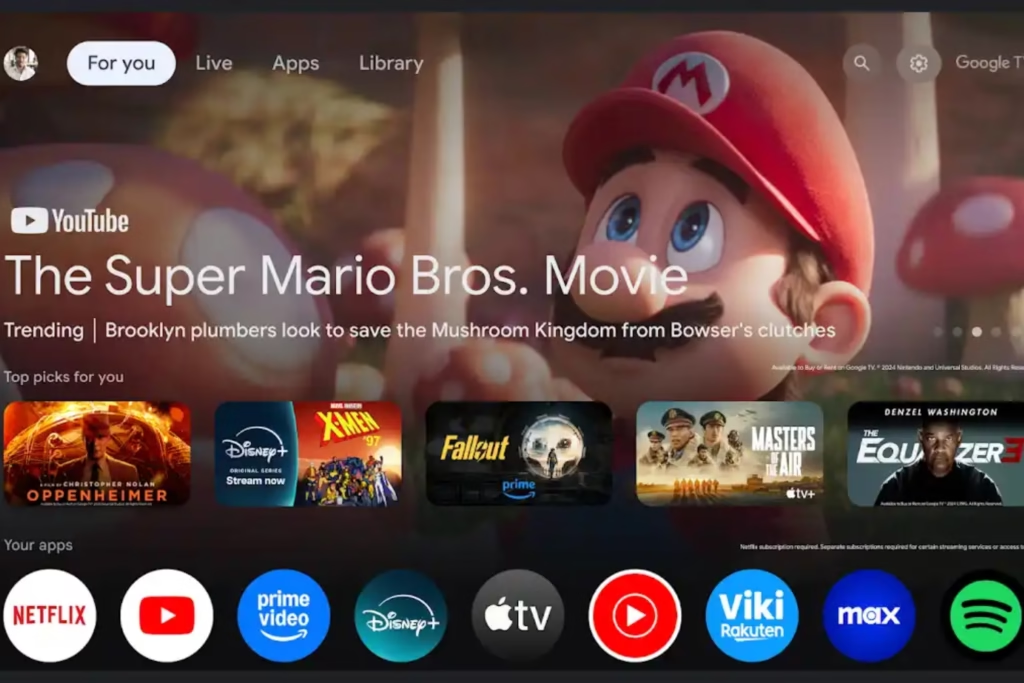
Credit: Google TV
Google TV is a smart TV and smartphone streaming operating system (OS) that centralizes multiple streaming services into one platform. It allows viewers to access in-stream video content without leaving the home screen, including YouTube TV, Netflix, and Disney+.
With over 800 live TV channels in a single guide and 10,000+ apps, Google TV has more free channels in one place than any other smart TV platform.
What is CTV Advertising?
CTV advertising delivers in-stream video ads on smart TVs exclusively, such as Roku, Apple TV, and Xbox. Not to be confused with over-the-top (OTT) advertising, which delivers video ads on any open internet-connected device, such as Hulu and Amazon Prime Video.
However, they work together to run video ad interruptions, banner ads, and sponsored content. CTV is a subset of OTT, offering apps and services with no subscriptions that traditional cable requires. OTT and CTV are interconnected, as one cannot exist without the other.
The Rise of CTV and Fall of Traditional Cable TV
Now that people don’t have to jump from app to app to watch different shows, movies, sports, live streams, or video games, the demand for CTV advertising has increased due to the enhanced user experience (UX).
A 2025 study shows that 86.7% of U.S. households cut the cords of traditional cable TV, with two out of five stating the main reason was the preference for streaming. This same study also projects that over 80.7 million U.S. households will use non-pay TV services by 2026, as the number of cable TV net subscribers has been declining by around 5,000 annually.
The future of advertising is streaming, and now, more than ever is the time for businesses to take advantage of CTV ads to reach audiences where they are.
Google TV Ads vs. Other CTV Platforms: What’s the Difference?
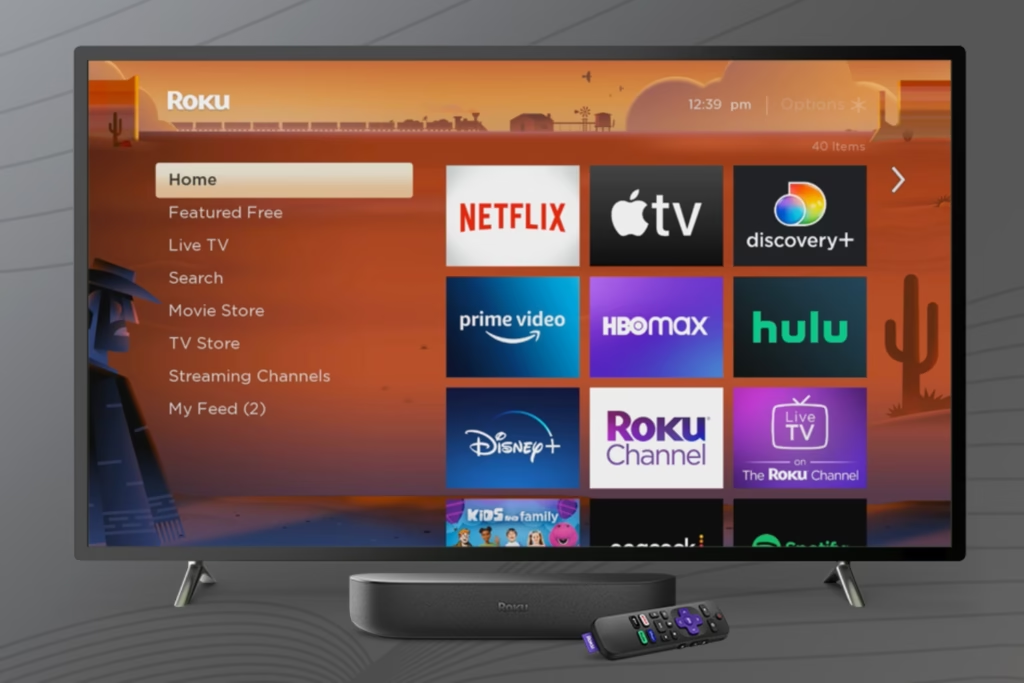
Credit: Roku
Below is a comparison of Google TV ads vs. other popular CTV aggregators, like Roku Ultra and Android TV, so you can understand the differences they offer in advertising.
Google TV Centralizes Audience Advertising Data Within Its Family Apps
As you probably know, Google owns a suite of family apps, including YouTube, Google Search, and Gmail. With Google TV, it centralizes its CTV advertising data across them all. This capability provides key insights into your ads on Google TV platforms.
When you know how users interact on each Google TV channel, it allows you to make more accurate, data-driven CTV advertising decisions. You’ll have a better understanding of your ad placements based on the most used platforms and devices.
Additionally, you can develop advanced targeting strategies in multiple areas, like Google Shopping and Search, to follow users along their buyer’s journey with streamlined reporting as the data is centralized for you.
Google TV Ads Cannot Be Segmented Separately
Credit: strikesocial
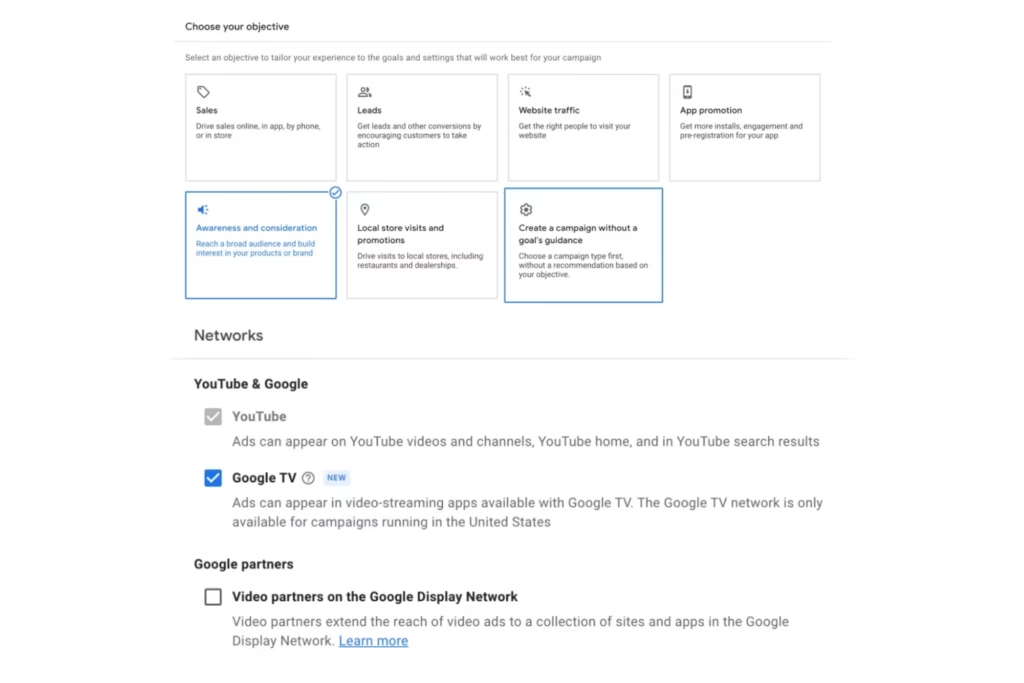
Because Google has an integrated suite of family apps, its CTV ads cannot be segmented separately. While it allows you to pair it with only YouTube at minimum, you cannot run ads on Google TV independently like other CTV platforms.
Google TV Has a Limited Inventory of Programmatic CTV Ad Placements
Since Google TV is relatively new, it has a limited inventory of ad placements on programmatic CTV buying. It may put restraints on your advertising efforts as premium placements are currently prioritized to direct buys from other CTV platforms like Peacock and Tubi. However, we expect more inventory growth in the future.
Google TV Has Only Two Video Ad Formats
In addition to limited ad placement inventory, Google TV also currently has two video ad formats: 15-second non-skippable in-stream ads and six-second bumper efficient reach ads. These formats focus mainly on top-funnel audiences, while other CTV platforms offer more middle and bottom-funnel targeting.
However, with other Google ad platforms focusing on lower-funnel user acquisition, like Performance Max, you can capitalize on all audience opportunities combined.
CTV Advertising FAQs:
What Does CTV Stand For?
CTV stands for connected TV.
How Does CTV Advertising Work?
CTV advertising works by delivering in-stream video ads on smart TVs. It works hand-in-hand with over-the-top (OTT) advertising, which delivers video ads on any open internet-connected device to reach all streaming audiences.
What Are Some CTV Advertising Examples?
Some CTV advertising examples include video ad interruptions, banner ads, and sponsored content while streaming video content, such as shows, live streams, and movies.
What Are Some Popular CTV Platforms?
Some of the most recognizable CTV platforms include Roku, YouTube TV, and PlayStation.
Should My Business Invest in Google TV Advertising?
Investing in ads on Google TV can provide innovative opportunities to reach new audiences, which studies have shown are significantly cutting the cord to streaming services. Meeting your target personas where they are by CTV channel and device on Google TV can help your brand expand market reach.
The Future of Advertising is Streaming–Get Started with CTV Ads Today
As more consumers switch to content streaming providers, is your business ready to adapt its advertising efforts? Whether you want to focus on broadening your audience reach beyond living room TVs via CTV ads, hyperfocus on OTT viewers, or both for full-funnel campaigns, we can help you pick the right advertising strategy that supports your bottom line.
At Reach Marketing Pro, we’re a full-service marketing agency with extensive experience in CTV and OTV advertising, including Google TV. We’ll recommend the best channels and ad placements to maximize your TV ad spend budget efficiently with monthly reporting and optimization.
As an e-commerce brand, maximizing the potential of your performance max campaigns is essential to sell more products and generate greater returns on your ad spend. If you notice declining conversion rates or have difficulty analyzing complex analytics to make data-driven decisions, you likely need to learn more about this platform to improve your results.
Here’s how to optimize performance max campaigns to enhance your advertising efforts and better support your online store.
How to Optimize Performance Max Campaigns for E-Commerce: A Step-by-Step Guide
This guide will walk you through how to optimize performance max campaigns for e-commerce step-by-step.
Create Separate PMax Campaigns for New and Existing Customers
Credit: Google Ads Help
New and existing customers aren’t the same, so your Pmax campaigns shouldn’t be either when trying to target them. New customers aren’t aware of or as familiar with your brand, while current ones are already or have shown loyalty with multiple purchases. That’s why making separate ads for each is crucial for relevancy, as they have different needs and wants.
Pmax has a Customer Lifecycle Goal feature with unique customer acquisition and retention smart bidding modes that allow you to create campaigns for the following audience segments:
New Customer Value Mode: Bid higher for new customers over existing ones
High-Value New Customer Mode: Bid higher for higher value new customers over regular new and existing ones
New Customer Only Mode: Bid for new regular customers only
Win-Back Mode: Bid higher for lapsed customers over existing loyal ones
High-Value Win-Back Mode: Bid higher for higher value lapsed customers than regular lapsed ones
To optimize your ad bidding with specific audiences, you must upload your customer data profile lists into the platform. Pmax utilizes AI and automation to learn about your current customers via the data you provide. Even if you’re launching a campaign for new customers, Pmax will show your ads to people with similar purchasing behaviors and demographics to your existing ones for better results.
Whether your goal is to increase customer retention, acquisition, or both, developing separate campaign structures is necessary to bid for the exact audiences you want to reach and reduce wasted ad spend.
Upload Customer Sales & Traffic Data Regularly to Optimize Ad Delivery
As mentioned above, Pmax uses machine learning based on the customer data you upload and heavily relies on it for better campaign results. However, per Pmax best practices, this should be done regularly to optimize ad delivery.
Input customer sales and website traffic data routinely so the platform can better target specific audiences. Doing this allows its capabilities to continuously improve by placing your ads in relevant platforms that people with transactional intent and bottom-funnel behaviors use, like Google Shopping searches and YouTube ad clicks, to increase conversions.
Label Each PMax Campaign for Organized Ad & Audience Management
While this may seem obvious to keep your Pmax ads organized, your dashboard can become overwhelming when running several campaigns simultaneously. Label each campaign in ways your staff can easily follow for streamlined ad and audience management.
Your advertising teams can better leverage Pmax’s audience sorting tools and listing groups to discover which products should be advertised for each campaign and customer group. That way, they can easily analyze previous ad performances and optimize them for better results more efficiently via organized multi-campaign data.
Add Conversion Value Rules to Maximize Your Campaign Budget
Credit: Google Ads Help
In addition to automated ad placement, Pmax optimizes bids to drive more conversions based on your goals and uploaded sales and website traffic data. The Conversion Value Rule feature lets you set specific bidding conditions based on the conversion value of your existing customers, including online shop visits, audience match segments, and store location.
It adjusts your bidding strategy per these conversion value rules to maximize your campaign budget because you’re targeting highly potential customers with similar demographics and online behaviors—reducing wasted ad spend on irrelevant audiences as a result. If improving conversion rates on Google Performance Max is your goal, you can’t afford to miss this step.
Design Unique Assets for the Ad Placement You’re Targeting for Optimal Results
You can organize audience data and ad campaigns efficiently yet still not get optimal results if the visuals aren’t relevant to the people and platforms you want to reach. While Pmax has a range of one to 20 image assets allowed, Google recommends at least four unique images per ad group.
Because Pmax shows your ads on Google’s family platforms, like YouTube’s Home page, sponsored Gmails, and Maps suggestions, creating separate images with varying aspect ratios is crucial to complement your omnichannel campaign visually. You can even repurpose the assets from your other search campaigns, like PPC dynamic display ads, to streamline the process.
Designing specific assets for the platform you’re targeting improves the visual quality of your ads by following their image guidelines. It also helps attract customers, as the first thing they notice in your Pmax campaigns is how your ad looks. If you use a square Google Shopping asset that becomes stretched on YouTube, it can hinder your brand’s perception from a grainy image.
Credit: Google Ads Help
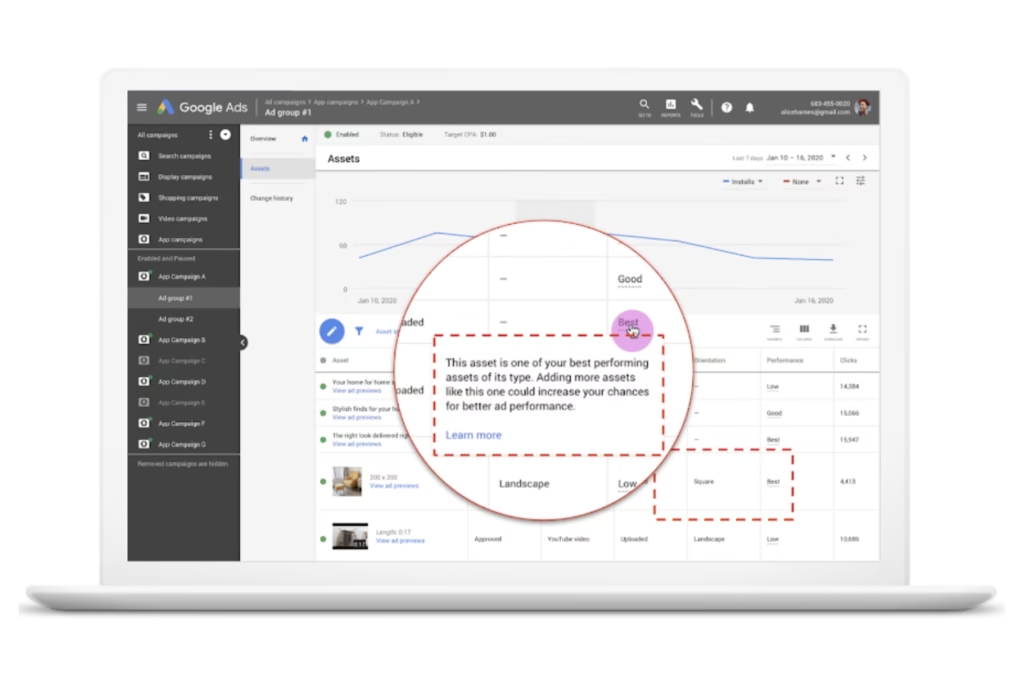
Pmax even has an Asset Report feature that compares the visual performance across individual and group images you used in other campaigns. It has a Performance Label that organizes image assets by Best, Good, and Low based on the most triggered user actions. That way, you can make data-driven creative decisions to optimize your Pmax campaigns visually.
Remember, your Pmax campaign images are meant to convey your product’s unique selling features. Displaying them properly based on the platform you’re advertising on and the people who use it is key.
Make Your Landing Page Design User-Friendly & Consistent with Your Ads to Encourage People to Complete Their Purchase
Don’t lose customers in the final step of their buyer’s journey from a bad landing page design. If users click on your ad but your website makes it harder for them to buy the product due to slow load speed or the landing page looks completely different, it can push them away from poor user experience (UX) or confusion from thinking it’s the wrong site.
Pmax best practices for optimized landing pages include:
Using the same call-to-action and keywords as your ad text for users to find the offer or discount displayed in your campaign easily
Designing a consistent look that mirrors your ad’s image assets
Creating a mobile-friendly design with balanced white space, visible contact buttons, and quick loading speed for users to shop and navigate your store on any device seamlessly
Having a user-friendly website, including your landing pages, goes hand-in-hand with your Pmax campaigns to encourage people to complete their purchases.
PMax Optimization FAQs:
What’s Automatically Optimized with a Performance Max Campaign?
Pmax automates several campaign optimization features, including:
Individual and group image asset performance and recommendations per campaign
Omnichannel budget allocation
Bidding strategies
Ad placements
Audience segment targeting
Can You Run Pmax with Standard Shopping Campaign?
Yes, you can run Pmax with standard Shopping campaigns, even when advertising the same products on the same account. Google recently changed the flexibility to manage these campaigns together, which previously prioritized Pmax over Shopping automatically.
However, it requires a careful strategy to prevent campaign overlapping. Campaigns with the highest Ad Rank will be served to audiences based on several factors, including ad/landing page quality, auction competitors, and search queries.
Keep in mind that PMax’s best practices are for broader audience targeting, while standard Shopping is meant for precise product targeting to maximize dual campaign performance.
How Many Custom Images for Performance Max Campaigns Are Allowed?
Pmax allows up to 20 custom image assets per ad group. You must have at least one image asset to launch a campaign.
What Are Some Tips for Improving Conversion Rates on Google Performance Max?
Improving conversion rates on Google Performance Max must involve sales-focused optimization, including:
Uploading bottom-funnel custom data routinely
Setting up ad conversion tracking
Creating optimized landing page designs
Designing unique image assets per ad group and platform you’re targeting per campaign
Supercharge Your Online Store’s Sales with Professional PMax Optimization
Now that you know how to optimize performance max campaigns, it’s also important to understand the commitment to do this successfully. From continuous campaign monitoring to custom graphic design and data-driven strategy development, it requires ongoing optimization to maximize results.
Let our Pmax pros handle this for you.
At Reach Marketing Pro, we’re a full-service digital marketing agency with extensive experience in all aspects of Google ads for e-commerce brands. We know how to leverage the complexities of Pmax’s platform to better reach your goals from search to sale.
Our team will provide monthly reports to ensure you maximize your budget and campaign performance with ongoing optimization. We also have in-house graphic designers and copywriters to create your ad’s messaging and custom visuals within your branding guidelines.
Whether you have an outsourced advertising agency or an in-house team, Google Ads Report Editor streamlines your manual reporting processes. From template-based reports to customized ad campaign metrics and user-friendly dashboards, you shouldn’t spend more time than you have to—especially if it’s on a monthly or quarterly basis.
Learn more about the Google Ads reporting tool and how you can leverage it to scale your client’s business more successfully.
How to Use Google Ads Report Editor for Client Reporting: A Step-by-Step Guide
Previously known as Google Adwords, the Google Ads Report Editor is software that automates and improves your search engine (SEM) marketing reporting processes via template-based features and customizable dashboards. For experienced SEM marketers, you can also create your own reports from scratch.
Below is a step-by-step guide on how to use Google Ads Report Editor for clients.
Select the Ads Report Type You Want Insights On
Before you start, confirm which Google Ads performance report you want to create for your client. There are four automated report templates, each with unique metrics they measure about:
Account Performance Report
Credit: Google Help
The account performance report measures the financial health of your client’s Google Ads account. It includes their ad budget, account billing, campaign clicks, and impressions. However, it also displays conversion metrics, like return on ad spend (ROAS), revenue, and conversions.
This report provides a monthly account overview of how successful your client’s advertising investments are via performance-based metrics compared to their competitors.
Ad Group Performance Report
Credit: Google Help
The ad group performance report measures how relevant your client’s keywords and ads are within a specific campaign or ad group. Like the account performance report, it also shows conversions, clicks, and impressions, but for specific ads versus a general overview.
This report is generated daily or weekly, with multiple filters available to review the ad group performance on a deeper level. You can filter by ad type, campaign type, advertising channel, the ad group the ad belongs to, and more.
Campaign Performance Report
Credit: Google Help
The Google Ads campaign report measures your client’s campaign success based on ad groups and keyword performance. It displays metrics like ad impressions, clicks, click-through rate (CTR), estimated conversions, and average cost-per-conversion (CPC).
This report is best for determining the success of your client’s ads within a specific group or campaign for optimization opportunities and strengthening conversion rates.
Keyword Performance Report
Credit: Google Help
The Google Ads keyword report measures the performance of all the keywords used in your client’s account. It displays metrics like clicks, impressions, CTR, and average ranking position for a specific keyword and period.
This report is best for monitoring keyword performance and which ones convert the most leads. It ensures the target keywords used for each ad campaign remain relevant to Google’s ever-changing algorithm and SEO trends. That way, you can discover keywords that aren’t driving traffic and optimize them for better results.
Search Term Performance Report
Credit: Google Help
The Google Ads search term report determines which queries generate ads on the search engine results page (SERP). It displays metrics like ad clicks, impressions, and CTR.
The difference between the keyword performance and search term report is the data provided. Search terms are the specific phrases people use when shopping or searching for services online. You can use this to create ad and landing content that’s shown to trigger ads in the SERP.
Keywords don’t show ad triggers. They display how many people use it to shop or search for services online and how difficult it’ll be to rank for it in your ad campaign. Additionally, if your clients have dynamic search ads, keywords aren’t used for these campaign types.
This report is best for generating weekly or monthly to stay up-to-date with your client’s campaign search term performance. It ensures you use queries that trigger ads in the SERP while using data-driven strategies for campaign optimization.
Understand the KPIs You Want to Share
When providing ad reports to clients for Google PPC efforts, consider their goals to determine which KPIs you want to share. It’s key to report on specific metrics relevant to their bottom line and ad campaign strategy to measure its success efficiently.
Average CPC (Cost-Per-Click)
Average CPC shows how much your client paid for each ad click and their budget’s effectiveness based on what this metric measures. It’s calculated by dividing the total cost of clicks by the number of total clicks.
Average CTR (Click-Through Rate)
Average CTR is the number of people who clicked through the ad’s call-to-action CTA). It measures how successful the ad’s engagement was in encouraging people to learn more about your offer.
Campaign Overview
If you have clients with multiple Google Ads campaigns, this metric provides an overview report of which ones were the most successful comparably. It’s the first dashboard you see when logging in and displays metrics like impressions, clicks, CTR, and more.
What makes this metric unique is that it also shows diagnostic insights of your ad campaigns. It spots specific issues that may contribute to your ad not generating conversion and even offers tailored recommendations. It skips the legwork of analyzing vast amounts of performance data so you can fix it faster.
Conversion Rate
Conversion rate is the average percentage of people who click into the ad’s CTA and become a customer as a result. It measures the campaign’s overall success because it contributes to your client’s ROI based on their ad spend.
CPC (Cost Per Conversion)
CPC is how much your client paid on average for each ad conversion. It measures ad campaign profitability by calculating how much revenue they generated after conversions and the costs they paid for them.
Impressions
Impressions are how many people your ad was shown to. It measures brand awareness and market reach, so your client understands their campaign’s visibility scale for their target audience.
Quality Score
Quality score is a unique metric specific to Google Ads Report Editor that measures the relevancy of your ad group’s keywords, ads, and landing page. It determines how your client’s ad campaign strategy should look by comparing it, on average, to their competitors.
Your ad quality score is measured on a scale from one to 10 and calculated by several factors. These include your client’s expected CTR, landing page user experience, and ad relevancy based on your target audience demographics.
Look for Reporting Trends & Opportunities
Google Ads reporting software is comprehensive. Not to mention, the wide range of metrics it provides can be overwhelming to clients who aren’t PPC-savvy. Don’t just share the report with a long list of data. You should also explain what these numbers represent.
When creating Ads reports, analyze them for common trends and opportunities to make data-driven campaign decisions for your clients, such as:
Consistent negative and positive performance metrics over a specific time to forecast future ad performance
Comparison of historical and new ad campaign performance data to determine what was successful for optimization opportunities
Review of real-time data to discover ad performance issues and successes quicker to better meet campaign goals with cost-effectiveness
Your clients invest in PPC and rely on you to translate Google Ads jargon into digestible data. These reporting practices help them understand their campaign performances more easily while seeing the value in the services you provide.
Spend Smarter On Your Ads, Not Harder: Optimize Your Campaigns with PPC Pros
The last thing your client wants is to see their advertising budget wasted from poor campaign performance. Leave it to the PPC pros to maximize your success.
At Reach Marketing Pro, we’re a full-service digital agency with extensive experience in all aspects of Google Ads and customized reporting to focus on metrics that matter for your client’s bottom line. We’ll show you what’s working and not every month to optimize your ad campaigns for better results.
Our in-house team of PPC experts, graphic designers, and copywriters customize ads and landing pages to ensure the full cycle of their ad campaign is unique to their brand.
Ready to generate greater returns on your clients?
You may be familiar with Google advertising. But do you know the difference between Google Local Service Ads vs. Search Ads? With many types of Google ads available, navigating which ones are best for your business can be challenging.
Below is a comparison guide on LSAs and Search Ads and when to use each based on your advertising needs.
What Are Google Local Service Ads (LSAs)?
Google LSAs are ads specifically designed for local service-based companies or those with location-specific products. Previously known as Google Adwords, LSA ads promote your business to target audiences in your surrounding areas.
Local service-based industries, like landscaping, electricians, and HOA housing development fencing contractors, are examples of businesses that can use LSA ads.
What Are Google Search Ads?
On the other hand, Google Search Ads can be used for any business, not just local ones. Also known as paid search or pay-per-click (PPC), it’s a type of search engine marketing (SEM). They’re designed to advertise your website or specific web pages to your audiences with search queries they use that are relevant to your company.
Google Local Service Ads vs. Search Ads: What’s the Difference?
While LSAs and Search Ads share some similarities, there are differences to understand before you invest in ad budgets.
SERP Ad Placements
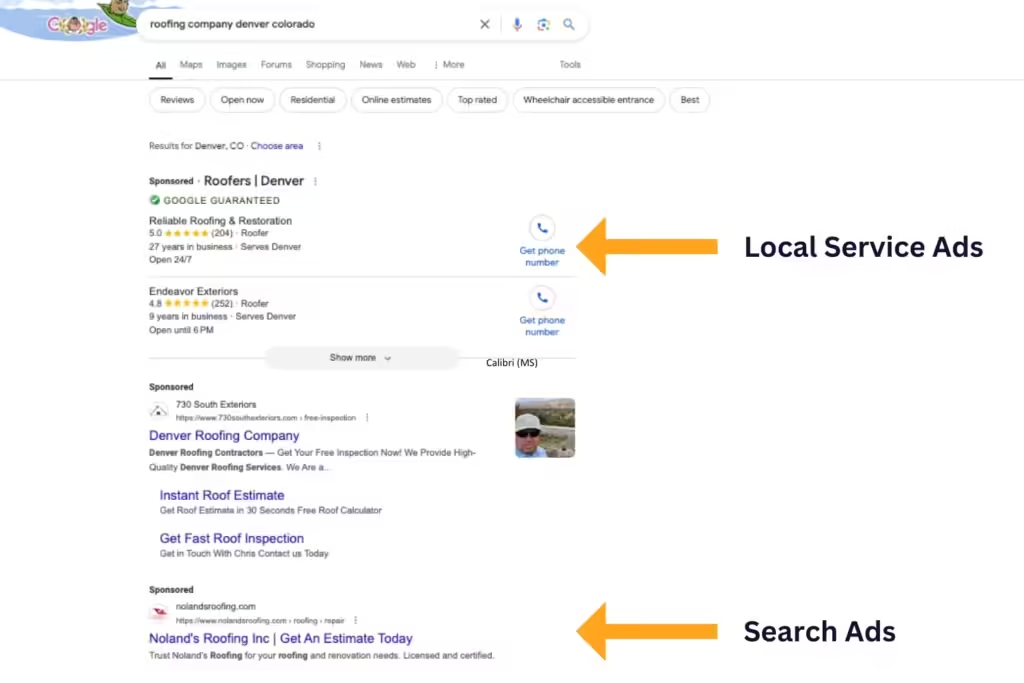
Another key difference between LSAs and Search Ads is their ad locations. LSA ads are placed above the SERPs and in Google Maps. They align your SEM and local SEO marketing strategies to advertise your business and generate leads from hyper-local audiences.
Search Ads require keyword bidding for your ad to be placed at the top of the SERPs as a “Sponsored” search result. While they also align SEM and SEO, it’s not hyper-localized compared to LSA ads and is placed first in SERPs (with keyword bidding), not above them.
Since Search Ads require higher budgets for keyword bidding to outrank competitors and be in the first spot within the SERPs, it may not be practical for businesses with lower ad budgets and local search needs. They’re best if your ad campaign goals are to increase online visibility for broader audiences and can afford competitive keyword bidding.
LSA ads are best if you want a guaranteed above-SERP placement for local audiences only without the larger budget requirements for keyword bidding.
Ad Payment Structures
A main differentiating factor between Local Service Ads vs. Search Ads is their payment structures.
As mentioned above, Search Ads use a pay-per-click (PPC) model, where you’re charged each time a user clicks on your ads.
LSAs ads use a pay-per-lead model, where you’re charged each time someone contacts your business through your ad. LSAs are typically more affordable and generate greater ROI because many users can click on Search Ads and not contact you, and you still must pay for them.
Based on their different payment methods, choosing between LSAs and Search Ads depends on your ad budget and campaign goals.
If you’re a locally based service provider and want to attract customers in your area, LSA ads are more cost-effective. You only pay for the leads you acquire, and you can even set a weekly budget to stop showing your ads after reaching your limit.
Search Ads are the better option if you want to increase brand awareness for wider audiences outside your area, bigger ad budgets, and easier campaign scalability.
Google Guarantee Badge Feature
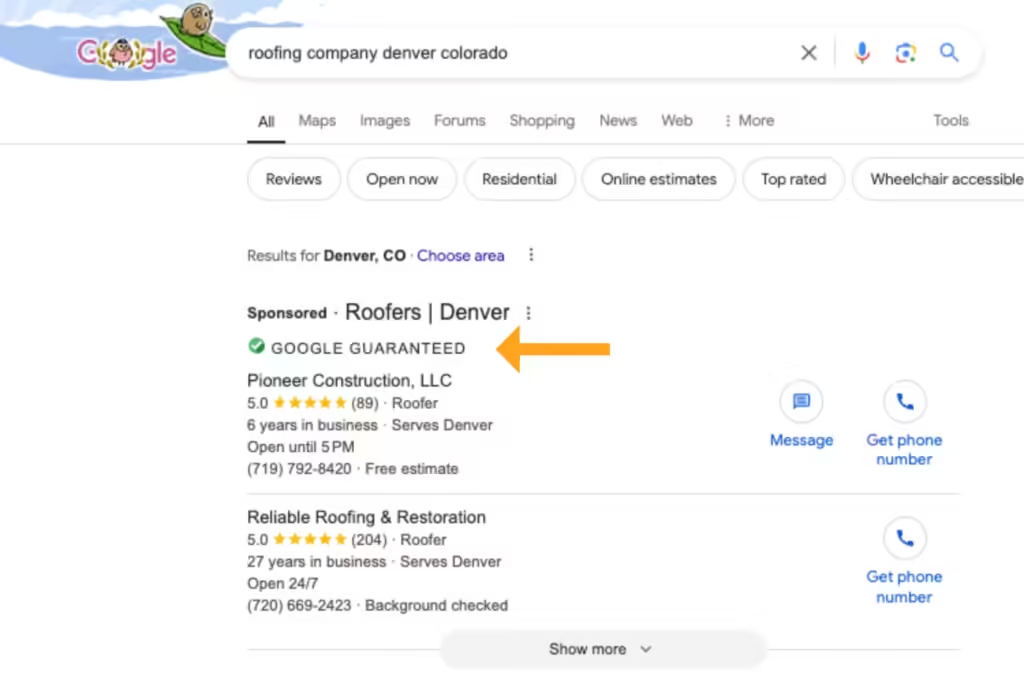
The Google Guarantee badge is an exclusive feature for LSA ads. When you display your LSAs, a green checkmark is displayed next to your business name. This feature is valuable for consumers because it shows that your company has passed Google’s screening and verification process.
If consumers aren’t satisfied with your localized services, they can submit a refund request, and Google will reimburse them based on potential factors. Service cancellations and delayed provider responsiveness are examples of when Google won’t reimburse consumers.
However, it gives your target audiences better peace of mind when your brand establishes its credibility and trust with Google.
Automated Keyword Research
When creating Local Service Ads vs. Search Ads, there are also exclusive automated keyword research features, depending on which one you choose. LSA ads do keyword research for you, while Search Ads require you to do it yourself.
For LSAs, Google will generate target keywords based on the information you enter upon setup. After you submit your business type and products/services from their list of options, they’ll prompt suggested keywords to use in your LSAs that you should rank for.
However, you must verify that the keywords Google provides for your LSA ads apply to your brand. If the search queries they automate have the wrong search intent or are irrelevant to your business, they may not generate the right ad results or qualified leads.
Because Search Ads require you to perform keyword research, you gain more control over which search queries you target in your campaigns. However, you must understand how to conduct keyword research the right way.
Again, if you use inapplicable search queries for your brand or keywords with the wrong search intent, you may not generate profitable ROI for your Search Ads.
Ad Copy Requirements
Did you know LSA ads don’t require you to write copy? These types of Google ads only display your Google Business Profile name, contact information, business hours, review ratings, and image.
In contrast, Search Ads require copywriting. You’ll decide on the ad’s title, body text, visual creative, and call-to-action button.
If you prefer customized ad campaigns, Search Ads are the best option because you can control the copy’s quality and what’s displayed to your broader audiences. If you prefer simpler ad campaigns to local audiences and have a strong reputation management on your Google Business Profile, LSAs can be the better choice.
Google Ad Industry Qualifications
LSA ads are only available for specific local businesses, industries, and job roles. Not every company can access them due to Google’s specific LSA ad qualifications.
Examples of eligible businesses for LSA ads include:
Auto body shops
Car wash and detailing services
Dentists
Plumbers
Tutors
Veterinarians
Search Ads don’t require industry eligibility, allowing any business to access this ad platform.
Navigate Google Ads with Confidence: Let Our Experts Select the Best Ad Platforms for Your Business
Still can’t decide if Local Service Ads vs. Search Ads are better for your business? Don’t take a leap of faith with your ad budget. Let us help you navigate Google’s comprehensive ad platforms for you.
At Reach Marketing Pro, we have extensive experience with Google advertising, including LSAs, PPC, and SEM, and aligning these campaigns with your SEO for optimal results.
We also have in-house copywriting and graphic design services to create effective ad campaigns for you. Our team will continuously monitor your ads with monthly in-depth reporting to measure success with complete transparency from start to finish.
Is your business not seeing optimal results in your PPC campaigns? Then, you may be choosing the wrong ad format. Whether it’s unprofitable bidding strategies or declining conversion rates, dynamic display ads can maximize your PPC campaign results more than static ads.
From continuous ad optimization to rich user data integration and maximized conversions, learn why dynamic ads are the best choice for PPC.
What Are Google Display Ads?
Google display ads are a type of PPC advertising within the Google Display Network. It allows you to reach global potential customers beyond Google Search on all Google-owned platforms, including YouTube and Gmail.
How Does Google Display Ads Grow Marketing Results for Advertisers?
The benefits of display advertising are streamlining and optimizing your PPC campaign creation process to maximize results. It generates ad formats, bidding strategies, and advanced audience targeting through various automated features based on first-party consumer data.
What Are the Differences Between Google Dynamic vs. Static Display Ads?
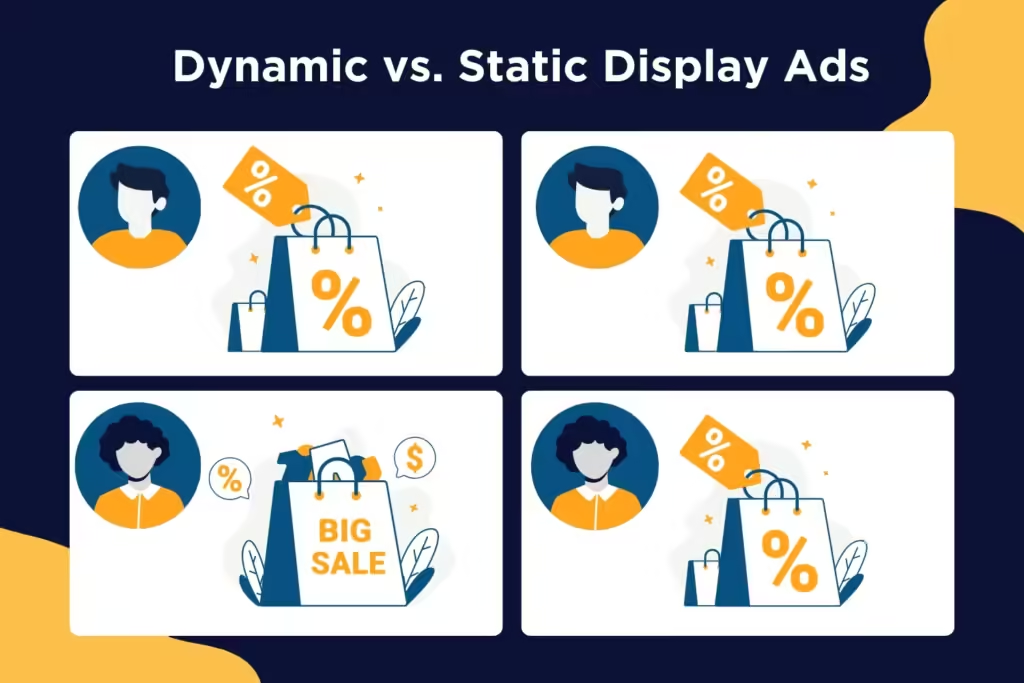
Google’s dynamic display ads update your PPC campaigns over time based on your target audience’s behavior. They’ll change the visuals, prices, or products/services shown if users browse similar content on your website or other platforms. They’re designed for specific audiences and ad campaigns.
Static display ads don’t update your PPC ads as they’re designed for general offers for brand awareness. It requires more manual campaign maintenance and strategy development without automation.
Benefits of Dynamic Display Ads in PPC: Why They’re the Better Choice Over Static Display Ads
Below are the top benefits of using dynamic ads on Google and how they can improve your PPC strategy over static ads.
Enhanced Personalization
Google dynamic ads offer more personalization based on your unique user data. Utilizing a data-driven approach, like using the exact products or services users were looking at on your website in your ads, brings more relevancy to your target audience. It strengthens your PPC strategy with high-quality first-party data as your foundation.
User interests based on ad text, image, and video assets with specific audience segments
User demographics, like income, age, and gender
Search queries
Used platforms and browsers
Website interactions and history
For example, you can tailor ads like discounted products for previous customers to improve customer lifetime value and first-time offers for new audiences to increase customer acquisition.
Dynamic display advertising optimizes your audience targeting and customizes your PPC campaigns by applying relevant user data feed to your ad group. It unlocks critical touchpoints in the buyer’s journey to drive more conversions through their accurate insights. That way, you can simplify your PPC campaign management and strengthen its performance easily.
Since static display ads require you to apply user data yourself to segment audiences, it doesn’t guarantee relevancy as display ads do. You may create an ad campaign that focuses on brand awareness, and it’s shown to users already familiar with your company.
According to Think with Google, 61% of people expect brands to personalize their experiences based on individual preferences and needs. In a competitive and oversaturated digital marketplace, reducing your wasted ad spend with customized PPC campaigns is crucial.
Automated Ad Formats
A key benefit of display campaigns in PPC dynamic ads is having automated ad formats. Google generates how your ads should look based on user behavior. It skips the manual process of figuring out which ad design is best, providing more accuracy and relevancy through data-driven predictive technology.
Google will design a media plan that maximizes your PPC budget with recommended visuals and messaging. They’ll even guide you through campaign launches with their first-party data for optimal results.
With AI-powered dynamic ad campaigns, you can strengthen your PPC performance for more conversions and budget value because the data comes directly from your customers—and it’s all done for you.
While static display ads give you full creative control, they require you to design the ad layout and have limited dimensions. You must analyze your consumer’s comprehensive data, which may result in choosing the wrong products or services to showcase. Because static display ads don’t have generated ad formats, you risk creative mistakes users aren’t interested in.
Optimized Bidding
Dynamic display ads optimize the best bid for each impression and how much you pay for each impression and conversion through automation. The Smart Bidding feature maximizes your PPC’s ROI since it automatically adjusts your bids over time based on your highest-performing audiences—achieving 18% more conversions at a similar cost per action!
Additionally, dynamic ads are more effective at retargeting, which leverages lower bidding budgets. It shows your ads to people who previously viewed your website’s products or services, allowing you to match with ideal consumers who showed the most interest.
Since static display ads don’t change over time, your competitor can outbid you more easily if it’s generating successful results. You may need to increase your bid to show up at the top of the SERPs or in certain ad placements to compete, costing you more of your PPC budget.
Maximum Conversions
Since static display ads are designed for top-funnel users, like brand awareness, it typically leads to lower conversion rates. Dynamic display ads are best for targeting middle and bottom-funnel users who are comparing options or ready to buy—leading to an average higher conversion rate of 37% than static ads!
Simplified Scalability
Dynamic PPC display ads can instantly create an unlimited number of campaigns for you that are tailored to your target audiences. Because Google’s AI and machine learning advertising tools generate dynamic ads for you, it simplifies the scalability process based on their algorithms.
Static display ads are harder to scale because they have a manual process. It requires you to create individual ads without automation, taking longer and more resources to execute. If you plan to launch several PPC campaigns for various clients and segment audiences, dynamic ads are more efficient and effective.
Maximize Your Advertising Budget & Results with Professional Digital Marketers
Although dynamic display ads help you learn what works best for your target audience, they still require time and resources to execute efficiently. You must create ad graphics, engaging copy, profitable budgets, and more. Let us do the heavy lifting for you.
At Reach Marketing Pro, we have extensive experience maximizing PPC budgets and optimizing ad strategies to generate greater results, including SEM and SEO. We’re a full-service agency of PPC marketers, graphic designers, and copywriters with the expertise to guide you from ad campaign strategy to launch.
We combine a mobile-first approach with data-driven keyword research to strengthen your PPC campaigns. Our team will continuously monitor your display ads with monthly reports to track their success.
Grow your business effectively with professional PPC services or contact us for help getting started today!
As a business owner, your SEO content marketing ROI can take some time, but it’s necessary in an oversaturated digital market. Depending on various factors like content quality, output, and competitive landscape, seeing the ROI of SEO can take four months to one year on average.
However, it can become your brand’s highest ROI driver over time with consistent content creation and performance monitoring.
Learn why investing in content marketing is crucial for your bottom line and why it’s worth keeping your SEO ship sailing.
Content Marketing ROI: Why Creating Unique SEO Content Matters for Your Bottom Line
SEO content marketing is more than just blogs. It also includes website copy, like your home page, product/service category pages, and Google Business Profile. Business owners often understand the importance of SEO content. However, they commonly make mistakes when creating it, like repeating the same content without added value or proper optimization.
Here’s why creating unique content is essential to maximize your SEO ROI and how to optimize it for better results.
Unique SEO Content Optimizes Your Online Visibility
As mentioned above, companies create SEO content because they know they must do it to remain competitive. But it’s not uncommon to find them repeating the same information already out there—leading to lower SERP rankings and SEO ROI because they’re not providing additional value.
To increase your content marketing ROI, you must create unique content to stand out in the SERPs. Even if you’re covering the same topic, use your expertise to add a different perspective or create new media your competitors aren’t doing, like industry expert quotes from your podcast or creating custom infographics that visualize your information.
High-Quality SEO Content Builds Your Brand’s Credibility
You’ve likely heard of the term “high-quality content.” But, what does that mean exactly, and how does it apply to SEO? High-quality content must follow Google’s E-E-A-T guidelines to achieve optimal SEO results.
E-E-A-T stands for Expertise, Experience, Authoritativeness, and Trustworthiness. It’s Google’s content framework designed to provide more relevant results when users search for information online.
Low-quality content like no external links, lengthy paragraphs, and disorganized heading structures negatively impacts your SEO. Remember, you’re still writing for humans, not just search engines. If your content is hard to read, over-optimizes keywords unnaturally, or repeats the same information as your competitors, it’ll hinder your SEO performance.
Creating E-E-A-T content helps establish your company as an authority in your niche—which, in return, builds brand credibility and trust. It shows your brand invests in quality SEO content and prioritizes being a valuable resource for users to reference.
When 81% of consumers nowadays need to trust a brand before they buy from them, it’s critical to earn that to maximize your content marketing ROI.
High-Performing SEO Content Generates Website Leads & Conversions
A recent Forbes study found that 74% of companies boosted their lead generation from content marketing alone. They also reported businesses can increase their conversion rate six times higher than their competitors with content marketing.
In addition to creating quality E-E-A-T content, it should also be actionable. Encouraging users to take action on your content can generate more website leads and conversions, not just organic traffic—which can promote the highest ROI!
How Do You Measure SEO Content Marketing Success?
Measuring SEO content success depends on your company’s goals and investments. You may have different KPIs, like expanding your market reach as a startup or driving more sales as an e-commerce brand.
Additionally, you’re probably investing in SEO platforms, analytics software, graphic design services, and content management systems (CMS) that impact your ROI calculations.
Regardless of your business objectives and SEO tools, below are the top metrics used to measure the ROI of content marketing and how to optimize your content for them.
Organic Website Traffic
Generating organic website traffic is one of the main purposes of SEO content marketing. It measures your content’s success by demonstrating how many people came to your site because of it. It’s a primary source to get more users to your site through various pages.
Ways to optimize your SEO content for organic traffic include:
Use the right keyword search intent to provide valuable, relevant content (Ex: transactional intent for product pages and informational for blogs)
Optimize your content’s metadata for Google to crawl/index easier and promote audience discovery when they search with relevant search queries (Ex: target keywords in meta descriptions, headings, page URL, etc.)
Design high-quality infographics for comprehensive subject matter to strengthen your content’s readability and brand recognition
Leads Generated
The number of leads generated from your content measures how influential it was in encouraging users to take action. Whether it’s downloading your free guides or submitting a contact form on your service page, increasing your content’s engagement attracts more potential customers.
Ways to optimize your SEO content for lead generation include:
Implement different linkbuilding strategies beyond cold emailing to boost your site’s Domain Authority and brand credibility (Ex: social media shoutouts, guest bloggers, email newsletter mentions after industry conventions)
Cross-promote your content on social media and Google Business Profile to capture leads in multiple locations
Send non-spammy email newsletters of your content to loyal and past customers who find your brand valuable
Conversion Rate
Generating organic traffic and leads with your content won’t matter with a declining conversion rate—especially when striving for a profitable SEO ROI. It measures how effectively your content attracts visitors and converts them into customers.
Ways to optimize your SEO content for conversions include:
Add valuable CTA buttons, like free consultations or software demos, throughout your content sparingly to prevent over-spamming
Use relevant minimal pop-ups to help guide users along their buyer’s journey without being too aggressive
Link to your email newsletter sign-ups to capture strong lead contacts and nurture them into conversions
Bounce Rate
Bounce rate measures your SEO content’s ROI by how long it takes them to leave. If users aren’t reading or viewing your content because they’re leaving your site quickly, you can optimize it to encourage them to stay.
Optimizing your SEO content to reduce bounce rates is by making it more engaging and easy to navigate. You can embed how-to assembly product videos or write long-form content, so users spend more time on your page.
But one of the top reasons brands see their website’s bounce rate so high is poor user experience (UX). If your website has a slow page loading speed or is hard to view on mobile devices like small text, it will negatively impact your content performance from users bouncing because it’s difficult to navigate.
You can strengthen your content’s UX by compressing large file images that are slowing your page load speed and optimizing it for mobile with responsive website design layouts to adjust how it looks on any device.
Sales/Revenue
Your SEO ROI is technically calculated by the profit or your sales/revenue after your content marketing expenses:
(Return – Content Investment) / Content Investment x 100 = ROI %
This formula measures content marketing success because it calculates if your ROI is profitable. If content ROI isn’t profitable, double-check if you’re maximizing your SEO software platforms. You may have multiple tools that can be consolidated or aren’t utilizing offered features to the fullest, like content and keyword gap analysis from your competitors.
There are multiple ways to optimize your SEO content for revenue generation:
Aligning SEO and SEM Marketing: Boost sales by generating paid search traffic and ranking for transactional keywords for audiences who are ready to buy
Customer Testimonials Web Page: Embed your Google Business Profile reviews or Instagram feed’s social proof to build your brand’s credibility with stronger reputation management
Free Trial CTAs: Offer something valuable that doesn’t require much of your audience in return to motivate them to submit their contact information
Maximize Your Content Marketing ROI with an SEO Digital Marketing Agency
Creating valuable SEO content that supports your bottom line effectively is a consistent process and takes time. As a business owner, you have plenty on your plate already, with managing your company and being an expert in your niche. If your brand invests in SEO content marketing, you can better maximize your budget with expert marketers.
At Reach Marketing Pro, our team has extensive experience in SEO content marketing for various verticals. From developing keyword-research-driven strategies to conducting competitor SERP analysis for content opportunities and creating custom visuals to strengthen its performance, we can do it all.
We’ll also provide in-depth monthly reporting to measure your SEO content strategy’s success and ensure they generate profitable ROI for your revenue goals.
Don’t create content for the sake of doing it. Get optimal results with your investment instead.
Whether you’re a dealership or auto parts retailer, investing in automotive SEO is essential to your bottom line. It helps your business show up on Google when consumers search for relevant information, services, and products you offer online.
If you aren’t optimizing your SEO marketing strategy for search engines, your brand is basically invisible online to users you want to reach, especially in an oversaturated digital market. You may already be creating SEO content or utilizing Google Business Profile.
But, are they generating the results you’re looking for?
Auto dealers often make mistakes with their SEO marketing, like using the wrong search intent for blogs or keyword stuffing their websites—which is common! You’re not expected to be an SEO expert. But as a result, you may not see high keyword rankings or web copy that doesn’t convert to sales.
Our complete automotive SEO marketing guide walks you through the best practices and mistakes to avoid. That way, you can better drive your dealership to the top of the search engine results page (SERP).
A Guide to Automotive SEO & Content Marketing to Drive Traffic for Your Dealership
Automotive search engine optimization (SEO) has many facets, including content marketing, local SEO, and more. However, they all share the same focus—generating traffic to your website by strengthening your online visibility. Some SEO automotive marketing strategies have additional end goals, such as converting paid search ads to sales.
Below are the SEO essentials your auto brand must know to meet your SEO goals effectively.
Invest in Local SEO for Your Local Dealership
SEO for the automotive industry is especially crucial for local dealerships and auto part retailers with physical stores. You need to reach local target audiences while standing out from competitors nearby.
That’s where local SEO comes in.
You know local consumers read your reviews and check how you compare to the competition to see if your online reputation is trustworthy. While you may have a Google Business Profile (GBP), it may not be optimized fully or marketed correctly to target local audiences.
Some automotive SEO tips for GBP include:
Optimizing your business description and image file names with target keywords
Creating weekly posts to cross-promote your blogs
Responding personally to all reviews over template-based responses, including your negative ones
Diversifying your GBP posts’ call-to-actions (CTAs), like “Learn More” or “Sign Up”—people aren’t always ready to “Buy Now” especially vehicles since they’re a larger purchase
Create Valuable & Optimized Automotive Blog Topics for All Funnel Stages
You know each customer is unique. Every driver isn’t always car-savvy. Some may only know basic information to look for when car shopping, like vehicle history, entertainment features, and test drive comfort. Others may have more technical knowledge, like understanding the powertrain they want for a work vehicle.
A vehicle is a significant investment. Drivers nowadays are conducting preliminary research to ensure they’re making the right choice in their car purchase. Creating blogs for users in all funnel stages is key to meeting them where they are in their buyer’s journey by providing valuable, relevant content.
The three funnel marketing stages with automotive blog topic examples are:
Top-of-Funnel (TOF): How to Buy Your First Car, # Mistakes to Avoid When Purchasing a Used Pickup—for users who need more guidance on basic vehicle information
Middle-of-Funnel (MOF): 2023 vs. 2024 Jeep Wrangler: What’s New, Best Light Duty Pickup Trucks of 2024—for more educated users who need help deciding between options
Bottom-of-Funnel (BOF): Auto Part Spotlight: Duramax’s New Diesel Engine, Customer Success Story, New Test Drive Videos—for users who are ready to buy
In addition to valuable funnel content, you must optimize all blogs for users and Google to find online, including:
Adding backlinks from reputable sites with high Domain Authority to be a trustworthy resource in your industry’s niche—arguably the top keyword ranking factor in SEO!
Using target keywords throughout the body and headings naturally to prevent keyword stuffing
Following the right keyword density per your blog’s word count to make it readable for users
Including internal links to other blogs and web pages naturally to prevent over-optimizing
We mentioned common SEO mistakes auto dealers make, like using the wrong search intent in their blogs. Search intent means exactly that—the intent behind a user’s search.
The four types of search intent with automotive keyword examples are:
Informational (TOF): car financing tips, used car buying mistakes to avoid, etc.
Commercial (MOF): best electric vehicles 2024, tesla cybertruck vs. gmc hummer ev, etc.
Navigational (BOF): auto parts stores in denver co, car dealerships near me, etc.
Transactional (BOF): used pickup trucks for sale, hybrid cars for sale, etc.
If a user searches for “vehicles for sale in manhattan” and you create a blog topic on “How to Find the Best Vehicles for Sale in Manhattan,” that’s not what they’re looking for. They’re searching for Manhattan vehicle product listings, not a blog with tips on finding one because it’s a transactional search intent.
You can verify a keyword’s search intent by simply typing it into Google and checking the SERPs. Do the SERPs show all blogs or product pages? While some keywords may have mixed search intent, if the SERPs don’t show blogs, it’s not the right search intent for your blog content.
If you don’t know where to begin with your keyword research, start by conducting a competitor SERP analysis. Enter a keyword into Google and perform a content audit with your SEO software of the top-ranking competitors. Content audits allow you to see which keywords they’re using and uncover content opportunities where you can outrank.
For example, you might find many question-based keywords related to a blog topic you’re writing about. You can take this opportunity to create an FAQ section to rank for those keywords if your competition didn’t make one.
Optimize Your Website for Search Engines & Users
As mentioned earlier, another common mistake auto dealers make with their SEO is keyword stuffing their websites in hopes of higher rankings. This practice can do the opposite and harm your keyword rankings instead.
Google prioritizes E-E-A-T content (Experience, Expertise, Authoritativeness, & Trustworthiness) to deliver more helpful, relevant information when searching for information. If your website is over-optimized with keywords, it makes your content’s readability less enjoyable and weakens your user experience (UX).
Remember, you’re also writing for humans, not just search engines.
Other common SEO mistakes include not optimizing your site for mobile devices or creating a separate website for your blog. A recent study shows that 33% of car shoppers use mobile devices to research vehicles online, and 60% of them would call a dealership from a call extension link.
Additionally, hosting your blog elsewhere is basically like having two different websites. Automotive SEO is comprehensive enough. Optimizing for two sites creates more challenges, and your end goal is to drive more traffic to your main site.
On-page SEO is optimizing what’s on your website pages, like keywords and internal links.
Off-page SEO is optimizing what’s off your website pages, like backlinks and social media.
Technical SEO is optimizing what’s behind your website’s page, like loading speed.
While this may seem like a lot of information to digest, don’t get overwhelmed with this part. SEO tools and software platforms, like SEMRush and Ahrefs, automate website optimizations for you. Through website audits, they’ll flag areas of your site needing optimization, which types, and how to do it.
Some automotive SEO tips for website optimizations include:
Implement a search bar with filters on your parts page so users can easily find and shop for products
Add QR codes to your specials page so consumers can download coupons and redeem limited-time offers faster
Write web copy for your services page so potential customers know what’s included in each of your offerings
Optimize your website for desktop and mobile to prevent people leaving from poor user experience (UX), like small text on smartphones and no site breadcrumbs
Include target keywords in your metadata, like headings, meta descriptions, and page URLs, for Google to crawl (discover) and index (store) easier
Website optimizations are about making it easier for your users and Google to discover online.
Promote Your Inventory with Google’s Vehicles for Sale & Vehicle Listing Ads
In addition to generating organic traffic, auto dealer SEO should promote paid traffic to your website. Also known as search engine marketing (SEM) or Pay-Per-Click (PPC), it boosts your search engine rankings through paid search ads. However, aligning your SEO and SEO marketing strategies can produce optimal results for automotive brands.
Remember, some users are ready to purchase a vehicle (transactional intent) or are comparing local providers before purchasing (commercial intent). The difference with SEO is that it focuses more on informational search intent and research-oriented queries, like “car buying tips.”
Combining SEO and SEM allows your brand to cover all relevant vehicle-related keywords consumers use when searching online. And, Google makes it easy for automotive brands to do so with its Vehicles for Sale and Vehicle Listing Ads.
The Vehicles for Sale feature allows auto dealers to integrate their inventory directories directly into Google’s search results via your Google Business Profile. Users can apply search filters and browse your inventory outside your website to learn more about a specific vehicle. It also links back to your site when they’re ready to buy.
The Vehicle Listing Ads feature matches your vehicle inventory data feed within Google Merchant Center to provide a personalized shopping experience via advertising. Google matches specific car details users search for by displaying relevant vehicle ad listings. They enter the features they want, like location, mileage, and price, and an ad listing is shown.
Monitor Your SEO Marketing Strategies
While everything we mentioned is auto dealer SEO best practices, that doesn’t mean it’ll always generate the results you want. Google’s algorithm and car consumer demands are consistently changing—especially with various technologies disrupting the SEO landscape, like AI content writing and Search Generative Experience.
Continuously monitoring your SEO marking strategies helps you measure their success with data-driven insights.
Key SEO metrics to track include:
Organic Traffic: Number of users who entered your site without paid search
Keyword Rankings: New, improved, and lost rankings
Clicks: Number of users who clicked on your website
Impressions: Number of users your website was displayed to
New Backlinks: Number of websites linking back to your site from theirs
Top Pages: Website pages that generated the most traffic
Local SEO Visibility: Number of calls, clicks, and search views of your Google Business Profile
Indexed Pages: Number of pages that Google indexed (stored) in their database, including those that couldn’t be indexed
While KPIs will vary depending on your SEO goals, you can find these metrics in Google Analytics, Google Search Console, and SEO platforms.
Turbocharge Your Dealership’s Online Traffic with an Auto SEO Agency
As an auto dealer, driving sales and investing in SEO can be time-consuming. You have to manage your company and your trade while understanding the importance of SEO.
Let our automotive SEO experts do the heavy lifting for you. At Reach Marketing Pro, we have extensive SEO experience in the automotive industry. We’ve worked with used and branded car dealerships and auto parts brands to enhance their online presence for their bottom line.
From website designs and optimizations to multiple GBP location management and content writing, we can supercharge your SEO efforts for optimal results. We’re fully transparent with in-depth monthly SEO reporting to continuously measure your strategy’s success.
What makes us stand out is our tailored automotive SEO services.
Our Dealer VIP Program boosts sales for your vehicles in production like SEO content writing for the customer reservation process and designing custom home page slider graphics.
Our Absorption Boost package streamlines your customer’s buying process, like mobile QR codes to scan specials easily within OEM and Google’s guidelines.
What is CDP? And, exactly how can it improve your PPC marketing? CDP stands for customer data platform. As a general overview, it’s a tool designed to organize your customer’s data from various platforms. It can strengthen your PPC efforts in various ways because you’re utilizing data-driven customer insights to develop your ad campaign strategy. Here’s how.
What is CDP?
As mentioned above, a customer data platform, or CDP, is a database that stores your customer’s data. It’s used to optimize your customer data management through centralization, data security, and customer data compliance.
What Does a CDP Do?
Depending on the software, some customer data platform capabilities have more than others. Generally, CDPs collect first-party customer data, including structured, unstructured, online, and offline. These sources are typically from your CRM, email, social media, in-store transactions, loyalty programs, and more. However, CDPs do more than collect and store customer data. They also organize them with segmentation and analyze them for you to create your ideal buyer personas and tailor your marketing strategies with data-driven customer metrics.
Benefits of a Customer Data Platform for PPC Marketing
CDPs can enhance your PPC campaigns because it’s designed for marketing. Here are the top advantages CDP advertising offers businesses:
Personalizes PPC Campaigns
CDP advertising personalizes your PPC campaigns through customer data segmentation. CDPs categorically organize customer data through behavioral, transactional, and demographic metrics to create unique customer profiles.
CDP examples of customer data categories include:
Spend groups, like average order value and monthly total spend
Location, birth date, and gender
Email open, click, and conversion rate
Last visited, purchased, and abandoned product
With a deeper understanding of your customer’s journey, you can customize your PPC ads to provide more value based on CDP data.
You can launch a PPC campaign to a segmented audience who never bought from you before to attract new customers. Then, launch another PPC campaign to another segmented list of past customers who haven’t purchased in a while to re-engage with them and increase CLTV. CDP advertising allows you to create more relevant ad content by optimizing your audience targeting for you.
Streamlines Bidding Strategies
CDPs make it easier for you to develop effective bidding strategies to improve the customer experience. Since CDPs also analyze customer data, your business can better utilize it for a more profitable ROAS.
You can calculate bids more accurately through automated bid management features. CDPs use AI and machine learning to analyze bidding algorithms and achieve greater ROAS based on the highest conversion value opportunities.
CDPs utilize prediction models and first-party data to display which users have a higher probability of converting. In return, you can leverage value-based bidding for greater profit. Some CDP platforms even integrate with big management platforms to centralize your advertising and marketing data into one place.
Improves Retargeting Campaigns
CDPs improve retargeting campaigns by connecting customer data to advertising data. They reduce average CPC for irrelevant audiences with access to real-time segmented customer data.
You’ll know which customers engaged more with your prior ads, the types they interacted with the most, and which advertising channels drove the most sales to strengthen your retargeting strategy. Some CDPs even automate activations to make advanced retargeting lists for you.
That way, you have data-driven strategies for retargeting campaigns to convert one-time buyers into repeat customers more effectively.
Delivers More Accurate Customer Data
CDPs constantly update their database to deliver the most accurate data than other sources because it’s collected directly from the customer. They enhance your customer journey reporting with quality and centralized data.
On average, 47% of new data collected by businesses have one or more critical errors. This same report showed that businesses receive customer data from 28 sources! With many decentralized data platforms, it risks your data accuracy, negatively impacting your paid search marketing efforts.
When you better understand your customer’s behavior and spending habits more accurately, you can better predict them to tailor your PPC campaigns and expand your market reach.
Maximize Your ROAS & Paid Search Results with Professional PPC Marketers
While customer data platforms do the heavy lifting in your paid search strategies, you can maximize your ROAS with professional PPC marketers. At Reach Marketing, we understand it can be challenging to utilize comprehensive CDP data effectively with many metrics available.
Our PPC team has extensive paid search experience to generate optimal results, including SEM keyword research, bid adjustment, A/B testing, and ad conversion tracking. We’ll continuously monitor your PPC marketing strategy with monthly reports to measure success and benefit your long-term business goals.
As a branded or used car dealership, you understand the importance of automotive social media marketing. But are you generating the results you’re aiming for? Dealership owners commonly make the mistake of posting on every social platform just to do it without data-driven metrics to develop their strategies, leaving them with little to no ROI.
Here’s a complete guide to social media marketing for car dealerships with content ideas to drive more sales.
A Guide to Automotive Social Media Marketing: Content Tips to Increase Sales
According to the CMM Council, leveraging social media marketing in the automotive industry more strategically can increase leads and sales. They reported that using natural language, big data analytics, and positive reputation management can deliver more meaningful social content based on your customer’s buyer’s journey.
Car shoppers aren’t always ready to buy immediately and don’t always want a “car for sale” in their feeds that feels spammy.
They also want personalized vehicle recommendations, to read dealer reviews, to get coupon offers, and even to engage with their favorite automotive brands’ social channels. In addition to transactional posts, consumers want informative and comparative car content before making a major investment.
CMM Council states that 38% of consumers will consult social media before buying their next vehicle, and 23% will use social media to communicate their purchase experience. By creating social media content at each marketing funnel stage, you can meet your target customers where they are in their purchasing process to generate more qualified leads.
Below are some automotive social media marketing strategies to consider and how they can benefit your bottom line.
Google Business Profile: Vehicles for Sale & Vehicle Listing Ads
Although Google Business Profile isn’t considered social media, it’s similar because you’re creating a profile online and sharing updates via that profile. It’s like a social media profile that lives in Google Search and Google Maps.
Vehicles for Sale is a module on your Google Business Profile that uses your dealership’s inventory to showcase specific listings to match a user’s search queries. Consumers can search and apply filters to navigate your inventory outside your website and learn more about it directly on Google.
Then, when they’re ready to get the vehicle they want, it’ll direct them to your dealership to buy it. This feature supports your local SEO because your specific vehicle listings can appear in related search results when local consumers are looking for them.
Vehicle Listing Ads
Vehicle Listing Ads is a feature you set up after you create an inventory data feed within Google Merchant Center. Google matches these details to potential buyers, utilizing the relevant vehicle makes and models they’re searching for.
It’s like a personal shopping assistant for car buyers. They can enter their desired features, like location, make, mileage, and price. Then, relevant Vehicle Listing Ads are shown, including dealerships that can ship it to them.
Google Business Profile Reviews & Customer Testimonials
Social proof can make or break car dealerships, especially as a local brand. Investing and maintaining your online reputation establishes trust for prospective car buyers by showcasing positive testimonials from real customers.
If you don’t have one already, create a Google Business Profile and ask happy customers to share reviews. Also, personally answer to the negative feedback that may occur over a template-based or no response.
Bad reviews are inevitable. But, you can control how you communicate and improve from them. Consumers will notice how you handle these.
Social Media Ads
In addition to organic social media content, creating ad campaigns is as crucial for auto dealers to increase lead acquisition and sales. When determining which social platforms to use, always conduct A/B testing for each ad campaign to see which type of content works first.
Also known as split testing, it sends different versions of your ad campaign to two audiences. We recommend only changing one element of your ad campaign instead of multiple to compare the results accurately. For example, you can use a single image ad for one group and an image ad carousel for another. Then, you can review which ad campaign had a better content performance to know which resonates best with your target audience.
You should also track KPIs and evaluate your ad’s monthly reporting metrics to see if your campaign is still working. If ad conversion rates are rapidly declining, you should re-evaluate your automotive social media strategy.
Now, let’s dive into the different social ad content ideas.
X advertisements with hashtag campaigns are an effective strategy to build brand awareness and attract new car buyers. In 2012, Audi launched a “#WantAnR8” X campaign to promote their R8 V10 model. It engaged the automotive community to win a free drive of their newest car by simply posting this hashtag on their accounts—receiving over 75,000 tweets!
Meta (Facebook) Ads
Meta makes it easy to create social ads for their family apps. You can create Facebook and Instagram ads all in Ads Manager. However, you must strategically create ad campaigns for each platform as they have unique formatting, audiences, and ad spend requirements.
Some car dealership social media ideas for Facebook ads are:
Facebook Canvas Ads: Use images and videos to showcase new car models or highlight the specific features your audience finds the most useful.
Facebook Lead Ads: Create retargeting campaigns for audiences who engaged with your previous ads to generate highly qualified leads.
Facebook Inventory Ads: Showcase your used, new, and vehicles in production inventories to sell cars faster when your audience knows where and when they’re available.
Some car dealership social media ideas for Instagram ads are:
Instagram Story Ads: Post video story ads that prevent users from swiping through, like contests for free one-year servicing or other prizes your audience finds valuable.
Instagram Feed Ads: Create ad copy that stops users from scrolling, like exclusive teasers for new vehicle launches or limited holiday campaign promotions.
Instagram Video Influencer Ads: Work with automotive influencers for video endorsements like “Get Ready with Me” to buy a car that takes them from their home to your dealership. Or videos of their online car shopping process with the car delivered to their home. This provides an immersive buying experience so consumers know what to expect when purchasing from you.
X (Twitter) Ads
TikTok Ads
Although you’re selling cars, you must remember that you’re selling to people, too. Using UGC of everyday people or influencer test drives and car walkthroughs/demos can drive more meaningful connections with your consumers. Their enthusiasm for the cabin amenities, infotainment features, and engine type gives a more visual ad experience.
LinkedIn Ads
LinkedIn ads are surprisingly showing success for auto dealers. Car buyers are likely working professionals, so meeting them on this platform can help them make a big purchase decision easier. You can maximize LinkedIn ad ROI with audience targeting, optimized budget allocation, and relevant content they find valuable.
According to Nielsen, effective LinkedIn ad marketing for dealerships includes:
Aspiration LinkedIn Ads: Displaying how your dealership meets and improves consumer needs, like non-luxury vehicle promotions, is 2X more likely to generate brand awareness.
Innovation LinkedIn Ads: Sharing new designs, like EV features and eligible government tax credits, is 2.3X more likely to increase customer recommendations.
Loyalty LinkedIn Ads: Showcasing your commitment to customer loyalty, like free annual services or anniversary discounts, is 47% more likely to drive favorability.
Pay-Per-Click (PPC) Ads
Did you know that 66% of automotive calls generated by search engines are from PPC search ads? This study shows that phone calls convert 10 to 15X more revenue than web leads. For this reason, creating PPC search ad campaigns with click-to-call buttons can strengthen its performance and click-through rate.
With many users browsing the web on mobile devices, you can personalize and streamline their car-buying process by enhancing the customer calling experience.
YouTube Ads
Entertainment is everything with YouTube video ads in automotive social media. Creating engaging ad visuals builds excitement with your audiences for new vehicle launches. Use engine revving audio, trending upbeat music, and large text so consumers can also experience your ads on mobile devices.
New Vehicle Launch YouTube or TikTok Videos
Build more hype for new vehicle release videos on YouTube and TikTok. You can make short and long-form videos on YouTube and then short-form videos on TikTok.
Some dealership social media ideas for YouTube and TikTok posts are:
New model year sneak peeks
New vehicle launch countdowns
Influencer new vehicle promos
Behind the scenes of design studios and testing facilities
These videos act as product spotlights, building excitement with potential customers for upcoming vehicle releases because they’re entertaining and informative.
Facebook Educational Content
Did you know that Facebook is the most popular social media platform consumers use to hear about new cars? A Facebook IQ study shows that people use their family of apps (Facebook, Messenger, Instagram, and WhatsApp) more for vehicle discovery than any other social network.
CMM Council also reports that 84% of car shoppers are on Facebook, and 24% use this channel as a resource for buying their next vehicle. Consumers want to learn more about what they’re purchasing and don’t want to buy blind—especially since cars are a big purchase.
That’s why creating educational automotive social media content on Facebook is crucial. It shows that your dealership is an authority in your industry by becoming a reputable resource for them to reference.
Some car dealership social media ideas for educational Facebook posts are:
Car buying tips
Financing guides
Model year and competitor automaker comparisons
Used car recommendations shared as blog post links
In return, sharing informative content increases your market reach and brand awareness by generating more organic traffic to your website.
Instagram Engagement Content
Automotive social media marketing is primarily visual-based, making Instagram a key platform for your business. In addition to image posts and Reels, you should create engaging content. Interacting with your audience is imperative because it increases your content’s engagement metrics and performance.
Some car dealership marketing ideas for engaging Instagram posts are:
Discount giveaways
Favorite used car brand polls
Personalized vehicle recommendation Q&As
Virtual showroom tour live streams
With Instagram engagement content, you gain valuable insights from your followers. You’ll discover which type of posts they interact with the most, allowing you to tailor your social strategy for better results.
Who better to get feedback from than the people you’re trying to reach?
X (Twitter) Trending Posts
Staying current on X by posting with trending hashtags helps you stay engaged with the automotive community. As a local branded dealership, you can join the discussion with your OEM’s posts. They might engage with your post by liking or reposting it, which increases its reach and impressions from their larger following while the topic is still relevant.
LinkedIn Thought Leadership Posts
As a dealership owner, acting as a thought leader in your field and networking with fellow dealerships can build your credibility. A leading presence resonates with potential customers when they see you’re a reputable seller and resource they can depend on.
A case study showed that Cox Automotive generated 61.8 million media impressions across major networks, including USA Today and Automotive News, with thought leadership marketing. They shared in-depth perspectives of the automotive industry, consumer preference projections, and interviews with fellow thought leaders.
Some car dealership social media ideas for LinkedIn thought leadership posts are:
Commenting on the automotive industry and car buying trends
Sharing current car shopper challenges and innovative solutions
Providing tips on ways dealerships can better serve their customers
Advising on ways OEMs can better support their local branded dealerships
Recapping automotive industry events and how other dealerships are succeeding
Create LinkedIn thought leadership content from an authoritative perspective using your own storytelling and success stories.
User-Generated Content (UGC) Reposts
UGC is one of the easiest and most effective automotive social media marketing strategies because you don’t have to create original content. Sharing posts from previous happy customers tagging you on their personal social media platforms is free-of-mouth marketing, and it generates up to 40% more engagement and 10% more dealership sales!
Additionally, consumers may see your UGC posts from their peers or non-influencers, acting as further social proof from someone they can relate to. Studies show that 92% of consumers trust recommendations from earned media and are 71% more likely to purchase from social media referrals.
Drive More Sales with an Automotive Social Media Marketing Team
With many social media and advertising platforms and consistent testing to ensure your strategies are successful, it can be challenging for dealership owners to navigate. You have to invest consistent time and resources while managing your business.
At Reach Marketing Pro, we have extensive experience in automotive social media management. We’ve worked with local branded and used car dealerships and know how to effectively create social content and ad campaigns on various platforms for your bottom line.
Our Dealership VIP Program helps streamline your vehicles in production pipeline to sell more cars before they arrive on your lot. We make it easier for your consumers to pre-order vehicles with user-friendly reservation pages, and we’ll even manage your Google Drive spreadsheets.
Our Absorption Boost services for auto dealers can also revamp your website with optimized designs on your service department center, car parts, and specials pages to boost your fixed operations. We combine stronger visualization, QR code functionality, and data-driven SEO to custom-build these web pages within your website and OEM guidelines.
No matter which service you choose, we’ll continuously monitor your marketing strategies with monthly reporting to ensure they generate results that support your long-term goals.
Need help deciding which service is best for your dealership?
You know the importance of creating graphics for your content. But is it effectively supporting your business’s content marketing strategy? Visuals play a crucial role in your digital marketing efforts. It’s how your target audience will first absorb your content immediately.
If the graphics don’t align with your unique brand, are overdesigned, or don’t connect with the written content it’s paired with, users will quickly scroll past it.
That’s where Canva comes in. You may already be familiar with or heard of it, as it’s one of the most used graphic design platforms because it’s user-friendly.
Whether you have a graphic designer, a content marketer, or doing DIY, here’s how to use Canva to create stunning graphics that support your bottom line—even if you’re not design savvy.
Canva: How to FAQs
Anyone can learn how to use Canva, regardless of whether you have prior graphic design experience. Here are some of the most FAQs if you’re new to this application.
What is Canva?
Canva is a graphic design platform for creating content visuals. You can use it for free or buy a Canva Pro subscription to access premium features, like exclusive stock imagery
Is Canva Easy to Use?
Canva is easy to use because it offers template-based designs to create graphics. Although you can design visuals from scratch, it’s designed to be user-friendly with its template editor-based application.
What is Canva Used For?
Canva can be used for vast types of content marketing, including social media posts, blog infographics, flyers, and paid ad creatives. However, it can do more than content marketing, like resumes, cover letters, and sales slideshows.
How to Use Canva to Create Effective Digital Marketing Content
Did you know that visual content receives 94% more views than text-only content? That’s why, you must create compelling visual content to increase brand awareness, market reach, and even SEO.
Here’s a step-by-step guide on how to use Canva for digital marketing to ensure it’s effective.
Understand Your Content Marketing Goals First
What are your content goals with the graphics you want to create when using Canva? Knowing the purpose of the visuals you’re designing is more than where they go. It should also support your content marketing goals.
For example, if you want to increase engagement on a social media post, consider visuals that interact with your audience more, like polls or giveaways. That way, you create the best graphics that support your content strategy.
Choose a Design Template
Once you create a Canva account, you’ll see a Home dashboard view. If you want to use Canva’s pre-designed templates, click Templates on the left-side navigation bar underneath Projects. They offer free and paid Canva Pro templates organized into various categories and subcategories.
These template categories include content types like social media, videos, and themed designs like holidays and industries. It even provides platform-specific specs, like Instagram image ad carousels and LinkedIn profile banners for you.
Customize Your Design Template
After selecting your template, next is customizing it—one of the most impactful design steps you take. While Canva’s templates are a solid foundation, you must tailor the visuals to your brand and target audience.
Don’t get overwhelmed with this part. Canva makes it simple to customize your graphics with its design tools on the same left-side navigation bar. You can drag and drop various elements, including photos or videos from their stock visual library, pre-designed headings, shapes, and more.
Customizing your Canva design templates should include:
Matching Your Branding Visual Guidelines
Update the template with your company brand colors, fonts, and logo. The templates or graphics will show a color palette used in the visual at the top of your design draft. You can even set up your branding guidelines under Brand Templates to save it for future designs. Brand Template includes your logos, brand colors, fonts, voice, and more.
Aligning Your Brand’s Messaging
Write with your brand’s tone, audience, and platform it’ll be on in mind. Does your business use humor like memes? Do you want a corporate tone with simple and professional graphics? Will these visuals be placed on your website’s home page or business cards?
Consider your company’s personality and where the graphics will go when creating text. That way, you’ll know how much to write, the font size to use, and how to develop your messaging.
Personalizing Your Visuals
Include original product, event, or staff images when possible. If you want to get creative, you can even draw on your graphics with multiple width points, highlighters, and colors. Other design features include free screen recorders for tutorials, photo filters, and image frames.
Download Your Created Content
Once your graphics are created and reviewed, the last step is downloading them. In the top right corner, click Share ⬆ and click Download ⬇ in the drop-down menu.
You’ll find seven download file type options:
PNG: Best for complex images and illustrations
JPG: Best for sharing
PDF Standard: Best for sharing documents and emailing
PDF Print: Best for printing documents
SVG: Best for web design and animations
MPG: Only for high-quality videos
GIF: Only for short clips with no sound
Using the correct download file for your graphics ensures they have the proper formatting.
Common Canva Design Mistakes to Avoid
Avoiding design mistakes can seem daunting, especially if you don’t know how to use Canva. Luckily, Canva offers help pages like its Design School, offering free lessons and courses on using its tools for the most effective designs. They also have a Learn blog where you can learn more tips on graphic design, branding, content marketing, and more.
In addition to Canva’s resources, here are some of the most common design mistakes to avoid when using this platform.
Overdesigning Graphics
Don’t overdo the elements in your graphics. It can harm your content performance if it’s over-designed.
Common overdesigning mistakes businesses make when using Canva include:
Too much text
Not enough white space
Overstretching images that become blurry
Font on dynamic patterned backgrounds
Too many font styles
Overdesigning graphics can confuse and overwhelm users because there isn’t a focal point. It can also harm your website’s content rankings due to poor image SEO practices.
With Search Generative Experience becoming more widely used, if Google can’t match your graphics with what users are looking for in Image Search from poor image quality, you can miss ranking and customer opportunities.
Share a collaboration link to test your graphic designs with your colleagues. Click Share ⬆ in the top right corner, next to your image file name. You can set specific user permissions to give people access to your draft if they want to hop in and design or share a Collaboration Link as a preview only.
Under-designing Graphics
Using Canva for graphic design shouldn’t just be copied and pasted if you want to create stunning visuals that support your content marketing strategy. While stock photos and pre-designed graphics work for some companies, you can gain a competitive advantage with brand awareness through personalized visuals.
Common under-designing mistakes businesses make when using Canva include:
No logos
No brand tone or personality
Misaligned branding design guidelines by using different fonts and colors
Not editing the template enough or at all
As one of the most popular content design platforms, people can likely spot a Canva graphic without customization. It’s like ChatGPT. You can spot pre-created content by the way it’s written or designed due to its template.
Remember, Canva is your canvas. You’re the creator!
Not Considering User Experience
If your audience has trouble reading your graphics on mobile or if the visuals are random for the written text it’s paired with, you risk poor user experience (UX) design in your content. UX design impacts all facets of content marketing, including website design, SEO, and conversion rates. You must make it easy for your audience to understand and absorb your graphics—or your competitors will.
Common UX design mistakes businesses make when using Canva include:
Hard-to-read fonts
Lack of contrasting colors to balance the visual
Not resizing graphics for various platforms
No clickable URLs when applicable (products, CTA buttons, etc.)
Mixed brand messaging—unclear what you’re selling, inconsistent imagery, etc.
Irrelevant stock photos or graphics
To prevent UX design mistakes when using Canva for graphic design, ensure you test them first. Send Collaboration Links to colleagues and have them check how the visuals look on desktop and mobile. Using graphics as part of the same series can maintain more brand consistency if you’re creating multiple ones within the same project.
Lastly, always resize your images if you’re using the same graphics for different platforms. With a Canva Pro account, you resize graphics instantly via the Resize & Magic Switch tool in the top left corner of your design draft.
If you don’t have Canva Pro, you can copy and paste your design into a blank project with the right specs, but it requires manual re-positioning of your graphic elements.
Elevate Your Content Marketing Graphics Beyond Templates
While Canva makes it simple to create visuals and customize their templates, working with professional graphic designers can elevate your content marketing strategy. Graphic designers offer more competitive positioning, brand consistency, and customization options with non-template-based applications with more design capabilities.
At Reach Marketing Pro, our graphic design services can personalize your visuals to enhance your content marketing further. We have extensive experience in web design, digital/print publications, packaging, motion graphics, original illustrations, and more.
Contact us to help bring your brand’s vision to life!