Tag: Technical SEO

  • Product Page SEO: How E-Commerce Brands Can Maximize ROI From Search to Sale

    Product Page SEO: How E-Commerce Brands Can Maximize ROI From Search to Sale

    As an e-commerce brand, investing in product page SEO is non-negotiable. Selling products is the core mission of your business. If your product pages aren’t properly optimized for search engines and users alike, they likely won’t perform successfully. 

    SEO for e-commerce product pages is essential to promote online visibly, clicks, and conversions from organic traffic. If shoppers and search engines can’t discover them or push them away from poor SEO, they won’t support your bottom line as they should. 

    Learn e-commerce product page best practices and how you can generate a greater ROI with SEO content optimization. 

    SEO for E-Commerce Product Pages: A Step-by-Step Guide


    Below is a step-by-step guide on product page SEO with common mistakes to avoid.

    Write Unique Product Page Titles & Descriptions

    A graphic people writing content on a page with a pencil

    SEO for product descriptions and titles requires unique copy for better search visibility, especially for e-commerce brands with large catalogs. Duplicate copy in your product pages can cause crawling delays from search bots because they don’t know which version to save in their database for indexing. 

    It also wastes your crawl budget, causing you to wait until you can request again, leaving your product pages undiscovered online. 

    More ways to improve your SEO product descriptions include:

    • Internal links to relevant product pages in the same collection to promote upselling and cross-selling opportunities
    • Backlinks from reputable sites that recommend your product to demonstrate trustworthiness and credibility
    • Not using the same product descriptions as the manufacturer’s website, as they’re not created for SEO or shoppers and keep your brand separate

    In addition to unique titles and descriptions, they should also provide an added value proposition. Instead of only explaining what your product does, showcase what customers will gain from it.

    If you’re selling winter coats describing them as, “engineered to keep you warm” is obvious, as it’s what they should do. Saying something like, “engineered to keep you warm at -10° F” is a stronger selling point.

    Displaying your product’s specific benefits, along with its features, better addresses your buyer persona’s challenges and concerns.

    Optimize Your Copy with the Correct Search Intent

    All shopping starts with a search. While you may be familiar with keyword optimization, businesses often make the mistake of choosing the wrong ones. 

    Your keyword research is more than finding queries with the highest search volume and lowest difficulty from your competitors. It should also include selecting keywords with the right search intent to attract the appropriate audience. 

    For example, if you’re an athletic footwear brand and optimize a product page description with a keyword, like “best running shoes” this wouldn’t provide the best SEO opportunity. This keyword generates blogs in the search engine results page (SERP), not product pages.
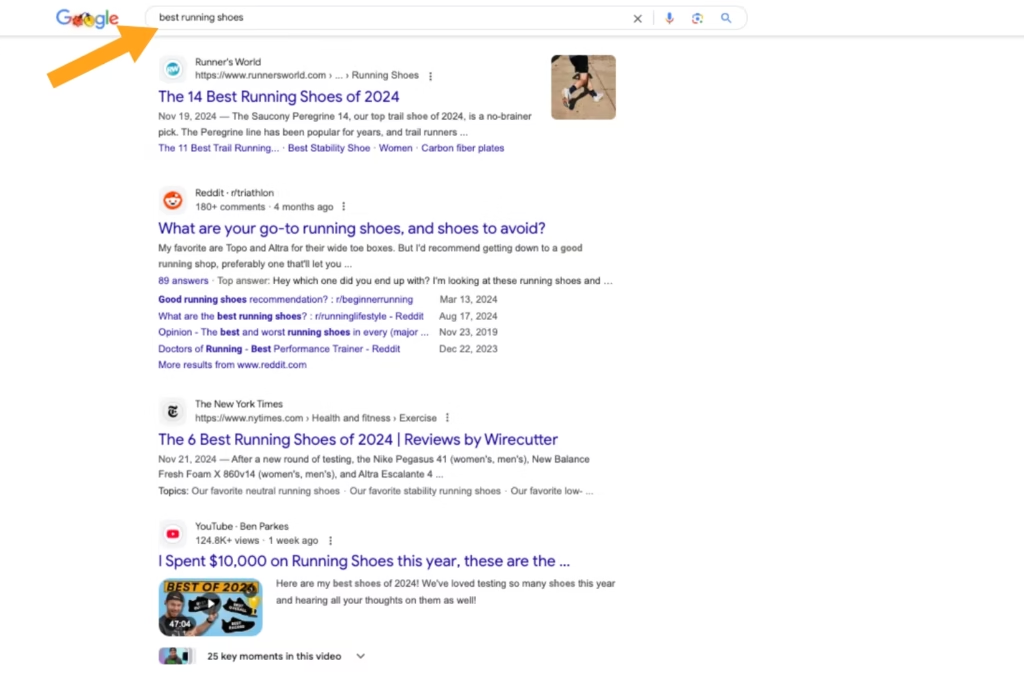
    Screenshot of Google search results for best running shoes with a yellow arrow pointing at the search bar

    While “best running shoes” has a commercial search intent, the SERP shows users comparing options by reading blog recommendations before buying. Optimizing your product pages with this keyword can cause fewer people to click on them or quickly leave because that’s not what they’re looking for with that search query.

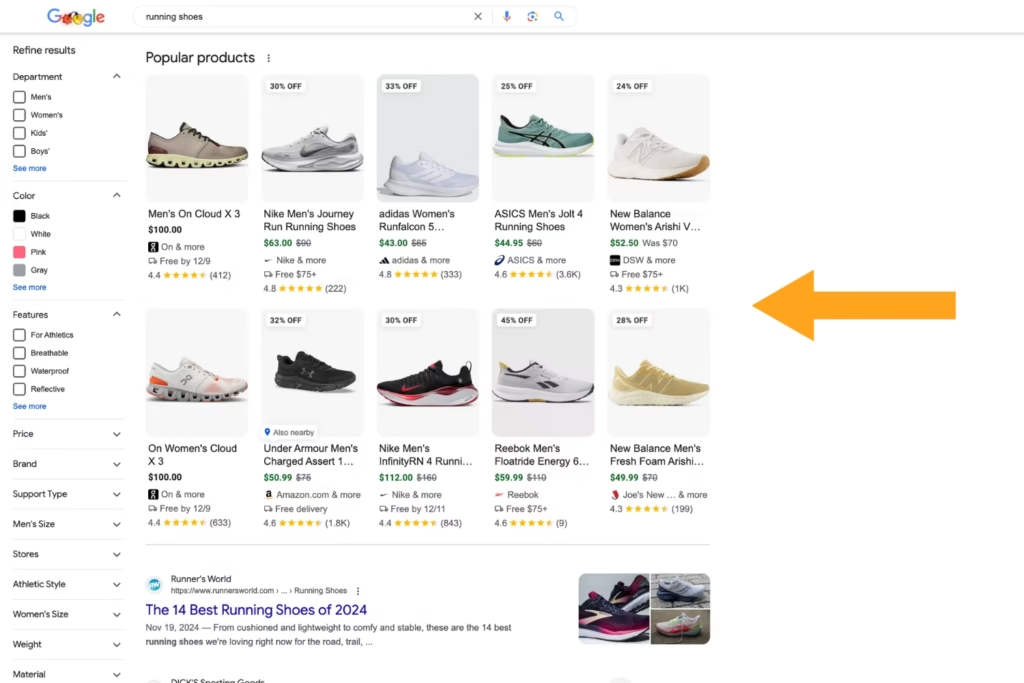
    A transactional keyword, like “running shoes” generates product pages in the SERP, showcasing the intent of people ready to buy. Adding this to your product’s description and page URL attracts relevant traffic, promoting a higher chance of converting them.
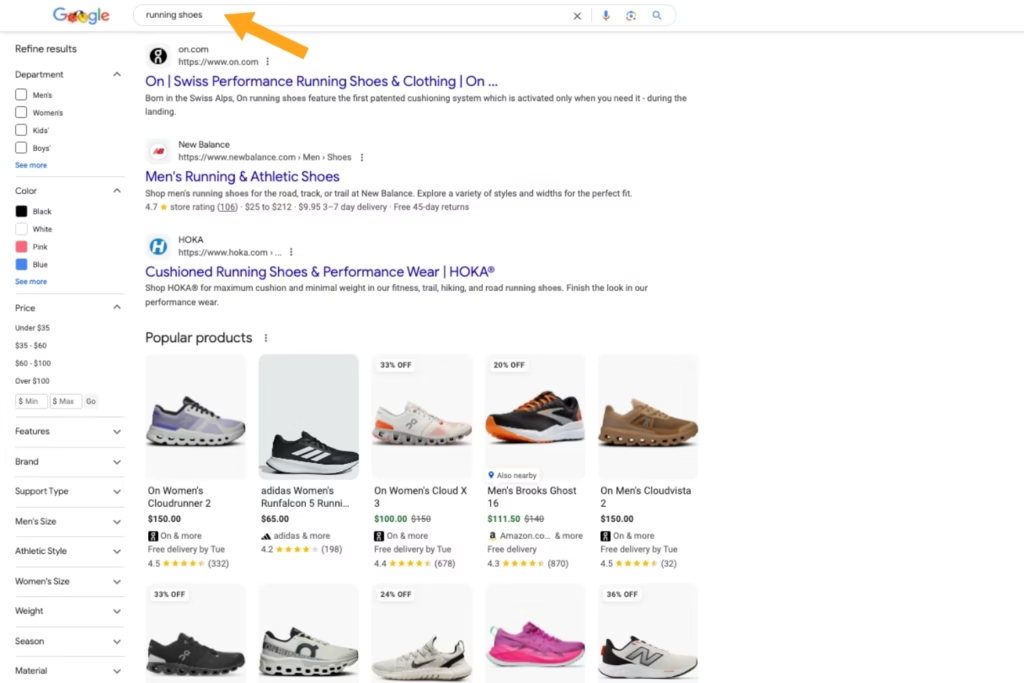
    A screenshot of the Google search results for the keyword running shoes with a yellow arrow pointing at the search bar

    A slight keyword change in your product page SEO can significantly impact its performance. Luckily, SEO platforms like SEMRush tell you the search intent behind every keyword, so you don’t have to guess. 

    However, it’s easy to check yourself. Simply enter the keyword into a search and review the SERP for what they show. If it generates product pages, you have the correct search intent.

    Use Clear, Captivating, & Optimized Product Visuals

    A graphic of three people adding photos to a website page

    While you may have high-quality product page images, are they captivating enough to customers? In addition to displaying your product, fully showcasing how they apply to the real world resonates further with shoppers. Instead of only using product images on a white background, include lifestyle visuals, too. 

    For example, if your brand sells hiking boots, include photos of people in a mountainous landscape wearing them to provide a better visual context. If you sell office chairs, use a short-form video to show their different sitting configurations, demonstrating the product’s diverse usability and comfort further.

    Once the product page visuals are finalized, ensure they’re optimized next. Writing image alt tags with descriptive language ensures it’s ADA-accessible for all online shoppers. Also, aim to use target keywords in your image alt tags naturally to improve your page’s search visibility via metadata.

    Implement Structured Data Markup to Generate Rich Results on Google
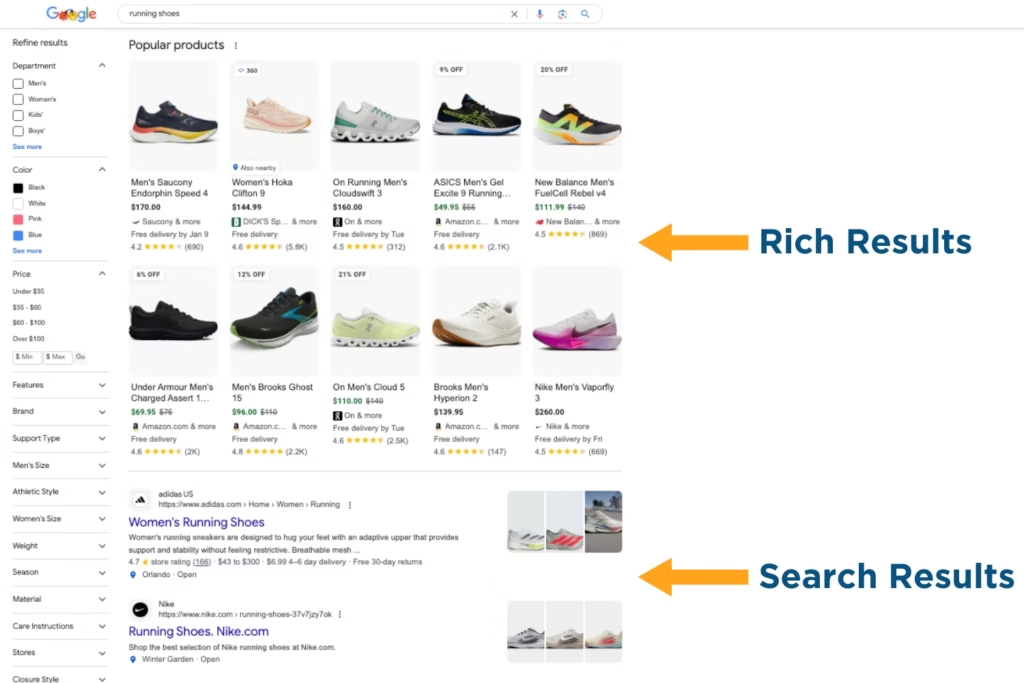
    Screenshot comparing the rich and search results on Google for running shoes

    Structured data markup is one of the most critical components of product page SEO. In a saturated online market, e-commerce brands must stand out in the SERP more than ever. As a form of on-page SEO, structured data markup helps your product pages generate rich results

    Rich snippets visually showcase your product differently than the SERPs and are placed above traditional search results. They’re designed by Google to enhance the shopping experience without having to click on your online store. When users click on rich results 58% of the time versus 41% for non-rich results, it’s worth optimizing your product pages for.

    Examples of structured data types for e-commerce product pages are:

    • Review Snippets: Average rating, number of reviews, reviewer information, etc.
    • Product Schema Markup: Carousel image, pricing, product availability, etc. 
    • Sitelinks Search Box: Sitewide product search in the SERP, without having to click on your website
    • FAQs Schema Markup: List of common product questions, assembly directions, etc. 

    Structured data markup gives customers a streamlined shopping experience while providing Google with the standardized language it requires to generate rich results for your product pages.

    Create Valuable Call-to-Action (CTA) Buttons

    As an online store, you must encourage users to take action via CTAs to increase click-through rate (CTR) and conversions. These CTAs should be more than buttons below your product description stating, “Buy Now.” They should also be convincing of the value your products bring. 

    If you’re a skincare brand selling facewash, instead of creating a “Shop Now” CTA button, write something like “Start Your Self-Care” to showcase to customers that it’s a worthy investment in themselves. 

    Additional ways to create valuable CTAs for e-commerce product pages include:

    • Using Multiple CTAs to Meet Customers Where They Are in Their Buyer’s Journey: add to wishlists, you might also like, one-click checkouts, save payment methods, address autocomplete, email signup discounts, etc. 
    • A/B Testing Button Designs to See What Resonates Best with Your Target Audience: button locations, shapes, colors, fonts, sizes, etc.
    • Placing CTA Buttons Strategically to Streamline Users From Product Page to Purchase: minimal pop-ups, responsive button designs on mobile and desktop, etc. 

    Conduct a Site Audit to Correct Page Performance Issues

    Graphic of three people conducting a website audit on a desktop

    You can do all the optimization in the world and still not have success if your product pages have performance issues. If they have slow loading times or poor mobile design, they can push potential customers away. Also known as user experience, it’s about making your site easier to use for a seamless shopping experience.

    Look for the following issues in your site audit to improve your product page SEO:

    • No breadcrumbs for easy site navigation from product page to checkout
    • Low-quality compressed product visuals on mobile  
    • More than four seconds in page load speed on desktop and mobile
    • No SSL certificate to secure your website and shoppers’ saved sensitive payment information

    User-friendly e-commerce websites help people discover, browse, and purchase from your product pages more. 

    Stop Losing Shoppers from Poor Product Page SEO: Get Found Faster & Sell More Today

    Drive more transitions to your product pages with digital marketing professionals. At Reach Marketing Pro, we’re a full-service agency with extensive experience in site-wide optimization, including Shopify, WordPress, and custom e-commerce websites. 

    We have graphic designers to create customized, compelling product visuals per your unique brand. Our SEO copywriters write effective product page copy that adheres to Google guidelines and customer needs. Additionally, our web designers/developers ensure your site’s shopping experience is seamless and engaging. 

    Together, our in-house team provides you with the full suite your e-commerce website needs for a stronger product page performance.

    Ready to generate more organic traffic and transactions?

    Learn more about our digital marketing services or contact us to reach more customers today!

  • How to Crawl a Website for Google & Other Search Engines More Effectively

    How to Crawl a Website for Google & Other Search Engines More Effectively

    As a business owner, you invest in your website and can’t afford for it to be invisible online. Whether you’re familiar with search engine crawling or not, it’s critical for user discoverability. If Google and other search engines can’t find (crawl) and save (index) your site, neither will people when looking up information related to your business.

    This step-by-step guide will show you how to crawl a website more effectively to promote a greater content marketing ROI

    How to Crawl a Website: Tips to Help Google & Other Search Engines Discover Your Content More


    Here’s how to crawl a website to make your content more discoverable by search engines.

    Conduct a Site-Wide Audit to Understand Potential Crawling Issues

    Numerous factors impact your site’s crawling from search engines. You can check website crawlability by conducting a site-wide audit to uncover the potential issues that may prevent it from being crawled. 

    Below are the key metrics to monitor during your site audit and how to improve each for greater crawl accessibility. 

    Low Crawl Budget

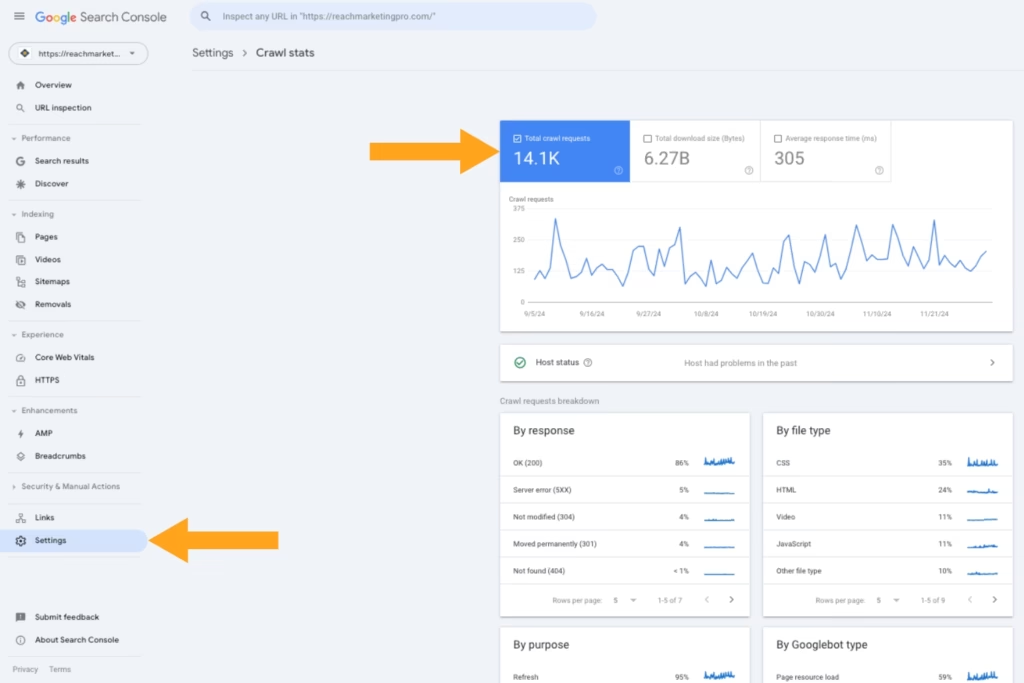
    A screenshot of Google Search Console's Crawl stats report

    Google crawlers have a time limit when crawling your site, known as a crawl budget. It’s determined for you and measured based on various factors, including your site size, number of URLs, total unique pages, content update frequency, and SEO health. 

    One of the most common crawlability problems businesses experience with their sites is a wasted crawl budget. From slow page load speed to duplicate content, these can make crawl bots take longer than necessary to discover your content from wasted time and confusing, redundant site structure.

    You can check your site’s crawl rate on Google Search Console’s “Crawl stats” report to find its current budget. We’ll break down how to optimize your crawl budget based on common issues impacting them below. 

    Duplicate Content

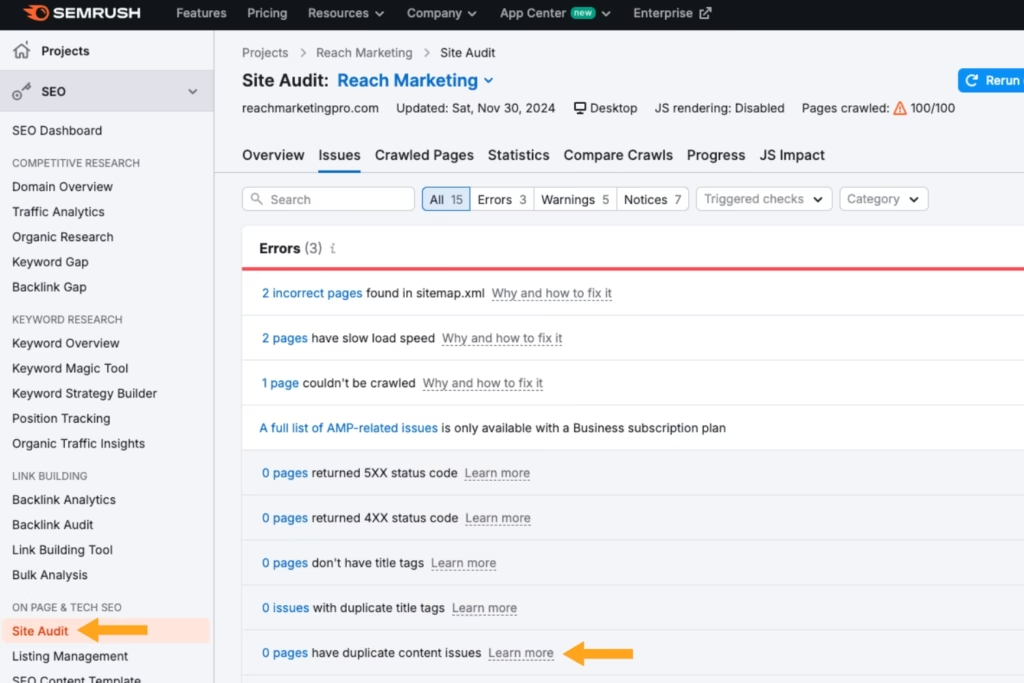
    A screenshot of SEMRush's Duplicate content site audit report

    Whether it’s repeating the same heading titles or page URLs, duplicate website content can cause crawlability issues. Not only can this waste your crawl budget, but it also can make search engine crawlers confused because they don’t know which version to save in their database for indexing. 

    You can discover if you have redundant website content with web crawler platforms like ScreamingFrog and SEMRush. These tools scan your entire site, including duplicate content, and will flag the exact areas for you to fix. You can correct this by updating your existing content so it’s unique or removing the pages altogether. 

    Broken Links

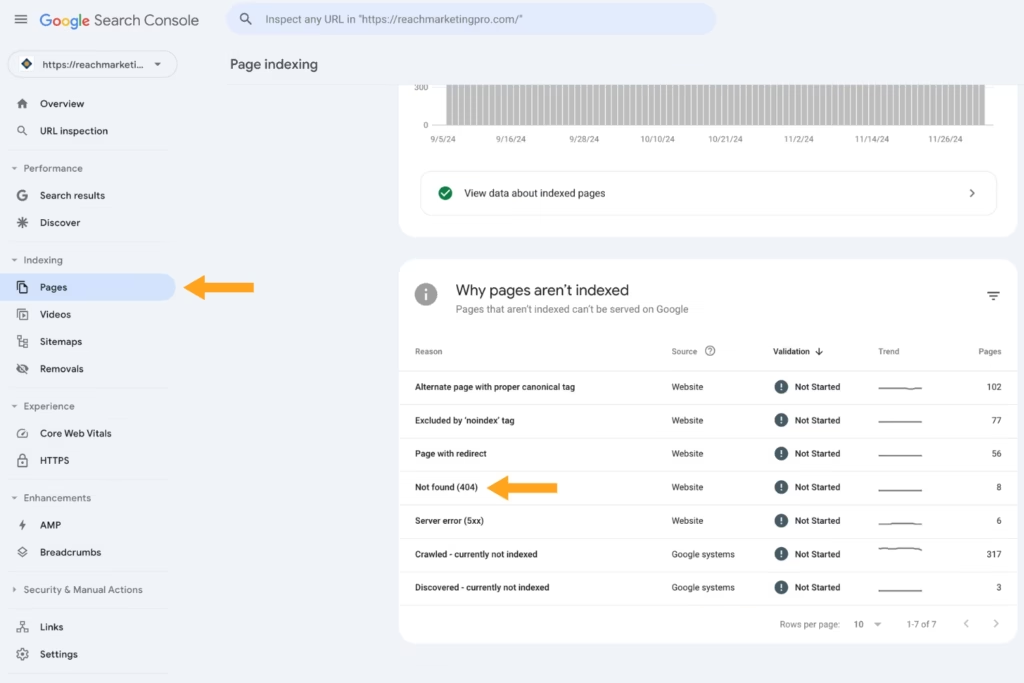
    A screenshot of Google Search Console's Indexing report

    Search engines rely on crawlable links from your website. If it has many broken links, this can cause crawlability problems. Whether it’s a removed page that’s still being linked from other areas of your site, URL typos from a site migration during a website redesign, or 404 errors, these can make it less crawlable. 

    Check for broken links with tools like Google Search Console under the “Indexing” report or Screaming Frog during your site audit. They’ll flag the specific broken URLs and the reasons why—and they’re easy to fix!

    The three main ways to fix broken links are:

    • Redirecting them to another URL 
    • Updating the URLs
    • Removing the links from your site

    Redirect Chains

    While fixing broken links, you may make mistakes when redirecting them, resulting in redirect chains. These are caused by multiple redirects between the original link and the location it’s being sent to. 

    Redirect chains waste your crawl budget because crawl bots continuously follow this loop that never reaches its final page destination—resulting in unnecessary crawling time spent. Search engine crawlers may even stop following it and skip it, causing delayed or missed indexing for certain pages. 

    Like broken links, you can fix redirect chains by updating or removing them during your site audit and routine web maintenance.

    Dated Canonicals

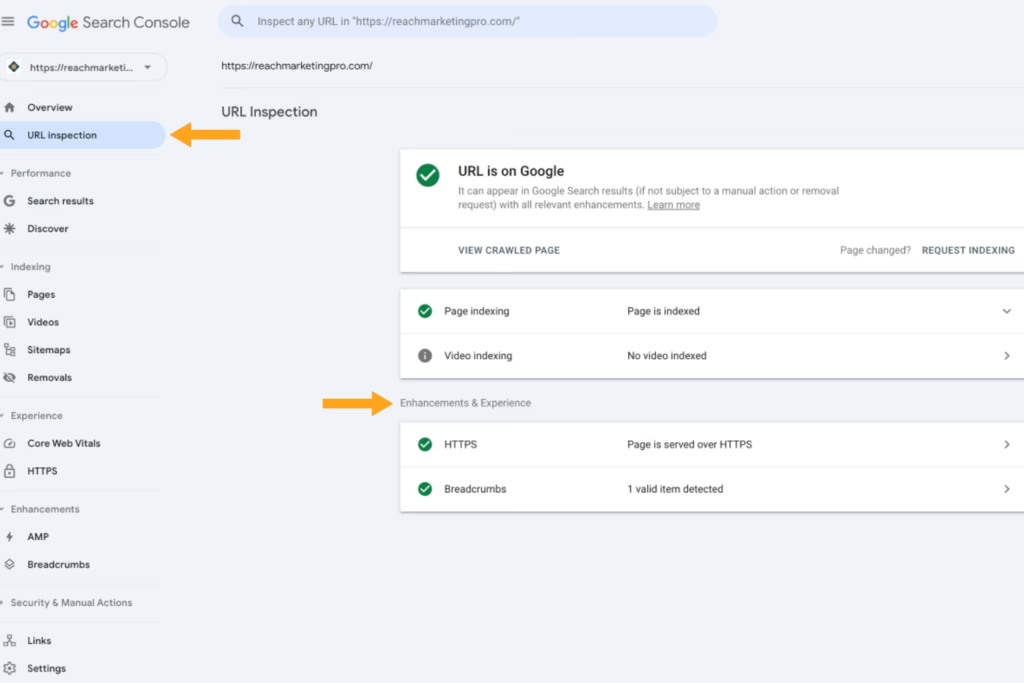
    A screenshot of Google Search Consoles URL inspection tool

    If you aren’t familiar with canonicals, they direct search engine crawlers on which URL you want them to crawl and index from a duplicate page. While some duplicate content is normal, like international web domains and separate blog websites, many dated canonical URLs and tags can lead them to crawl the wrong ones, like older page versions, which waste your crawl budget. 

    URL inspection tools like Google Search Console flag harmful canonical URLs so you can remove them from your site. 

    Slow Page Load Speed

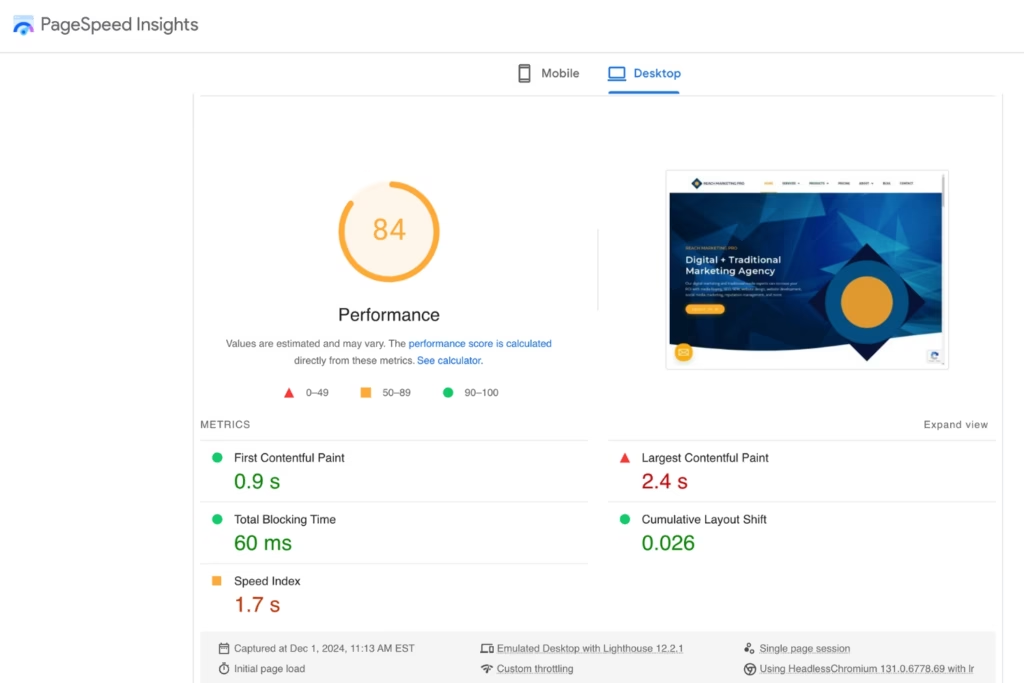
    A screenshot of Google PageSpeed Insights test results

    If your website takes too long to load, this can also negatively impact your crawl budget. Your site’s below-average load speed uses more time to crawl each web page. As a result, your other web pages may not get crawled because your budget was prematurely spent. While sites differ in size, the optimal page load speed shouldn’t take more than three seconds

    You can check your site’s average loading times on PageSpeed Insights. All you have to do is copy and paste your website’s URL into Google’s free tool. It measures your website’s desktop and mobile load speeds and diagnoses performance issues impacting them, such as unused Javascript or CSS code. 

    You can improve your site’s page loading speed by:

    • Minifying Javascript and CSS code with unnecessary rules or dense structures to reduce the files loaded on your web pages
    • Compressing large media files, like background videos and images, to a lower resolution
    • Upgrading or switching web hosting plans with larger servers that can better host your site’s size

    That way, you can ensure your website has an efficient crawl rate and optimized crawl budget.

    Poor Core Web Vitals

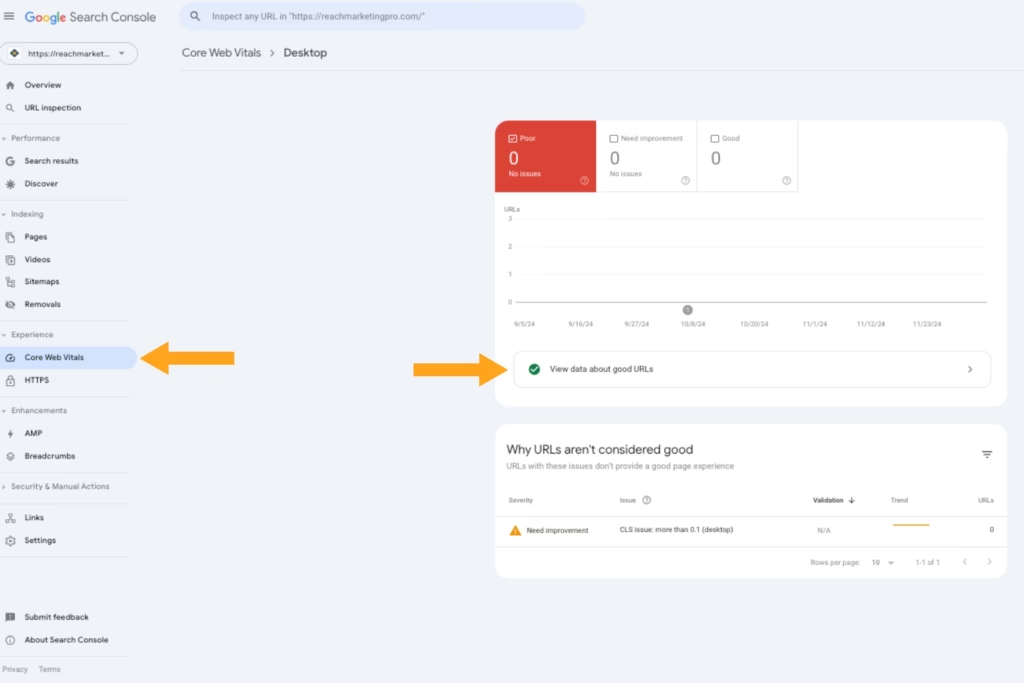
    A screenshot of Google Search Console Core Web Vitals report

    If your website has poor performance, this can cause crawlability issues. Your site’s health can be checked on Google Search Console’s Core Web Vitals. These metrics measure your website’s overall performance for loading, responsiveness, and visual stability on mobile and desktop. 

    Don’t get discouraged if your site fails the Core Web Vitals test. Google will diagnose the areas of your website causing these issues with solutions to fix them, such as caching page content and improving site speed.

    Remove Unnecessary Pages From Robots.txt Files

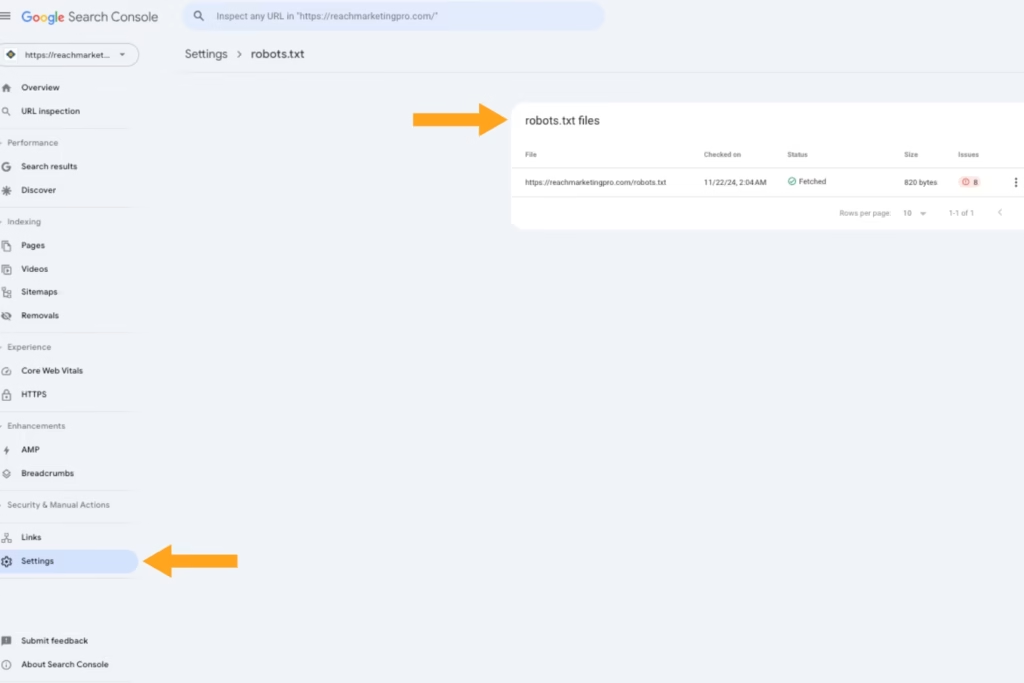
    A screenshot of Google Search Console robots.txt files dashboard

    If you don’t know, a robots.txt file is a plain text tile that directs search engines how you want them to access and crawl your site. It’s like a recipe written in the language crawl bots understand so they know how to follow it. 

    As a tip, don’t include all your web pages in your robots.txt file that don’t require crawling. For example, shopping carts and staff directories typically don’t need to be crawled for users because they’re not intended for SEO and focus more on on-page user interaction.

    Removing these unnecessary pages can optimize your crawl budget, so it prioritizes the ones you want while preventing your site from being overloaded with bot traffic requests.

    Resubmit XML Sitemaps After Content Updates & New Pages

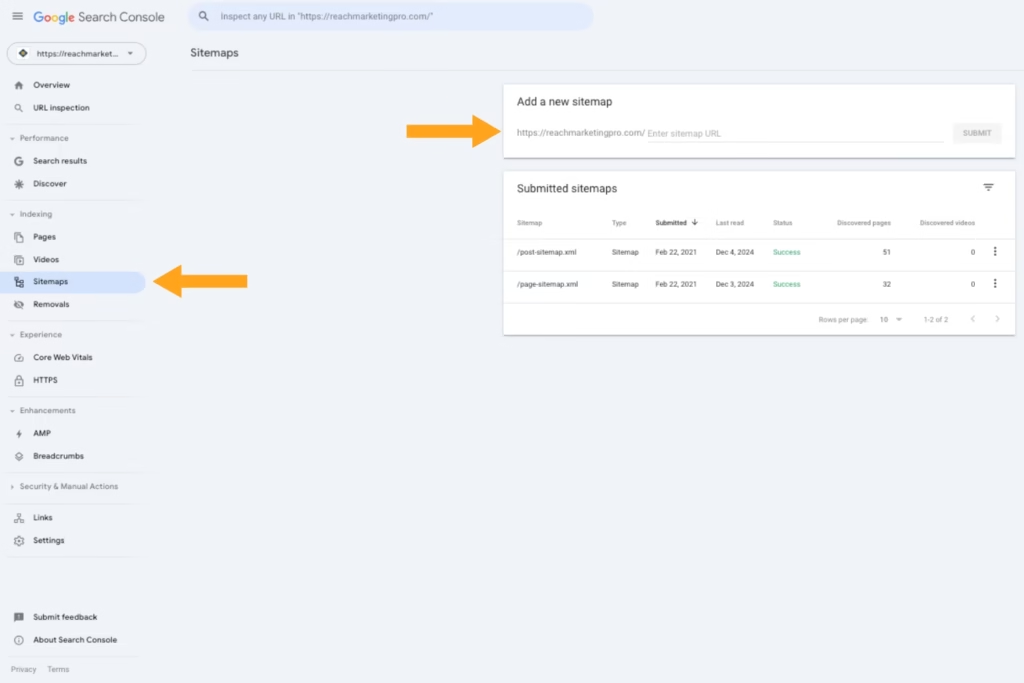
    A screenshot of Google Search Console's Sitemap dashboard

    In addition to providing robots.txt files, you must submit XML sitemaps to Google for efficient crawling. While robots.txt files are like a recipe, XML sitemaps are as the name suggests, a map of your site. It acts as a blueprint of your site structure for search engine crawlers to reference.

    Even if you submitted an XML sitemap already, resubmitting it after content pages and new page creations is the best crawling practice. It gives crawl bots the most up-to-date version of your site so the right one is shown to users when searching for information related to your business online.

    You can submit XML sitemaps on Google Search Console, and best done by web developers—especially if you don’t know how to crawl a website. While sitemap generators exist, web developers have the coding expertise to create them more accurately and prevent wasted crawl budgets due to structural errors.

    Add Relevant Structured Data to Web Pages

    A screenshot of Google SERP rich results on running shoes

    Structured data helps search engine crawlers better understand your page’s content. Although you’re providing a robots.txt file and XML sitemap, structured data contextualizes your web pages to maximize their crawlability and online visibility from rich results in the SERP. 

    Rich results are unique features that stand out from the SERP’s standard blue links and textual elements, such as product feature carousels and images.

    The most common types of structured data are:

    • Reviews schema markup for product pages
    • FAQs schema markup for demo pillar pages and blogs
    • Navigation breadcrumbs for users to backtrack their pages more easily

    You can test your web page for rich results on Google Search Console to ensure the structured data you implement are relevant.

    Search Engine Crawling FAQs:

    What is Crawling in SEO?

    SEO crawling is the process search engines use to discover your website. It’s the preliminary step before they save it in their database, known as indexing, so it shows your site content to users when using relevant search queries.

    What is a Web Crawler?

    Web crawlers are the bots search engines use to discover your site so it becomes visible on their platform. 

    How Do Web Crawlers Work?


    Web crawlers are search engine bots that use an automated process to find your site’s content so it can download it into their database (index) next. Search engines use web crawlers to retrieve your site’s information and display it to users when using queries relative to it.

    Keep Your Site Visible Online with SEO Web Experts

    Don’t let your website disappear. At Reach Marketing Pro, we’re a full-service digital agency with extensive experience in site-wide optimization for greater crawlability, indexation, and overall SEO performance. These include websites of all sizes and various CMS systems, like WordPress, Shopify, Webflow, Dealer.com, and more.

    Our team of SEO experts and web designers/developers can help you navigate the complexities of crawling. That way, you can improve your site’s performance and better support your bottom line.

    Ready to maximize your site’s online visibility?

    Learn more about our SEO and web design/development services, or contact us today!
  • Automotive SEO & Content Marketing: How to Rev Up Your Dealership’s Rankings 

    Automotive SEO & Content Marketing: How to Rev Up Your Dealership’s Rankings 

    Whether you’re a dealership or auto parts retailer, investing in automotive SEO is essential to your bottom line. It helps your business show up on Google when consumers search for relevant information, services, and products you offer online. 

    If you aren’t optimizing your SEO marketing strategy for search engines, your brand is basically invisible online to users you want to reach, especially in an oversaturated digital market. You may already be creating SEO content or utilizing Google Business Profile. 

    But, are they generating the results you’re looking for? 

    Auto dealers often make mistakes with their SEO marketing, like using the wrong search intent for blogs or keyword stuffing their websites—which is common! You’re not expected to be an SEO expert. But as a result, you may not see high keyword rankings or web copy that doesn’t convert to sales.

    Our complete automotive SEO marketing guide walks you through the best practices and mistakes to avoid. That way, you can better drive your dealership to the top of the search engine results page (SERP).

    A Guide to Automotive SEO & Content Marketing to Drive Traffic for Your Dealership

    Automotive search engine optimization (SEO) has many facets, including content marketing, local SEO, and more. However, they all share the same focus—generating traffic to your website by strengthening your online visibility. Some SEO automotive marketing strategies have additional end goals, such as converting paid search ads to sales.

    Below are the SEO essentials your auto brand must know to meet your SEO goals effectively. 

    Invest in Local SEO for Your Local Dealership

    Two people looking at videos and reviews of a car listing

    SEO for the automotive industry is especially crucial for local dealerships and auto part retailers with physical stores. You need to reach local target audiences while standing out from competitors nearby. 

    That’s where local SEO comes in. 

    You know local consumers read your reviews and check how you compare to the competition to see if your online reputation is trustworthy. While you may have a Google Business Profile (GBP), it may not be optimized fully or marketed correctly to target local audiences. 

    Some automotive SEO tips for GBP include:

    • Optimizing your business description and image file names with target keywords
    • Creating weekly posts to cross-promote your blogs 
    • Responding personally to all reviews over template-based responses, including your negative ones
    • Diversifying your GBP posts’ call-to-actions (CTAs), like “Learn More” or “Sign Up”—people aren’t always ready to “Buy Now” especially vehicles since they’re a larger purchase 

    Create Valuable & Optimized Automotive Blog Topics for All Funnel Stages

    You know each customer is unique. Every driver isn’t always car-savvy. Some may only know basic information to look for when car shopping, like vehicle history, entertainment features, and test drive comfort. Others may have more technical knowledge, like understanding the powertrain they want for a work vehicle. 

    A vehicle is a significant investment. Drivers nowadays are conducting preliminary research to ensure they’re making the right choice in their car purchase. Creating blogs for users in all funnel stages is key to meeting them where they are in their buyer’s journey by providing valuable, relevant content. 

    The three funnel marketing stages with automotive blog topic examples are:

    • Top-of-Funnel (TOF): How to Buy Your First Car, # Mistakes to Avoid When Purchasing a Used Pickup—for users who need more guidance on basic vehicle information 
    • Middle-of-Funnel (MOF): 2023 vs. 2024 Jeep Wrangler: What’s New, Best Light Duty Pickup Trucks of 2024—for more educated users who need help deciding between options
    • Bottom-of-Funnel (BOF): Auto Part Spotlight: Duramax’s New Diesel Engine, Customer Success Story, New Test Drive Videos—for users who are ready to buy 

    In addition to valuable funnel content, you must optimize all blogs for users and Google to find online, including:

    • Adding backlinks from reputable sites with high Domain Authority to be a trustworthy resource in your industry’s niche—arguably the top keyword ranking factor in SEO! 
    • Using target keywords throughout the body and headings naturally to prevent keyword stuffing
    • Following the right keyword density per your blog’s word count to make it readable for users
    • Including internal links to other blogs and web pages naturally to prevent over-optimizing
    • Cross-promoting your blogs by sharing them on your automotive social media profiles 

    Keyword Research Tips for Automotive Blogs

    Two people conducting keyword research on a computer

    We mentioned common SEO mistakes auto dealers make, like using the wrong search intent in their blogs. Search intent means exactly that—the intent behind a user’s search. 

    The four types of search intent with automotive keyword examples are:

    • Informational (TOF): car financing tips, used car buying mistakes to avoid, etc. 
    • Commercial (MOF): best electric vehicles 2024, tesla cybertruck vs. gmc hummer ev, etc. 
    • Navigational (BOF): auto parts stores in denver co, car dealerships near me, etc. 
    • Transactional (BOF): used pickup trucks for sale, hybrid cars for sale, etc. 

    If a user searches for “vehicles for sale in manhattan” and you create a blog topic on “How to Find the Best Vehicles for Sale in Manhattan,” that’s not what they’re looking for. They’re searching for Manhattan vehicle product listings, not a blog with tips on finding one because it’s a transactional search intent.

    You can verify a keyword’s search intent by simply typing it into Google and checking the SERPs. Do the SERPs show all blogs or product pages? While some keywords may have mixed search intent, if the SERPs don’t show blogs, it’s not the right search intent for your blog content. 

    If you don’t know where to begin with your keyword research, start by conducting a competitor SERP analysis. Enter a keyword into Google and perform a content audit with your SEO software of the top-ranking competitors. Content audits allow you to see which keywords they’re using and uncover content opportunities where you can outrank. 

    For example, you might find many question-based keywords related to a blog topic you’re writing about. You can take this opportunity to create an FAQ section to rank for those keywords if your competition didn’t make one. 

    Optimize Your Website for Search Engines & Users

    As mentioned earlier, another common mistake auto dealers make with their SEO is keyword stuffing their websites in hopes of higher rankings. This practice can do the opposite and harm your keyword rankings instead. 

    Google prioritizes E-E-A-T content (Experience, Expertise, Authoritativeness, & Trustworthiness) to deliver more helpful, relevant information when searching for information. If your website is over-optimized with keywords, it makes your content’s readability less enjoyable and weakens your user experience (UX)

    Remember, you’re also writing for humans, not just search engines.

    Other common SEO mistakes include not optimizing your site for mobile devices or creating a separate website for your blog. A recent study shows that 33% of car shoppers use mobile devices to research vehicles online, and 60% of them would call a dealership from a call extension link. 

    Additionally, hosting your blog elsewhere is basically like having two different websites. Automotive SEO is comprehensive enough. Optimizing for two sites creates more challenges, and your end goal is to drive more traffic to your main site. 

    Website optimization must include on-page, off-page, and technical SEO:

    • On-page SEO is optimizing what’s on your website pages, like keywords and internal links.
    • Off-page SEO is optimizing what’s off your website pages, like backlinks and social media.
    • Technical SEO is optimizing what’s behind your website’s page, like loading speed.

    While this may seem like a lot of information to digest, don’t get overwhelmed with this part. SEO tools and software platforms, like SEMRush and Ahrefs, automate website optimizations for you. Through website audits, they’ll flag areas of your site needing optimization, which types, and how to do it. 

    Some automotive SEO tips for website optimizations include:

    • Implement a search bar with filters on your parts page so users can easily find and shop for products
    • Add QR codes to your specials page so consumers can download coupons and redeem limited-time offers faster
    • Write web copy for your services page so potential customers know what’s included in each of your offerings
    • Optimize your website for desktop and mobile to prevent people leaving from poor user experience (UX), like small text on smartphones and no site breadcrumbs
    • Include target keywords in your metadata, like headings, meta descriptions, and page URLs, for Google to crawl (discover) and index (store) easier

    Website optimizations are about making it easier for your users and Google to discover online.

    Promote Your Inventory with Google’s Vehicles for Sale & Vehicle Listing Ads

    Two people buying a car with a clipboard of its features

    In addition to generating organic traffic, auto dealer SEO should promote paid traffic to your website. Also known as search engine marketing (SEM) or Pay-Per-Click (PPC), it boosts your search engine rankings through paid search ads. However, aligning your SEO and SEO marketing strategies can produce optimal results for automotive brands. 

    Remember, some users are ready to purchase a vehicle (transactional intent) or are comparing local providers before purchasing (commercial intent). The difference with SEO is that it focuses more on informational search intent and research-oriented queries, like “car buying tips.” 

    Combining SEO and SEM allows your brand to cover all relevant vehicle-related keywords consumers use when searching online. And, Google makes it easy for automotive brands to do so with its Vehicles for Sale and Vehicle Listing Ads.

    The Vehicles for Sale feature allows auto dealers to integrate their inventory directories directly into Google’s search results via your Google Business Profile. Users can apply search filters and browse your inventory outside your website to learn more about a specific vehicle. It also links back to your site when they’re ready to buy. 

    The Vehicle Listing Ads feature matches your vehicle inventory data feed within Google Merchant Center to provide a personalized shopping experience via advertising. Google matches specific car details users search for by displaying relevant vehicle ad listings. They enter the features they want, like location, mileage, and price, and an ad listing is shown.

    Monitor Your SEO Marketing Strategies

    While everything we mentioned is auto dealer SEO best practices, that doesn’t mean it’ll always generate the results you want. Google’s algorithm and car consumer demands are consistently changing—especially with various technologies disrupting the SEO landscape, like AI content writing and Search Generative Experience

    Continuously monitoring your SEO marking strategies helps you measure their success with data-driven insights. 

    Key SEO metrics to track include:

    • Organic Traffic: Number of users who entered your site without paid search 
    • Keyword Rankings: New, improved, and lost rankings 
    • Clicks: Number of users who clicked on your website
    • Impressions: Number of users your website was displayed to
    • New Backlinks: Number of websites linking back to your site from theirs
    • Top Pages: Website pages that generated the most traffic 
    • Local SEO Visibility: Number of calls, clicks, and search views of your Google Business Profile
    • Indexed Pages: Number of pages that Google indexed (stored) in their database, including those that couldn’t be indexed

    While KPIs will vary depending on your SEO goals, you can find these metrics in Google Analytics, Google Search Console, and SEO platforms. 

    Turbocharge Your Dealership’s Online Traffic with an Auto SEO Agency

    As an auto dealer, driving sales and investing in SEO can be time-consuming. You have to manage your company and your trade while understanding the importance of SEO. 

    Let our automotive SEO experts do the heavy lifting for you. At Reach Marketing Pro, we have extensive SEO experience in the automotive industry. We’ve worked with used and branded car dealerships and auto parts brands to enhance their online presence for their bottom line.

    From website designs and optimizations to multiple GBP location management and content writing, we can supercharge your SEO efforts for optimal results. We’re fully transparent with in-depth monthly SEO reporting to continuously measure your strategy’s success. 

    What makes us stand out is our tailored automotive SEO services. 

    Our Dealer VIP Program boosts sales for your vehicles in production like SEO content writing for the customer reservation process and designing custom home page slider graphics.  

    Our Absorption Boost package streamlines your customer’s buying process, like mobile QR codes to scan specials easily within OEM and Google’s guidelines. 

    Ready to rev up your automotive brand’s rankings?

    Learn more about our SEO services or contact us for help today!
  • How to Create a Shopify Website: A 10-Step Guide

    How to Create a Shopify Website: A 10-Step Guide

    As an online store, building and designing your website is an exciting journey that can make or break your brand if it’s not done properly. In a saturated e-commerce market, your brand must stand out while making the shopping experience seamless. Luckily, plenty of user-friendly website design platforms are available to help—even if you’re not web design savvy. 

    Shopify is one of the best e-commerce website builders because they offer you pre-designed site templates, built-in payment processors, and more. So, how can you ensure you reach customers while developing a Shopify site that’s powerful enough to remain competitive? 

    Below is a 10-step guide on how to create a Shopify website with design and build tips, along with mistakes to avoid. 

    How to Create a Shopify Website: A 10-Step Guide to Building & Designing a Powerful E-Commerce Site

    A graphic of three people designing an e-commerce website together

    E-commerce brands need a compelling Shopify site to support their bottom line. It helps you build brand awareness to reach new audiences, strengthen online visibility to stand out among competitors and increase conversions to sell more products. 

    Here’s how to create a Shopify website in 10 steps to help you effectively achieve your business goals.

    1. Set Up Your Shopify Store

    The first step to starting a Shopify store is account creation. You’ll need to enter a domain name for your website, store name, time zone, and currency type. A domain name is your website’s URL and automatically defaults to a “myshopify.com” URL. If you prefer a “.com” URL, you must create a custom domain name by buying one from Shopify or a third-party domain provider. 

    A benefit of purchasing domain names from Shopify is that they come with a TLS certificate, so you don’t need to buy SSL encryption for your domain to secure your site. Pricing will vary, with annual registration and domain renewal fees separate. 

    Your store name is what your customers see, which should be catchy, memorable, and unique to your brand. 

    Some tips for creating a Shopify store name include:

    • Make it simple to remember, spell, and pronounce. 
    • Add a keyword, if possible.
    • Keep it short.
    • Don’t use numbers, hyphens, or long names.
    • Reflect your brand’s missions, values, or personality.

    If you need help creating an online store name, Shopify offers a free business name generator to guide you as creative inspiration. 

    2. Select a Design Theme

    After setting up a Shopify store, the next step is the site’s design theme. Selecting themes is one of the most impactful decisions you’ll make. Your Shopify store design affects how customers understand your brand and shop on your website.

    With plenty of free and paid website design templates available in the Shopify Theme Store, it can be challenging to know which is best for your business.

    Consider the following when selecting Shopify design themes:

    • Product Inventory: How many products do you plan on displaying? Some themes offer one-product stores and product catalog designs. 
    • Features: Decide your must-have vs. nice-to-have features, like home page image slideshows, Instagram feed, related products, and quick buy. You can also search by theme feature in the Shopify Theme Store. 
    • Updates: Can you easily rearrange or remove page sections or simply install plug-ins without updating the site’s code? 
    • Budget: Is purchasing a paid theme worth the investment? 
    • Industry: Look at their offered industry-specific themes if it suits your brand, like restaurants, pet supplies, and clothing. 

    After deciding on your Shopify store design theme, the next step is customizing it.  

    3. Customize Your Theme

    A graphic of two people reviewing website analytics on desktop and mobile

    When you design a Shopify website, you must customize its themes to align with your brand and user experience (UX). Your site should be easy for customers to navigate with an immediate understanding of your brand’s unique identity. 

    If consumers can’t find products quickly with organized product category pages, have fast loading speeds on mobile, or access site breadcrumbs to return to a page, they’ll leave because of poor UX. Recent research reports show that 60% of e-commerce site traffic comes from mobile devices, and only 64% will load a page two to three times before leaving. 

    When customizing your Shopify design theme, include the following UX design tips:

    • Use your brand colors, fonts, and tone in your website copy.
    • Add site breadcrumbs for easy navigation and shopping.
    • Incorporate mobile-friendly designs, like white space and larger fonts, for easier readability.
    • Avoid overdesigning, adding too many call-to-action (CTA) buttons, and text-heavy pages that can overwhelm visitors.
    • Compress quality images and videos to reduce load speed times.

    Don’t get too hung up when you design a Shopify website where it prolongs your site launch. Minor edits can always be updated post-launch. 

    4. Install Your Necessary Plug-Ins

    When you build a Shopify store, consider the possible plug-ins you may want to install. Plug-in applications are commonly used to add custom features to enhance your site design and UX.

    Common plug-ins used for Shopify sites include:

    • Live chats
    • Social proof widgets
    • Product search filters
    • Custom contact forms
    • SEO plug-ins

    Shopify offers plugins in the Shopify App Store with simple one-click installation, or you can insert a link to install a third-party plugin. If you’re using a custom plug-in app from a web developer, they must provide you with an installation link specific to your store, as it cannot be used on another store.

    5. Write & Upload All Website Content

    A graphic of a person sitting down and writing website content on their laptop

    Your website’s content is as crucial as its design. The written content displayed on your web pages impacts how your brand is perceived and how your site is structured. To write content that ranks on Google, it must be relevant and helpful. Google rewards quality content with best optimization practices. 

    Avoid lengthy paragraphs, overlinking, and irrelevant content. For example, don’t create a blog post meant to educate users about an industry-related topic and then solely promote your products instead—also known as search intent. 

    This common content writing mistake not only pushes readers away because that’s not what they’re searching for but harms your rankings, too. 

    While every Shopify site is different, you’ll need the following foundational content:

    • Product images, prices, inventory SKUs, etc.
    • Product category pages
    • Individual product page titles and descriptions
    • Product variations: styles, colors, weights, specs, etc.
    • Main site pages: Home, About Us, Contact Us, Cart, Checkout, etc. 

    You can also streamline your product page content by importing them in bulk via a CSV file.

    Depending on your online store and brand, you may need additional website content, like an FAQ page for technical items and how-to-use directions or an in-person store location finder page.

    6. Optimize Your Shopify Site for SEO

    Written content not only reflects your brand and UX but also your SEO for users and search engines to find. It impacts how your website ranks in the SERPs to produce more organic traffic. 

    You’ll need to optimize your website in three ways:

    • On-Page SEO: The content on your website pages, including metadata, internal links, image alt descriptions, keywords, and best SEO copywriting practices. This step ensures that Google can understand what your website is about when linking to it in relevant user search queries.
    • Off-Page SEO: The information “off” your website pages, including backlinks, social media, and online reviews. This step ensures that your website is trustworthy with its content relevancy and Domain Authority. 
    • Technical SEO: The technical information “behind” your website pages, including indexing, crawling, and clean structured code (HTML/CSS/JavaScript). This step ensures that Google can discover and store your site content in their database.

    You can waste tremendous effort building a website on Shopify if it isn’t optimized. Without SEO optimization, your website is essentially invisible online, as users and search engines cannot discover it. 

    7. Set Up Payment Processing

    The next step in setting up a Shopify store is your payment processing, and it’s really simple. Shopify offers built-in payment processors with sales tax and multiple types of shipping rates. Their shipping options include flat, price-based, weight-based, and free shipping rates. 

    Shopify Shipping also helps calculate your shipping rates to simplify order fulfillment based on default shipping zones and profiles. 

    Next, all you have to do is enter your bank account information in your Shopify Payments account, select the shipping rate you want, and click Activate Shopify Payments in your Payments settings.

    8. Review Your Shopify Site Pre-Launch

    A graphic of two people reviewing a website performance on a mobile device together

    You’re almost at the finish line! Now that your Shopify build website is almost complete, review it before going live to ensure it’s functioning properly. 

    Review the following steps pre-launch:

    • Fast page loading speed on desktop and mobile
    • Broken internal links and conversion paths (CTA buttons, forms, landing pages, etc.)
    • No copyright licensing issues with images
    • Error-free written content, like typos and grammatical errors
    • Site security and website data backups
    • Unique page titles and metadata

    It’s common to find minor issues post-launch and can easily be updated, so don’t get too hung up on this phase either that can prolong your site going live. 

    9. Launch Your Shopify Website

    Now congratulate yourself on your new website launch! While the celebration is well-deserved, you should have a marketing plan to further promote your site. Consider cross-promotional social media posts, email blast announcements, and countdown campaigns to let your target audience know you’re officially live and they’re free to shop at your store. 

    This step is especially crucial for small business websites to increase brand awareness for a wider audience reach. 

    10. Review Your Shopify Site Post-Launch

    A graphic of three people testing a website performance on different devices together

    While a website launch is a significant accomplishment, it doesn’t end there. Always double-check your site after going live to ensure everything is working properly. 

    Review the following steps post-launch:

    Also plan for ongoing maintenance, such as plug-in updates and outdated information to avoid a complete website design revamp.  

    Start Your Shopify Journey On the Right Foot with Professional Web Design & Development

    Although Shopify makes it simple to design and build a site on its platform, working with web designers is the best investment you can make. As an e-commerce business owner or key stakeholder, you have to manage your business while being an expert in your trade. 

    Various factors can also go wrong, especially if you don’t know how to create a Shopify website—which can cost more time and resources to fix than hiring web designers from the start. A Shopify site is a significant investment and should be designed and developed by professionals to maximize your results. 

    At Reach Marketing Pro, our in-house web development and design team has extensive experience creating Shopify sites. We’ll walk you through each step to ensure your website reflects your individual brand, supports your business goals, and is optimized for online visibility. 

    Our services also include ongoing website maintenance and management, like technical site updates, adding more pages, and ensuring your website consistently performs as it should. We provide full transparency to your website performance with monthly reports to measure and track success.

    Ready to start your Shopify journey on the right foot?

    Learn more about our website design and development services, or contact us for questions today! 

  • Link Building Strategies in 2023: What Works & What Doesn’t

    Link Building Strategies in 2023: What Works & What Doesn’t

    What is Link Building in SEO?

    Illustration with various technology webpages with business figures and "links" around them

    Link-building in SEO is a way to construct one-way hyperlinks to a website to enhance your overall search engine visibility. If you’ve recognized these familiar terms—backlinking and interlinking—then you are familiar with link-building since those are two of its components. These tactics can be utilized across multiple methods that build one-way or a referral hyperlink so that prospective clients can find your website and purchase services much easier.

    Methods of Link Building

    Illustration of two people "link building" in front of a phone screen

    Developing an effective link-building strategy isn’t easy, so finding the best method is key to success. Here are some methods for link-building:

    • Content Marketing is beneficial when you create evergreen content that adds long-term value to your blog.
    • Guest blogging is another option to build shareable links and post relevant infographics without putting in the elbow grease.
    • Utilizing Link-building tools helps you identify and acquire the highest quality backlinks for your chosen topic.
    • Ensure you’re offering useful products and services
    • Email Outreach can be useful if the email is well-written and personable so that it entices the person receiving the email. With this method, be sure to elaborate how you will improve the user experience of visitors to their site.
    • Broken Link-Building is a useful tactic that takes advantage of broken pages across the web by discovering dead pages and asking linkers to swap links to a working page on your site.
    • Public Relations link-building methods include press releases and media pitching to secure editorial links that are directed straight to your website.

    Creating the Best Link Building Strategy

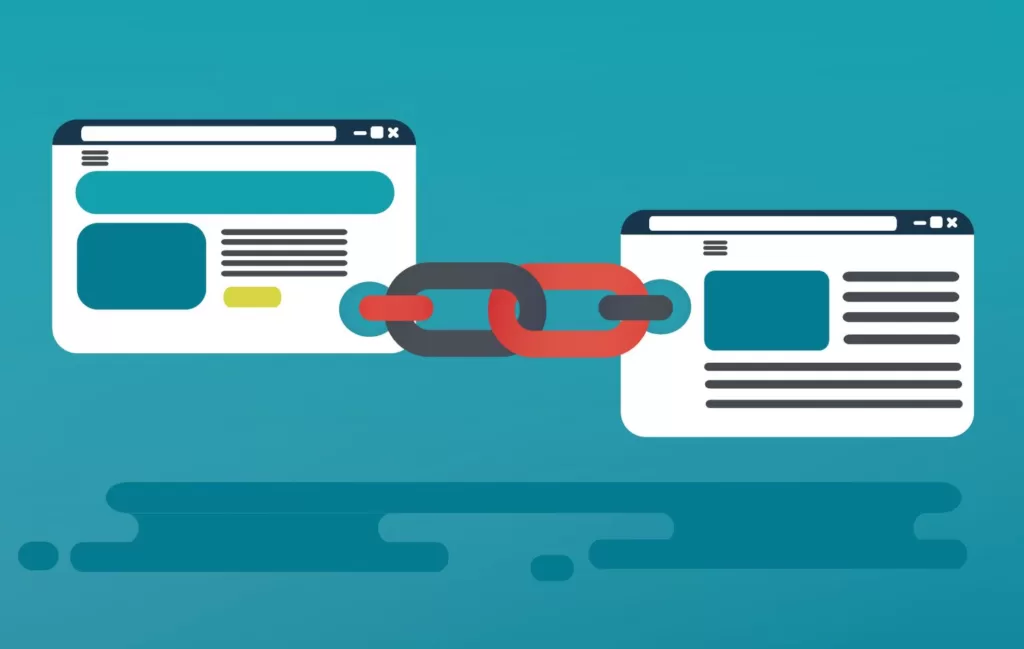
    Image of two webpages connected by "link building"

    There are multiple tactics that bring benefits to your link-building strategy.

    First and foremost, crafting something that is “link-worthy” should be #1 on your SEO agenda.

    Once that’s done, move forward with the following link-building recommendations:

    • Proper outreach to those who see your product/service as useful is who you should target. Don’t send a generic mass email to anyone; instead, stick to who will value your business. For example, utilize those who mentioned your target keywords in their article or who linked similar articles with a similar product/service, since that will result in higher response rates.
    • Serve as a guest blogger by reaching out to businesses and offer free written content to potentially bring them more visitors to their site.
    • Identify broken links and pages on a website so you can create valuable content to that resource. It’s better to connect content to a working site rather than a dead one.
    • Link unlinked mentions by using various tools to identify which links yours would be best paired with.
    • Look for lost links by reaching out to the prior contacted business and see if your link would be better suited somewhere else on their website.
    • Use list posts since bite-sized, easy-digestible content brings more value to the reader than large, hard-to-read paragraphs.
    • Utilize links from mediocre pages IF you believe your content is better than theirs. Make sure to check the links and then add them to yours.
    • Use paid promotions for linkable assets to provide value about your products/services to target audiences.

    Link Building Tactics to Run Away From

    Image of a thumbs down

    While there are some tactics that are go-to’s, there are some to stray away from.

    • Buying links is a tactic that is against Google’s SEO guidelines. It’s advisable to stay away from it, as it may come with repercussions.
    • Paying for each link-building opportunity is very costly and racks up quickly. The average private blog price is $350; you do the math.
    • Not checking and verifying the authority of the site can cause major issues because if you don’t understand your site’s credibility, you won’t know how you compare to the competition.
    • Not considering the link’s position on the page is something to highly consider! Is it embedded in the content? Is it buried in the footer? Make its location a priority.
    • Initiating cold outreach and mass-emailing potential links can have negative effects as a mass email has a more generic copy/paste feel. It’s best to cater the content for each point of contact so they don’t feel ignored.

    Why is Link Building Beneficial?

    Illustration of two laptops with a hand coming out of each screen, connecting to each other via "chains" representing link builing

    First off, link-building leads to higher site metrics and a stronger SEO score—this brings more people to your site and helps your business.

    Since backlinks remain as Google’s first choice ranking signal, it makes sense to see why it’s useful to link with reputable, popular websites. Leverage quality over quantity when it comes to making a positive impact in today’s search engine realm. Also, why not stick with something if it brings beneficial professional relationships with it? Backlinking brings continued opportunities to build and grow your business, create brand familiarity, and generate product awareness on partnering websites.

    There’s no better feeling than bringing back more traffic to your website!

    Is Link Building the Same as Backlinking?

    While both terms are popular tactics for SEO, they have slight differences. Link Building is creating links to your website from other websites. Backlinking is linking content from one website to a certain page on another.

    Don’t Be Afraid to Build a Link with Us!

    Implementing link-building strategies into your SEO is a time-consuming process that requires lots of attention and commitment. Making sure you work with someone who can put the effort and time into it that will generate the best results. Let our team of SEO experts help you get there.

    By staying updated on current digital trends and knowing what will get the customer to your website, our team leverages cutting-edge SEO and link-building tools to launch a successful strategy that aligns with your specific industry and niche product/service.

    Contact us today to get started.

  • Why Word Count & Keyword Density Matters in SEO

    Why Word Count & Keyword Density Matters in SEO

    What is Keyword Density?

    Keyword density is the number of times a keyword may appear on a webpage or within a specific piece of content as a ratio or percentage rate of the total word count. By noticing the number of times the keywords may appear, that calculates the overall keyword frequency on a specific webpage. Normally, a user or search engine would use Keyword Density to determine what a certain webpage may discuss.

    Is Keyword Density Important for Best SEO Practices?

    Illustration of a webpage with a key

    Keywords are a significant piece to an SEO strategy’s puzzle, therefore Keyword Density matters. By launching efficient keyword practices, you’re imminently positioning yourself in the place of people who have specific Keyword intent, meaning they’re more likely to find your content if the keywords they would more than likely search are embedded in your business’s webpage.

    Every day, we search certain keywords online to find specific content. To grow your search engine rankings, become an authority on the subject matter you’re representing. When you’ve found via the right keywords and Keyword Density per each piece of content, there is an increased chance of re-targeting, achieving higher conversion rates, and boosting customer loyalty—a major accomplishment and golden ticket for the everyday SEO Marketer!

    Where Will You See Keyword Density Used?

    Let’s play out a scenario; let’s say you’re reading an article about marketing. As you read through the article, you notice the word “social media” is used frequently, followed by secondary words such as Facebook, Instagram, and LinkedIn. Although the article’s overarching topic is related to marketing, its Keyword Density narrows its focus on social media marketing strategies. Incorporating these keywords into the article boosts its opportunity to rank higher in search engines for searched keywords, including “social media” or “social media marketing.”

    Things to Consider When Evaluating Your Next Piece of Content

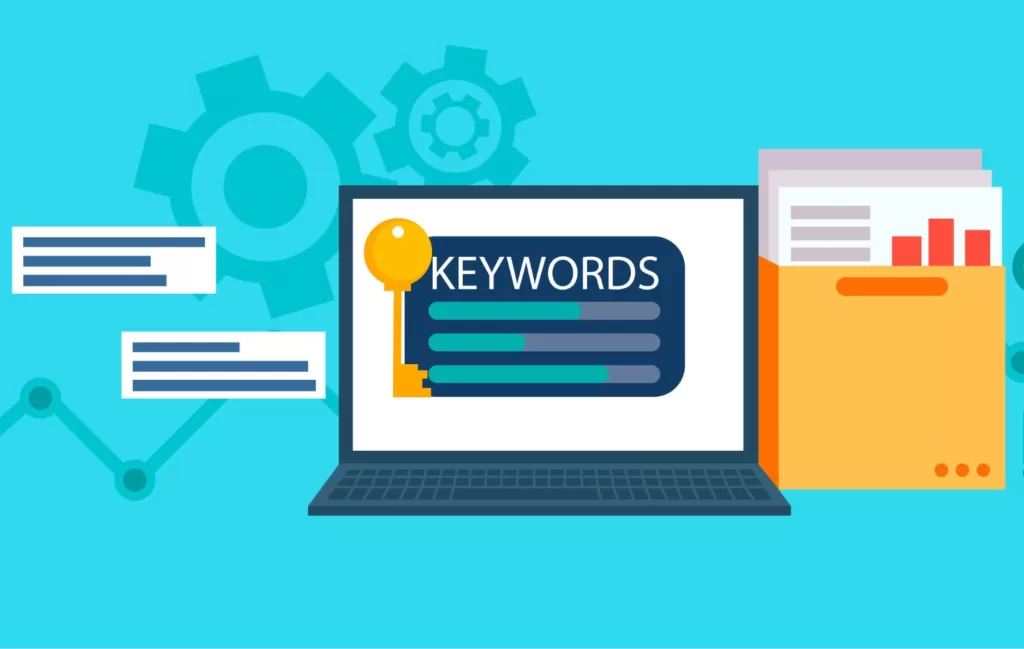
    Illustration of a laptop with the the a key and the term "keywords" on the screen, next to a folder with files inside

    While there are no defined “rules or regulations” for Keyword Density, make sure to implement today’s best SEO practices to ensure you achieve optimal results.

    Focus on Achieving Topic Coverage – While loading content with the same keyword repeatedly is not a feasible long-term SEO strategy, focus on fully covering the topic at hand. Include subtopics to enhance your page’s search ranking and add a new level of flare and creativity.

    Incorporating keyword additions to prominent places (Title Tag, H1, URL, and Meta Description) – While it’s not ideal to “stuff” your article with keywords (known as keyword stuffing) include your main keyword in the Title, Header 1, URL, and Meta Description. That way, it is placed in prominent locations and will enable a higher search ranking for that specific keyword.

    Write naturally –  Readers want to see personality come out in the content they see! Don’t be a robot and write to what Google’s algorithms want to see. Let the words flow the way you want them to, and the results will follow.

    Now, while there isn’t a golden number that’s considered “too high” for Keyword Density in search engine optimization, it’s advisable to revise the content if goes above 2 percent.

    How to Calculate Keyword Density

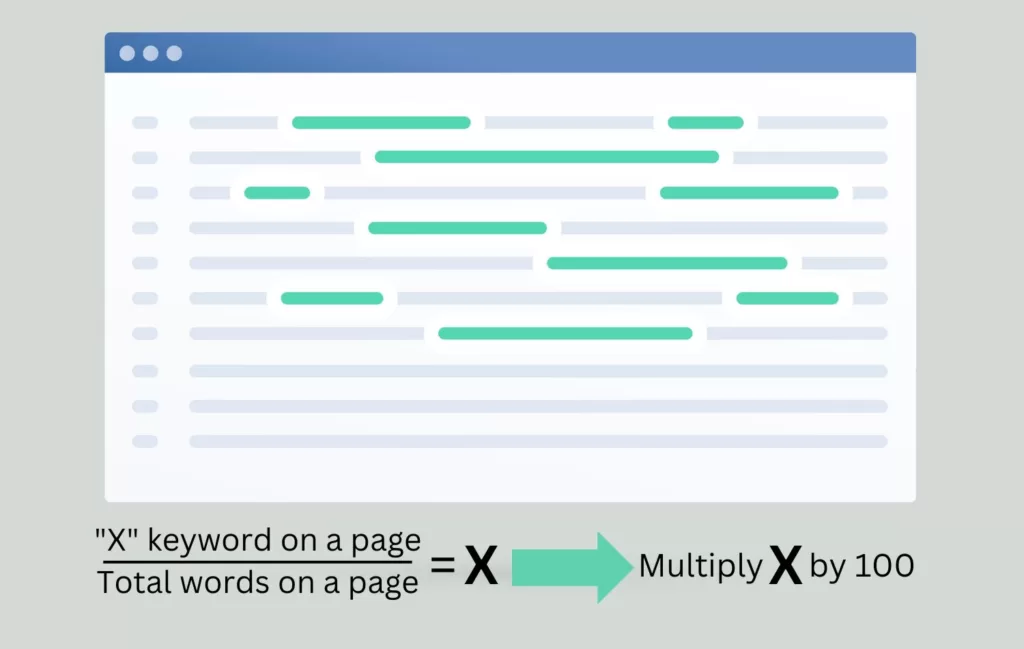
    Image of a webpage with highlighted keywords followed by the calculation to find keyword density

    The formula for calculating Keyword Density is straightforward:

    Divide the number of times a keyword is used on a specific page by the total number of words on the given page. Next, multiply that number by 100.

    The above formula isn’t the only way to calculate Keyword Density. There are multiple types of Keyword Density checkers that help measure (in percentage) the number of times a keyword or phrase appears in comparison to the number of words on a webpage. Optimizing your overall SEO doesn’t have to be a challenge.

    By simply copying and pasting your content into a checker tool, it will calculate the level of density for you!

    Keyword Density and SEO Marketing Professionals at Your Fingertips

    Our team of experts love to dive into the world of SEO. Since Keyword Density is a critical component of SEO marketing, we utilize and leverage proper optimization techniques and strategies to help you appear higher in SERPs, and ideally, leaps and bounds ahead of the competition.

    Reach Marketing Pro has a surplus of Google algorithm trend knowledge to initiate keyword research, content creation, content analysis, and updating content months (even years) after its integration. There are many factors that come into play when ensuring every piece of content is formulated properly for the best results.

    Ready to kickstart your business’s SEO strategy? Contact us to connect with your Keyword Density partner and discuss the next steps.

  • What are the Best SEO Tools and Software?

    What are the Best SEO Tools and Software?

    When you have a goal to increase traffic and user engagement to your website, utilizing an SEO tool will help with your business’s search optimization strategy. Here we will define what SEO is, how it can impact your online traffic, the best SEO tools to use, and how our SEO specialists utilize the best software tools that produce long-lasting results.

    What is Search Engine Optimization or SEO?

    Search Engine Optimization (SEO) is a process that involves incorporating specific keywords and content that helps your website rank higher across various search engines. SEO is used to generate more engagement to a specific website, web page, or piece of content. When a company wants to boost its SEO strategy, they normally hire an SEO Specialist who focuses the majority of their time on analyzing the website’s overall health and identifies areas of improvement that can be optimized to improve your search rankings.

    How SEO Specialists Use SEO Tools

    Illustration with multiple male & female figures who are standing in front of a large webpage with a SEO label

    Investing in an SEO Specialist can provide positive, long-term results for your online traffic. An SEO Specialist navigates your website and makes improvements on the front-end and back-end that can significantly improve the search performance of your website. SEO tools and software assist SEO Specialists during this process by enabling them with the data they need for proper optimization. These SEO software tools are used for keyword searches, organic data, and backlinking, which all benefit your business’s search engine rankings.

    Keyword Searches involve incorporating keywords into the content you put on your website, so they show up as relevant results when similar keywords are searched online. Keyword data refers to the keyword volume of a particular keyword phrase on a monthly basis as well as the SERP position (Page 1, Page 2, Page 3 on Google) of your website page for any given keyword phrase.

    Backlinking includes an internal and external effort for linking websites together through relevant keyword phrases and content topics. For example, if another business or individual links to your site, then you now have a backlink from them, or vice versa, which can improve your SEO and their SEO. It’s a mutually beneficial search relationship.

    Organic Data involves analyzing the website metrics, after combining keyword research and backlinking into your website, and extrapolating useful analytic insights to implement on your site pages. That way you can ensure your content ranks, and continues to rank, at the top of organic, unpaid search engine results pages (SERPs).

    The Best SEO Tools and Software to Use

    Illustration with a magnifying glass over text on a laptop. The background is blue and has various SEO terms

    With so many moving parts that are involved with SEO, it can be hard to master at the beginning. However, there is software that’s considered to be the best SEO tools on the market today. Based on our research findings, the best SEO tools are:

    • Ahrefs for SEO Keyword Research has been recognized as being second to Google when it comes to website crawling. When you want to determine your competitor’s backlinks, Ahrefs specializes in link building, keyword research, competitor analysis, rank tracking, and site audits.
    • Google Search Console provides detailed information on how Google crawls, indexes, and serves websites. Best of all, it monitors and optimizes your overall search performance.
    • Semrush is an all-in-one suite that improves your website’s visibility and provides marketing insights. SEMrush delivers optimized specialties in SEO, PPC, SMM, Keyword Research, Competitive Research, PR, Content Marketing, Marketing Insights, and Campaign Management.
    • KWFinder is a keyword research platform that helps you find long-tail keywords with low competition.
    • Moz Pro is used to gather data on your site’s search rankings, page optimization, site crawl, and backlink metrics.
    • SpyFu offers competitive intelligence used by digital marketers to improve their performance in online research.

    Based on what your specific needs are, these are some of the best SEO tools to use in today’s marketplace. No matter the tool you choose, your online presence is in good hands and you will see dramatic results.

    When Using SEO Tools and Software, How Long Will It Take to See Results?

    Short answer: It can be anywhere between 4 to 12 months to see results. Sometimes longer depending on the competition level of the chosen primary keyword phrase. However, the speed at which you can see verifiable results depends on how well combine ranking factors into your executed SEO strategy. For example, if you target low-competition keywords, you may start to see results quicker than if you target high-competition keywords. Think of it this way – SEO is a marathon, not a sprint. If you want to see long-lasting results and not fall backward, slow and steady always wins the race.

    Why Should I Use SEO Tools if It Takes a While to See Results?

    A collage of animated webpages, forms, and graphs

    Think back to each passing New Year. The typical New Year’s resolution is to go on a diet and lose some weight. Most of the time when this happens, this sudden resolution ends after only a few months because people would not see any significant changes as quickly as they would like to see. That is why it is called a lifestyle change, rather than a fad diet or a “quick fix.” SEO is the same way. Results do not change overnight. Instead, it takes consistent optimization for a minimum of 4 months until you begin to see a change in traffic or your google search rankings. If you stay diligent and continue running your marathon, you will reach the finish line and see a significant improvement.

    SEO Professionals That Handle Your SEO All at One Cost

    Reach Marketing Pro is a leading industry expert on what it takes to grow your social engagement. We offer a full-fledged SEO marketing service that kickstarts your organic strategy from the ground up, creating captivating content using graphics, photos, and videos across your website pages and blog posts. Our close-knit team includes Search Engine Optimization Specialists who can boost your SEO rankings by utilizing the most optimal SEO tools and software on the market. By leveraging proper optimization, data-driven keywords, and SEO marketing strategies, we will have your business ranking higher in SERPs – ahead of your competition. We are industry experts who specialize in content creation, backlinking, website crawling, SEO, and keyword analytics that can benefit your business’s website traffic and profitability in the long run.

    Visit our SEO services page to learn more.