
Tag: Schema

  • Product Page SEO: How E-Commerce Brands Can Maximize ROI From Search to Sale

    Product Page SEO: How E-Commerce Brands Can Maximize ROI From Search to Sale

    As an e-commerce brand, investing in product page SEO is non-negotiable. Selling products is the core mission of your business. If your product pages aren’t properly optimized for search engines and users alike, they likely won’t perform successfully. 

    SEO for e-commerce product pages is essential to promote online visibly, clicks, and conversions from organic traffic. If shoppers and search engines can’t discover them or push them away from poor SEO, they won’t support your bottom line as they should. 

    Learn e-commerce product page best practices and how you can generate a greater ROI with SEO content optimization. 

    SEO for E-Commerce Product Pages: A Step-by-Step Guide


    Below is a step-by-step guide on product page SEO with common mistakes to avoid.

    Write Unique Product Page Titles & Descriptions

    A graphic people writing content on a page with a pencil

    SEO for product descriptions and titles requires unique copy for better search visibility, especially for e-commerce brands with large catalogs. Duplicate copy in your product pages can cause crawling delays from search bots because they don’t know which version to save in their database for indexing. 

    It also wastes your crawl budget, causing you to wait until you can request again, leaving your product pages undiscovered online. 

    More ways to improve your SEO product descriptions include:

    • Internal links to relevant product pages in the same collection to promote upselling and cross-selling opportunities
    • Backlinks from reputable sites that recommend your product to demonstrate trustworthiness and credibility
    • Not using the same product descriptions as the manufacturer’s website, as they’re not created for SEO or shoppers and keep your brand separate

    In addition to unique titles and descriptions, they should also provide an added value proposition. Instead of only explaining what your product does, showcase what customers will gain from it.

    If you’re selling winter coats describing them as, “engineered to keep you warm” is obvious, as it’s what they should do. Saying something like, “engineered to keep you warm at -10° F” is a stronger selling point.

    Displaying your product’s specific benefits, along with its features, better addresses your buyer persona’s challenges and concerns.

    Optimize Your Copy with the Correct Search Intent

    All shopping starts with a search. While you may be familiar with keyword optimization, businesses often make the mistake of choosing the wrong ones. 

    Your keyword research is more than finding queries with the highest search volume and lowest difficulty from your competitors. It should also include selecting keywords with the right search intent to attract the appropriate audience. 

    For example, if you’re an athletic footwear brand and optimize a product page description with a keyword, like “best running shoes” this wouldn’t provide the best SEO opportunity. This keyword generates blogs in the search engine results page (SERP), not product pages.
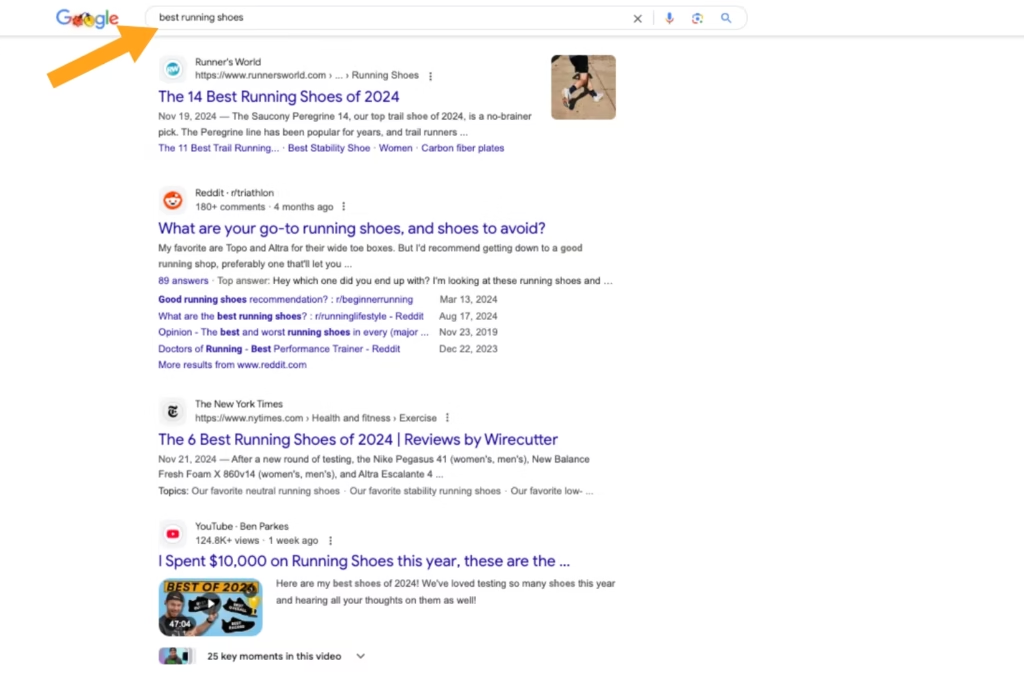
    Screenshot of Google search results for best running shoes with a yellow arrow pointing at the search bar

    While “best running shoes” has a commercial search intent, the SERP shows users comparing options by reading blog recommendations before buying. Optimizing your product pages with this keyword can cause fewer people to click on them or quickly leave because that’s not what they’re looking for with that search query.

    A transactional keyword, like “running shoes” generates product pages in the SERP, showcasing the intent of people ready to buy. Adding this to your product’s description and page URL attracts relevant traffic, promoting a higher chance of converting them.
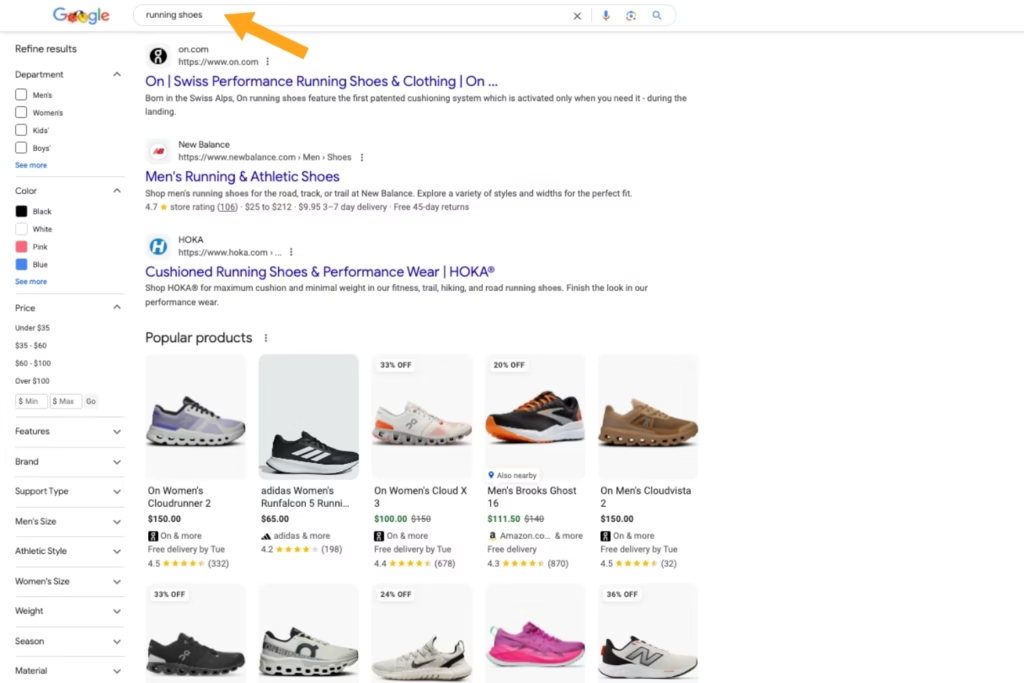
    A screenshot of the Google search results for the keyword running shoes with a yellow arrow pointing at the search bar

    A slight keyword change in your product page SEO can significantly impact its performance. Luckily, SEO platforms like SEMRush tell you the search intent behind every keyword, so you don’t have to guess. 

    However, it’s easy to check yourself. Simply enter the keyword into a search and review the SERP for what they show. If it generates product pages, you have the correct search intent.

    Use Clear, Captivating, & Optimized Product Visuals

    A graphic of three people adding photos to a website page

    While you may have high-quality product page images, are they captivating enough to customers? In addition to displaying your product, fully showcasing how they apply to the real world resonates further with shoppers. Instead of only using product images on a white background, include lifestyle visuals, too. 

    For example, if your brand sells hiking boots, include photos of people in a mountainous landscape wearing them to provide a better visual context. If you sell office chairs, use a short-form video to show their different sitting configurations, demonstrating the product’s diverse usability and comfort further.

    Once the product page visuals are finalized, ensure they’re optimized next. Writing image alt tags with descriptive language ensures it’s ADA-accessible for all online shoppers. Also, aim to use target keywords in your image alt tags naturally to improve your page’s search visibility via metadata.

    Implement Structured Data Markup to Generate Rich Results on Google
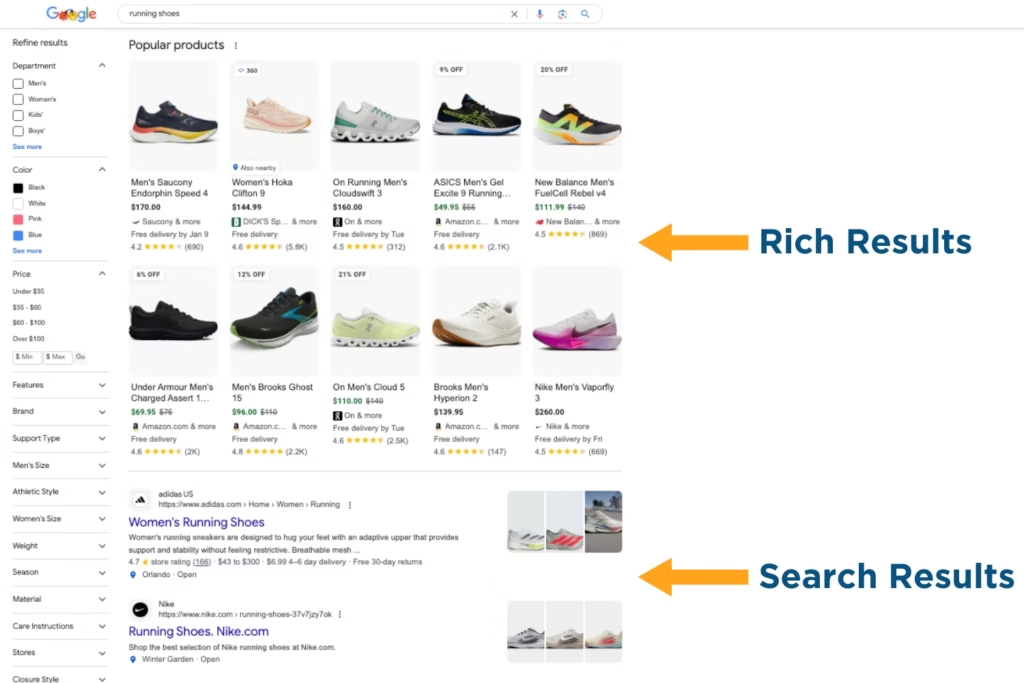
    Screenshot comparing the rich and search results on Google for running shoes

    Structured data markup is one of the most critical components of product page SEO. In a saturated online market, e-commerce brands must stand out in the SERP more than ever. As a form of on-page SEO, structured data markup helps your product pages generate rich results

    Rich snippets visually showcase your product differently than the SERPs and are placed above traditional search results. They’re designed by Google to enhance the shopping experience without having to click on your online store. When users click on rich results 58% of the time versus 41% for non-rich results, it’s worth optimizing your product pages for.

    Examples of structured data types for e-commerce product pages are:

    • Review Snippets: Average rating, number of reviews, reviewer information, etc.
    • Product Schema Markup: Carousel image, pricing, product availability, etc. 
    • Sitelinks Search Box: Sitewide product search in the SERP, without having to click on your website
    • FAQs Schema Markup: List of common product questions, assembly directions, etc. 

    Structured data markup gives customers a streamlined shopping experience while providing Google with the standardized language it requires to generate rich results for your product pages.

    Create Valuable Call-to-Action (CTA) Buttons

    As an online store, you must encourage users to take action via CTAs to increase click-through rate (CTR) and conversions. These CTAs should be more than buttons below your product description stating, “Buy Now.” They should also be convincing of the value your products bring. 

    If you’re a skincare brand selling facewash, instead of creating a “Shop Now” CTA button, write something like “Start Your Self-Care” to showcase to customers that it’s a worthy investment in themselves. 

    Additional ways to create valuable CTAs for e-commerce product pages include:

    • Using Multiple CTAs to Meet Customers Where They Are in Their Buyer’s Journey: add to wishlists, you might also like, one-click checkouts, save payment methods, address autocomplete, email signup discounts, etc. 
    • A/B Testing Button Designs to See What Resonates Best with Your Target Audience: button locations, shapes, colors, fonts, sizes, etc.
    • Placing CTA Buttons Strategically to Streamline Users From Product Page to Purchase: minimal pop-ups, responsive button designs on mobile and desktop, etc. 

    Conduct a Site Audit to Correct Page Performance Issues

    Graphic of three people conducting a website audit on a desktop

    You can do all the optimization in the world and still not have success if your product pages have performance issues. If they have slow loading times or poor mobile design, they can push potential customers away. Also known as user experience, it’s about making your site easier to use for a seamless shopping experience.

    Look for the following issues in your site audit to improve your product page SEO:

    • No breadcrumbs for easy site navigation from product page to checkout
    • Low-quality compressed product visuals on mobile  
    • More than four seconds in page load speed on desktop and mobile
    • No SSL certificate to secure your website and shoppers’ saved sensitive payment information

    User-friendly e-commerce websites help people discover, browse, and purchase from your product pages more. 

    Stop Losing Shoppers from Poor Product Page SEO: Get Found Faster & Sell More Today

    Drive more transitions to your product pages with digital marketing professionals. At Reach Marketing Pro, we’re a full-service agency with extensive experience in site-wide optimization, including Shopify, WordPress, and custom e-commerce websites. 

    We have graphic designers to create customized, compelling product visuals per your unique brand. Our SEO copywriters write effective product page copy that adheres to Google guidelines and customer needs. Additionally, our web designers/developers ensure your site’s shopping experience is seamless and engaging. 

    Together, our in-house team provides you with the full suite your e-commerce website needs for a stronger product page performance.

    Ready to generate more organic traffic and transactions?

    Learn more about our digital marketing services or contact us to reach more customers today!

  • How to Optimize Website Pages for Google Discover Traffic

    How to Optimize Website Pages for Google Discover Traffic

    Well…What Exactly is Google Discover?

    Google Discover is a feed that appears on the homepage of Google’s iOS and Android application (APP) as well as the mobile Google.com homepage. When utilizing Google Discover, users can personalize their feeds so they can visualize content that directly aligns with them. This is separate from Google Search Ads because, with Discover, people aren’t required to enter a search query to have this interest-specific content visible. Essentially, Google Discover replaces the Google feed on mobile devices and provides relative content that is specific to the likes and interests of the user based on their mobile (iOS and Android) activity.

    Google Discover, Google News, and Google Alerts – They All Seem Quite Similar but They are Quite Different

    A magnifying glass over the Google News search page

    Google News versus Google Discover

    Aside from Google Discover, Google News features news headlines, local weather, and the top stories of the day on the main page, while promoting fact-checking on the right-hand margin. Specifically, Google News is an aggregator service that presents a continuous flow of backlinks to articles organized from thousands of publishers and magazines. It is available for users on a mobile application via Android and iOS as well as online.

    Google Discover, however, utilizes artificial intelligence to show users the information they may want to see, or have shown previous interest in. As a replacement for the Google Feed, it surfaces relevant content to the user, even when they’re not searching.

    Google Alerts versus Google Discover

    Google Alerts is a content change detection platform that is based on a free notification service. Essentially, it notifies the user via email when it finds new results, such as web pages, newspaper articles, blogs, or scientific research that matches the user’s search term(s). Aside from Google Discover, it’s been known that Google alerts haven’t been the most effective in terms of accuracy. With Google Discover, everything the user sees is based on their specific search history, rather than alerts they might not be interested in anymore.

    Why You Should Optimize Your Webpages for Google Discover Traffic

    Illustration with a man looking at a phone with the text "search" and a search bar beneath it

    Although Google Discover isn’t a prioritized platform that digital marketers keep in their immediate toolbox, it is one businesses are leveraging to grow, further develop their brand, and reach new customers. Optimizing your content for Google Discover allows your content to have a higher chance of reaching a larger audience due to its personalized approach. There will even be times when you’ll generate much more traffic through Google Discover than you would with organic search. For your marketing content to appear on Discover, it should be of top quality with your web pages indexed by Google. Discover helps your brand become relevant to what the user seeks. Based on what they search for and have an interest in, Discover brings your content that matches the user’s interests to the forefront, which optimizes your pages, increases conversion rates, and boosts your brand’s credibility.

    How to Optimize Your Website for Google Discover Traffic

    Illustration of a man running up stairs

    Content is automatically eligible to appear on Discover as long as it’s indexed by Google and meets Discover’s content policies. To get there, it is best to follow the below recommendations to optimize your website and web pages to improve your online foot traffic:

    • Ensure that your Google Business Profile, formerly Google My Business (GMB) is created fully and working properly.
    • Confirm that your Google Business Profile (GBP) is verified on Google. If it isn’t, learn how to verify it here.
    • Adhere to and comply with Google’s content policies.
    • Consider and implement a “Mobile-First” approach by starting from within and optimizing existing products/services for mobile users.
    • Make sure you develop a mobile approach that prioritizes the user experience (UX), including mobile friendliness and responsiveness.
    • Strengthen your copy and graphics and consider current events for future content that is relevant to what the user wants.
    • Utilize and leverage high-quality visuals such as organic photos and emotionally-triggering videos that bring the user in.
    • Recommend readers to follow your brand by utilizing call-to-actions (CTAs).
    • Research what your competition is doing so you can innovate unique solutions that help you stand out.
    • Write optimized page titles that capture the essence of the content you’re presenting to your target audience.
    • Implement AMP and Schema (structured data) so your content can appear in rich results in mobile search, like the “Top Stories” carousel or “Host” carousel.

    By following these tips and putting plans into motion, you’re well on your way to optimizing your website and being successful on Google Discover.

    How Schema (Structured Data) Helps Google Discover Traffic

    Illustration resembling different devices and device layout

    Schema, a type of microdata that creates an enhanced description that Google may use in search results to share as a snippet of your article, allows the reader to get a sense of what your article is about and how it may bring value to their related query.

    By using this form of structured data, you are essentially helping potential customers find your article easier- meaning a potential lead or conversion! Utilizing this data type can improve the appearance of your site for the relative search result(s), enable you to appear in front of a user that may not have seen your site without it, and increase the readers’ time on your page with the relative query and engaging content!

    There are many types of Schema out there such as Products Schema, Articles Schema, Recipes Schema, Events Schema, and many more. Each one serves its own purpose and there are some Schemas that can help your articles show up in the Google Discover feed. Most of the articles that populate the Google Discover feed often use some form of Schema.

    Illustration of a tablet, with different search related images over it

    For example, you will find that webpages populated in Google Discover may use Schema categories such as CreativeWork which houses structured data markups like Article, NewsArticle, Blog, and HowTo. Pages like this are often trendy and frequently searched for in Google and are perfect for Google Discover. With the implementation of Schema, Google has a lot more data to utilize to build a rich snippet or an enhanced search result page (which is really what Google Discover is).

    Aside from Schema, AMP is very important too. Google Discover feeds are mobile-only and having your website set up with Accelerated Mobile Pages just speaks for itself. Unfortunately, there is no secret sauce or surefire way to get your content into Google Discover, but utilizing Schema and AMP will increase your chances of showing up in the sought-after Google Discover feed and increase mobile traffic from Google Discover.

    Google Discover Will Keep You Ahead of the Competition & Stay Relevant in Your Consumer’s Minds or at Least on Their Phones…and We Can Help!

    At Reach Marketing Pro, our team of search engine optimization (SEO) experts will optimize your website and web pages to outperform your local competition and gain more visibility/exposure for your business. We partner with you and your business to look through your unique lens and grow your brand across multiple forefronts in the digital marketing realm. Whether you are familiar with the process of Google Discover or not, it’s always recommended to obtain a professional consultation on expert services to ensure that you are truly optimizing every aspect of your business’s online visibility can achieve. Leverage one of Google’s newest and most critical features to become a staple in your industry today by getting in touch with our team here.