Tag: Off-Page SEO

  • Website Project Management: A Complete Guide for Design & Development 

    Website Project Management: A Complete Guide for Design & Development 

    Your website is a multi-faceted platform with various moving parts and siloed teams to track continuously. Do you have an organized system to manage ongoing projects and daily tasks simultaneously? 

    From regular maintenance to complete site redesigns, having streamlined workflows for website project management is essential. It ensures the design and development of your site remains efficient with the time and resources your business invests in. 

    While certain aspects require collaboration, your web developers, designers, SEO copywriters, and clients should all be on the same page to better deliver quality work. 

    If they’re constantly disrupted to redo site designs that stray far from the original concept or complete multiple rounds of copy edits that could’ve been consolidated, it can cost you more than necessary. It also increases the chance of mistakes happening due to this lack of focus. 

    Below is a complete guide to project management for websites to maximize your work efficiency and budget—without overwhelming everyone involved. 

    Website Project Management for Design & Development: A Complete Guide for Seamless Collaboration & Execution

    A graphic of three people meeting and reviewing statistics

    Website project management should be a separate department or assigned to a specific role outside your dev ops and designers. They’re responsible for their own technical tasks and need proper guidance from a website project manager to execute them efficiently. 

    Here’s how to ensure you set your web teams up for success in design, development, and everything in between. 

    Create a Website Project Plan 

    The first step for completing anything related to your site is creating a clear plan for everyone involved. This includes project management for routine site maintenance, new web builds, and redesigns for internal and external teams. 

    A website project plan should include the following:

    Understanding Your Web Project’s Goals

    What are the goals behind your website’s tasks or projects? Whether you’re redesigning, building a new one, or optimizing it for SEO, understanding the reason behind your site’s projects is the foundation of its success.

    For example, if you’re creating web content for the sake of doing it, it’s not researched-backed. Your website’s projects should be data-driven to ensure you remain on strategy for your bottom line.

    Ask your team the following questions if you need help figuring out your site’s project goals:

    • Why are we redesigning this site, and what is this aiming to accomplish? 
    • Why are we building a new site, and what is this aiming to accomplish? 
    • What are our top and lowest-performing web pages? 
    • Which website performance metrics do we want to improve or sustain?
    • How do we want our website to support our business goals?  

    That way, everyone is aligned on the overall mission of the website’s project goals. 

    Defining Key Web Project Details

    Before you begin assigning tasks to your web teams, you must define the key details of how these will be executed and the project scope. 

    Buffer Budget with All Website Deliverables

    First, create a client-approved buffer budget for additional tasks that may pop up or take longer than expected. This budget should include exact deliverables, like the number of redesigned pages or written blogs. Don’t forget to include potential subtasks required, like A/B testing page design concepts and publishing blogs after approval to prevent going out of scope. 

    Deadline Schedules with Your Preferred Project Management Method 
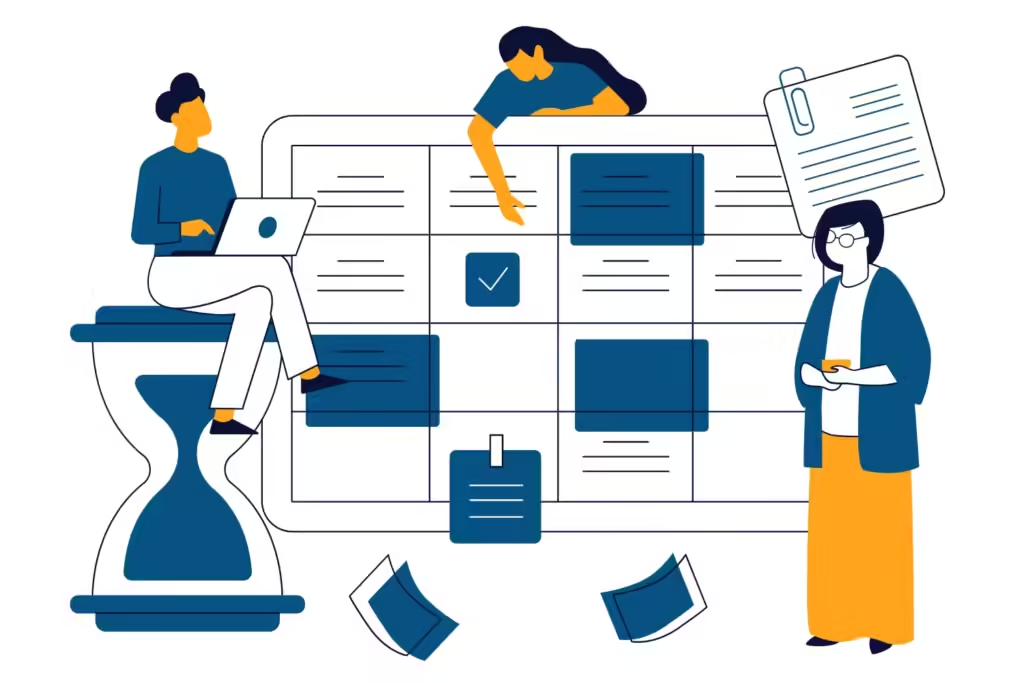
    A graphic of three people creating a calendar schedule for tasks

    Next, set the deadlines for your website’s tasks and how you want to complete them. 

    You can create milestones, like building a few web pages at a time and submitting them for client review. Known as agile web development, this project management methodology allows your team to work in short sprints with a few weekly or monthly deliverables at a time. 

    If you prefer to complete your web projects all at once, choose the waterfall web development approach. However, you must understand the pros and cons of each that best suits your web project’s goals. 

    Agile web project management is best if you’re on a tight deadline because you gain continuous feedback throughout the design and development process that can be turned around faster with fewer deliverables. Waterfall methodology is best for long-term web projects because it allows your team to work uninterrupted and the extra time to finalize the process. 

    Website Project Management Template or Software 

    We can’t stress enough the importance of using website project management platforms like Jira and Trello. Taking advantage of automation saves you time and headaches from manually creating workflows for your site’s projects.

    Depending on the application, these may include:

    • Pre-built website requests for new page graphics, copy edits, add-on features, etc. 
    • Interconnected action items that prevent future web tasks from being assigned until the previous one is completed
    • Sequenced site design/development steps, like preliminary design, code review, and testing
    • Organized web tasks by priority and status of completion  

    Web project management tools streamline your tasks and teams visually and easily in an automated, centralized platform. 

    Organize Web Tasks by Phase 

    Now that your website project plan is finalized, next is organizing the tasks by phase. While project management tools automate this for you, this helps guide your teams throughout the process. 

    Your site’s tasks should be categorized in the following order: 

    Website Project Discovery

    This discovery phase occurs when you first create your website project plan. This initial step is the ideation of your site’s project. However, it requires careful guidance to prevent your discovery meeting from expanding into unrealistic or disorganized expectations. 

    Ensure you only include people directly involved with the project, like a lead web developer, site designer, website project manager, and client representative. It prevents you from having too many cooks in the kitchen and promoting over-communication. 

    You should also prepare questions from your website project plan, like client goals, buffered budget, deliverables, timeline, and project management methodology. That way, there aren’t any surprises that may delay everyone before you start design and development.  

    Web Design
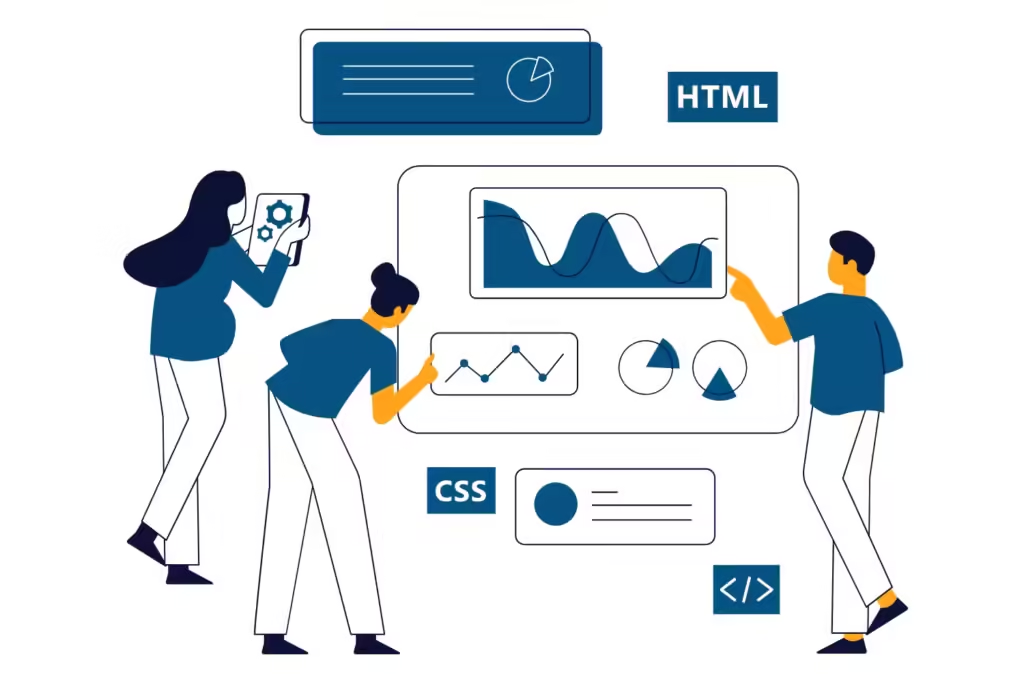
    A graphic of three people designing a website with HTML and CSS

    The site design phase involves multiple people, including web designers, SEO copywriters, and potential clients for approvals. They’re responsible for how the front end of your site will look. It’s especially crucial to organize the design stage of a web project because of the multiple roles you’ll manage. 

    Set your web design team up for success with the following:

    • Submit website examples to your designers for visual layout inspiration, must-have features, etc. 
    • Provide your web designers with everything they need, including branding guidelines, images, logos, optimized web copy, etc.
    • Give platform access to everyone involved to complete design tasks simultaneously across siloed teams
    • Schedule design tasks from highest to lowest priority, like your Home page first and Testimonials page later
    • Centralize all communications within your project management software for internal teams and update their tasks timely if you have edits from clients after review

    You should also standardize core web design processes, including:

    • Creating wireframes for web developers to reference when building sitemaps for the site’s structure
    • Designing the visual layout of all web pages, including colors, font, visuals, and staging links for client review
    • Setting up a content management system (CMS) to host, manage, and upload visuals and text assets for all web pages
    • Registering a web domain so your site owns the rights to its name

    Keep in mind that your web designers and developers work together to complete site projects. The main difference is that site designers create the visual elements, while web developers build and make them usable. 

    Web Development

    The web development phase primarily involves your dev ops team. They’re responsible for building the back end of your site’s functionality, requiring complex processes that must be executed successfully. While each web build is unique per platform and project, you can streamline their workflows more efficiently.

    Standardizing core web development processes should include:

    • XML Sitemap Creation: Creating a blueprint of the site’s structure, navigation, information hierarchy, etc. 
    • Platform Plug-in Installation: Installing popular plug-ins separate from your site platform, like Yoast SEO and WooCommerce
    • SSL (Secure Sockets Layer) Certification: Acquiring the code on your site’s server to create an encrypted connection and secure its data.
    • Website Analytics Software Integration: Connecting the software to your site to track its performance. 
    • Site Code & Tests: Building and testing the site’s various codes and markup languages to ensure proper functionality. 

    While you can use a website project management tool to automate these processes, it still needs to be properly assigned and scheduled.  

    Site-Wide Testing

    Testing your website is comprehensive, but you don’t need to complicate it more with a set process in place. That way, your dev ops and web design teams ensure they don’t miss any crucial steps.

    Create a site-wide testing plan for the following: 

    • Website accessibility for disabled users per ADA compliance 
    • User experience (UX) to provide visitors with seamless interaction in all aspects of your site, including minimal pop-ups, balanced white space, easy navigation, etc. 
    • HTTPS (Hypertext Transfer Protocol Secure) to ensure the HTTP version is redirected for site security 
    • Page load speed on PageSpeed Insights for mobile and desktop 
    • Site audits to check for potential issues, like broken links, invalid CSS/HTML, duplicate headings, and missing metadata 

    Website Launch

    A graphic of three people launching a new website with a rocketship

    Now that your website is ready to go live, your team is in the final phase of design and development.

    Include the following in your workflows for a successful site launch:

    • Submit sitemaps to Google Search Console for crawling and indexing 
    • Train internal staff training for website management, like content uploads and performance tracking
    • Proofread all web copy to ensure everything is accurate and error-free

    Remember, you can always fix minor issues and make design changes once the website is live—so don’t delay the launch for aesthetics and quick fixes! 

    Post-Launch

    Even newly launched websites must be continuously monitored and maintained to ensure they perform as they should. From troubleshooting bugs to optimizing the site for new search engine algorithm updates, your website isn’t a set-it-and-forget-it situation. It’s an ongoing responsibility for your business. 

    Create a post-launch checklist for your web team, including:

    • Scheduling weekly website backups to save your site from accidental data loss
    • Checking conversion paths for proper functionality on forms, page displays, etc.  
    • Cross-promoting the website on social media 
    • Fixing bugs when necessary

    Make Your Site’s Projects Smooth Sailing with a Website Project Manager

    As you can see, project management for website design and development is time-consuming and can get complex, even with automated platforms. Let a website project manager do the heavy lifting for you. 

    At Reach Marketing Pro, we have extensive experience in all aspects of web project management, including site design, development, and maintenance. We’re a full-service digital agency equipped to handle all aspects of your site with our in-house web developers, web designers, graphic designers, SEO copywriters—and, of course, project managers. 

    That way, you can focus on what you do best—managing your business and being an expert in your trade.

    Ready to optimize your website’s workflows and better support your bottom line? 

    Learn more about our website management services or contact us to make your site’s projects smoother sailing today! 

  • Keep Your Visitors Happy: Top 10 Attributes of User-Friendly Websites

    Keep Your Visitors Happy: Top 10 Attributes of User-Friendly Websites

    A user-friendly website is vital for your bottom line. It determines the ease of usability your site has for lead generation, conversions, SEO, and more. In contrast, poor site usability can make it harder for people to navigate, leading to higher bounce rates, lost sales, and dropped keyword rankings. 

    Learn more about the significance of website user-friendliness and how to achieve successful usability to support your business goals. 

    What Does User-Friendly Mean for Websites? 

    The meaning of user-friendly for websites is making them easier for people to use. They should be able to browse, search for information, and complete actions on your site quickly and easily. 

    Not to be confused with user experience (UX), which focuses on your site’s overall experience for people, whereas usability is for specific tasks. However, user-friendliness falls under the UX umbrella. Anyone should be able to use your site’s features easily and have a positive perception throughout the process.

    For example, if your website has an easy-to-use custom product builder, but your page takes too long to load, it can compromise its usability. User-friendly sites and UX design go hand-in-hand.

    Designing for Users: 10 Key Attributes of User-Friendly Websites

    A graphic of a person logging into a website on a laptop sitting down


    Learn the top 10 attributes of user-friendly websites with mistakes to avoid, tips on implementing them, and why each one matters.

    1. Responsive Moblie & Desktop Design

    Your website’s security is arguably the most important reason to take care of it. If your site’s platform hasn’t been updated to the People browse, research, and shop on mobile devices more than ever. In August 2024, studies show that nearly 62% of website traffic is from mobile users. At the same time, this doesn’t mean to neglect your desktop users. 

    Compared to mobile, people using desktop devices visited 100% more pages and spent almost 38% more time on websites—an average of four to seven pages than mobile’s three!  

    That’s why having a responsive website design on desktop and mobile is crucial. 

    A responsive website means its layout can easily adapt to any screen size. If your site has the same design for all devices, it can make it harder for people to navigate, a.k.a. not user-friendly. Examples of non-responsive web design include shrunken pages on mobile that make your text too small to read or grainy images that stretch too far on desktop. 

    You can optimize your site with user-friendly responsive design by:

    • Testing your website on different devices after major updates to ensure everything remains responsive 
    • Using flexible website grids and layouts via CSS (Cascading Style Sheets) code for optimal screen resolutions and orientations (portrait, landscape, iPads, Android phones, etc.)
    • Implementing max-width image source codes so they resize proportionally to all devices
    • Minimizing UI (user interactive) elements to prevent cluttering your site’s layout and complicating navigation

    2. Fast Page Load Speed

    Did you know if your website takes more than three seconds to load 40% of users will leave? In a rapid digital age, you can’t afford to lose visitors for slow page load speed. 

    Common reasons for slow websites include:

    • Large media files like long background videos and non-optimized images
    • Insufficient web host plans that share servers with other websites, slowing your site’s queue and lowering server performance
    • Limited CDN (Content Delivery Network) capabilities with smaller networks and no caching features
    • Dated CMS (content management system) that hasn’t been updated regularly or has many unused plug-ins
    • Unoptimized CSS and Javascript code with unnecessary rules or dense code, leading to increased HTTP requests your server can’t handle 

    You can improve your website’s page load speed with the following:

    • Compressing large media files and resizing them to a lower resolution
    • Upgrading your web hosting plan or switching providers with larger networks
    • Using CDNs with caching features for browsers and servers 
    • Downloading CMS updates regularly and removing unnecessary plug-ins
    • Minifying CSS and Javascript code to reduce the number of files loaded on your web pages

    Not to mention, slow page load also impacts your website’s technical SEO performance, like lower SERP rankings and reduced crawl rates. Google prioritizes fast-loading sites because it strengthens UX with quick content access. 

    Additionally, poor technical SEO makes it harder for search bots to crawl your website, delaying the indexing process. If Google takes a while to discover (crawl) and index (store) your site in their database, it’s essentially invisible online to users. 

    3. Seamless Navigation

    A graphic of a person navigating a website on a mobile device

    Your website’s navigation can be the main reason users browse or bounce. A beautifully designed site is nothing without successful functionality. If your website has no breadcrumbs for users to return to a page easily or has cluttered menu bars with too many web pages, it makes it harder for people to navigate. 

    User-friendly websites provide a seamless navigation experience, including:

    • Organized menu hierarchy by page priority with the top ones in the beginning, the lowest in the middle, and the contact page at the last 
    • Simplified menu bar design with a short list of options at the top header or side (seven maximum is recommended for most sites) 
    • Implemented breadcrumbs for users to backtrack easier or for sites with complex structures 
    • User-focused navigation experience with a recognizable search bar and accurate content label categories 

    4. Clear CTAs & Proper Placement

    As a business, your website must encourage users to take action. Whether it’s generating user engagement, leads, or conversions, your site should have various calls to action (CTAs) for your bottom line. CTAs prompt user interactions by guiding them to take the next step, like submitting a contact form, scheduling a demo, or downloading a free guide. 

    However, your CTAs require a careful balance to prevent them from making your site less user-friendly. Using too many pop-ups can overwhelm people, adding buttons that aren’t recognizable can easily be missed, and writing non-persuasive copy can make them ineffective. 

    User-friendly websites have clear and impactful CTAs, including:

    • Adding CTA buttons with bold colors, responsive sizing, and easy-to-find placement
    • Minimizing pop-ups that are distracting or spammy and make users bounce
    • Using persuasive CTA copy with action-oriented verbs that support the page’s content appropriately, like “Start Your Free Trial Today” instead of “Sign Up”
    • A/B testing your CTA buttons to see which designs resonate with users more

    5. Compliant User Accessibility

    Your website must be accessible to all users by law. The Americans with Disabilities Act (ADA) now requires business websites to have accessibility-designed features and functionalities for disabled users. 

    The ADA’s website accessibility guidelines include: 

    • Writing descriptive image alt text for blind users to understand the purpose of your visuals, including pictures, logos, and charts
    • Using screen readers that speak the text of your web pages and online forms for blind users 
    • Implementing keyboard navigation for users who cannot physically access a website via mouse 
    • Adding captions to your videos for people with hearing disabilities 

    You should also check with your state and local governments if they have specific regulations for website accessibility requirements. Remember, user-friendly sites are meant for all users. 

    6. Balanced Layout Design

    A graphic of a person designing the layout of a web page

    Adding more website designs and features doesn’t always mean better when it comes to user-friendliness. In fact, it can do the opposite for your site’s usability. Text-heavy pages and too many visuals can make your site look cluttered and harder to read for users.

    User-friendly site designs include:

    • Contrasting page colors to create a balanced layout design
    • Ample white space to break up heavy text 
    • Easy-to-read fonts with sufficient sizing on all devices
    • Appropriate number of visuals that support your page’s content without distraction 

    7. Organized Content Structure

    Site maintenance costs depend on several factors, including:

    Your website’s content must pass the scanability test for users and search engines alike. They should be able to quickly scroll and know instantly what it’s about to ensure your site’s content has strong usability and SEO performance. 

    User-friendly content formatting for websites includes:

    • Headings, subheadings, bullet point lists, and small paragraphs with four sentences minimum for easier readability 
    • Proper heading hierarchy for search engines to crawl and index faster (Ex: One H1 per page)
    • Keyword-optimized heading titles that briefly and clearly describe the content sections below it for search engine relevancy and user understanding

    Organized website architecture can boost your conversion rate six times and be your highest ROI driver over time.  

    8. Simple Online Forms

    Your website’s online forms are how you capture contacts and generate leads. If you make this harder than it should be, users can easily leave in the middle of filling them out due to the inconvenience—potentially losing customers from poor usability. 

    User-friendly forms should be straightforward. Include the minimum number of form fields you require, like name, phone number, email, and a button to submit their information. Adding too many required or optional fields can reduce your form’s lead generation as a result. 

    You can also strengthen form usability by having an option to save their contact information for future use. Returning customers like the convenience of minimal clicks to check out their purchases. 

    9. Clean Code & Valid Markup

    A graphic of a person coding the back-end of their website on a laptop

    Having clean site code and valid markup is not only beneficial for users but also for your web developers to enhance its usability more easily. Cluttered or error-filled code and invalid markup, like missing tags, make it harder for developers to read for regular website maintenance, scale it for site redesigns, and troubleshoot it for technical issues when necessary. 

    On the user end, sites with organized code and proper markup language have stronger browser compatibility and SEO performance. 

    In addition to different devices, users visit websites with various browsers, like Chrome, Firefox, and Safari, which all interpret web pages differently. Since quality code is more stable with fewer loading errors, it allows your site to have a consistent browser experience so its usability performs and looks as it should across all of them. 

    Regarding SEO, clean code makes it easier for search bots to crawl and index your site’s content because they’ll understand it better. In return, it can improve your site’s visibility and keyword rankings for search engines because it’s optimized for them. 

    You can check if your website has user-friendly code and markup language with the following:

    • Code comments for future web developers to reference without overdoing them
    • SEO crawlers, like ScreamingFrog, flag and help you fix HTML errors on your site
    • Code cleaner tools, like DirtyMarkup, reformat your disorganized HTML, CSS, and JavaScript code

    10. Valuable User Feedback

    Who better to learn how to make your site more user-friendly than the people you’re designing it for? Your users know what they like and don’t like from your website the best. You can gain valuable insights from the people you’re trying to attract directly. 

    Online surveys are a simple way to get feedback on the user-friendliness of your site. You can add them to the home page or in email blasts and even offer incentives for users to fill them out, like one-time discounts or gift cards. 

    Include questions in your site’s surveys like:

    • On a scale of 1 to 10, how easy was it to find what you were looking for? 
    • How likely are you to recommend our website to people you know?
    • What features would you like to see added or changes to be made to our website? 
    • Did you experience any technical issues while using our website? 

    Don’t Push People Away: Make Your Site User-Friendly Today

    Don’t push potential customers away from your website with poor user-friendliness. Your site is a significant investment and the foundation for your business. It should attract your target audience and keep them by making it as easy as possible for them to use. 

    However, it’s understandable to not know where to begin and have the time commitment to maintain since it’s multi-faceted. User-friendly websites require regular updates on the front and back end, which can be challenging for businesses to do themselves—especially if it hasn’t been maintained for a while. 

    At Reach Marketing Pro, we’re a full-service digital marketing agency with extensive experience designing, developing, and managing user-friendly sites. From website redesigns to UX optimization and custom code, we can improve your site’s usability in all aspects. 

    Ready to keep your users happy for your bottom line?

    Learn more about our website design & development services, or contact us to make your site more user-friendly today! 

  • Website Maintenance & Management: How it Keeps Your Site Up & Running Efficiently

    Website Maintenance & Management: How it Keeps Your Site Up & Running Efficiently

    Like other aspects of your business’s digital marketing, your website needs regular upkeep to ensure everything runs smoothly. Website maintenance is an ongoing process, even if you recently launched a new one. 

    From site security risks to optimal SEO performance, learn more about web maintenance and management and why keeping up is imperative.

    What is Website Maintenance? 

    Website maintenance means, as the name suggests, taking care of your site as needed. 

    Your security software will eventually need to be updated to new versions to maximize your site’s protection from new cyber threats. Sometimes, there’s a significant shift in Google’s algorithms, and different aspects of website SEO need different optimization, like its new AI search engine, Search Generative Experience

    There are even website accessibility laws, where your site must be ADA-compliant for users with disabilities.

    The digital landscape is ever-evolving, and your business website must adapt quickly. That’s where web maintenance comes in. It prevents your site from experiencing several online risks and performance issues. 

    What is Website Management? 

    Website management and maintenance are interconnected. Maintaining your site falls under the management umbrella. However, site management is more than updating it as necessary. It involves monitoring your website’s overall performance and uploading new content as part of your digital marketing efforts. 

    Web management and maintenance are both key focuses for keeping your site’s functionality and health in top shape.

    Why Web Maintenance & Management is Necessary for Businesses

    A graphic of two people inspecting their website for checkup

    Website management and maintenance are essential for businesses. Learn why investing in these services is necessary for your bottom line below.

    Prevents Site Security Risks

    Your website’s security is arguably the most important reason to take care of it. If your site’s platform hasn’t been updated to the most recent version or has expired SSL certificates, your business is at serious risk because your data isn’t protected.

    During site maintenance, web developers scan it for these potential security issues to prevent you from cyber attacks, malware, and leaked sensitive information. 

    Strengthening your site’s security typically includes:

    • Updating security codes
    • Re-certifying SSL
    • Installing web application firewalls (WAFs)
    • Implementing multi-factor authorization (MFA)
    • Limiting user access settings

    With a 72% increase in data breaches last year alone and at a record high, now, more than ever, it’s critical to safeguard your company’s website from cyber crimes. 

    Strengthens SEO Performance

    Google’s algorithms are constantly changing, and your website needs to keep up for optimal SEO performance, including on-page, off-page, and technical SEO

    SEO website management and maintenance tasks may require:

    • Technical SEO: Compressing large media files to increase site speed, fixing broken links, redesigning pages for mobile responsiveness, etc.
    • On-Page SEO: Optimizing metadata with new target keywords, including page titles, meta descriptions, image alt text, and fixing related issues like duplicate content or word count limits, etc.
    • Off-Page SEO: Creating sitemaps for crawling or indexing issues on Google Search Console, removing toxic backlinks, etc. 

    It ensures your site maximizes its online visibility for search engines and target audiences.


    Saves Your Website From Data Loss

    Another major impact of website maintenance is saving it from data loss with routine backups. Whether you accidentally deleted files, have a hardware failure, transferred information incorrectly, or experienced malware, these are the most common reasons your entire website’s data can become lost. 

    If you don’t regularly back up your site, you’ll have nowhere to recover it. You may lose customer contacts, saved passwords, complex codes your developers created to customize your site, and more. 

    Website backups make a copy of your existing site by safely storing it offline or in a secure cloud so you can always recover the most recent version. How often you should back up your website depends on how frequently you update it. 

    If you only post monthly blogs, backing up your site at that rate should be sufficient. If you’re redesigning your site, backing it up daily or weekly is recommended.

    Supports Your Bottom Line

    A graphic of two people repairing their website on a computer

    Web maintenance strengthens its user experience (UX), which, in return, supports your bottom line. Even if you regularly take care of your site, any updates may negatively impact its UX. 

    For example, large media files like background videos may significantly slow your site’s page load speed. In today’s digital age, 40% of users will leave a website if it takes more than three seconds to load. During maintenance, web developers may recommend compressing these files or replacing them with new media that doesn’t slow your site down. 

    Additional UX site maintenance tasks may include:

    • Adding breadcrumbs for users to navigate your site pages more easily
    • Installing one-click checkout to increase cart conversions
    • Uploading clearer visuals for a sleeker site design and a stronger brand impression

    Website Maintenance FAQs

    Below are some common FAQs about web maintenance asked by businesses. 

    How Often Should I Maintain My Website?

    As mentioned above, how often you should maintain your website depends on how frequently you update it. If you change it daily, weekly, or monthly, your site maintenance should meet this same rate. That way, you can recover the most recent version of it should you lose any data and ensure it always performs as it should.

    How Much Does Maintaining a Website Cost?

    Site maintenance costs depend on several factors, including:

    • Website size
    • Website platform
    • Web developer rates
    • What you’re updating: (Ex: domain names, SSL certificates, web hosting providers, content updates, SEO optimization, etc.) 

    In 2024, the average pricing for web maintenance plans ranges between $15 and $300 per month. 

    Should I Hire a Website Maintenance Company or DIY?

    While some web maintenance tasks may be doable yourself, like on-page SEO, there are risks your business poses without prior experience. Complex tasks, like site security updates, should be done by web developers to prevent related risks. You’ll also spend more time and resources doing it yourself instead of professionals who can do it quickly and more efficiently.

    What’s Included in Professional Web Maintenance Plans?

    Professional web maintenance services offer various plans, depending on the company. Most web developers will include plug-in updates, site theme changes, security scanning, and website backups in their plans.


    Keep Your Site Updated & Safe with Professional Web Maintenance Services

    Because web maintenance is ongoing, you may not have the time to commit to these necessary tasks. You have to manage your business while being an expert in your trade. At Reach Marketing Pro, we can lift this workload off your shoulders and ensure your website performs as it should. 

    We’re a full-service digital agency with extensive experience in web design, maintenance, development, and management. Our site maintenance services include technical support, UX design changes, WordPress updates, and more. 

    Learn more about our website services or contact us for questions about how we can upgrade your site today! 
  • How to Create a Website in Webflow: A Beginner’s Guide

    How to Create a Website in Webflow: A Beginner’s Guide

    Are you considering building a website or migrating an existing one to Webflow? Whether it’s a new business launch or a site redesign, Webflow is a user-friendly website builder that makes it easy to do so. 

    From drag-and-drop features to pre-designed site templates and a flexible content management system (CMS), you can customize your new Webflow website no matter your experience. 

    Learn how to create a website in Webflow with tips and mistakes to avoid in this beginner’s guide. 

    How to Create a Website in Webflow in Six Steps

    Here’s how to create a website in Webflow in six simple steps.

    1. Sign Up For a Webflow Account


    The first step to building a Webflow site is to sign up for an account. Webflow offers free starter accounts with fully customizable templates. It also has paid site plans with access to premium features like custom domains and additional monthly contact form submissions. 

    2. Select a Site Template

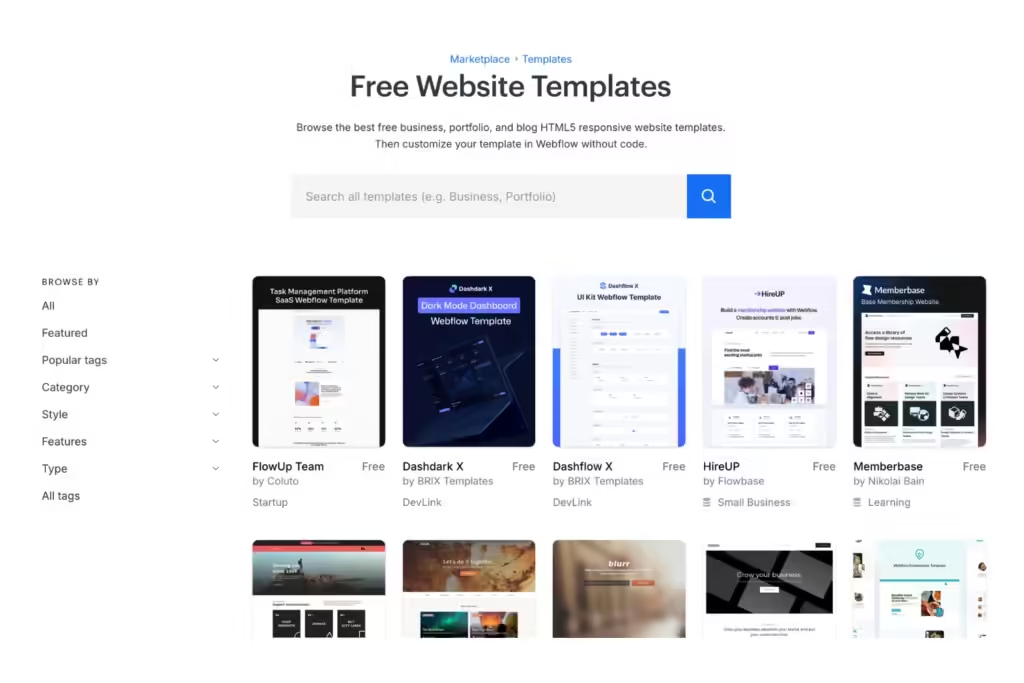
    A screenshot of Webflow's free website templates

    Next is choosing a website template. Webflow has over 1,500 free pre-designed templates with diverse themes from non-profits to fashion, medical, and more. Regardless of which you pick, they’re all easily customizable without code. Webflow also offers blank templates if you prefer to build a site from scratch. 

    If you have limited to no experience creating websites from site builders, we suggest using a pre-designed template. It gives you a foundation to customize, so you don’t have to build certain page elements or features on your own. Pre-designed templates also allow you to have a quicker turnaround for launch. 

    However, selecting the right Webflow template is one of your most important decisions. It must fully support your business needs, showcase your unique brand, and keep your customers happy when visiting your site. 

    Consider the must-have designs before building your website, such as: 

    • Industry-specific features like payment gateways and one-click checkout for e-commerce 
    • Total pages required (these are limited per template)
    • Type of pages required: collection, service, product, blog, etc. 
    • Brand-centric themes like 3D elements or demo contact forms for SaaS 

    While the details may seem overwhelming, you can start by choosing a category that closely aligns with your industry. Webflow also allows you to preview their templates by testing them to ensure their functionalities and designs meet your business needs. 

    3. Customize Your Site Template

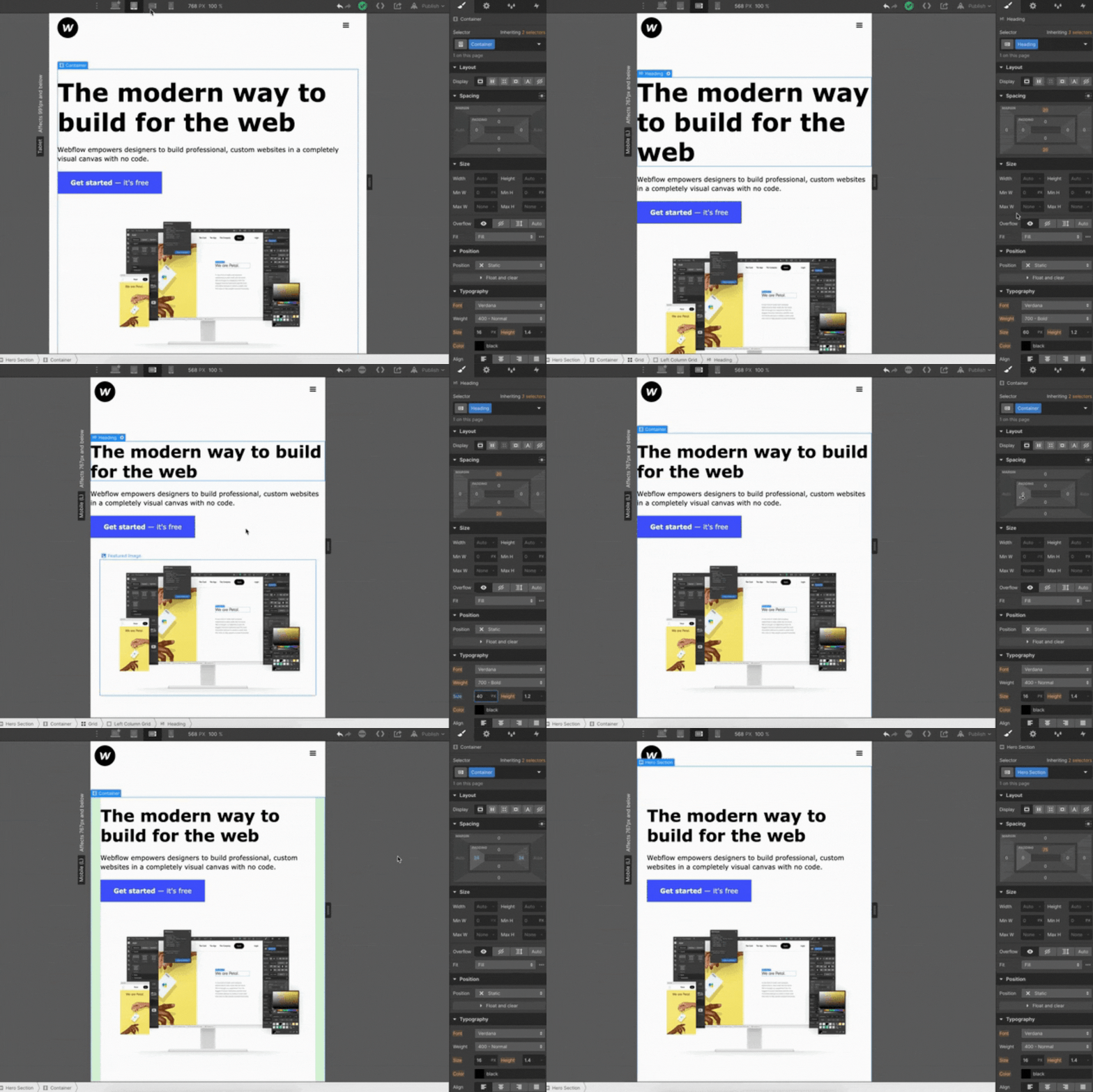
    A GIF of a user designing a web page in Webflow's interface
    Source: Webflow

    After selecting a template, you must customize the design to match your branding guidelines. Change the theme colors, text fonts, and logos to showcase your unique brand. Otherwise, it’ll have stock imagery and look like a pre-designed template that wasn’t customized—which your audience will notice.  

    You’ll need to become familiar with Webflow’s interface, but luckily, it’s easy to navigate. In the upper right-hand corner, open the Navigator tab, which organizes your site structure in one list. Depending on your template, it’ll display your site’s Body, Header, Section, and Footer, where you can simply drag and drop elements to customize the design.

    In addition to aesthetics, ensure your updated template has optimal UX (user experience) design. UX is crucial in web design because it’s built with your users in mind. If potential customers experience text-heavy pages, slow page speeds, and blurry mobile images when navigating your site, they’ll quickly bounce.

    In fact, 40% of users will leave a website if it takes more than three seconds to load and are five times more likely to abandon a task if it isn’t optimized for mobile. Your website should be generating traffic and converting leads. Don’t be the reason they leave from poor UX. 

    Some UX-centric site design tips include: 

    • Balanced white space
    • Clear visuals
    • Responsiveness on mobile and desktop
    • Easy-to-use navigation with site breadcrumbs
    • Compressing large media files for faster page load speed

    Keep in mind that you don’t have to customize your template in one sitting. It takes time to create a website, even with Webflow. Start with your core site pages, like Home, Service/Product, About, and Contact Us. Then, you can branch out to design the rest one page at a time. 

    4. Create or Migrate Your Website Content to Webflow

    A GIF of a user designing a web page in Webflow's interface
    Source: Webflow Blog

    If you’re migrating content from an existing site to Webflow, you can use migration tools or CSV plug-in files to transfer text and media to their platform. 

    If you’re creating content within Webflow, you’ll need to insert your text and media via Webflow Editor. It’s like the Navigator tab for your site structure mentioned above but for content. 

    The most common Webflow Editor elements to create content within your template are Sections, Headings, and Paragraphs. All you have to do is fill in your text and upload visuals in their CMS fields that are shown visually right on the page. Webflow also offers dynamic content features, like 3D visual transformations and pop-up variations for different pages.

    While websites built with Webflow have built-in SEO tools with no plug-ins necessary, you’ll still need to optimize your content. You can write your metadata, add schema markup, create sitemaps, migrate 301 directs from an existing site, and more. You can even set editor settings for collaborators to access your content to help you create and optimize it. 

    5. Preview Your Webflow Website

    GIF of a user designing a website page in Webflow
    Source: Webflow Tutorial

    Once your site template is customized and your content is added, the final step before launch is reviewing it for design and functionality. Webflow has a preview mode where you can check if all the site designs look and perform as they should as a saved draft.

    Test your web design on mobile and desktop for the following:

    • Click all buttons and links to ensure they work 
    • Look at your content on different devices to see if they have easy readability
    • Measure how long your site takes to load on Google PageSpeed Insights
    • Share your preview link with others for further review on details you may miss

    Don’t get too hung up on the details during this part. You can always update your site once it’s live with ongoing website maintenance. 


    6. Launch Your Webflow Website

    When you’re ready to publish your website, you can use a subdomain of webflow.com or create a custom domain with a paid Webflow account. Just make sure to index your web pages on Google Search Console so it can index and crawl your site. Remember, if Google can’t discover your website, it’s essentially invisible online.

    In addition to indexing, monitoring your new site’s performance is critical. It ensures everything is running smoothly for your visitors. 

    Track the following in a post-site launch:

    • Indexing status on Google Search Console
    • Overall website performance with Google Analytics 4 (GA4)
    • Potential SEO issues like duplicate headings and broken links with website crawlers like ScreamingFrog 

    Finally, start spreading the word! Cross-promote your new Webflow website on social media or advertising to generate audience discovery of all the hard work you put in.


    Unlock Your Webflow Site’s Potential with Full-Service Web Design & Development

    Although Webflow makes it easier to build a website, it’s still a comprehensive process that must be done correctly. Your site must be accessible to users with disabilities, properly optimized for Google’s changing algorithms, and regularly maintained for optimal performance.

    As a business owner or leader in your trade, it can be time-consuming and challenging to navigate the complexities of web design. At Reach Marketing Pro, we are your one-stop shop for everything you need to launch or migrate a new Webflow site. 

    We’re a full-service digital marketing agency with extensive experience in Webflow, including design, maintenance, development, and management. Our team includes graphic designers to make custom visuals for a powerful site and brand design. We also have SEO content writers with the expertise to create and optimize your site text for target audiences and Google. 

    Ready to unlock your Webflow website’s full potential? 

    Learn more about our web design and development services, or contact us to kick off your new site journey on the right foot today! 
  • Website Redesign: Tips, Examples, & Best Practices

    Website Redesign: Tips, Examples, & Best Practices

    A website redesign is a significant investment but eventually necessary for your business. Whether you have a dated design, are rebranding your company, or aren’t seeing optimal results with your site’s SEO performance, redesigning a website can help achieve these goals. 

    As a business owner, it’s understandable to feel apprehensive about a website makeover. It’s a comprehensive process and requires various resources to execute successfully. 

    However, it doesn’t always have to be a complete website revamp. 

    You can take an easier approach to your redesign project as an ongoing process with a step-by-step plan. 

    How to Redesign a Website for Your Business: A Step-by-Step Guide

    A graphic of three people redesigning their website

    On average, businesses should redesign their websites every 1.5 to 2.5+ years. Website redesign frequency depends on various factors, like how often you maintain it and your site’s performance. 

    Some signs that it’s time for a website upgrade include:

    • Weak SEO Performance: Rapidly declining keyword rankings, indexed pages, etc. 
    • Dated Site Design: Many text-heavy home page sliders, generic stock photos, etc.  
    • Poor Website Functionality: No website breadcrumbs, slow page load speed, etc. 
    • Rebranding: Merging companies, expanding product/service offerings, etc. 
    • Challenging Customization: Limited capabilities to edit design templates, can’t integrate popular third-party applications, etc.  
    • Poor Website Benchmarks: Rapidly declining conversion rates, form submissions, traffic, etc. 

    Below is a step-by-step guide on the website redesign process from initial strategy to relaunch. 

    Develop a Website Redesign Strategy

    The first step in your website redesign project plan must be developing a strategy. Creating this foundation defines why you need to redesign your website in the first place. 

    Ask your team these key questions before you start the redesign process:

    • Why do you want to redesign your website?
    • Which website performance metrics do you want to improve?
    • Who will be responsible for the redesign and development? 
    • How much budget do you have for the design and development?
    • What are your goals with your new website design? 

    That way, you can set clear expectations and have a smoother redesign process for your team to execute more effectively.  

    Define What Your Website Makeover Should Look Like

    A new website design is more than a makeover. It should align with your unique brand and support your bottom line. Defining what the site’s new visuals and messaging should look like is essential to a successful redesign. 

    Ask your team these key design questions before you start the redesign process:

    • What do you like and dislike about your current site? 
    • Which features do you want to add or remove from your current site?
    • What new designs do you want to see on your site, and why? 
    • Do you have inspirational design examples to reference? 
    • Can you provide website branding guidelines, like fonts and colors? 

    If you need more guidance on your site’s visual designs, research your competitors and industry leaders as inspiration. Just be sure you make it align with your unique brand and that it doesn’t exactly copy. 

    Additionally, you must follow key website redesign best practices, including ample blank space to prevent text-heavy pages and contrasting colors for balance.

    Analyze Your Site Audit Metrics Before Redesigning

    A graphic of three people analyzing website metrics

    Don’t redesign your website for the sake of looks only. While dated site designs are important to upgrade, the purpose of your redesign project should be data-driven through a website audit. That way, you can make the necessary changes and investments for optimal results. You may discover areas of your site that need improvement you didn’t notice before.  

    Common website audit metrics to analyze for a redesign include:

    • Top pages with the most organic traffic
    • Total keyword rankings 
    • Top pages with the most leads
    • Top pages with the most conversions

    When evaluating these metrics, check if their rates are increasing or decreasing to know which pages to prioritize first. Investing in your top-performing pages first can help maintain its performance during the redesign process. 

    You should also note your lower-performing web pages to know which areas to prioritize for improvement. If you see a high cart abandonment rate or declining conversions, your website may have a poor user experience (UX). Your current site design may be making it harder for potential customers to convert, like no saved payment method features or slow page load speeds. 

    Use a New Website Platform If Necessary

    You can waste time and resources on a website redesign if your current platform has many limitations on its capabilities. If you can’t customize the design template to meet your branding guidelines or integrate vital e-commerce features for your business, like a one-click checkout, you likely won’t meet your redesign goals. 

    Your website platform shouldn’t hold you back from getting your ideal site design. If this is the case, be prepared for a website migration. Your web developers should utilize sitemap lists, create 301 redirects, and set up Google Analytics to streamline the data transfer process.   

    Create a Content Strategy for Your New Website Design

    To maximize your content marketing ROI during a website redesign, organize your current content into three categories:

    1. Removable Content: Deleting vague home page details that don’t immediately define your brand, talking about your company instead of how you can help your target audience, etc. 
    2. Updated Content: Adding captivating infographics, embedding Google reviews to product pages, integrating a separate blog website to your main site, etc. 
    3. New Content: Creating individual location pages for multiple in-person stores or service areas, making short clip videos for software demos, adding more downloadables, etc. 

    Quality website content that ranks high on Google can be one of your biggest ROI drivers over time—especially when you’re investing in a new site design. 

    Re-Optimize Your Site for SEO

    A graphic of three people working on SEO

    Website redesign SEO is a critical step. It ensures you protect your top-performing pages while improving your lower ones during the redesign process. 

    Conducting an SEO audit for your site will guide you on where to start, such as:

    • Search Valued Pages: Pages with the highest and lowest traffic, lead generation, conversions, etc. 
    • Metadata/On-Page SEO: Page tiles without keyword optimization, missing headings, duplicate meta descriptions, etc. 
    • Technical SEO: Pages with slow page load speed, broken links, no SSL, etc. 
    • Off-Page SEO: Pages with the highest-quality backlinks, traffic from social media, etc. 

    Luckily, popular SEO platforms make it easy to prioritize which web pages you should redesign first. They’ll flag which pages are impacting your website’s SEO performance most to least. 

    Test Your Site Redesign

    Now you’re at the final step before a website relaunch. Before going live, test it to ensure everything functions properly and looks how it should. 

    Conduct A/B testing via email with two versions of one of your web pages to see which ones users respond to better. Your target audience may download more free template guides with one CTA button color or text over another. It’s about learning which designs work best with your consumers without assuming. 

    Also, send your website’s staging link to your team for their review on the following:

    • Proofreading web copy for typos, grammatical errors, and effective messaging
    • Clicking all links to confirm they’re not broken or directing to the wrong page
    • Navigating the website as a visitor to ensure your redesign has a strong UX

    Once your new site design has been approved for final review, you can relaunch! We also encourage monitoring your website post-launch to confirm its performance continues successfully. 

    Website Redesign FAQs

    A graphic of three people redesigning a website

    Below are some of the most common FAQs when redesigning a website. 

    Why Redesign a Website?

    Your SEO ROI is technically calculated by the profit or your sales/revenue after your content marketing expenses: 

    Website redesigns are necessary if they’re not functioning as they should or aren’t supporting your bottom line. Analyzing your website audit reports can determine if minor updates can fix current issues or if a redesign is warranted. 

    How Often Should You Redesign Your Website?

    You should redesign your website every 1.5 to 2.5+ years. It depends on how often you maintain it and your marketing goals.

    Should I Use Website Redesign Services or DIY?

    While DIY web redesign is doable with user-friendly website platform builders and template designs, you can maximize your investment and results with a website redesign company. They understand how to optimize your new design within your unique business goals and streamline the process with their expertise—saving you time and resources. 

    Make the Most of Your Site’s Makeover with a Website Redesign Agency

    Your website is the foundation of your business. In a competitive digital marketplace, it’s crucial that your site stands out and performs well for your bottom line. Investing in professional website redesign is the best way to maximize your budget and accomplish your company’s goals. 

    At Reach Marketing Pro, our in-house web developers and designers have extensive experience revamping dated sites, rebranding, re-optimizing for SEO, and more. We know how to make your website look as good as it performs with monthly reporting to ensure it generates optimal results.

    Ready to make the most of your website’s makeover? 

    Learn more about our website design and development services, or contact us for help today! 
  • Content Marketing ROI: Importance of Unique SEO Content & How it Can Become the Highest ROI Driver Over Time

    Content Marketing ROI: Importance of Unique SEO Content & How it Can Become the Highest ROI Driver Over Time

    As a business owner, your SEO content marketing ROI can take some time, but it’s necessary in an oversaturated digital market. Depending on various factors like content quality, output, and competitive landscape, seeing the ROI of SEO can take four months to one year on average.  

    However, it can become your brand’s highest ROI driver over time with consistent content creation and performance monitoring. 

    Learn why investing in content marketing is crucial for your bottom line and why it’s worth keeping your SEO ship sailing.  

    Content Marketing ROI: Why Creating Unique SEO Content Matters for Your Bottom Line

    A person having success in their digital marketing with high reviews and metrics

    SEO content marketing is more than just blogs. It also includes website copy, like your home page, product/service category pages, and Google Business Profile. Business owners often understand the importance of SEO content. However, they commonly make mistakes when creating it, like repeating the same content without added value or proper optimization. 

    Here’s why creating unique content is essential to maximize your SEO ROI and how to optimize it for better results.

    Unique SEO Content Optimizes Your Online Visibility

    As mentioned above, companies create SEO content because they know they must do it to remain competitive. But it’s not uncommon to find them repeating the same information already out there—leading to lower SERP rankings and SEO ROI because they’re not providing additional value.

    To increase your content marketing ROI, you must create unique content to stand out in the SERPs. Even if you’re covering the same topic, use your expertise to add a different perspective or create new media your competitors aren’t doing, like industry expert quotes from your podcast or creating custom infographics that visualize your information. 

    High-Quality SEO Content Builds Your Brand’s Credibility

    You’ve likely heard of the term “high-quality content.” But, what does that mean exactly, and how does it apply to SEO? High-quality content must follow Google’s E-E-A-T guidelines to achieve optimal SEO results.

    E-E-A-T stands for Expertise, Experience, Authoritativeness, and Trustworthiness. It’s Google’s content framework designed to provide more relevant results when users search for information online.

    Low-quality content like no external links, lengthy paragraphs, and disorganized heading structures negatively impacts your SEO. Remember, you’re still writing for humans, not just search engines. If your content is hard to read, over-optimizes keywords unnaturally, or repeats the same information as your competitors, it’ll hinder your SEO performance. 

    Creating E-E-A-T content helps establish your company as an authority in your niche—which, in return, builds brand credibility and trust. It shows your brand invests in quality SEO content and prioritizes being a valuable resource for users to reference. 

    When 81% of consumers nowadays need to trust a brand before they buy from them, it’s critical to earn that to maximize your content marketing ROI.

    High-Performing SEO Content Generates Website Leads & Conversions

    A person generating leads down the sales marketing funnel

    A recent Forbes study found that 74% of companies boosted their lead generation from content marketing alone. They also reported businesses can increase their conversion rate six times higher than their competitors with content marketing. 

    In addition to creating quality E-E-A-T content, it should also be actionable. Encouraging users to take action on your content can generate more website leads and conversions, not just organic traffic—which can promote the highest ROI! 

    How Do You Measure SEO Content Marketing Success? 

    Measuring SEO content success depends on your company’s goals and investments. You may have different KPIs, like expanding your market reach as a startup or driving more sales as an e-commerce brand. 

    Additionally, you’re probably investing in SEO platforms, analytics software, graphic design services, and content management systems (CMS) that impact your ROI calculations. 

    Regardless of your business objectives and SEO tools, below are the top metrics used to measure the ROI of content marketing and how to optimize your content for them. 

    Organic Website Traffic

    Generating organic website traffic is one of the main purposes of SEO content marketing. It measures your content’s success by demonstrating how many people came to your site because of it. It’s a primary source to get more users to your site through various pages.

    Ways to optimize your SEO content for organic traffic include:

    • Use the right keyword search intent to provide valuable, relevant content (Ex: transactional intent for product pages and informational for blogs) 
    • Optimize your content’s metadata for Google to crawl/index easier and promote audience discovery when they search with relevant search queries (Ex: target keywords in meta descriptions, headings, page URL, etc.)
    • Design high-quality infographics for comprehensive subject matter to strengthen your content’s readability and brand recognition

    Leads Generated

    A person attracting multiple business leads with a magnet and megaphone

    The number of leads generated from your content measures how influential it was in encouraging users to take action. Whether it’s downloading your free guides or submitting a contact form on your service page, increasing your content’s engagement attracts more potential customers. 

    Ways to optimize your SEO content for lead generation include:

    • Implement different linkbuilding strategies beyond cold emailing to boost your site’s Domain Authority and brand credibility (Ex: social media shoutouts, guest bloggers, email newsletter mentions after industry conventions)
    • Cross-promote your content on social media and Google Business Profile to capture leads in multiple locations 
    • Send non-spammy email newsletters of your content to loyal and past customers who find your brand valuable 

    Conversion Rate

    Generating organic traffic and leads with your content won’t matter with a declining conversion rate—especially when striving for a profitable SEO ROI. It measures how effectively your content attracts visitors and converts them into customers.

    Ways to optimize your SEO content for conversions include:

    • Add valuable CTA buttons, like free consultations or software demos, throughout your content sparingly to prevent over-spamming
    • Use relevant minimal pop-ups to help guide users along their buyer’s journey without being too aggressive 
    • Link to your email newsletter sign-ups to capture strong lead contacts and nurture them into conversions

    Bounce Rate

    Bounce rate measures your SEO content’s ROI by how long it takes them to leave. If users aren’t reading or viewing your content because they’re leaving your site quickly, you can optimize it to encourage them to stay. 

    Optimizing your SEO content to reduce bounce rates is by making it more engaging and easy to navigate. You can embed how-to assembly product videos or write long-form content, so users spend more time on your page. 

    But one of the top reasons brands see their website’s bounce rate so high is poor user experience (UX). If your website has a slow page loading speed or is hard to view on mobile devices like small text, it will negatively impact your content performance from users bouncing because it’s difficult to navigate. 

    You can strengthen your content’s UX by compressing large file images that are slowing your page load speed and optimizing it for mobile with responsive website design layouts to adjust how it looks on any device. 

    Sales/Revenue

    A person celebrating their sales revenue in front of a laptop

    Your SEO ROI is technically calculated by the profit or your sales/revenue after your content marketing expenses: 

    (Return – Content Investment) / Content Investment x 100 = ROI %

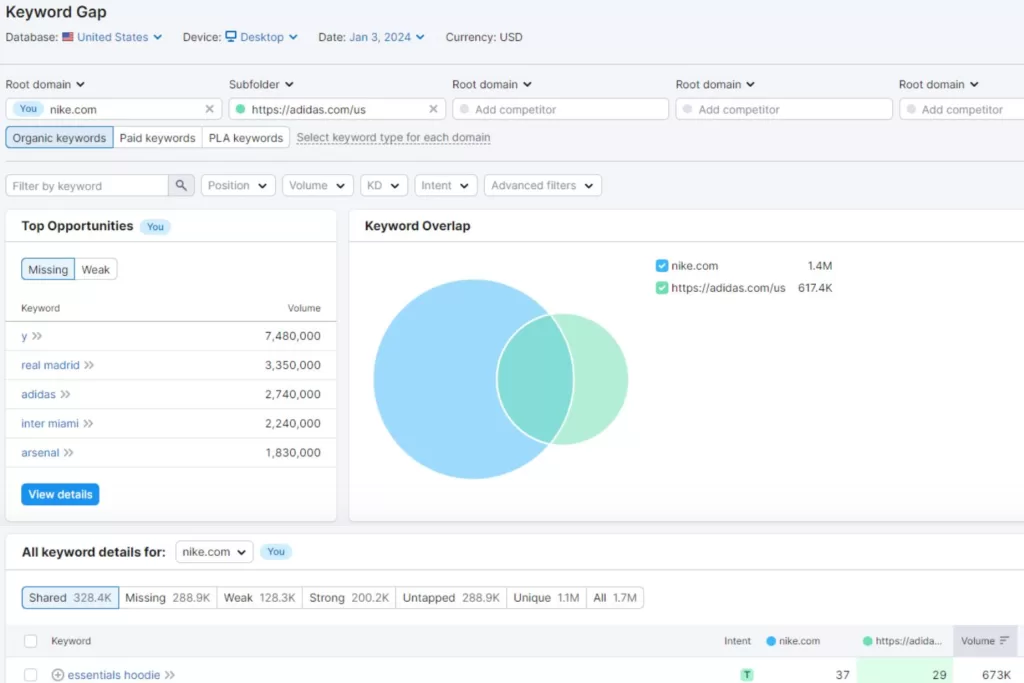
    This formula measures content marketing success because it calculates if your ROI is profitable. If content ROI isn’t profitable, double-check if you’re maximizing your SEO software platforms. You may have multiple tools that can be consolidated or aren’t utilizing offered features to the fullest, like content and keyword gap analysis from your competitors. 

    There are multiple ways to optimize your SEO content for revenue generation:

    • Aligning SEO and SEM Marketing: Boost sales by generating paid search traffic and ranking for transactional keywords for audiences who are ready to buy
    • Customer Testimonials Web Page: Embed your Google Business Profile reviews or Instagram feed’s social proof to build your brand’s credibility with stronger reputation management 
    • Free Trial CTAs: Offer something valuable that doesn’t require much of your audience in return to motivate them to submit their contact information

    Maximize Your Content Marketing ROI with an SEO Digital Marketing Agency

    Creating valuable SEO content that supports your bottom line effectively is a consistent process and takes time. As a business owner, you have plenty on your plate already, with managing your company and being an expert in your niche. If your brand invests in SEO content marketing, you can better maximize your budget with expert marketers. 

    At Reach Marketing Pro, our team has extensive experience in SEO content marketing for various verticals. From developing keyword-research-driven strategies to conducting competitor SERP analysis for content opportunities and creating custom visuals to strengthen its performance, we can do it all.  

    We’ll also provide in-depth monthly reporting to measure your SEO content strategy’s success and ensure they generate profitable ROI for your revenue goals.

    Don’t create content for the sake of doing it. Get optimal results with your investment instead. 

    Learn more about our SEO content marketing services or contact us today! 
  • Automotive SEO & Content Marketing: How to Rev Up Your Dealership’s Rankings 

    Automotive SEO & Content Marketing: How to Rev Up Your Dealership’s Rankings 

    Whether you’re a dealership or auto parts retailer, investing in automotive SEO is essential to your bottom line. It helps your business show up on Google when consumers search for relevant information, services, and products you offer online. 

    If you aren’t optimizing your SEO marketing strategy for search engines, your brand is basically invisible online to users you want to reach, especially in an oversaturated digital market. You may already be creating SEO content or utilizing Google Business Profile. 

    But, are they generating the results you’re looking for? 

    Auto dealers often make mistakes with their SEO marketing, like using the wrong search intent for blogs or keyword stuffing their websites—which is common! You’re not expected to be an SEO expert. But as a result, you may not see high keyword rankings or web copy that doesn’t convert to sales.

    Our complete automotive SEO marketing guide walks you through the best practices and mistakes to avoid. That way, you can better drive your dealership to the top of the search engine results page (SERP).

    A Guide to Automotive SEO & Content Marketing to Drive Traffic for Your Dealership

    Automotive search engine optimization (SEO) has many facets, including content marketing, local SEO, and more. However, they all share the same focus—generating traffic to your website by strengthening your online visibility. Some SEO automotive marketing strategies have additional end goals, such as converting paid search ads to sales.

    Below are the SEO essentials your auto brand must know to meet your SEO goals effectively. 

    Invest in Local SEO for Your Local Dealership

    Two people looking at videos and reviews of a car listing

    SEO for the automotive industry is especially crucial for local dealerships and auto part retailers with physical stores. You need to reach local target audiences while standing out from competitors nearby. 

    That’s where local SEO comes in. 

    You know local consumers read your reviews and check how you compare to the competition to see if your online reputation is trustworthy. While you may have a Google Business Profile (GBP), it may not be optimized fully or marketed correctly to target local audiences. 

    Some automotive SEO tips for GBP include:

    • Optimizing your business description and image file names with target keywords
    • Creating weekly posts to cross-promote your blogs 
    • Responding personally to all reviews over template-based responses, including your negative ones
    • Diversifying your GBP posts’ call-to-actions (CTAs), like “Learn More” or “Sign Up”—people aren’t always ready to “Buy Now” especially vehicles since they’re a larger purchase 

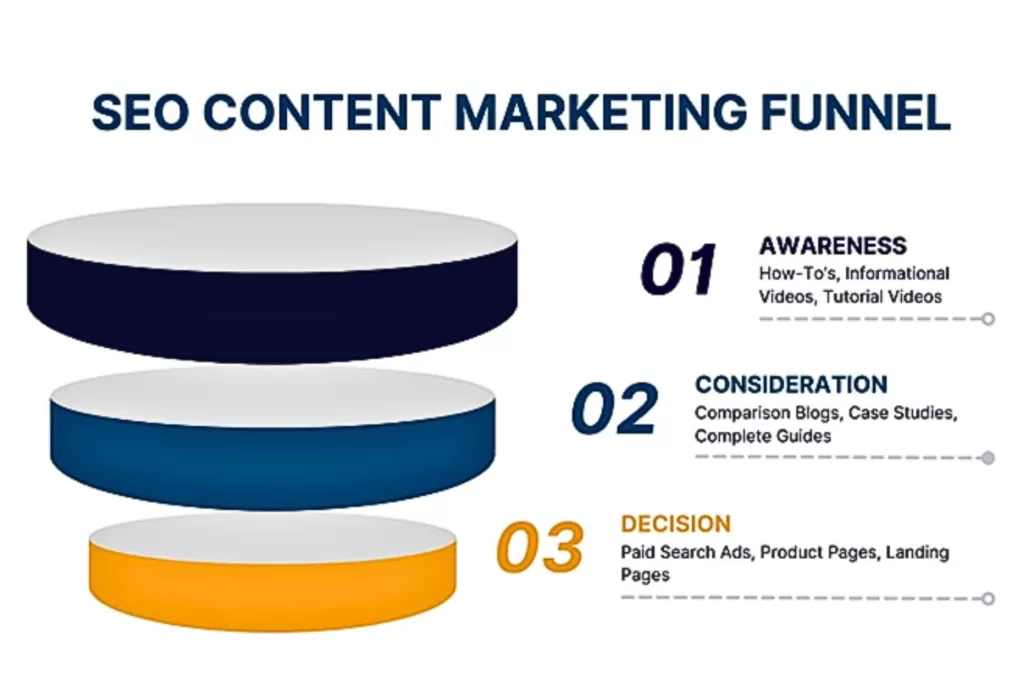
    Create Valuable & Optimized Automotive Blog Topics for All Funnel Stages

    You know each customer is unique. Every driver isn’t always car-savvy. Some may only know basic information to look for when car shopping, like vehicle history, entertainment features, and test drive comfort. Others may have more technical knowledge, like understanding the powertrain they want for a work vehicle. 

    A vehicle is a significant investment. Drivers nowadays are conducting preliminary research to ensure they’re making the right choice in their car purchase. Creating blogs for users in all funnel stages is key to meeting them where they are in their buyer’s journey by providing valuable, relevant content. 

    The three funnel marketing stages with automotive blog topic examples are:

    • Top-of-Funnel (TOF): How to Buy Your First Car, # Mistakes to Avoid When Purchasing a Used Pickup—for users who need more guidance on basic vehicle information 
    • Middle-of-Funnel (MOF): 2023 vs. 2024 Jeep Wrangler: What’s New, Best Light Duty Pickup Trucks of 2024—for more educated users who need help deciding between options
    • Bottom-of-Funnel (BOF): Auto Part Spotlight: Duramax’s New Diesel Engine, Customer Success Story, New Test Drive Videos—for users who are ready to buy 

    In addition to valuable funnel content, you must optimize all blogs for users and Google to find online, including:

    • Adding backlinks from reputable sites with high Domain Authority to be a trustworthy resource in your industry’s niche—arguably the top keyword ranking factor in SEO! 
    • Using target keywords throughout the body and headings naturally to prevent keyword stuffing
    • Following the right keyword density per your blog’s word count to make it readable for users
    • Including internal links to other blogs and web pages naturally to prevent over-optimizing
    • Cross-promoting your blogs by sharing them on your automotive social media profiles 

    Keyword Research Tips for Automotive Blogs

    Two people conducting keyword research on a computer

    We mentioned common SEO mistakes auto dealers make, like using the wrong search intent in their blogs. Search intent means exactly that—the intent behind a user’s search. 

    The four types of search intent with automotive keyword examples are:

    • Informational (TOF): car financing tips, used car buying mistakes to avoid, etc. 
    • Commercial (MOF): best electric vehicles 2024, tesla cybertruck vs. gmc hummer ev, etc. 
    • Navigational (BOF): auto parts stores in denver co, car dealerships near me, etc. 
    • Transactional (BOF): used pickup trucks for sale, hybrid cars for sale, etc. 

    If a user searches for “vehicles for sale in manhattan” and you create a blog topic on “How to Find the Best Vehicles for Sale in Manhattan,” that’s not what they’re looking for. They’re searching for Manhattan vehicle product listings, not a blog with tips on finding one because it’s a transactional search intent.

    You can verify a keyword’s search intent by simply typing it into Google and checking the SERPs. Do the SERPs show all blogs or product pages? While some keywords may have mixed search intent, if the SERPs don’t show blogs, it’s not the right search intent for your blog content. 

    If you don’t know where to begin with your keyword research, start by conducting a competitor SERP analysis. Enter a keyword into Google and perform a content audit with your SEO software of the top-ranking competitors. Content audits allow you to see which keywords they’re using and uncover content opportunities where you can outrank. 

    For example, you might find many question-based keywords related to a blog topic you’re writing about. You can take this opportunity to create an FAQ section to rank for those keywords if your competition didn’t make one. 

    Optimize Your Website for Search Engines & Users

    As mentioned earlier, another common mistake auto dealers make with their SEO is keyword stuffing their websites in hopes of higher rankings. This practice can do the opposite and harm your keyword rankings instead. 

    Google prioritizes E-E-A-T content (Experience, Expertise, Authoritativeness, & Trustworthiness) to deliver more helpful, relevant information when searching for information. If your website is over-optimized with keywords, it makes your content’s readability less enjoyable and weakens your user experience (UX)

    Remember, you’re also writing for humans, not just search engines.

    Other common SEO mistakes include not optimizing your site for mobile devices or creating a separate website for your blog. A recent study shows that 33% of car shoppers use mobile devices to research vehicles online, and 60% of them would call a dealership from a call extension link. 

    Additionally, hosting your blog elsewhere is basically like having two different websites. Automotive SEO is comprehensive enough. Optimizing for two sites creates more challenges, and your end goal is to drive more traffic to your main site. 

    Website optimization must include on-page, off-page, and technical SEO:

    • On-page SEO is optimizing what’s on your website pages, like keywords and internal links.
    • Off-page SEO is optimizing what’s off your website pages, like backlinks and social media.
    • Technical SEO is optimizing what’s behind your website’s page, like loading speed.

    While this may seem like a lot of information to digest, don’t get overwhelmed with this part. SEO tools and software platforms, like SEMRush and Ahrefs, automate website optimizations for you. Through website audits, they’ll flag areas of your site needing optimization, which types, and how to do it. 

    Some automotive SEO tips for website optimizations include:

    • Implement a search bar with filters on your parts page so users can easily find and shop for products
    • Add QR codes to your specials page so consumers can download coupons and redeem limited-time offers faster
    • Write web copy for your services page so potential customers know what’s included in each of your offerings
    • Optimize your website for desktop and mobile to prevent people leaving from poor user experience (UX), like small text on smartphones and no site breadcrumbs
    • Include target keywords in your metadata, like headings, meta descriptions, and page URLs, for Google to crawl (discover) and index (store) easier

    Website optimizations are about making it easier for your users and Google to discover online.

    Promote Your Inventory with Google’s Vehicles for Sale & Vehicle Listing Ads

    Two people buying a car with a clipboard of its features

    In addition to generating organic traffic, auto dealer SEO should promote paid traffic to your website. Also known as search engine marketing (SEM) or Pay-Per-Click (PPC), it boosts your search engine rankings through paid search ads. However, aligning your SEO and SEO marketing strategies can produce optimal results for automotive brands. 

    Remember, some users are ready to purchase a vehicle (transactional intent) or are comparing local providers before purchasing (commercial intent). The difference with SEO is that it focuses more on informational search intent and research-oriented queries, like “car buying tips.” 

    Combining SEO and SEM allows your brand to cover all relevant vehicle-related keywords consumers use when searching online. And, Google makes it easy for automotive brands to do so with its Vehicles for Sale and Vehicle Listing Ads.

    The Vehicles for Sale feature allows auto dealers to integrate their inventory directories directly into Google’s search results via your Google Business Profile. Users can apply search filters and browse your inventory outside your website to learn more about a specific vehicle. It also links back to your site when they’re ready to buy. 

    The Vehicle Listing Ads feature matches your vehicle inventory data feed within Google Merchant Center to provide a personalized shopping experience via advertising. Google matches specific car details users search for by displaying relevant vehicle ad listings. They enter the features they want, like location, mileage, and price, and an ad listing is shown.

    Monitor Your SEO Marketing Strategies

    While everything we mentioned is auto dealer SEO best practices, that doesn’t mean it’ll always generate the results you want. Google’s algorithm and car consumer demands are consistently changing—especially with various technologies disrupting the SEO landscape, like AI content writing and Search Generative Experience

    Continuously monitoring your SEO marking strategies helps you measure their success with data-driven insights. 

    Key SEO metrics to track include:

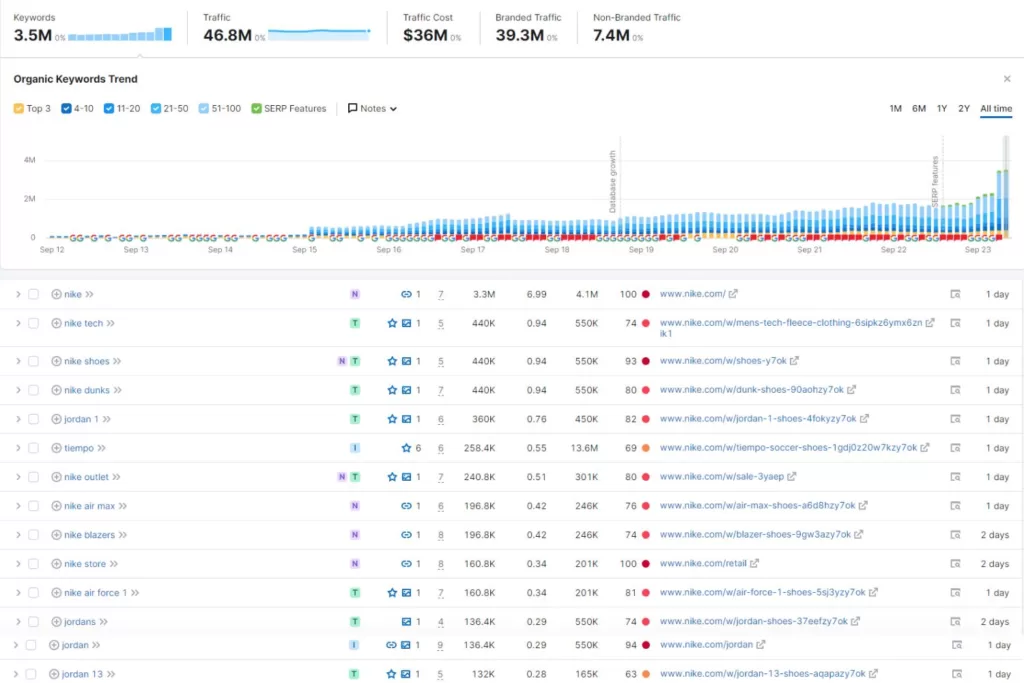
    • Organic Traffic: Number of users who entered your site without paid search 
    • Keyword Rankings: New, improved, and lost rankings 
    • Clicks: Number of users who clicked on your website
    • Impressions: Number of users your website was displayed to
    • New Backlinks: Number of websites linking back to your site from theirs
    • Top Pages: Website pages that generated the most traffic 
    • Local SEO Visibility: Number of calls, clicks, and search views of your Google Business Profile
    • Indexed Pages: Number of pages that Google indexed (stored) in their database, including those that couldn’t be indexed

    While KPIs will vary depending on your SEO goals, you can find these metrics in Google Analytics, Google Search Console, and SEO platforms. 

    Turbocharge Your Dealership’s Online Traffic with an Auto SEO Agency

    As an auto dealer, driving sales and investing in SEO can be time-consuming. You have to manage your company and your trade while understanding the importance of SEO. 

    Let our automotive SEO experts do the heavy lifting for you. At Reach Marketing Pro, we have extensive SEO experience in the automotive industry. We’ve worked with used and branded car dealerships and auto parts brands to enhance their online presence for their bottom line.

    From website designs and optimizations to multiple GBP location management and content writing, we can supercharge your SEO efforts for optimal results. We’re fully transparent with in-depth monthly SEO reporting to continuously measure your strategy’s success. 

    What makes us stand out is our tailored automotive SEO services. 

    Our Dealer VIP Program boosts sales for your vehicles in production like SEO content writing for the customer reservation process and designing custom home page slider graphics.  

    Our Absorption Boost package streamlines your customer’s buying process, like mobile QR codes to scan specials easily within OEM and Google’s guidelines. 

    Ready to rev up your automotive brand’s rankings?

    Learn more about our SEO services or contact us for help today!
  • The Future of AI Marketing: Current Trends & Predictions

    The Future of AI Marketing: Current Trends & Predictions

    Artificial intelligence (AI) is going to replace digital marketing. AI doesn’t create original content. These are common, yet understandable experiences of AI marketing for business owners in today’s online realm. It has disrupted the digital marketplace in almost every facet, including graphic design, advertising, SEO, and VR. 

    Since it’s still relatively new, there are risks of improper use of artificial intelligence and marketing. Unedited AI-written content has become unintentionally plagiarized and customer service chatbots have human language constraints. Whether you’ve adopted marketing AI or not, it’s here to stay and will only evolve. 

    So, how does your business successfully adapt to emerging AI technologies? 

    Learn more about the current trends in AI, our future predictions based on trending insights, and how you can better embrace AI to enhance your digital marketing strategies.  

    5 Artificial Intelligence Current Trends in Marketing

    A graphic of a marketing team using artificial intelligence for various marketing-related tasks

    AI’s impact on marketing is vast with many automated features and applications offering businesses new ways to optimize their online presence. Below are the five most popular AI marketing tools used currently and the benefits they’re providing. 

    AI Content Writing

    You’ve most likely heard of ChatGPT as one of the most used AI platforms for content writing today. ChatGPT was a groundbreaking AI chatbot that revolutionized the way we create content online. Grammarly also had a major industry influence and changed how we proofread content with prompted edit suggestions. 

    Some of the most popular generated features of AI content writing tools include:

    • Content topic ideas and outlines
    • Content analysis and summaries
    • Content editing
    • Coding language
    • Text production

    To avoid AI content writing applications from doing more harm than good, you must use it as a foundation—not a complete solution. Copying and pasting generated content without checking if the information is accurate and editing it to create unique content puts your business at risk of distributing misinformation or even plagiarism, as it’s largely unregulated and still new. 

    We’ve seen the rise of AI content writers specialized in integrating artificial intelligence to optimize their content creation processes. AI marketers enter detailed prompts with preliminary research to generate more accurate and humanized AI-written content faster. Web programmers generate code to write, debug, and analyze coding languages to save time. 

    Generate ideas from AI content creation applications to get creative inspiration instead and stay up-to-date with changing AI copyright laws. It will help streamline your content creation workflows while preventing legal challenges. 

    Search Generative Experience (SGE)

    Many people have interacted with Search Generative Experience (SGE) largely for its famous AI image generator. Users can enter random image details and SGE acts as a graphic designer bot to create the exact visual you prompted. However, businesses are now using SGE to strengthen their SEO. 

    Some of SGE’s most popular SEO features include:

    • AI-powered SERP overviews
    • Product and shopping ad image searches
    • Follow-up question-based search queries
    • Google Business Profile snapshot previews

    SGE doesn’t replace standard SEO. It relies on human-written content to generate results. That’s why you must know how to leverage both to deliver the best, most relevant, and most streamlined search results possible to your target audience when looking up information related to your business online. 

    To accomplish this, you must optimize your website for Google AI search. Create quality E-E-A-T content with strong backlinks, metadata, and user experience (UX) that SGE algorithms reward. SGE can create a generated overview of your site’s information while linking back to it if you create a higher standard of information quality for your users with traditional SEO optimization. 

    Also, utilize SGE website audits to identify the most important keyword rankings you can’t afford to lose first. It provides an SGE impact analysis to measure your site’s SGE-SEO performance to see how it’ll perform in Google’s AI search engine. 

    Customer Service Chatbots

    A graphic of a man messaging a customer service chatbot for more information

    Although customer service chatbots have been around for some time, there are new AI marketing features that are increasing their capabilities.

    Some of the most popular customer service chatbot features include:

    • Decision-tree prompts to transfer customers to the correct departments
    • Deeper understanding of conversational customer language
    • 24/7 customer service support 

    With advanced automated features, chatbots are solving customer service issues without the need for phone operators, reducing call wait times and bottlenecks contributing to poor customer satisfaction. 

    Project Management Automation

    Popular project management AI tools, like Asana, Jira, and Monday.com, are widely used in businesses for organizing and streamlining their internal workflows.  

    Some of the most-used project management automated features include:

    • Task triggers and rules
    • Recurring tasks
    • Customized task deadlines
    • Team project collaboration spaces
    • Multiple task list views (lists, boards, calendars, etc.)

    Having an automated project management platform is a requirement for businesses nowadays. Without an application that centralizes your tasks and team, it’s like operating in the dark.

    AI Advertising

    Illustration of a robot and people working together for new marketing ideas

    Advertising with AI marketing offers more personalized ads and audience targeting to streamline purchase decisions. With advanced predictive analytics and audience segmentation, AI advertising can categorize personas at each stage of the marketing funnel with web behavioral insights. 

    They can assess which advertising platforms and materials have the best performance for specific groups of people through views and engagement metrics. That way, businesses can better personalize how they create ads for each persona and connect with them where they are on their buyer’s journey for a hyper-personalized shopping experience. 

    Popular AI advertising features include:

    • Real-time bidding
    • A/B testing optimization
    • Advanced audience segmentation and targeting
    • Predictive ad performance analysis

    When you understand your ideal customer’s online behavior, you can better predict how they’ll respond to your content and provide customized solutions. 

    5 Predictions On the Future of AI in Marketing 

    Based on these current AI marketing trends, how will AI affect marketing in the future? While it’s hard to know exactly how far advanced AI will become and how fast it will evolve, we predict the five following future trends will occur: 

    Stronger Understanding of Branding Guidelines & Human Language

    One of the biggest challenges that AI marketing platforms currently face is their understanding of the human language. People nowadays can spot AI-written content as it uses the same robotic tone with long run-on sentences and fluff that doesn’t sound human. 

    Based on these constraints, we believe that AI digital marketing tools will advance their machine learning processes to reduce the humanization required. We predict that they’ll have a stronger contextual awareness and understand personalized tones to generate more uniquely branded content.

    Advanced Customer Behavioral Analysis

    Illustration of two people strategizing about digital consumer behavior

    While engagement analytics are available in AI marketing platforms, we believe that their consumer behavioral analysis will advance with more comprehensive data insights. They’ll be able to achieve more accurate campaign performance predictions with greater machine learning tools.

    We think AI digital marketing tools will have an increased awareness of consumer behavioral trends and ROI projections to help businesses stay ahead of the competition by using consumer data more effectively in their marketing campaigns. AI is designed to continuously learn, so we believe it will help brands make better data-driven marketing decisions in real time.  

    Enhanced Ad Target Marketing

    AI advertising platforms currently have predictive analytics, and we foresee this feature will be enhanced in the future to strengthen audience targeting. They’ll be able to build audience profiles more accurately with their advanced customer behavioral analysis and segmentation. 

    These tools will be able to analyze comprehensive user data, personalize human language, and offer behavioral prediction analytics based on these valuable insights. It will automate and fine-tune businesses’ buyer persona profiles to better target the right audiences. 

    However, we think integrating AI advertising with traditional marketing strategies will remain imperative to achieve the most accurate results until new capabilities become available.

    AI Integration with AR & VR

    A graphic of a woman using VR to shop for products online

    The future of AI in marketing will most likely evolve more into AR and VR. We predict VR assistant avatars with detailed rendering will replace chatbots to provide a more “human-like” shopping experience. It’ll be able to try on clothes in different colors and make styling suggestions based on your home’s specs, customer profile, and purchasing history. 

    While brands like Amazon currently have AR camera views, like seeing how furniture looks in your home before buying, it will become more interactive and advanced. 

    AI will also utilize enhanced sensory technology for AR to create a real-life immersive experience where simulations can interact with dynamic environments in the real world better. 

    AI Video Marketing: Pre & Post-Production

    Video marketing currently utilizes AI tools for features like viewer behavioral analysis data on live streams and generated video content. While AI video marketing is being implemented, we believe it will enhance pre and post-production processes more efficiently. It will be able to edit raw footage, transcribe audio to create scripts, and render higher-quality animations faster. 

    However, until new advancements are made, we believe that video marketers will still need to edit AI-powered video content to ensure it’s AI copyright compliant. 

    Generate Better Results with AI & Human-Driven Marketing

    Although AI can do most of the heavy lifting, it doesn’t replace professional digital marketing. That’s why combining human-driven and AI marketing is imperative when marketing your business online while it’s still new. 

    At Reach Marketing Pro, we have extensive experience with humanizing and tailoring AI-enabled marketing to optimize your strategies for the best results possible. We’ll also keep you informed throughout the process with monthly performance reports to measure and track success. 

    Ready to stop worrying about AI and embrace AI digital marketing?

    Learn more about our digital marketing services, or contact us for any questions today! 
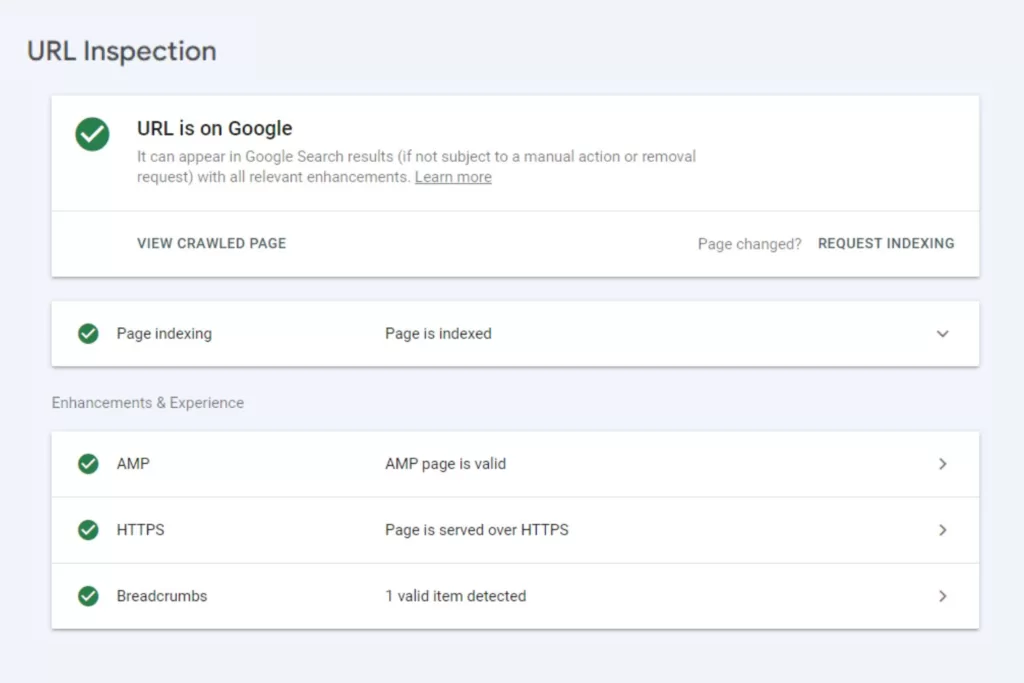
  • How to Write Content For a Website That Ranks On Google

    How to Write Content For a Website That Ranks On Google

    You may know how to write content for a website. But to create high-quality content that ranks high on Google’s SERPs is a different ballgame. It requires an SEO content strategy with target keywords (that aren’t just the highest volume and lowest keyword difficulty), optimization, and unique storytelling for each piece to connect with your audience.

    SEO content writing is a major facet of digital marketing today. If you aren’t writing for search engine optimization and your consumers effectively, your brand is essentially invisible online in a competitive digital market.

    Here’s how to write content for your website to improve its performance in the SERPs and better support your bottom line.

    How to Write Website Content That Ranks

    Brands often make mistakes when writing website content, like spammy sales language in informational blogs or keyword stuffing on service pages that doesn’t sound natural. It can do the opposite of what you’re trying to achieve with your SEO since Google doesn’t reward content that isn’t relevant or helpful.

    While you’re writing content for Google, you must have your audience’s questions, concerns, and pain points in mind to have high-ranking content. Remember, you’re still writing for humans—not just search engines!

    Below is a step-by-step guide on how to write content for a website to achieve higher rankings.

    Create a Content Outline to Structure the Web Page

    Before you begin writing SEO website content, create an outline first. It acts as a template for everything you need from start to finish to ensure you don’t make mistakes or miss any crucial steps along the way.

    Create Your Web Page’s Content Structure

    Whether it’s web copy or a blog post, most SEO content structures are similar in their processes.

    When creating your outline, include the following placeholders to fill in as you go:

    • Title
    • Target and secondary keywords with volume and keyword difficulty
    • Internal links
    • External links
    • Headings
    • Call to action (CTA)
    • Estimated word count

    Content outlines will differ in detail depending on the type you’re creating. For example, product page copy is short-form and will most likely use social proof as their external links. On the other hand, blogs will link to external reputable resources and can be short or long-form.

    Keep in mind that you’ll update this as you go, and an outline shouldn’t be set in stone as you may discover new information when writing.

    Understand Your Content Goals and Target Audience

    Illustration of a SEO content marketing funnel

    Do you know the goals for the content you’re creating and who you’re trying to reach? If you don’t know the strategic importance of each piece of content you’re creating, it won’t be effective and can negatively impact its SEO performance.

    When you have a topic that you want to write about, ask yourself, “Who are the readers of this content?” If you don’t know the exact audience demographics, reference the content marketing funnel.

    By creating unique content for each funnel stage, you can meet your users where they are in their buyer’s journey. Some consumers may be ready to buy in the bottom funnel and want a straightforward answer before purchasing instead of reading an in-depth top-funnel blog.

    Others may be in the middle funnel stage and want an accurate comparison between two products that aren’t clearly biased to make a better purchase decision.

    Here’s where common SEO content categories fall in the marketing funnel:

    • Top-Funnel (Awareness): How-to’s, informational videos, etc.
    • Middle-Funnel (Consideration): Comparison blogs, complete guides, case studies, etc.
    • Bottom-Funnel (Decision): Paid search ads, product pages, landing pages, etc.

    When you understand your content goals and reader demographics for each piece, you can better solve their needs. It also sets you up for better success during keyword research, so you select the right search intent based on the funnel stage you’re writing in—which we’ll dive into more below.

    Choose Your Web Page’s Topic

    After determining your content goals, target audience, and funnel stage, brainstorm a general topic of what you want it to cover. This is the first step you’ll take when starting keyword research. You’ll end up finalizing the topic later once you have a target keyword.

    Conduct Keyword Research for Target and Secondary Keywords

    As mentioned above, your keyword research should do more than select the ones with the lowest keyword difficulty and highest search volume. While these attributes can find you great SEO opportunities, they shouldn’t be the only factors to consider if you want to target the best keywords in your content.

    Below is a step-by-step process for effective keyword research and avoiding common mistakes.

    Perform a Competitor SERP Analysis

    In the first step of your keyword research, search for your general topic on Google and review the top SERPs—those are your direct competitors for this content piece. Also known as a competitor SERP analysis, it provides insights that Google is showing you what qualifies as top-ranking content for that topic. It’s like finding out the secret SEO sauce.

    However, this doesn’t mean to copy what your competition is doing exactly. Google doesn’t reward duplicate content without added value, either.

    Analyze the attributes that contribute to their higher rankings and see what they all share in common, including:

    • Word count
    • Headings
    • Backlinks
    • Visuals

    Also, look for key details they might be missing where you can position your SEO content to outrank. Remember, Google prioritizes helpfulness and relevance. If you find that the competition is only providing surface-level details on the topic or lacks infographics to visually support the content, this can help your website rank higher in the SERPs.

    Run a Competitor Content Audit

    Image of a competitor SERP analysis between Nike and Adidas

    Next, take those top-ranking pages you found and do a content audit. Utilize SEO tools, like SEMRush and Ahrefs to analyze its performance. They have features like content gap and backlink analysis to see what’s contributing to its high SERP ranking with recommendations you can do to outrank.

    Check for the following during a competitor content audit:

    • Backlinks: Check which sites are linking to their page and their Domain Authority so you can try to earn a backlink from them, too.
    • Keywords: Look at the keywords they used and build a keyword list to optimize yours with it, too.
    • Performance: Analyze the content’s performance metrics, including traffic and engagement (clicks, comments, shares) to measure the topic’s success.

    With this approach, you’ll be able to streamline your keyword research process next.

    Conduct Keyword Research

    Image of Keyword Research via SEMrush

    After a competitor SERP analysis and content audit, you now have a base list of target keywords. Don’t just copy the competition’s keyword lists. One of the most common mistakes brands make with keyword research is wrong search intent—the general reason behind a user’s search query.

    While some content has mixed search intent, it’s not always the best-case scenario. For example, if you optimize a top-funnel (informational) blog with bottom-funnel (transactional) keywords, it can turn users away because it’s not relevant to what they’re searching for. They’re looking for helpful information, not product pages or shopping ads.

    Remember, Google doesn’t reward irrelevancy if you use the wrong keyword search intent for your SEO content. Confirm the keywords are aligned with your content’s funnel stage by comparing the search intent.

    Search intent keyword examples include:

    • Informational (Top Funnel): how-to, what is, tips
    • Commercial (Middle Funnel): brand vs. brand, best recommendations
    • Navigational (Bottom Funnel): directions, branded keywords
    • Transactional (Bottom Funnel): for sale, buy, discount

    You can also automate this process with SEO platforms, which tell you a keyword’s search intent. This way you know which keywords to use based on the persona’s funnel stage you’re targeting.

    In addition to search intent and standard keyword metrics, like search volume and keyword difficulty, look for other types of keywords that can boost your content’s performance. Long-tail and question-based keywords are also effective keyword research strategies for SEO content writing.

    According to a study, 92% of search queries use long-tail keywords to find more specific results. Keywords with low search volume and keyword difficulty can also be great low-hanging fruit opportunities to boost organic traffic in your website’s content—so don’t rule those out!

    From there, you can build your finalized keyword list to select your focus and secondary keywords to optimize your content.

    Update Your Content Outline

    Now that you have your target and secondary keywords set, go back to your outline to update your content structure:

    • Create a title with your target keyword and search intent in mind
    • Write headings with focus and secondary keywords naturally
    • Add external and internal links you want to include

    This outline will be the foundation you’ll need to finally start writing website content.

    Write E-E-A-T Content With Your Audience in Mind

    With the preliminary steps complete, you can now begin your SEO content writing process. If you don’t know how to write content for a website, reference Google’s E-E-A-T framework. It’s their content model that can help you create helpful and relevant information that their algorithms prioritize.

    E-E-A-T stands for Expertise, Experience, Authoritativeness, and Trustworthiness. It’s designed to provide users with a higher standard of content and a better search experience when looking for information online.

    SEO Content Writing Mistakes to Avoid

    Many businesses always reference “high-quality content,” but do you know what that entails?

    Examples of low-quality E-E-A-T content include:

    • Copying competitor content without added value
    • Long paragraphs with more than 5+ rows
    • Using too many internal links
    • Disorganized heading structure
    • Bullet point lists with no transition text in between

    All the efforts you put into writing content for your website can harm its SEO performance if you’re making these mistakes when creating it.

    How to Write Content for Your Website Effectively
    With an understanding of SEO writing mistakes to avoid, here are the best practices you should follow.
    Examples of high-quality E-E-A-T content include:
    ● Easy Readability: Small paragraphs and bullet point lists to share information in a visually digestible way.
    ● Organized Headings: Users should be able to quickly scroll through your web page and know what it’s about.
    ● Supportive Visuals: Aim for helpful infographics or use stock images relevant to your topic.
    ● Compelling Storytelling: Grab users’ attention with a hook statement in the introduction, a persuasive CTA in the conclusion, and smooth flows in between.
    You want to keep your readers engaged, so don’t make it harder for them to understand your content when it’s the solution they’re searching for.

    Optimize Your SEO Website Content for Google

    Illustration of hands waving a wand to showcase the magic of ranking on Google

    Once your content is complete, you must optimize it with on-page, off-page, and technical SEO. Optimization ensures search engines discover your content and provide it to users when using related search queries to your topic.

    Optimize for On-Page SEO

    On-page SEO is straightforward. It means optimizing the content on the physical page itself and involves a few different steps.

    Keyword Optimization

    Optimize your content with your target and secondary keywords naturally throughout the text. The amount of keywords you use should balance with your word count. Also known as keyword density, this prevents you from over-optimizing your content. As a rule of thumb, add one to two keywords for every 100 words.

    Also, aim to have your target keyword as close to the introduction as possible naturally. It’ll help Google and your audience know what your content is about instantly.

    In addition to your content, optimize your keywords in your metadata. This is the language that Google uses to better understand your content.

    Best keyword optimization practices for metadata should include:

    • Title Tag: Keep within 60 characters to prevent it from being cut off in preview texts. Use your focus keyword.
    • Meta Description: Keep between 50 to 160 characters and use engaging language that persuades users to click through, like CTAs or a short summary of the solutions they’re seeking. Use your focus keyword.
    • Image Alt Tag: Keep it around 140 characters and use descriptive language so it’s accessible for all users online to understand. Look at the image and close your eyes to better describe it. Use your focus and secondary keywords when possible.
    • URL Slug: Keep between three and 250 characters, and don’t use special characters other than dashes. Use your focus keyword.

    Keep all metadata sounding as natural as possible so it doesn’t sound forced by keyword stuffing.

    Link Optimization

    Like keyword density, your link optimization should also consider your word count. As best practice, aim to have five to six internal links per page to prevent overoptimization. Internal links help keep users on your website by navigating them to other helpful information related to the topic.

    Add internal links to other blogs, case studies, and CTA in the conclusion—which is often a contact form, service page, or products. Use rich anchor text that’s relevant when hyperlinking to encourage users to click through so they know what the other page is about.

    For external links, one to three per page is a rule of thumb. Always use reputable resources with high Domain Authority (60 and above) so Google recognizes your content as an authoritative and trustworthy resource—aka, E-E-AT. You can also use external links that your competitors are using from your content audit when possible.

    Now you can finally publish your SEO content!

    Optimize for Off-Page SEO

    Image of a URL inspection on Google Search Console

    Off-page SEO is the optimization that occurs off your website. Examples of off-page SEO include social media posts and link building. However, the first step after publishing your content is ensuring that Google and users can discover it.

    Request Indexing for Google

    Once your content is published, always request indexing on Google Search Console (GSC). If Google can’t crawl (find your content) and index it (store it in their database), neither will your audience. You can monitor the status in GSC to see if there are any issues that Google has with crawling or indexing it.

    Common indexing issues include broken links like 404 errors and duplicate content. GSC will provide reports so you know how to fix them, like replacing or removing broken links and editing duplicate content.

    Invest in Effective Link Building

    Link building is arguably one of the most important ranking factors on Google. When websites with high Domain Authority link to your site, it shows Google that you are an authoritative and trustworthy resource within your niche. In return, it generates referral traffic that has more qualified leads since a brand they trust is referring your company.

    Go above cold email outreach and utilize more effective link building strategies:

    • Social Media Posts: Offer cross-promotional social media shoutouts or include them in a campaign post.
    • Podcast Interviews: Find industry experts within your specific niche to form better relevancy for your target audience.
    • Broken Link Building: Contact websites you want to earn a backlink from by notifying them of broken links and offering to swap them with your site’s content.

    When you only cold email outreach, you’re essentially asking for a favor as a stranger. Provide something of value in exchange instead.

    Optimize for Technical SEO

    Technical SEO is what happens behind the scenes of your website. This type of optimization helps how your web pages are displayed and ensures they provide a strong user experience (UX). In addition to easy content readability, it should be simple to navigate too.

    Include the following in your technical SEO optimization:

    • Website Speed: Compress large image files or remove lengthy videos that aren’t adding value. Test the speed afterward on Google PageSpeed Insights for mobile and desktop.
    • Mobile Design: Test how your published content looks and performs on mobile to ensure it’s easy to read and navigate on all devices with breadcrumbs.
    • Website Analytics: Check if your site’s performance has a high bounce rate or low engagement. You can also review your top-performing pages and use those as a reference.

    Users nowadays will quickly leave for a competitor’s site if your site has poor UX, making technical SEO a crucial part of your content strategy.

    Reach Your Website Ranking Goals with Professional SEO Content Writing

    While anyone can technically write website content, that doesn’t always mean it’ll give you the results you’re looking for. At Reach Marketing Pro, our SEO services include professional SEO content writing and optimization. We also focus on your website’s functionality so your content provides a stronger user experience.

    Whether you need a persuasive product page or a compelling case study to showcase your successful track record, we can help you create high-quality SEO content your website needs to stand out.

    Our team will keep you informed throughout the content creation and optimization process with monthly performance reports to measure and track success.

    Ready to reach your SEO content writing goals?

    Contact us to get better website content that ranks today!

  • Search Generative Experience: How Google’s AI Search Engine Impacts SEO & Organic Traffic

    Search Generative Experience: How Google’s AI Search Engine Impacts SEO & Organic Traffic

    Search generative experience (SGE) is Google’s AI search engine. Chances are you may have interacted with it before. But do you know how this impacts your business’s SEO and organic traffic? Adapting your SEO marketing strategies to automated technologies is essential as they influence user online behavior and algorithms. 

    SGE Google has different features than its standard search engine. AI-generated results empower SERPs by using advanced systems to understand human language and legacy algorithms more clearly.

    However, it doesn’t replace traditional SEO. Google’s standard algorithms and SGE work together to deliver the best search results possible.

    Artificial intelligence is disrupting the digital market landscape and isn’t going away. That’s why your business must invest in SGE to meet your audience where they are when looking for information online. 

    Here’s a complete guide to search generative experience and how to optimize your SEO strategies with SGE to drive organic traffic.

    What is SGE?

    Example image of a product search with SGE results

    People commonly ask, “What is Google SGE?” You may have heard of ChatGPT. SGE Google and ChatGPT are similar since they’re both AI learning tools that users can interact with conversationally for automated results. The difference is that ChatGPT is an AI-generated content-writing platform, and SGE is an AI-empowered search engine.

    SGE vs. SERP: What’s the Difference?

    Search generative experience and search engine results page (SERP) are both part of the search experience. SERPs are the pages Google displays in response to a user’s queries on a traditional search engine. SGE is Google’s AI search engine. It’s more experimental by using automated learning models and algorithms to deliver more relevant results.

    For example, SGE offers a more tailored experience for ad space. If you’re shopping online, SERPs often display rich results like product ad listings and reviews. SGE takes it further by showing you the same results, yet with more information. It includes follow-up questions, important product considerations, ad links, styling options, and more, all in one place.

    SGE allows users to dive deeper into their online shopping experience. It displays snapshots of everything they need to know about a product in one location—instead of entering multiple search queries and clicking on multiple sites to learn more.

    Google Search Generative Experience Features

    Image of Generative AI search results

    Now that you have a general overview of SGE Google, next is understanding its unique features. With many advanced capabilities, it can improve your SEO performance and the bottom line. Here’s how:

    AI-Powered Snapshots

    AI-generated overviews of topics you’re searching to provide helpful information quickly. It gives you access to more diverse content like retailers, publishers, and businesses.

    Follow-Ups

    Users can ask follow-up questions in a conversational tone to gain context and refine their search results more easily. This feature allows you to explore deeper into the topics you’re interested in with related insights and web page descriptions to learn more.

    Product and Local SEO Experience

    Snapshot overviews of products and Google Business Profile listings. E-commerce and local businesses can benefit from this feature by leveraging AI to create demand. It displays reviews, customer ratings, related information, and product images to influence faster purchase decisions in one centralized location.

    Search Ads Experience

    These are dedicated ad slots to provide more helpful information while promoting your business online. Users can also use product images they find on social media, blogs, and more to locate where they can buy them online. It directs consumers to product pages and shopping ads based on the image screenshot they enter.

    This provides a seamless search ad experience when they don’t need to go on a hunt on where to buy items they’re interested in if they only have photos available.

    Image Generation

    AI-generated images help streamline visual marketing concept ideas and creative inspiration for your business. It’s like your automated graphic designer that creates any image you describe.

    E-commerce brands can benefit greatly from this feature since customers can generate images of the ideal products they want and be navigated to the real versions of them. SGE Google links to related shopping ads or product pages based on the generative image search information consumers enter.

    Image of ECommerce website on a mobile phone

    Common Concerns Businesses Have About Search Generative Experience

    If SGE Google delivers a more tailored and automated search experience, why would users continue using traditional search engines? Business owners often think that SGE SEO will replace standard SEO. Here’s why that’s not the case and why you should integrate search generative experience into your SEO strategies instead.

    SGE Concern: Taking Organic Traffic Away Your Website

    Businesses commonly think that AI will replace digital marketing, especially now with SGE SEO. It’s understandable to fear that SGE will take away your organic traffic since users no longer need to visit websites for information when everything they need is in one place—making traditional SEO obsolete.

    SGE Google cannot exist without humans. That’s why optimizing your site for SGE SEO is a necessary addition, not a replacement.

    SGE Solution: Writing Quality Content for Google AI Search

    Google search generative experience relies on human-written content to provide results. It takes your online information and displays it together while linking to the original content it generated from. SGE relies on people for it to exist. So, if your business stops creating content, it won’t have information to pull from.

    Writing content for SGE Google makes it a helpful feature for business growth because it supercharges SEO.

    Search generative experience only works because people enable it to!

    How SGE Google Impacts SEO and Organic Traffic

    While SGE doesn’t replace SEO, it does impact it. According to a study, 62.8% of SGE packs didn’t exactly match the content or keyword ranking of traditional local packs—including branded and nonbranded keywords.

    There’s no standardization across SGE and SERPs. For this reason, local businesses should reconsider their keyword research and local SEO strategies for SGE separately. SGE packs don’t always match local packs, even if the search intent is obvious.

    That’s why researching the SERPs and auditing SGE engines for target keywords is necessary for your SEO marketing strategy. If your business doesn’t adapt to AI generative search, you can miss ranking for local search queries that users are looking for.

    In addition to local SEO, here’s how search generative experience impacts SEO and organic traffic in general.

    Improves Organic Traffic Predictions

    SGE Google is also a helpful analytics tool to measure your website’s SEO performance. Its impact analysis model provides organic traffic predictions by comparing them to your current traffic data. This framework predicts which keywords are most likely to increase and decrease your site’s traffic, including how much.

    Strengthens SEO Performance

    When you can analyze which keywords may be responsible for decreasing your website’s organic traffic, you can better optimize it before it’s impacted. By mitigating SGE risks that predict which keywords may be attributed to your organic traffic, you can strengthen your site’s SEO performance from an unexpected drop.

    Identifies Strategic Keywords

    Identifying the keywords impacting Google SGE’s organic traffic predictions the most can help your business rank better in SGE. Target keywords valuable to your business may not rank in SGE snapshot carousels as they might do in the top traditional SERPs. Keyword performance for SGE and SERPs may have different ranks.

    With the SGE impact model, you can know which keywords you can’t afford to lose and which ones may be negatively impacting your SEO performance. By finding keywords contributing the most to organic traffic, you can strategically select better ones to optimize.

    Streamlines SEO Efforts

    When users can ask complex and descriptive questions more easily, they can understand topics or shop faster. Taking SGE’s suggested next steps or asking follow-up questions streamlines your SEO efforts because it’s less manual work for consumers to find relevant content. They’ll have all the information about your site in snapshot overviews to learn more.

    How to Optimize Your Website for SGE Google

    Image of Google Settings for SGE

    The first step to optimizing your website for SGE SEO is knowing how to get Google AI search first. Below is a step-by-step guide on how to access, download, and enable Google search generative experience.

    1. Go to Google Seach Labs and join the waitlist to get access to limited-time experiments as an early tester. These features include “Add to Sheets,” where you can insert search results directly into spreadsheets, and Code Tips to automate programming language writing.
    2. Google will send you an email when you’re off the waitlist.
    3. Once you get Search Labs access, you can download Google AI search onto your Google Chrome browser with Incognito Mode turned off.
    4. Click the New Tab at the top of the browser.
    5. Click the Labs icon at the top right of the page.
    6. Turn the experiment on by clicking the slider on the top of the SGE card.

    You must sign up and in with a personal Google account as it’s currently not available to Google Workspace.

    Image of SGE Browsing Examples

    It may take time for SGE features to show up. Try doing some searches to see if it triggers AI-powered overviews—remember, these won’t always be available. Depending on your queries and the information available, SGE may or may not be triggered to deliver the best results possible.

    You can also check if your experiments are on by clicking “Ask a follow-up” under the “Overview” section. Google suggests asking questions about a topic with different angles to consider. They recommend finding a range of relevant information, options, or viewpoints.

    Once the experiments are available, you can begin optimizing your site for SGE Google. Here’s how:

    Create High-Quality E-E-A-T Content

    Did you know that Google recently added a second “E” to the now E-E-A-T framework? The second E stands for experience. This latest update shows that writing E-E-A-T content is essential since SGE is held to a higher standard for information quality.

    The original E-A-T standard was expertise, authoritativeness, and trustworthiness. It’s how Google evaluates if their search ranking systems are providing helpful and relevant information. With updated search rater guidelines, Google now prioritizes the importance of original and helpful content for users that can be explained in various formats and sources.

    Examples of low-quality E-E-A-T content include:

    • Web pages with misleading titles unrelated to the content
    • Pages that disguise ads as site navigation links
    • Copied or scraped content from other sites without adding original content or value
    • Keyword-stuffing content that doesn’t read naturally to people
    • Surface level details that force users to search more to find better information

    Here’s to write high-quality E-E-A-T content:

    • Create helpful content with your audience in mind. Provide insightful analysis with original information that’s relevant to the topic. 
    • Avoid copying and only rewriting content from external sources. Link to them, but add substantial value with a new perspective or educate further.
    • Write titles and headings as a descriptive summary of the page’s content. Users should be able to quickly scroll through your content structure and know what it’s about.
    • Make your content easily readable. Use small paragraphs of no more than four sentences with helpful visuals that support the content. Avoid fluff, irrelevant information, and unedited AI content writing.
    • Keep search intent in mind. Don’t spam users with sales promotions if you’re creating informational blog content on a specific subject.

    E-E-A-T content creation is about providing an overall great page experience. Google rewards websites that provide this because you’re creating people-first content while demonstrating that you’re a trustworthy authority and expert in your niche.

    Focus on the Most Important Keyword Rankings First

    Sitewide SGE audits and optimization can seem daunting. Start by identifying the most important keyword rankings you can’t afford to lose first. Then audit one page at a time for an organized process of SGE recovery.

    After conducting an SGE analysis, record your high-impact keywords, and optimize your existing pages with them. Then, rerun your SGE impact analysis to measure its new SGE SEO performance. Check if you’ve reduced the number of lost keyword predictions to ensure you’re on the right track.

    Invest in a Solid Link building Strategy

    Backlinks are arguably the most important ranking factor in SEO. Go above cold email link acquisition with solid linkbuilding strategies. Try offering social media shoutouts, podcast interviews, email newsletter blasts, and free link exchanges to offer a higher value in return.

    This helps show Google search generative experience that you’re creating high-quality E-E-A-T content.

    Review Your User Experience (UX)

    If users have difficulty navigating your website, SGE optimization won’t be impactful if they can’t find what they need. Signs of poor user experience (UX) include high bounce rates, slow page load speed, and complex mobile design. When performing SGE audits, review your UX to prevent pushing traffic away when users click through SGE into your site.

    Optimize Your Site’s Metadata

    SGE and SERP rely on metadata to better understand your site’s content because it’s written in search engine language. If Google can’t properly crawl your site through metadata, it won’t generate in SGE to consumers using relevant queries.

    Here’s how to optimize your site’s metadata:

    • Write valuable and enticing meta descriptions for each web page to engage users to click through, like hook statements and calls to action.
    • Include target keywords in your title tags, page content, and headings naturally, without over-optimizing. Don’t force keywords into your copy if it doesn’t sound right out loud.
    • Create image alt tag descriptions with target and secondary keywords for audience accessibility.

    Remember, if Google can’t find your site, your audience and SGE won’t either.

    Elevate Your Business’s Google Search Generative Experience

    Transforming your business’s online presence for SGE Google is a must with evolving AI technologies. At Reach Marketing Pro, we have extensive experience with SEO optimization, including on-page, off-page, technical, local, SEM, and SGE.

    We also focus on website functionality for a stronger user experience because SEO isn’t only about climbing Google’s ranks. Our team takes your site’s information and products to optimize it with your business’s SEO goals and branding in mind.

    While we do all the work, we keep you informed throughout the optimization process and provide monthly performance reports to measure and track success.

    Ready for your business to be an early adapter of AI search?

    Contact us to take the first step into your Google search generative experience today!