Artificial intelligence (AI) has become more widely used among businesses for web design and development. AI website builders bring numerous benefits, like streamlined troubleshooting of bugs by scanning your existing code and SEO recommendations by analyzing your current content. It skips the time-consuming manual processes with automated, cost-effective features.
The rise of AI marketing trends still poses several risks without proper use for site builds. From accidental plagiarism to private data leaks, website building with AI still requires cautionary use as improvements remain ongoing.
Learn when it’s best to use AI site builders and when to hire professional web developers for your company’s needs.
AI Website Builders: When to Use AI or Professional Web Developers
Below is a guide on AI website builder best practices, including when and when not to use them.
When It’s Best to Leverage AI for Website Creation
Here’s when you should use AI-powered website builders for your business.
Tight Site Launch Timelines
It’s not uncommon to have delays in your web build projects. If tight deadlines are coming soon, AI site builders can streamline your launch.
They can accelerate the web build process through each stage, including:
Site design concepts with generated visuals
Branding brainstorming sessions with prompt summaries
Web design and development generated coding languages
Interface analysis testing for performance issues
Streamlined SEO Optimization of Existing Content
One of the simplest ways to leverage the benefits of AI website builders is their SEO content analysis capabilities. They can quickly scan your existing web copy with SEO-generated suggestions, like keyword density and easy readability.
This feature is especially useful for site redesigns to strengthen its SEO performance before you migrate it to another platform.
Enhanced User Experience (UX)
Your website’s user experience (UX) can make or break its performance. If your site makes it harder for people to navigate with slow page load speed or vague content that doesn’t address their specific needs, they’ll quickly leave for a competitor who meets them more effectively.
That’s where AI website design and development comes in.
You can craft visitor profiles with website interface testing in AI prompts to generate personalized recommendations and strengthen UX. AI site builders may suggest mobile design-focused changes to make browsing on all devices easier or chatbots to provide 24/7 customer service for international users with different time zones than yours.
Another example is copy edits related to your audience’s emotions with action-focused verbs, like “Start Your Free Trial” instead of “Sign Up” to promote more engagement and conversions.
When It’s Best Not to Use AI for Website Creation
Here’s when you shouldn’t use AI-powered website builders for your business.
Unique Content Creation
Although AI made significant advancements in its machine learning capabilities, it’s still relatively new and requires careful use. If you plan to use an AI site builder to create unique content for your web pages, we don’t recommend using this tool as you may face accidental plagiarism.
Whether it’s for website copy or blogs, AI writing tools pull their generated text from various online sources. They analyze existing content across internet algorithms and combine it with your entered prompts to generate paraphrased text. If you copy this content word for word, it can become a form of plagiarism.
Additionally, AI text generators still need improvements to sound more human. They often use the same sounding robotic-like tones and content structure patterns that look like AI wrote them. Examples of these include wordy, run-on sentences and formal tones without emotion.
That’s not to say you shouldn’t use AI web builders for content.
It’s best to leverage them as a writing assistant for:
Content inspiration for specific writing tones, like editorial blogs, persuasive product pages, conversational home pages, formal case studies, etc.
Web copy outlines to help format what your pages should look like faster
Website branding to guide on what makes your business unique with visual suggestions
Existing content analysis and recommendations for SEO, buyer persona needs, grammar, etc.
Target audience discovery sessions based on their demographics, interests, website visitor data, etc.
Summaries of existing long-form content to streamline its main points
Sensitive Website Visitor Data
As mentioned above, you can enter your website’s visitor data into AI site builders to generate personalized UX recommendations.
Sensitive Data Collection: Healthcare information, social media feeds, etc.
Non-Consensual Data Collection: Photos/videos of people, facial recognition without permission, etc.
Private Data Leakage: Unintentional data leaks or outside breaches due to insufficient cybersecurity
Because AI web builders are third-party platforms that use real-world algorithms to tailor generated text and enhance their machine learning capabilities, data privacy compliance issues can arise. It’s best to enter generalized visitor demographics into your AI web build prompts, like age, location, interests, and pain points.
That way, you can take advantage of AI while keeping your website visitor information anonymous, safe, and consensual since it isn’t private data.
Minimal to No Experience in Using AI to Build a Website
If you haven’t used AI for building websites before or have minimal experience, we recommend starting on a smaller scale first. AI tools require a learning curve to leverage their benefits fully without risk.
For web builds, you can start with detailed web page prompts for copywriters to reference or generated visual design concepts for graphic designers to gain inspiration. On the back end, you can use AI site builders to scan your existing code for web developers to troubleshoot bugs and performance issues faster.
AI Website Builder FAQs:
Can AI Build a Website?
Yes, you can use AI to build a website. Their capabilities include web copy, site code, content organization, and more.
What’s the Best Free AI Website Builder?
Some of the best free AI website builders include:
HubSpot: Designs single-page websites based on the answers to the questions it asks in your prompts
WIX Artificial Design Intelligence (ADI): Generates site builds for small to medium businesses within minutes including, scalable features like live chats, member registrations, etc.
GetResponse: Creates small business websites with complex marketing features based on customer data/behavior, conversion-focused designs, and customizations for existing site templates.
What’s the Best AI Builder Available?
Some of the best AI builders for paid accounts include:
CodeWP: Generates WordPress site builds, including conversational coding, 24/7 AI assistance, security scanning, and troubleshooting issues
Hostinger: Includes a free custom domain name, email accounts, SEO, e-commerce features, and marketing integrations from a single AI web builder
Shopify Magic: Builds Shopify sites with generated AI product image editing, SEO-friendly e-commerce copy, personalized live chat responses to boost conversions, etc.
Leverage Web Developers with AI Experience to Maximize Your Site Build Success
Deliver faster results and greater ROI of your web builds by blending the best of both worlds. Leveraging professional web development with AI-powered tools can maximize your site’s success.
At Reach Marketing Pro, we’re a full-service digital agency with in-house web designers/developers with AI-enhanced experience in various site platforms, including WordPress, Webflow, Shopify, and more. We combine traditional web development with modern AI integration to bring your site’s goals to life more efficiently.
Artificial intelligence (AI) text generators initially received a bad reputation for lack of unique content. However, machine learning and training in properly using these apps have advanced AI content writing to help businesses streamline their marketing efforts ethically.
So, how can you automate and elevate your content with AI? Learn our six recommendations on the best AI writing tools and how to leverage them correctly to create personalized content.
What is the Best AI for Writing?
AI has disrupted the digital marketplace in all facets, from SEO to advertising, and it’s here to stay. Current AI marketing trends show it’ll continue to advance, so your business should understand how to find the best text generators. That way, you use them correctly to prevent accidental plagiarism and promote a greater ROI on your content marketing.
How to Find the Best AI Writing Tools
When searching for the best AI tools for writing, there are key attributes to look for, including:
Plagiarism Detection: They should offer a feature to run their generated content through a plagiarism scanner to ensure it’s original.
User-Friendliness: They should be easy to use for all skill levels, such as text prompt templates and recommendations to enhance your AI content.
Content Personalization: They should have specific industry categories or target audience prompts for you to create personalized short and long-form content.
Fact-Checks: They should have a feature that scans their generated content through a fact checker to verify its accuracy.
Content-Specific Platforms: AI tools differ in content focuses, like novel writing and SEO blogs, so the platform you pick should be specific to what your business requires.
While it may seem daunting to try AI if it’s new to your business, leveraging it offers several advantages for your content marketing. They help reduce writer’s block by generating topics and text as inspiration to kickstart the creation process. AI writing tools also provide simplified summaries of long-form content to analyze them faster.
These are just a few of the benefits of using AI content.
However, they all share a primary purpose—boosting productivity by reducing manual writing tasks so your company can become more efficient.
How to Use AI Content Generators Correctly
As with any marketing software, there are pros and cons of AI content writing if you don’t know how to use it. While some applications offer plagiarism detection, you should never use their generated text word for word. AI content tools should act as a foundation and inspiration, not a replacement for your writing.
Additionally, if you’re using AI text generators for SEO blogs, this doesn’t replace your keyword research. They don’t gather keywords when you enter prompts, so you must still use SEO software to optimize your AI-generated content.
Best-use practices for AI writing tools include:
Detailed Prompts: Enter as many instruction details as possible into your prompts to generate a higher quality content output, including tone, target audience, and the company it’s for.
Referential Research: In addition to detailed prompts, include your own research and add necessary citations for the AI tool to reference and enhance its content accuracy.
Personal Fact-Checks: While AI writing tools offer fact-checking, also check this yourself to verify its accuracy by reviewing it or using third-party tools, like Google Fact Check Explorer.
Content Editing: Always edit AI-generated content to tailor it to your client’s branding and prevent harming your credibility with plagiarism.
Remember, AI is still relatively new. But it offers countless opportunities to save you time by using it properly.
Streamline Your Content Workflows: The 6 Best AI Writing Tools Businesses Should Leverage
Now that you know the benefits of using AI-generated content, how to use it, and what to look for in different applications, below are the six best AI writing tools to consider and why they make the list.
1. ContentShake AI
Credit: SEMRush
If your business creates SEO content, such as blogs and web page copy, look for AI generators focusing on producing optimized content. As one of the leading SEO platforms, SEMRush has its own AI text generator, ContentShake AI. What separates it from other AI writing apps is that it combines SEMRush’s SEO data to create high-ranking AI-generated content 12 times faster.
ContentShake AI uses real-life competitor insights to create SEO-optimized content for organic traffic and engagement. It even scores how well it’s optimized per Google’s algorithms and SEO content guidelines.
While SEMRush claims you don’t need to do extra keyword research, we always recommend doing so to verify its accuracy and maximize your content’s SEO performance.
2. ChatGPT
Credit: OpenAI
You’ve likely heard of ChatGPT, as one of the original AI text generators. Developed by OpenAI, it’s an AI chatbot that generates content via conversational prompts and machine learning models.
While ChatGPT doesn’t have a specific content focus, you can use it for diverse writing tasks, including:
Emails, articles, web pages, outlines, essays, resumes, cover letters, poems, etc.
Application and website coding in multiple programming languages
Summaries of long-form content, including research journals, books, etc.
Complex problem-solving, like debugging your existing website code, content edit suggestions, etc.
What makes ChatGPT one of the best AI writing tools is it remembers your conversations. As you continuously use it for clients, it stores information from your previous prompts and references it to better produce ongoing personalized content.
3. Jasper AI
Credit: Jasper AI
If you’re looking for business-focused AI content generators, consider JasperAI. Like ChatGPT, it’s also a large language model that uses AI to create content. However, JasperAI is the better option for marketing-oriented AI content. It’s specifically programmed for marketing content writing, like emails, blogs, and social media posts.
4. Google Gemini
Credit: Google Gemini
Google has its own AI content generator, Gemini. It has two focuses: web developers and businesses. If your company wants to streamline web builds and designs, it uses state-of-the-art generative AI models for coding in various programming languages. From flexible frameworks to customizable code and problem-solving, it provides countless solutions for your developers.
Regarding business use, Gemini acts as your AI writing assistant across your Google Workspace. It integrates with Gmail, Docs, Sheets, and more to centralize and automate your writing tasks.
Gemini crafts content drafts, including blog posts, proposals, advertising copy, and more. It can even generate customized images with a single prompt to enhance your visual branding
5. Claude AI
Credit: Claude AI
Similar to ChatGPT, ClaudeAI is an AI-powered chatbot designed to generate various types of text based on conversational prompts and large language models. From coding to long-form content summaries and proofreading, you can leverage ClaudeAI for almost any writing project.
However, ClaudeAI produces more human-like writing that sounds less generic than ChatGPT. While ChatGPT excels at complex problem-solving, ClaudeAI is best suited for more personalized content.
6. CoPilot
Credit: Microsoft 365
Like Google, Microsoft has its own AI content writing assistant, CoPilot. It similarly integrates across Microsoft 365 apps, including Word, Excel, Teams, and PowerPoint. CoPilot combines large language models and your company’s organizational data to streamline production workflows.
Some notable content writing features include:
Creating and refining existing content by referencing up to three Word documents
Transforming and condensing PowerPoint presentations from existing documents with speaker notes
Summarizing complex data in Excel to help you analyze it faster with filters
Recapping Teams conversations and key discussion points based on chat history
CoPilot is one of the best AI content writing tools because you don’t need to enter prompts to generate text. It directly pulls information from your Microsoft apps, including files, emails, chats, and meeting notes—making it user-friendly for everyone. It also has different CoPilot versions for small to medium-sized businesses and specific industries, like public sectors and education.
Words Matter–Get Quality Content Writing That Works with Reach Marketing Pro
While AI text generators streamline your content marketing workflows with automation and advanced learning models, you can maximize their performance with professionals. AI writing tools still require a learning curve to leverage their fullest potential and precise editing to ensure it’s accurate and original.
Let us help you generate a greater ROI for your content marketing. At Reach Marketing Pro, we’re a full-service digital agency with extensive experience creating content across diverse industries. From SEO-optimized blogs to compelling website messaging and effective ad copy, we create high-quality content that supports your bottom line.
As a business owner, your SEO content marketing ROI can take some time, but it’s necessary in an oversaturated digital market. Depending on various factors like content quality, output, and competitive landscape, seeing the ROI of SEO can take four months to one year on average.
However, it can become your brand’s highest ROI driver over time with consistent content creation and performance monitoring.
Learn why investing in content marketing is crucial for your bottom line and why it’s worth keeping your SEO ship sailing.
Content Marketing ROI: Why Creating Unique SEO Content Matters for Your Bottom Line
SEO content marketing is more than just blogs. It also includes website copy, like your home page, product/service category pages, and Google Business Profile. Business owners often understand the importance of SEO content. However, they commonly make mistakes when creating it, like repeating the same content without added value or proper optimization.
Here’s why creating unique content is essential to maximize your SEO ROI and how to optimize it for better results.
Unique SEO Content Optimizes Your Online Visibility
As mentioned above, companies create SEO content because they know they must do it to remain competitive. But it’s not uncommon to find them repeating the same information already out there—leading to lower SERP rankings and SEO ROI because they’re not providing additional value.
To increase your content marketing ROI, you must create unique content to stand out in the SERPs. Even if you’re covering the same topic, use your expertise to add a different perspective or create new media your competitors aren’t doing, like industry expert quotes from your podcast or creating custom infographics that visualize your information.
High-Quality SEO Content Builds Your Brand’s Credibility
You’ve likely heard of the term “high-quality content.” But, what does that mean exactly, and how does it apply to SEO? High-quality content must follow Google’s E-E-A-T guidelines to achieve optimal SEO results.
E-E-A-T stands for Expertise, Experience, Authoritativeness, and Trustworthiness. It’s Google’s content framework designed to provide more relevant results when users search for information online.
Low-quality content like no external links, lengthy paragraphs, and disorganized heading structures negatively impacts your SEO. Remember, you’re still writing for humans, not just search engines. If your content is hard to read, over-optimizes keywords unnaturally, or repeats the same information as your competitors, it’ll hinder your SEO performance.
Creating E-E-A-T content helps establish your company as an authority in your niche—which, in return, builds brand credibility and trust. It shows your brand invests in quality SEO content and prioritizes being a valuable resource for users to reference.
When 81% of consumers nowadays need to trust a brand before they buy from them, it’s critical to earn that to maximize your content marketing ROI.
High-Performing SEO Content Generates Website Leads & Conversions
A recent Forbes study found that 74% of companies boosted their lead generation from content marketing alone. They also reported businesses can increase their conversion rate six times higher than their competitors with content marketing.
In addition to creating quality E-E-A-T content, it should also be actionable. Encouraging users to take action on your content can generate more website leads and conversions, not just organic traffic—which can promote the highest ROI!
How Do You Measure SEO Content Marketing Success?
Measuring SEO content success depends on your company’s goals and investments. You may have different KPIs, like expanding your market reach as a startup or driving more sales as an e-commerce brand.
Additionally, you’re probably investing in SEO platforms, analytics software, graphic design services, and content management systems (CMS) that impact your ROI calculations.
Regardless of your business objectives and SEO tools, below are the top metrics used to measure the ROI of content marketing and how to optimize your content for them.
Organic Website Traffic
Generating organic website traffic is one of the main purposes of SEO content marketing. It measures your content’s success by demonstrating how many people came to your site because of it. It’s a primary source to get more users to your site through various pages.
Ways to optimize your SEO content for organic traffic include:
Use the right keyword search intent to provide valuable, relevant content (Ex: transactional intent for product pages and informational for blogs)
Optimize your content’s metadata for Google to crawl/index easier and promote audience discovery when they search with relevant search queries (Ex: target keywords in meta descriptions, headings, page URL, etc.)
Design high-quality infographics for comprehensive subject matter to strengthen your content’s readability and brand recognition
Leads Generated
The number of leads generated from your content measures how influential it was in encouraging users to take action. Whether it’s downloading your free guides or submitting a contact form on your service page, increasing your content’s engagement attracts more potential customers.
Ways to optimize your SEO content for lead generation include:
Implement different linkbuilding strategies beyond cold emailing to boost your site’s Domain Authority and brand credibility (Ex: social media shoutouts, guest bloggers, email newsletter mentions after industry conventions)
Cross-promote your content on social media and Google Business Profile to capture leads in multiple locations
Send non-spammy email newsletters of your content to loyal and past customers who find your brand valuable
Conversion Rate
Generating organic traffic and leads with your content won’t matter with a declining conversion rate—especially when striving for a profitable SEO ROI. It measures how effectively your content attracts visitors and converts them into customers.
Ways to optimize your SEO content for conversions include:
Add valuable CTA buttons, like free consultations or software demos, throughout your content sparingly to prevent over-spamming
Use relevant minimal pop-ups to help guide users along their buyer’s journey without being too aggressive
Link to your email newsletter sign-ups to capture strong lead contacts and nurture them into conversions
Bounce Rate
Bounce rate measures your SEO content’s ROI by how long it takes them to leave. If users aren’t reading or viewing your content because they’re leaving your site quickly, you can optimize it to encourage them to stay.
Optimizing your SEO content to reduce bounce rates is by making it more engaging and easy to navigate. You can embed how-to assembly product videos or write long-form content, so users spend more time on your page.
But one of the top reasons brands see their website’s bounce rate so high is poor user experience (UX). If your website has a slow page loading speed or is hard to view on mobile devices like small text, it will negatively impact your content performance from users bouncing because it’s difficult to navigate.
You can strengthen your content’s UX by compressing large file images that are slowing your page load speed and optimizing it for mobile with responsive website design layouts to adjust how it looks on any device.
Sales/Revenue
Your SEO ROI is technically calculated by the profit or your sales/revenue after your content marketing expenses:
(Return – Content Investment) / Content Investment x 100 = ROI %
This formula measures content marketing success because it calculates if your ROI is profitable. If content ROI isn’t profitable, double-check if you’re maximizing your SEO software platforms. You may have multiple tools that can be consolidated or aren’t utilizing offered features to the fullest, like content and keyword gap analysis from your competitors.
There are multiple ways to optimize your SEO content for revenue generation:
Aligning SEO and SEM Marketing: Boost sales by generating paid search traffic and ranking for transactional keywords for audiences who are ready to buy
Customer Testimonials Web Page: Embed your Google Business Profile reviews or Instagram feed’s social proof to build your brand’s credibility with stronger reputation management
Free Trial CTAs: Offer something valuable that doesn’t require much of your audience in return to motivate them to submit their contact information
Maximize Your Content Marketing ROI with an SEO Digital Marketing Agency
Creating valuable SEO content that supports your bottom line effectively is a consistent process and takes time. As a business owner, you have plenty on your plate already, with managing your company and being an expert in your niche. If your brand invests in SEO content marketing, you can better maximize your budget with expert marketers.
At Reach Marketing Pro, our team has extensive experience in SEO content marketing for various verticals. From developing keyword-research-driven strategies to conducting competitor SERP analysis for content opportunities and creating custom visuals to strengthen its performance, we can do it all.
We’ll also provide in-depth monthly reporting to measure your SEO content strategy’s success and ensure they generate profitable ROI for your revenue goals.
Don’t create content for the sake of doing it. Get optimal results with your investment instead.
Artificial intelligence (AI) is going to replace digital marketing. AI doesn’t create original content. These are common, yet understandable experiences of AI marketing for business owners in today’s online realm. It has disrupted the digital marketplace in almost every facet, including graphic design, advertising, SEO, and VR.
Since it’s still relatively new, there are risks of improper use of artificial intelligence and marketing. Unedited AI-written content has become unintentionally plagiarized and customer service chatbots have human language constraints. Whether you’ve adopted marketing AI or not, it’s here to stay and will only evolve.
So, how does your business successfully adapt to emerging AI technologies?
Learn more about the current trends in AI, our future predictions based on trending insights, and how you can better embrace AI to enhance your digital marketing strategies.
5 Artificial Intelligence Current Trends in Marketing
AI’s impact on marketing is vast with many automated features and applications offering businesses new ways to optimize their online presence. Below are the five most popular AI marketing tools used currently and the benefits they’re providing.
AI Content Writing
You’ve most likely heard of ChatGPT as one of the most used AI platforms for content writing today. ChatGPT was a groundbreaking AI chatbot that revolutionized the way we create content online. Grammarly also had a major industry influence and changed how we proofread content with prompted edit suggestions.
Some of the most popular generated features of AI content writing tools include:
Content topic ideas and outlines
Content analysis and summaries
Content editing
Coding language
Text production
To avoid AI content writing applications from doing more harm than good, you must use it as a foundation—not a complete solution. Copying and pasting generated content without checking if the information is accurate and editing it to create unique content puts your business at risk of distributing misinformation or even plagiarism, as it’s largely unregulated and still new.
We’ve seen the rise of AI content writers specialized in integrating artificial intelligence to optimize their content creation processes. AI marketers enter detailed prompts with preliminary research to generate more accurate and humanized AI-written content faster. Web programmers generate code to write, debug, and analyze coding languages to save time.
Generate ideas from AI content creation applications to get creative inspiration instead and stay up-to-date with changing AI copyright laws. It will help streamline your content creation workflows while preventing legal challenges.
Search Generative Experience (SGE)
Many people have interacted with Search Generative Experience (SGE) largely for its famous AI image generator. Users can enter random image details and SGE acts as a graphic designer bot to create the exact visual you prompted. However, businesses are now using SGE to strengthen their SEO.
Some of SGE’s most popular SEO features include:
AI-powered SERP overviews
Product and shopping ad image searches
Follow-up question-based search queries
Google Business Profile snapshot previews
SGE doesn’t replace standard SEO. It relies on human-written content to generate results. That’s why you must know how to leverage both to deliver the best, most relevant, and most streamlined search results possible to your target audience when looking up information related to your business online.
To accomplish this, you must optimize your website for Google AI search. Create quality E-E-A-T content with strong backlinks, metadata, and user experience (UX) that SGE algorithms reward. SGE can create a generated overview of your site’s information while linking back to it if you create a higher standard of information quality for your users with traditional SEO optimization.
Also, utilize SGE website audits to identify the most important keyword rankings you can’t afford to lose first. It provides an SGE impact analysis to measure your site’s SGE-SEO performance to see how it’ll perform in Google’s AI search engine.
Customer Service Chatbots
Although customer service chatbots have been around for some time, there are new AI marketing features that are increasing their capabilities.
Some of the most popular customer service chatbot features include:
Decision-tree prompts to transfer customers to the correct departments
Deeper understanding of conversational customer language
24/7 customer service support
With advanced automated features, chatbots are solving customer service issues without the need for phone operators, reducing call wait times and bottlenecks contributing to poor customer satisfaction.
Project Management Automation
Popular project management AI tools, like Asana, Jira, and Monday.com, are widely used in businesses for organizing and streamlining their internal workflows.
Some of the most-used project management automated features include:
Task triggers and rules
Recurring tasks
Customized task deadlines
Team project collaboration spaces
Multiple task list views (lists, boards, calendars, etc.)
Having an automated project management platform is a requirement for businesses nowadays. Without an application that centralizes your tasks and team, it’s like operating in the dark.
AI Advertising
Advertising with AI marketing offers more personalized ads and audience targeting to streamline purchase decisions. With advanced predictive analytics and audience segmentation, AI advertising can categorize personas at each stage of the marketing funnel with web behavioral insights.
They can assess which advertising platforms and materials have the best performance for specific groups of people through views and engagement metrics. That way, businesses can better personalize how they create ads for each persona and connect with them where they are on their buyer’s journey for a hyper-personalized shopping experience.
Popular AI advertising features include:
Real-time bidding
A/B testing optimization
Advanced audience segmentation and targeting
Predictive ad performance analysis
When you understand your ideal customer’s online behavior, you can better predict how they’ll respond to your content and provide customized solutions.
5 Predictions On the Future of AI in Marketing
Based on these current AI marketing trends, how will AI affect marketing in the future? While it’s hard to know exactly how far advanced AI will become and how fast it will evolve, we predict the five following future trends will occur:
Stronger Understanding of Branding Guidelines & Human Language
One of the biggest challenges that AI marketing platforms currently face is their understanding of the human language. People nowadays can spot AI-written content as it uses the same robotic tone with long run-on sentences and fluff that doesn’t sound human.
Based on these constraints, we believe that AI digital marketing tools will advance their machine learning processes to reduce the humanization required. We predict that they’ll have a stronger contextual awareness and understand personalized tones to generate more uniquely branded content.
Advanced Customer Behavioral Analysis
While engagement analytics are available in AI marketing platforms, we believe that their consumer behavioral analysis will advance with more comprehensive data insights. They’ll be able to achieve more accurate campaign performance predictions with greater machine learning tools.
We think AI digital marketing tools will have an increased awareness of consumer behavioral trends and ROI projections to help businesses stay ahead of the competition by using consumer data more effectively in their marketing campaigns. AI is designed to continuously learn, so we believe it will help brands make better data-driven marketing decisions in real time.
Enhanced Ad Target Marketing
AI advertising platforms currently have predictive analytics, and we foresee this feature will be enhanced in the future to strengthen audience targeting. They’ll be able to build audience profiles more accurately with their advanced customer behavioral analysis and segmentation.
These tools will be able to analyze comprehensive user data, personalize human language, and offer behavioral prediction analytics based on these valuable insights. It will automate and fine-tune businesses’ buyer persona profiles to better target the right audiences.
However, we think integrating AI advertising with traditional marketing strategies will remain imperative to achieve the most accurate results until new capabilities become available.
AI Integration with AR & VR
The future of AI in marketing will most likely evolve more into AR and VR. We predict VR assistant avatars with detailed rendering will replace chatbots to provide a more “human-like” shopping experience. It’ll be able to try on clothes in different colors and make styling suggestions based on your home’s specs, customer profile, and purchasing history.
While brands like Amazon currently have AR camera views, like seeing how furniture looks in your home before buying, it will become more interactive and advanced.
AI will also utilize enhanced sensory technology for AR to create a real-life immersive experience where simulations can interact with dynamic environments in the real world better.
AI Video Marketing: Pre & Post-Production
Video marketing currently utilizes AI tools for features like viewer behavioral analysis data on live streams and generated video content. While AI video marketing is being implemented, we believe it will enhance pre and post-production processes more efficiently. It will be able to edit raw footage, transcribe audio to create scripts, and render higher-quality animations faster.
However, until new advancements are made, we believe that video marketers will still need to edit AI-powered video content to ensure it’s AI copyright compliant.
Generate Better Results with AI & Human-Driven Marketing
Although AI can do most of the heavy lifting, it doesn’t replace professional digital marketing. That’s why combining human-driven and AI marketing is imperative when marketing your business online while it’s still new.
At Reach Marketing Pro, we have extensive experience with humanizing and tailoring AI-enabled marketing to optimize your strategies for the best results possible. We’ll also keep you informed throughout the process with monthly performance reports to measure and track success.
Ready to stop worrying about AI and embrace AI digital marketing?
You may know how to write content for a website. But to create high-quality content that ranks high on Google’s SERPs is a different ballgame. It requires an SEO content strategy with target keywords (that aren’t just the highest volume and lowest keyword difficulty), optimization, and unique storytelling for each piece to connect with your audience.
SEO content writing is a major facet of digital marketing today. If you aren’t writing for search engine optimization and your consumers effectively, your brand is essentially invisible online in a competitive digital market.
Here’s how to write content for your website to improve its performance in the SERPs and better support your bottom line.
How to Write Website Content That Ranks
Brands often make mistakes when writing website content, like spammy sales language in informational blogs or keyword stuffing on service pages that doesn’t sound natural. It can do the opposite of what you’re trying to achieve with your SEO since Google doesn’t reward content that isn’t relevant or helpful.
While you’re writing content for Google, you must have your audience’s questions, concerns, and pain points in mind to have high-ranking content. Remember, you’re still writing for humans—not just search engines!
Below is a step-by-step guide on how to write content for a website to achieve higher rankings.
Create a Content Outline to Structure the Web Page
Before you begin writing SEO website content, create an outline first. It acts as a template for everything you need from start to finish to ensure you don’t make mistakes or miss any crucial steps along the way.
Create Your Web Page’s Content Structure
Whether it’s web copy or a blog post, most SEO content structures are similar in their processes.
When creating your outline, include the following placeholders to fill in as you go:
Title
Target and secondary keywords with volume and keyword difficulty
Internal links
External links
Headings
Call to action (CTA)
Estimated word count
Content outlines will differ in detail depending on the type you’re creating. For example, product page copy is short-form and will most likely use social proof as their external links. On the other hand, blogs will link to external reputable resources and can be short or long-form.
Keep in mind that you’ll update this as you go, and an outline shouldn’t be set in stone as you may discover new information when writing.
Understand Your Content Goals and Target Audience
Do you know the goals for the content you’re creating and who you’re trying to reach? If you don’t know the strategic importance of each piece of content you’re creating, it won’t be effective and can negatively impact its SEO performance.
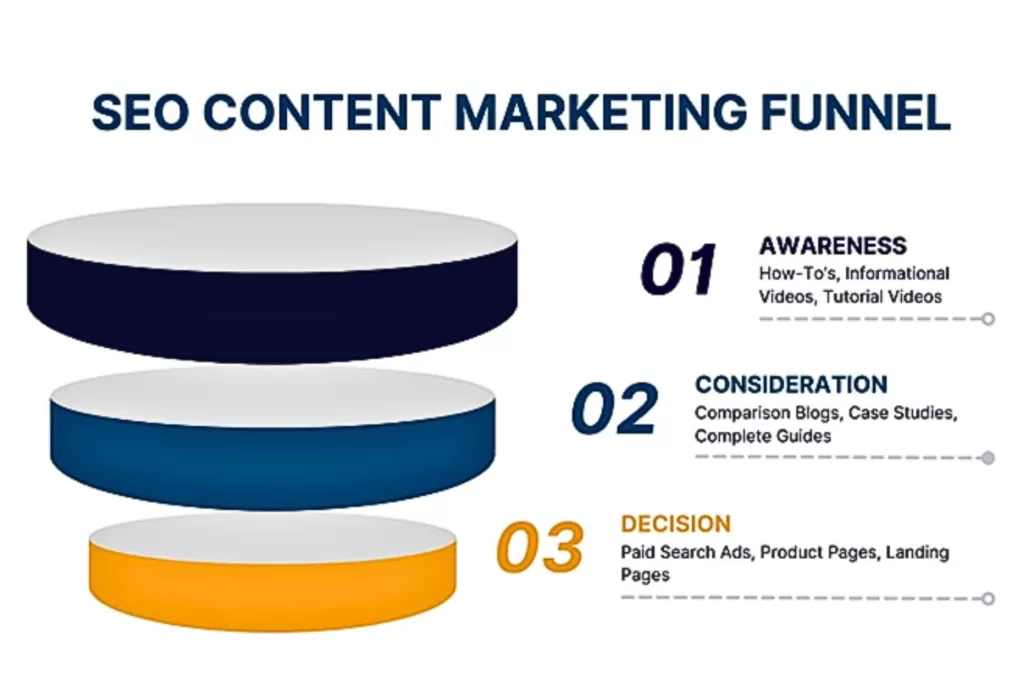
When you have a topic that you want to write about, ask yourself, “Who are the readers of this content?” If you don’t know the exact audience demographics, reference the content marketing funnel.
By creating unique content for each funnel stage, you can meet your users where they are in their buyer’s journey. Some consumers may be ready to buy in the bottom funnel and want a straightforward answer before purchasing instead of reading an in-depth top-funnel blog.
Others may be in the middle funnel stage and want an accurate comparison between two products that aren’t clearly biased to make a better purchase decision.
Here’s where common SEO content categories fall in the marketing funnel:
Top-Funnel (Awareness): How-to’s, informational videos, etc.
Middle-Funnel (Consideration): Comparison blogs, complete guides, case studies, etc.
Bottom-Funnel (Decision): Paid search ads, product pages, landing pages, etc.
When you understand your content goals and reader demographics for each piece, you can better solve their needs. It also sets you up for better success during keyword research, so you select the right search intent based on the funnel stage you’re writing in—which we’ll dive into more below.
Choose Your Web Page’s Topic
After determining your content goals, target audience, and funnel stage, brainstorm a general topic of what you want it to cover. This is the first step you’ll take when starting keyword research. You’ll end up finalizing the topic later once you have a target keyword.
Conduct Keyword Research for Target and Secondary Keywords
As mentioned above, your keyword research should do more than select the ones with the lowest keyword difficulty and highest search volume. While these attributes can find you great SEO opportunities, they shouldn’t be the only factors to consider if you want to target the best keywords in your content.
Below is a step-by-step process for effective keyword research and avoiding common mistakes.
Perform a Competitor SERP Analysis
In the first step of your keyword research, search for your general topic on Google and review the top SERPs—those are your direct competitors for this content piece. Also known as a competitor SERP analysis, it provides insights that Google is showing you what qualifies as top-ranking content for that topic. It’s like finding out the secret SEO sauce.
However, this doesn’t mean to copy what your competition is doing exactly. Google doesn’t reward duplicate content without added value, either.
Analyze the attributes that contribute to their higher rankings and see what they all share in common, including:
Word count
Headings
Backlinks
Visuals
Also, look for key details they might be missing where you can position your SEO content to outrank. Remember, Google prioritizes helpfulness and relevance. If you find that the competition is only providing surface-level details on the topic or lacks infographics to visually support the content, this can help your website rank higher in the SERPs.
Run a Competitor Content Audit
Next, take those top-ranking pages you found and do a content audit. Utilize SEO tools, like SEMRush and Ahrefs to analyze its performance. They have features like content gap and backlink analysis to see what’s contributing to its high SERP ranking with recommendations you can do to outrank.
Check for the following during a competitor content audit:
Backlinks: Check which sites are linking to their page and their Domain Authority so you can try to earn a backlink from them, too.
Keywords: Look at the keywords they used and build a keyword list to optimize yours with it, too.
Performance: Analyze the content’s performance metrics, including traffic and engagement (clicks, comments, shares) to measure the topic’s success.
With this approach, you’ll be able to streamline your keyword research process next.
Conduct Keyword Research
After a competitor SERP analysis and content audit, you now have a base list of target keywords. Don’t just copy the competition’s keyword lists. One of the most common mistakes brands make with keyword research is wrong search intent—the general reason behind a user’s search query.
While some content has mixed search intent, it’s not always the best-case scenario. For example, if you optimize a top-funnel (informational) blog with bottom-funnel (transactional) keywords, it can turn users away because it’s not relevant to what they’re searching for. They’re looking for helpful information, not product pages or shopping ads.
Remember, Google doesn’t reward irrelevancy if you use the wrong keyword search intent for your SEO content. Confirm the keywords are aligned with your content’s funnel stage by comparing the search intent.
Search intent keyword examples include:
Informational (Top Funnel): how-to, what is, tips
Commercial (Middle Funnel): brand vs. brand, best recommendations
Transactional (Bottom Funnel): for sale, buy, discount
You can also automate this process with SEO platforms, which tell you a keyword’s search intent. This way you know which keywords to use based on the persona’s funnel stage you’re targeting.
In addition to search intent and standard keyword metrics, like search volume and keyword difficulty, look for other types of keywords that can boost your content’s performance. Long-tail and question-based keywords are also effective keyword research strategies for SEO content writing.
According to a study, 92% of search queries use long-tail keywords to find more specific results. Keywords with low search volume and keyword difficulty can also be great low-hanging fruit opportunities to boost organic traffic in your website’s content—so don’t rule those out!
From there, you can build your finalized keyword list to select your focus and secondary keywords to optimize your content.
Update Your Content Outline
Now that you have your target and secondary keywords set, go back to your outline to update your content structure:
Create a title with your target keyword and search intent in mind
Write headings with focus and secondary keywords naturally
Add external and internal links you want to include
This outline will be the foundation you’ll need to finally start writing website content.
Write E-E-A-T Content With Your Audience in Mind
With the preliminary steps complete, you can now begin your SEO content writing process. If you don’t know how to write content for a website, reference Google’s E-E-A-T framework. It’s their content model that can help you create helpful and relevant information that their algorithms prioritize.
E-E-A-T stands for Expertise, Experience, Authoritativeness, and Trustworthiness. It’s designed to provide users with a higher standard of content and a better search experience when looking for information online.
SEO Content Writing Mistakes to Avoid
Many businesses always reference “high-quality content,” but do you know what that entails?
Examples of low-quality E-E-A-T content include:
Copying competitor content without added value
Long paragraphs with more than 5+ rows
Using too many internal links
Disorganized heading structure
Bullet point lists with no transition text in between
All the efforts you put into writing content for your website can harm its SEO performance if you’re making these mistakes when creating it.
How to Write Content for Your Website Effectively With an understanding of SEO writing mistakes to avoid, here are the best practices you should follow. Examples of high-quality E-E-A-T content include: ● Easy Readability: Small paragraphs and bullet point lists to share information in a visually digestible way. ● Organized Headings: Users should be able to quickly scroll through your web page and know what it’s about. ● Supportive Visuals: Aim for helpful infographics or use stock images relevant to your topic. ● Compelling Storytelling: Grab users’ attention with a hook statement in the introduction, a persuasive CTA in the conclusion, and smooth flows in between. You want to keep your readers engaged, so don’t make it harder for them to understand your content when it’s the solution they’re searching for.
Optimize Your SEO Website Content for Google
Once your content is complete, you must optimize it with on-page, off-page, and technical SEO. Optimization ensures search engines discover your content and provide it to users when using related search queries to your topic.
Optimize for On-Page SEO
On-page SEO is straightforward. It means optimizing the content on the physical page itself and involves a few different steps.
Keyword Optimization
Optimize your content with your target and secondary keywords naturally throughout the text. The amount of keywords you use should balance with your word count. Also known as keyword density, this prevents you from over-optimizing your content. As a rule of thumb, add one to two keywords for every 100 words.
Also, aim to have your target keyword as close to the introduction as possible naturally. It’ll help Google and your audience know what your content is about instantly.
In addition to your content, optimize your keywords in your metadata. This is the language that Google uses to better understand your content.
Best keyword optimization practices for metadata should include:
Title Tag: Keep within 60 characters to prevent it from being cut off in preview texts. Use your focus keyword.
Meta Description: Keep between 50 to 160 characters and use engaging language that persuades users to click through, like CTAs or a short summary of the solutions they’re seeking. Use your focus keyword.
Image Alt Tag: Keep it around 140 characters and use descriptive language so it’s accessible for all users online to understand. Look at the image and close your eyes to better describe it. Use your focus and secondary keywords when possible.
URL Slug: Keep between three and 250 characters, and don’t use special characters other than dashes. Use your focus keyword.
Keep all metadata sounding as natural as possible so it doesn’t sound forced by keyword stuffing.
Link Optimization
Like keyword density, your link optimization should also consider your word count. As best practice, aim to have five to six internal links per page to prevent overoptimization. Internal links help keep users on your website by navigating them to other helpful information related to the topic.
Add internal links to other blogs, case studies, and CTA in the conclusion—which is often a contact form, service page, or products. Use rich anchor text that’s relevant when hyperlinking to encourage users to click through so they know what the other page is about.
For external links, one to three per page is a rule of thumb. Always use reputable resources with high Domain Authority (60 and above) so Google recognizes your content as an authoritative and trustworthy resource—aka, E-E-AT. You can also use external links that your competitors are using from your content audit when possible.
Now you can finally publish your SEO content!
Optimize for Off-Page SEO
Off-page SEO is the optimization that occurs off your website. Examples of off-page SEO include social media posts and link building. However, the first step after publishing your content is ensuring that Google and users can discover it.
Request Indexing for Google
Once your content is published, always request indexing on Google Search Console (GSC). If Google can’t crawl (find your content) and index it (store it in their database), neither will your audience. You can monitor the status in GSC to see if there are any issues that Google has with crawling or indexing it.
Common indexing issues include broken links like 404 errors and duplicate content. GSC will provide reports so you know how to fix them, like replacing or removing broken links and editing duplicate content.
Invest in Effective Link Building
Link building is arguably one of the most important ranking factors on Google. When websites with high Domain Authority link to your site, it shows Google that you are an authoritative and trustworthy resource within your niche. In return, it generates referral traffic that has more qualified leads since a brand they trust is referring your company.
Social Media Posts: Offer cross-promotional social media shoutouts or include them in a campaign post.
Podcast Interviews: Find industry experts within your specific niche to form better relevancy for your target audience.
Broken Link Building: Contact websites you want to earn a backlink from by notifying them of broken links and offering to swap them with your site’s content.
When you only cold email outreach, you’re essentially asking for a favor as a stranger. Provide something of value in exchange instead.
Optimize for Technical SEO
Technical SEO is what happens behind the scenes of your website. This type of optimization helps how your web pages are displayed and ensures they provide a strong user experience (UX). In addition to easy content readability, it should be simple to navigate too.
Include the following in your technical SEO optimization:
Website Speed: Compress large image files or remove lengthy videos that aren’t adding value. Test the speed afterward on Google PageSpeed Insights for mobile and desktop.
Mobile Design: Test how your published content looks and performs on mobile to ensure it’s easy to read and navigate on all devices with breadcrumbs.
Website Analytics: Check if your site’s performance has a high bounce rate or low engagement. You can also review your top-performing pages and use those as a reference.
Users nowadays will quickly leave for a competitor’s site if your site has poor UX, making technical SEO a crucial part of your content strategy.
Reach Your Website Ranking Goals with Professional SEO Content Writing
While anyone can technically write website content, that doesn’t always mean it’ll give you the results you’re looking for. At Reach Marketing Pro, our SEO services include professional SEO content writing and optimization. We also focus on your website’s functionality so your content provides a stronger user experience.
Whether you need a persuasive product page or a compelling case study to showcase your successful track record, we can help you create high-quality SEO content your website needs to stand out.
Our team will keep you informed throughout the content creation and optimization process with monthly performance reports to measure and track success.
Ready to reach your SEO content writing goals?
Contact us to get better website content that ranks today!
Search generative experience (SGE) is Google’s AI search engine. Chances are you may have interacted with it before. But do you know how this impacts your business’s SEO and organic traffic? Adapting your SEO marketing strategies to automated technologies is essential as they influence user online behavior and algorithms.
SGE Google has different features than its standard search engine. AI-generated results empower SERPs by using advanced systems to understand human language and legacy algorithms more clearly.
However, it doesn’t replace traditional SEO. Google’s standard algorithms and SGE work together to deliver the best search results possible.
Artificial intelligence is disrupting the digital market landscape and isn’t going away. That’s why your business must invest in SGE to meet your audience where they are when looking for information online.
Here’s a complete guide to search generative experience and how to optimize your SEO strategies with SGE to drive organic traffic.
What is SGE?
People commonly ask, “What is Google SGE?” You may have heard of ChatGPT. SGE Google and ChatGPT are similar since they’re both AI learning tools that users can interact with conversationally for automated results. The difference is that ChatGPT is an AI-generated content-writing platform, and SGE is an AI-empowered search engine.
SGE vs. SERP: What’s the Difference?
Search generative experience and search engine results page (SERP) are both part of the search experience. SERPs are the pages Google displays in response to a user’s queries on a traditional search engine. SGE is Google’s AI search engine. It’s more experimental by using automated learning models and algorithms to deliver more relevant results.
For example, SGE offers a more tailored experience for ad space. If you’re shopping online, SERPs often display rich results like product ad listings and reviews. SGE takes it further by showing you the same results, yet with more information. It includes follow-up questions, important product considerations, ad links, styling options, and more, all in one place.
SGE allows users to dive deeper into their online shopping experience. It displays snapshots of everything they need to know about a product in one location—instead of entering multiple search queries and clicking on multiple sites to learn more.
Google Search Generative Experience Features
Now that you have a general overview of SGE Google, next is understanding its unique features. With many advanced capabilities, it can improve your SEO performance and the bottom line. Here’s how:
AI-Powered Snapshots
AI-generated overviews of topics you’re searching to provide helpful information quickly. It gives you access to more diverse content like retailers, publishers, and businesses.
Follow-Ups
Users can ask follow-up questions in a conversational tone to gain context and refine their search results more easily. This feature allows you to explore deeper into the topics you’re interested in with related insights and web page descriptions to learn more.
Product and Local SEO Experience
Snapshot overviews of products and Google Business Profile listings. E-commerce and local businesses can benefit from this feature by leveraging AI to create demand. It displays reviews, customer ratings, related information, and product images to influence faster purchase decisions in one centralized location.
Search Ads Experience
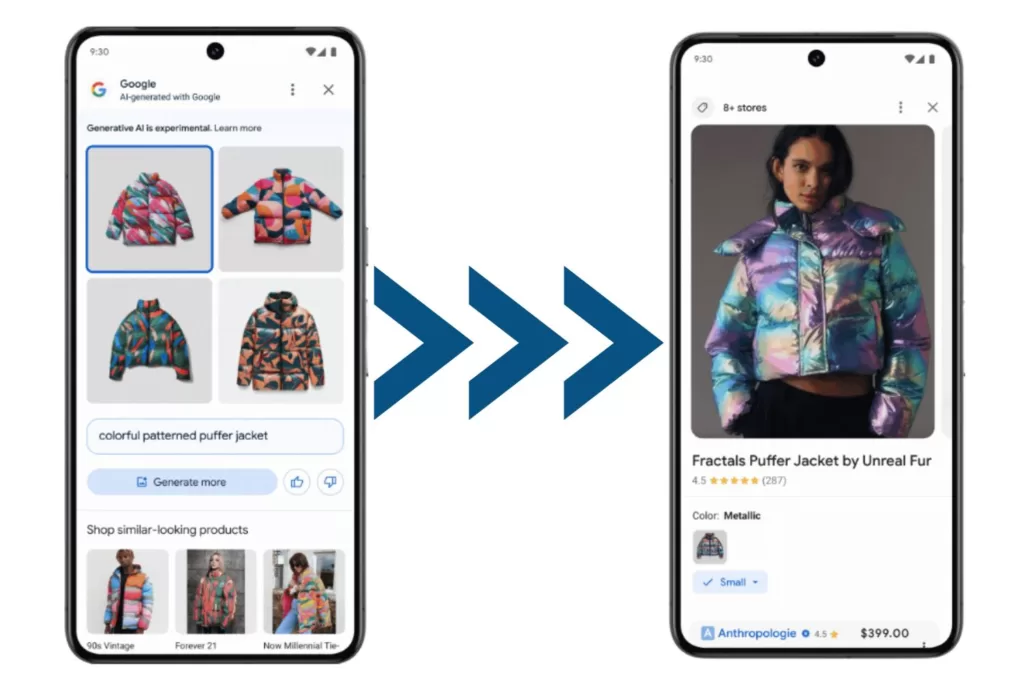
These are dedicated ad slots to provide more helpful information while promoting your business online. Users can also use product images they find on social media, blogs, and more to locate where they can buy them online. It directs consumers to product pages and shopping ads based on the image screenshot they enter.
This provides a seamless search ad experience when they don’t need to go on a hunt on where to buy items they’re interested in if they only have photos available.
Image Generation
AI-generated images help streamline visual marketing concept ideas and creative inspiration for your business. It’s like your automated graphic designer that creates any image you describe.
E-commerce brands can benefit greatly from this feature since customers can generate images of the ideal products they want and be navigated to the real versions of them. SGE Google links to related shopping ads or product pages based on the generative image search information consumers enter.
Common Concerns Businesses Have About Search Generative Experience
If SGE Google delivers a more tailored and automated search experience, why would users continue using traditional search engines? Business owners often think that SGE SEO will replace standard SEO. Here’s why that’s not the case and why you should integrate search generative experience into your SEO strategies instead.
SGE Concern: Taking Organic Traffic Away Your Website
Businesses commonly think that AI will replace digital marketing, especially now with SGE SEO. It’s understandable to fear that SGE will take away your organic traffic since users no longer need to visit websites for information when everything they need is in one place—making traditional SEO obsolete.
SGE Google cannot exist without humans. That’s why optimizing your site for SGE SEO is a necessary addition, not a replacement.
SGE Solution: Writing Quality Content for Google AI Search
Google search generative experience relies on human-written content to provide results. It takes your online information and displays it together while linking to the original content it generated from. SGE relies on people for it to exist. So, if your business stops creating content, it won’t have information to pull from.
Writing content for SGE Google makes it a helpful feature for business growth because it supercharges SEO.
Search generative experience only works because people enable it to!
How SGE Google Impacts SEO and Organic Traffic
While SGE doesn’t replace SEO, it does impact it. According to a study, 62.8% of SGE packs didn’t exactly match the content or keyword ranking of traditional local packs—including branded and nonbranded keywords.
There’s no standardization across SGE and SERPs. For this reason, local businesses should reconsider their keyword research and local SEO strategies for SGE separately. SGE packs don’t always match local packs, even if the search intent is obvious.
That’s why researching the SERPs and auditing SGE engines for target keywords is necessary for your SEO marketing strategy. If your business doesn’t adapt to AI generative search, you can miss ranking for local search queries that users are looking for.
In addition to local SEO, here’s how search generative experience impacts SEO and organic traffic in general.
Improves Organic Traffic Predictions
SGE Google is also a helpful analytics tool to measure your website’s SEO performance. Its impact analysis model provides organic traffic predictions by comparing them to your current traffic data. This framework predicts which keywords are most likely to increase and decrease your site’s traffic, including how much.
Strengthens SEO Performance
When you can analyze which keywords may be responsible for decreasing your website’s organic traffic, you can better optimize it before it’s impacted. By mitigating SGE risks that predict which keywords may be attributed to your organic traffic, you can strengthen your site’s SEO performance from an unexpected drop.
Identifies Strategic Keywords
Identifying the keywords impacting Google SGE’s organic traffic predictions the most can help your business rank better in SGE. Target keywords valuable to your business may not rank in SGE snapshot carousels as they might do in the top traditional SERPs. Keyword performance for SGE and SERPs may have different ranks.
With the SGE impact model, you can know which keywords you can’t afford to lose and which ones may be negatively impacting your SEO performance. By finding keywords contributing the most to organic traffic, you can strategically select better ones to optimize.
Streamlines SEO Efforts
When users can ask complex and descriptive questions more easily, they can understand topics or shop faster. Taking SGE’s suggested next steps or asking follow-up questions streamlines your SEO efforts because it’s less manual work for consumers to find relevant content. They’ll have all the information about your site in snapshot overviews to learn more.
How to Optimize Your Website for SGE Google
The first step to optimizing your website for SGE SEO is knowing how to get Google AI search first. Below is a step-by-step guide on how to access, download, and enable Google search generative experience.
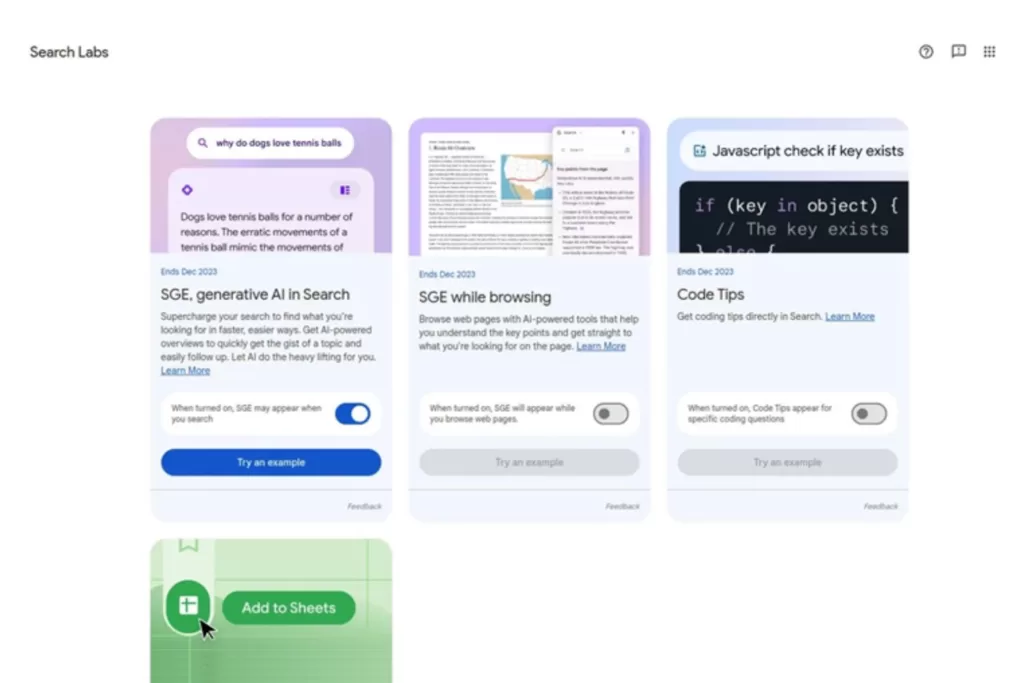
Go to Google Seach Labs and join the waitlist to get access to limited-time experiments as an early tester. These features include “Add to Sheets,” where you can insert search results directly into spreadsheets, and Code Tips to automate programming language writing.
Google will send you an email when you’re off the waitlist.
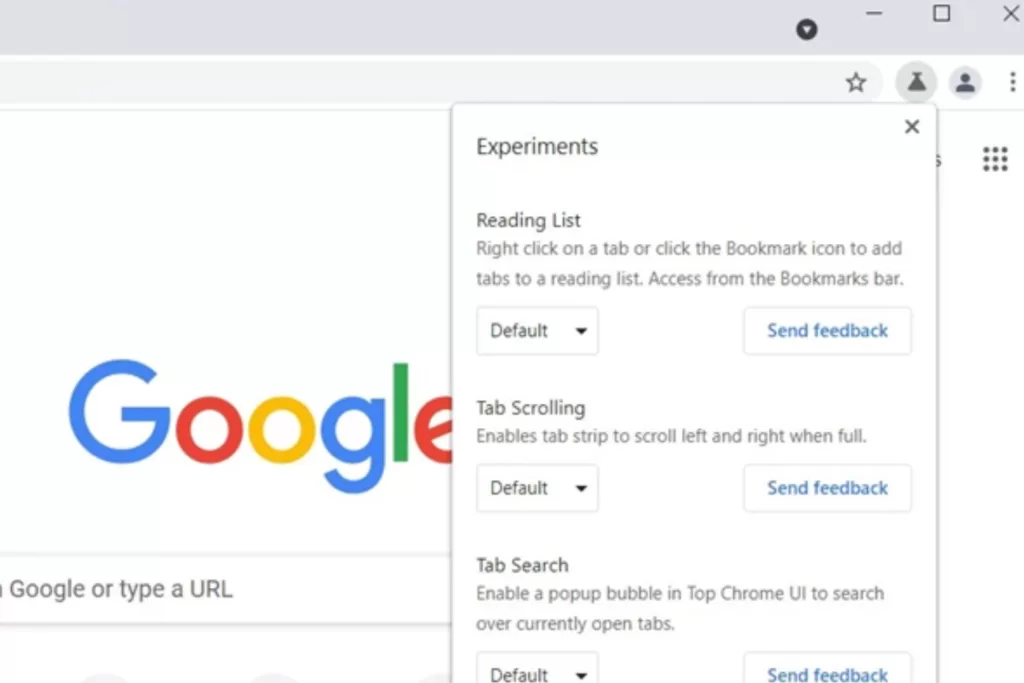
Once you get Search Labs access, you can download Google AI search onto your Google Chrome browser with Incognito Mode turned off.
Click the New Tab at the top of the browser.
Click the Labs icon at the top right of the page.
Turn the experiment on by clicking the slider on the top of the SGE card.
You must sign up and in with a personal Google account as it’s currently not available to Google Workspace.
It may take time for SGE features to show up. Try doing some searches to see if it triggers AI-powered overviews—remember, these won’t always be available. Depending on your queries and the information available, SGE may or may not be triggered to deliver the best results possible.
You can also check if your experiments are on by clicking “Ask a follow-up” under the “Overview” section. Google suggests asking questions about a topic with different angles to consider. They recommend finding a range of relevant information, options, or viewpoints.
Once the experiments are available, you can begin optimizing your site for SGE Google. Here’s how:
Create High-Quality E-E-A-T Content
Did you know that Google recently added a second “E” to the now E-E-A-T framework? The second E stands for experience. This latest update shows that writing E-E-A-T content is essential since SGE is held to a higher standard for information quality.
The original E-A-T standard was expertise, authoritativeness, and trustworthiness. It’s how Google evaluates if their search ranking systems are providing helpful and relevant information. With updated search rater guidelines, Google now prioritizes the importance of original and helpful content for users that can be explained in various formats and sources.
Examples of low-quality E-E-A-T content include:
Web pages with misleading titles unrelated to the content
Pages that disguise ads as site navigation links
Copied or scraped content from other sites without adding original content or value
Keyword-stuffing content that doesn’t read naturally to people
Surface level details that force users to search more to find better information
Here’s to write high-quality E-E-A-T content:
Create helpful content with your audience in mind. Provide insightful analysis with original information that’s relevant to the topic.
Avoid copying and only rewriting content from external sources. Link to them, but add substantial value with a new perspective or educate further.
Write titles and headings as a descriptive summary of the page’s content. Users should be able to quickly scroll through your content structure and know what it’s about.
Make your content easily readable. Use small paragraphs of no more than four sentences with helpful visuals that support the content. Avoid fluff, irrelevant information, and unedited AI content writing.
Keep search intent in mind. Don’t spam users with sales promotions if you’re creating informational blog content on a specific subject.
E-E-A-T content creation is about providing an overall great page experience. Google rewards websites that provide this because you’re creating people-first content while demonstrating that you’re a trustworthy authority and expert in your niche.
Focus on the Most Important Keyword Rankings First
Sitewide SGE audits and optimization can seem daunting. Start by identifying the most important keyword rankings you can’t afford to lose first. Then audit one page at a time for an organized process of SGE recovery.
After conducting an SGE analysis, record your high-impact keywords, and optimize your existing pages with them. Then, rerun your SGE impact analysis to measure its new SGE SEO performance. Check if you’ve reduced the number of lost keyword predictions to ensure you’re on the right track.
Invest in a Solid Link building Strategy
Backlinks are arguably the most important ranking factor in SEO. Go above cold email link acquisition with solid linkbuilding strategies. Try offering social media shoutouts, podcast interviews, email newsletter blasts, and free link exchanges to offer a higher value in return.
This helps show Google search generative experience that you’re creating high-quality E-E-A-T content.
Review Your User Experience (UX)
If users have difficulty navigating your website, SGE optimization won’t be impactful if they can’t find what they need. Signs of poor user experience (UX) include high bounce rates, slow page load speed, and complex mobile design. When performing SGE audits, review your UX to prevent pushing traffic away when users click through SGE into your site.
Optimize Your Site’s Metadata
SGE and SERP rely on metadata to better understand your site’s content because it’s written in search engine language. If Google can’t properly crawl your site through metadata, it won’t generate in SGE to consumers using relevant queries.
Here’s how to optimize your site’s metadata:
Write valuable and enticing meta descriptions for each web page to engage users to click through, like hook statements and calls to action.
Include target keywords in your title tags, page content, and headings naturally, without over-optimizing. Don’t force keywords into your copy if it doesn’t sound right out loud.
Create image alt tag descriptions with target and secondary keywords for audience accessibility.
Remember, if Google can’t find your site, your audience and SGE won’t either.
Elevate Your Business’s Google Search Generative Experience
Transforming your business’s online presence for SGE Google is a must with evolving AI technologies. At Reach Marketing Pro, we have extensive experience with SEO optimization, including on-page, off-page, technical, local, SEM, and SGE.
We also focus on website functionality for a stronger user experience because SEO isn’t only about climbing Google’s ranks. Our team takes your site’s information and products to optimize it with your business’s SEO goals and branding in mind.
While we do all the work, we keep you informed throughout the optimization process and provide monthly performance reports to measure and track success.
Ready for your business to be an early adapter of AI search?
Contact us to take the first step into your Google search generative experience today!
Have you ever been online shopping, and the payment process required you to create an account before purchasing? Or, have you ever compared two similar products, and the descriptions weren’t clear enough on the differences?
Whether it’s a lack of guests and one-click checkouts to confusing product offerings, these are signs of poor user experience on an e-commerce website. This is one of many site design issues that can turn potential customers away and buy a similar product from your competitor.
So, how do you know which e-commerce platform is best? Here’s how to pick the right one including, features, recommended website builders, and tips to consider before buying.
What Makes a Good E-Commerce Platform?
Website development can be complex, especially if you don’t know how to build a website and what the process looks like. Even if you’re not tech-savvy, website builders are designed to be user-friendly for anyone to make one on their own.
However, this is just a starting point. It’s up to you to customize your online store’s brand and ensure it pushes products at the forefront of what your target audience wants.
Here are a few features to look for in an e-commerce platform and why they come in handy during the development process:
Budget
While budget may seem obvious, e-commerce platforms have varying prices and add-on costs depending on the package you purchase. Create a list of must-have and nice-to-have features for launch, and compare which builder can give you the best options based on your financial needs.
Ongoing Website Support
An e-commerce platform should have helpful support forums and an easy way to contact customer service for questions and challenges you may have during and after development.
UX/UI Design
As mentioned above, an e-commerce website with a strong user experience is foundational to the bottom line and can increase conversions by up to 400%. Can customers easily shop online through their smartphones? Or does it load products slowly and display them in a scattered design? If it’s difficult for you, pick another e-commerce platform that won’t push potential customers away.
Analytics
An e-commerce website’s performance analytics is fundamental to measuring success. Review the reporting and features the platform provides to ensure you can track key metrics and KPIs that are important to your online store.
E-Commerce Website Features
After preparing for development, understanding a site builder’s features must also be considered. From checkout customizations to drop shipping, these are some functionalities to look for as an e-commerce business.
SEO
If your online store isn’t optimized for search engines, it’s virtually invisible. That’s why it’s imperative to buy the best e-commerce platform with SEO features and functionalities. From metadata to custom URLs, investing in SEO is required for any website and business to succeed.
Previous Experience with Website Builders
If you have prior website development experience, check how easily an e-commerce platform can migrate from one site to another. Depending on your website size and complexity, some builders may charge a fee or not offer migration services at all.
Keep E-Commerce Platform and Software Fees in Mind
When searching for the best e-commerce platform, understand that software fees and different charging systems are involved. While it may seem tempting to pick the cheapest or free ones, these most likely won’t have the necessary features and integrations your online store needs.
Remember, you get what you pay for. And as an e-commerce business, investing in your website is an extension of your brand’s success. Below are some common payment/fee structures for e-commerce website builders and how they work.
Monthly Fees
Depending on the website package you purchase, monthly fees will vary as each has specific offerings. The more inclusive the package service offerings are, the higher the monthly rates will be.
Transaction Fees
E-commerce platforms that process payments for you charge through a per-transaction fee, typically a percentage of each transaction. There are also payment processing plug-ins that may be more cost-effective than purchasing through a website builder.
Payment Gateway Fees
A fee system that charges for every online transaction the platform authorizes. Payment gateway fees are charged for every debit/credit card they authorize, while transaction fees charge for every completed purchase.
5 E-Commerce Website Builders We Recommend
Now that you know what to look for in a website builder, here are five of the best e-commerce platforms we recommend:
1. Shopify
Shopify is one of the most widely used e-commerce platforms available. If you have a large product inventory or an enterprise-size online store, Shopify allows you to manage up to 1,000 locations and has over 6,000 ready-to-install plug-ins. Even small businesses can benefit from this platform with streamlined fulfillment, shipping, and inventory management in one centralized place.
2. Squarespace
Squarespace is one of the easiest platforms to work with. They offer plenty of user-friendly template design customizations and a large inventory management system. However, if scalability is a priority for your online store, other website builders may be more beneficial.
3. BigCommerce
BigCommerce is a high-performing e-commerce platform that’s built for retailers. Although it’s higher in cost, the returns you can receive are highly valuable. They don’t require additional platform fees like Shopify and offer built-in features to prevent pricing increases or add-ons.
From seamless social media integration for multi-channel cross-selling to strong technical SEO features like automated redirects, this web builder is ideal for larger online stores and those with prior development experience. So if you’re selling small-scale, have a lower budget, and looking for a simple web build, this may not be the best option.
4. WooCommerce
WooCommerce should be your go-to choice if your online store is built on WordPress. It’s a plug-in that integrates with WordPress easily for online shopping carts, abandon cart emails, customer rewards, and more. But, development is more complex compared to other platforms due to its highly customizable features.
5. Wix
Wix is the cheapest e-commerce platform option with monthly plans starting as low as $27 per month. With over 250 free applications and social media channel integration, this is the ideal beginner website builder if you want basic features.
We Can Build Your E-Commerce Website for You!
As a business owner, a new website is an exciting time. But, we understand you may not have the time to build one. You have to focus on your trade and managing the company.
At Reach Marketing Pro, we have extensive experience with building e-commerce and non-e-commerce websites. Our web design and development services can create your online store while showcasing your unique brand. We ensure not only the best marketing strategies (SEO, SEM, Social Media) but also the website’s functionality to make a lasting impression on users.
We’ll take all your company information and products to create a website with your business and audience in mind. While we do all of the work, we’ll keep you informed throughout the development process.
Ready to kick off your new e-commerce website journey?
Don’t get overwhelmed by the details. For small business owners, it’s common to not know how to create a website. You have to focus on managing the company and providing expertise in your trade.
However, there are steps to prepare for the best web development experience and results possible— and it’s easier than you might think.
A new web build is an exciting journey and can provide marketing opportunities, especially for small business owners. It’s an extension of your brand, mission, and products/services, which is crucial in an evolving and competitive digital marketplace. Consumers today expect a solid first impression before buying, and your website might be their first experience with your brand.
Whether you’re utilizing a web designer and want to educate yourself or considering DIY, here’s a complete guide to small business website development in just 11 steps.
Must-Have Details to Gather Before Your Website Build
Before building a website, it’s practical to gather business details first to determine the type of site you need. For example, small e-commerce brands can benefit from creating a Shopify website. Shopify’s features include mobile-friendly product page design templates and payment gateways that are designed for e-commerce businesses. Company details, such as how many products or services you offer, also determine the website size you need.
Here’s a pre-website build checklist to help guide you before development:
Web Hosting: Pick a domain name (website name/address) and register it with a web hosting provider.
Web Designer: Who is responsible for the web build and design?
Website CMS: Which CMS (content management system) platform will you use? Ex: Shopify, WordPress, HubSpot, etc.
Company Brand: What are your branding guidelines? Gather your brand colors, fonts, logo files, visual do’s/don’ts, content rules, and reference sites for design inspiration.
Website Trends: Research current web design trends to ensure your site meets new consumer demands and search engine algorithm updates.
Site Maintenance: How committed are you to maintaining and updating your website as needed? Who is responsible for this?
Web Content: Do you have current marketing collateral? Are you committed to creating unique content for your website?
Website SEO: Do you know how to properly optimize your website for search engines and keep up with competitor SEO rankings?
Website UX (User Experience): Can users quickly navigate your website and not feel overly spammed?
While this may seem like a long or detailed checklist, it’s worth it. The more you prepare before a website build, the better the process is. Simply gather this information into designated folders and your web developer will have everything they need. It also eliminates the need for further back-and-forth on missed items.
How to Build a Website for Your Small Business in 11 Steps
Now that you know the information needed before a web build, we’ll explain how exactly a website is created. From design inspiration references to domain name registration, here’s how to build a website for your small business in 11 steps.
1. Identify Your Target Audience to Understand Your Traffic Sources
Do you know who your ideal customer is? Understanding your target audience is crucial to web builds because it should be designed with them in mind.
Dive deeper into your buyer personas. Address their common questions and challenges so you can provide related and specific solutions through your website. This way, you can drive potential traffic with more qualified leads since you understand what influences their online behavior.
Define your business goals for your website. Whether it’s selling products or offering services, identifying your target audience is the foundation of creating a successful website. It determines how you’ll connect and persuade them to engage with your site.
2. Research Competitor Sites for Design Inspo and Marketing Opportunities
Certainly, don’t copy what your competitors are doing with their websites. Avoid using the same color scheme, exact layout, and images. However, it’s beneficial to have visual inspirations for how you want your website to look. This way your developer understands the creative design and structural direction you’d like to incorporate.
Researching your competition is also an effective marketing strategy to uncover missed opportunities in their web design. For example, if you’re a boutique e-commerce brand and discover that your competitors don’t utilize one-click checkouts, this can be a great opportunity to provide a better online shopping experience.
One-click checkouts can increase transactions by 25.8% since customers aren’t burdened to create an account before buying— resulting in reduced abandoned carts and checkouts. Finding ways to make your website look and perform better is key to outdoing the competition and prioritizing your products or services.
3. Select a Domain Name that Represents Your Brand
A domain name is more the name of your website address. It represents your brand and determines how users feel about your business based on a name alone. Domain names also cannot be changed or modified once you register them. For these reasons, it’s critical to select a domain name that accurately represents your company’s identity, mission, and values.
Consider the following when picking a brandable domain name:
Make it simple, short, and impactful: Make a memorable and brandable domain name under 15 characters.
Aim for a “.com” TLD when possible: Top-level domains (TLDs), like “.shop” for e-commerce brands or “.org” for non-profits, can be suitable options if “.com” is taken.
Avoid long or hard-to-pronounce words: Prevent users from misspelling your website or making it harder to find.
Don’t include slang, numbers, or hyphens: Focus on a seamless user experience so consumers can access your site easily.
If you need inspiration, there are domain name generators, like Shopify and Wix, where all you need to do is enter a keyword, and creative options are prompted. However, you must ensure that a domain name hasn’t been taken by checking if it’s registered online.
4. Register Your Domain Name with a Web Hosting Provider for Copyrights
Now that you have a domain name in mind, the next step is registering it so you own the copyrights and trademarks. But before you do, confirm it’s available by checking its registration. A common source to verify if a domain is already registered is through domain name search tools like GoDaddy or ICANN.
There are options if you want a domain name that’s registered:
Buy it from the owner: If the brand is inactive, has a dated website, and has no social media presence, there’s a chance the owner might accept an offer.
Use different TLDs: If “.com” is taken, try registering with “.shop,” “.co,” and other authoritative TLDs.
Consider name variations: Brainstorm other creative versions of the domain name you want. Make them specific to your niche to avoid duplication.
Once you verify a domain name isn’t registered, it’s available for purchase. Popular website hosting platforms, such as BlueHost and Hostinger, offer tools that automatically register domain names for you.
Domain Hosting
Content Hosting
Website address
Website CMS (content management system)
Domain names cannot be changed
Edit content without markup or programming
Hostinger, SiteGround, BlueHost
WordPress, Drupal, PrestaShop
Some hosting platforms, like GoDaddy and Squarespace, also provide CMS systems. It may be a beneficial option to consolidate your website marketing services, especially if you don’t know how to build a website. Ensure you compare all options that are best for your needs and budget.
5. Choose Your Content Hosting Platform for Simple Content Management
In addition to a domain hosting provider, you’ll also need a content hosting provider—also known as a CMS (content management system). The difference between domain vs. content hosting is their functionalities and customization.
A domain hosting provider hosts your website on a server to function properly. While you can change hosting providers, domain names cannot be changed or modified once registered.
A content hosting provider stores your website’s content and shares its files, and hyperlinks pages. Its purpose is to give website owners easy access to edit their content without the need for marking up or programming languages.
Each content hosting site has various capabilities, plugin updates on their platform, monthly/yearly fees, and more. So, when picking a content hosting site, consider the must-have functionalities that are key to your business, like simple SEO plug-in integration or user-friendly blog management.
6. Create a Skeleton of Your Site for Streamlined Web Development
A skeleton is a visual roadmap of what your website design will look like. The purpose of site skeletons is to streamline the development process so business owners can see how exactly their website will be laid out. It helps with revisions or new design changes before placing it on the content hosting platform.
Here’s what you should consider when reviewing your site skeleton:
Do you have an eye-catching homepage that quickly explains what you do as a company?
Is your branding clear?
Are the products/services you provide easy to find, read, and clear?
How much content do you have that will be displayed throughout the site?
Do you have testimonials, FAQs, press releases, or blogs you want to feature?
How will a customer/client contact you?
While website updates are doable after launch, having a preview design through skeletons can reduce the need for more revisions before content uploading.
7. Optimize Your Website for Search Engines and Online Visibility
After finalizing your small business web design, the next step is to ensure search engines can effectively find and store it through off-page, on-page, and technical SEO. If search engines like Google can’t discover (crawl) and store (index) your website in their database, it’s virtually invisible to users online.
Use a mobile-first approach to your design and site responsiveness
Index all web pages in Google Search Console for indexing and crawling (off-page SEO)
Invest in technical SEO with fast loading times and site breadcrumbs for easy navigation
Implement on-page SEO by writing optimized page titles with target keywords
In addition to visibility and traffic, website optimization is crucial to keep up with your competition. By maintaining best SEO practices, you can promote competitiveness by ranking for similar keywords while building your online presence.
Business websites that rank at the top of their niche’s SERPs (search engine results page) generate a 39.8% CTR (click-through rate), while second ranks receive 18.7% and third at 10.2%. Optimizing your website isn’t only for search visibility and keyword rankings. It’s also an effective SEO strategy to increase engagement and leads.
8. Create and Add Content to Your Website That Aligns with Your Brand
Every website needs content. Whether you’re repurposing old marketing collateral or writing unique content, each web page needs written text and visuals. This includes home pages, product/service descriptions, graphics, page headers, and blogs. After creating and reviewing your content to ensure it aligns with your brand and business, place it throughout your website. Remember to optimize your content to ensure search engines and users can discover it.
9. Review Your Website on Mobile and Desktop for a Better User Experience (UX)
Check your website multiple times across several devices, including mobile and desktop. Review the site layout on your computer, phone, and tablet to ensure easy navigation and strong user experience (UX).
UX is the user’s overall experience when interacting with a website or application. It plays a critical role in maintaining customer satisfaction and may push potential new ones away. If not, it’s considered in your site design.
For example, conversion rates drop an average of 4.42% for each additional second of page load time. If your site has slow web response rates, low-quality images, or irrelevant content, these are signs of poor UX design. Websites with strong UX design can increase conversion rates up to 400% because they’re designed to be simple to navigate and easily accessible.
Some ways to improve UX design for small business web development include:
Create Flowcharts: Use these visuals in your site’s skeleton to decide how users will interact with your site for the optimal experience.
Conduct Interface Tests: Gather data on the experience quality of your site and compare the effectiveness compared to other user interfaces.
Create User Surveys: After launch, chat with potential and existing users of your system to gain feedback for UX improvements.
Before launch, get a close friend, colleague, or relative to view the staging link on their devices and provide feedback. Getting a fresh perspective can uncover UX design issues you may thought were working but are invisible to the user.
10. Launch Your Website to Make it Live!
Once everything is reviewed, added, and to your liking, click that “Publish” button! Congratulate yourself or your team for this major business accomplishment. After launch, it’s essential to monitor your new website to ensure it’s running smoothly.
Here’s a post-website launch checklist to help guide you:
Submit your site to Google Search Console for indexing and crawling
Monitor your site in Google Search Console for any design errors, like duplicate pages or broken links
Setup Google Analytics with your site to monitor its performance and gain valuable data
Spread the word on social media as part of your off-page SEO strategy
Regular updates are an ongoing process after you build a website for your business. From content marketing to structural improvements for UX, a site launch isn’t the end of the process but the beginning of a new chapter.
11. Plan for Regular Website Maintenance After Launch
All websites will have regular maintenance, including plug-ins, platform updates, backups, product/service changes, etc. However, if a consumer finds a business with a website that seems outdated, has broken links, or slow loading, they’ll most likely move on to another competitor. Keeping your website regularly maintained is easier than a complete revamp.
Let Website & SEO Experts Handle Your Website Build for You
With these steps, you can streamline your small business web design. But as a business owner, we understand if you don’t know how to build a website— and you shouldn’t have to.
Professional web developers have expertise in custom mobile-responsive design and plugin integration that you can’t do on your own or as easily. They can create unique site features to make your brand stand out and ensure its structure meets search performance requirements.
At Reach Marketing Pro, we’re a full-service digital marketing agency and can guide you every step of the way. From website design concepts, content creation, monthly site updates, and SEO optimization, we help ensure our clients are successful in providing the best user experience for potential and returning customers.
Skip the hassle of creating a website and let our SEO and web development team do it for you. Our developers provide superior design, webmaster services, and site management to handle all of your website’s needs. This way you can focus on what you do best, your trade.
Contact us to kick off your new website journey today!
There are many reasons why you would want or need to block a website. For example;
Parental Controls: If you have children, some websites contain explicit content that you want to keep them from.
Increase Productivity: Permanently or temporarily block certain websites to improve your productivity time for studying or working.
Suspicious Sites: Save yourself from attempts at infecting your computer with a virus or stealing your personal data.
Which Site-Blocking Method is Right For You?
Each method of site blocking will vary based on its restriction, the users, and the device you’re using. For example, if you want to block websites temporarily or permanently on an individual device, it’s recommended to install a more configurable program or easy-to-use browser extension.
If you want to block manually through the host’s file, firewall, or router, it’s a good option if you don’t want to deal with software. However, this method is only suitable if you want to disable access to certain sites permanently.
If you’re blocking certain sites for multiple users on a single network, you should use either web filtering software, which is normally used by businesses or schools, or block through the router.
How to Block Websites on Your Browser
Chrome
Log in to your Google Admin Account and go to the Chrome browser homepage.
Choose which users you want to block from visiting certain websites.
Find the URL Blocking section.
Enter the web address you want to block in the Blocked URLs tab.
Save the changes.
Firefox
In the Options page, select the Privacy & Security tab.
Scroll down to the Permissions section and click the Block Websites option.
In the Block Websites page, enter the URL of the website that you want to block, and then click the Add button.
Safari
Go into the Content and Privacy section of Screen Time.
Click Customize to block specific websites.
Click the “+“ under the restricted section to block specific sites.
Add the URL of the site you want to block and click OK.
Select OK again to finalize your decision to block a site.
Internet Explorer
Open the browser and go to Tools (alt+x) > Internet Options.
Click the Security tab.
Click the red Restricted Sites icon.
Click the Sites button below the icon.
Now in the pop-up, manually type the websites you want to block one by one.
Click Add after typing the name of each site.
When done, click Close and click OK in all other windows.
Blocking Websites on Your Mobile Device
When using an Android and or iOS device, you will need to download specific apps to block unwanted websites. Thankfully, most apps can work across multiple browsers! Here are a few examples of apps and their features:
Choose your family member then scroll down to Content Filters.
Toggle on Filter Inappropriate Websites.
To block specific sites, add their URLs under Blocked Sites.
You can block access to specific sites by turning on the Only use-allowedwebsites toggle.
Add URLs of approved websites under Allowed sites.
Parental Controls on a Mac:
Click the Apple icon and select System Preferences.
Click the Parental Controls icon.
Click the lock symbol and enter your password.
Select the account you want to filter with parental controls.
Click Enable Parental Controls.
Additional Methods to Block a Website
In addition to the above, there are additional ways to block unwanted websites. Here are some ways to do that.
Using Browser Extensions: Using specific extensions on your browser helps block certain websites you don’t want other users to visit. For example, BlockSite is a Chrome Extension that helps block web pages and limit adult websites individually or by categories.
Using Productivity Software: Using these samples will help reclaim your productivity and steer away from potentially dangerous websites; Freedom, Forest, PawBlock, RescueTime, Pause, Focus, etc.
Leverage Web Filtering Software: These help block unfiltered websites from being accessible on your computer. Examples include WatchGuard.
Let Our Team Help You Gain Productivity Time
When working with Reach Marketing Pro, you’ll know your privacy and security always come first. We have the skills you need to strategize, analyze, and curate creative designs for your business, giving you back time to focus on what’s most important!
For anyone looking to dive into digital marketing, search engine algorithms aren’t a new concept to learn. An AI search engine collects insights from multiple sources such as search queries, browsing behaviors, social media interactions, and purchase histories. They utilize sophisticated algorithms to analyze any collected data, identify patterns, and generate actionable insights. However, AI marketing has changed more than one may think! Since it’s recognized for making things easier, it helps alleviate the typical effort of interpreting customer preferences from large data sets and provides information that’s reliable. By utilizing it correctly, AI search engine marketing can develop and implement targeted marketing campaigns, optimize customer journeys, and deliver personalized experiences.
Search Marketer’s Use of AI
What marketers need to focus on when using AI-powered tools is providing high-quality, user-centric content that appeals to the interests of their target customer base. Additionally, optimizing a company’s user experience can enhance the overall experience for consumer audiences. AI search considers a user’s previous search history, location, and additional factors to provide personalized results, producing a more efficient zero-click search experience.
Capitalizing on AI-powered search will create content that clearly answers questions, provides efficient solutions to complex problems, and delivers a positive user experience.
How AI can Help Search Marketers
AI is different for each business and that should remain top of mind when creating an efficient, customized strategy. Here’s how AI-powered tools can help create a more efficient digital strategy and how they can aid Search Marketers in improving their campaigns:
Creative Testing: This strategy helps creative teams revise concepts, drop ones that don’t resonate well with target audiences, and identify which ones work the best. This testing can be used to conduct market research before a new product launch.
Campaign Optimization: This strategy helps boost a company’s visibility and conversation rates, which drives more potential customers in their direction.
Measurement: Analyzing measurements serve as quantifiable insights to search marketers. When using them correctly, measurements can project the success of an advertising campaign and track toward KPIs.
Improve Productivity: Productivity is important in AI marketing because it serves as a key contributor to driving unparalleled growth and profitability.
Reiterating what was mentioned above, AI-powered tools are indeed tools and should be placed in a proper strategy instead of simply taking information and mixing them together.
AI Search Engines, Search Marketers, and You
AI marketing takes digital strategy to the next level. Using a personalized marketing strategy with search marketers can help them leverage their expertise in AI-powered search engines may help their marketing initiative. Let’s break it down further.
Tailored Marketing Strategies: These help a business identify its unique selling proposition, target its right audience, and create compelling narratives that resonate with its ideal customer.
Having a Competitive Edge: Having a competitive advantage helps a business effectively distinguish itself from its competitors by offering something unique of superior value to its customers.
Measurements: There are multiple ways a business can measure its performance, including tracking processes, sharing intelligence, making informed decisions, identifying goals, developing reliable metrics, and collecting valuable data that accelerates growth and development.
Enhanced Customer Engagement: Implementing a customer engagement strategy will not only help improve the overall customer experience, but boost the value of a business’s existing relationships, increase the likelihood of referrals, and foster sustainable growth.
Our Experts Use the Right Tools & Expertise!
Although AI marketing carries a unique mind of its own, utilizing SEO and SEM specialists help leverage their knowledge and expertise to keep up with evolving technology to implement a personalized marketing strategy. At Reach Marketing Pro, we serve as your digital strategy partner to optimize business performance and uptick growth to ensure your company has a competitive edge in your industry.
Are you ready to take the first step and evolve your marketing strategy using AI-powered tools?